
Himosoft Django Admin
Customized Django admin panel with advanced UI and real-time system insights
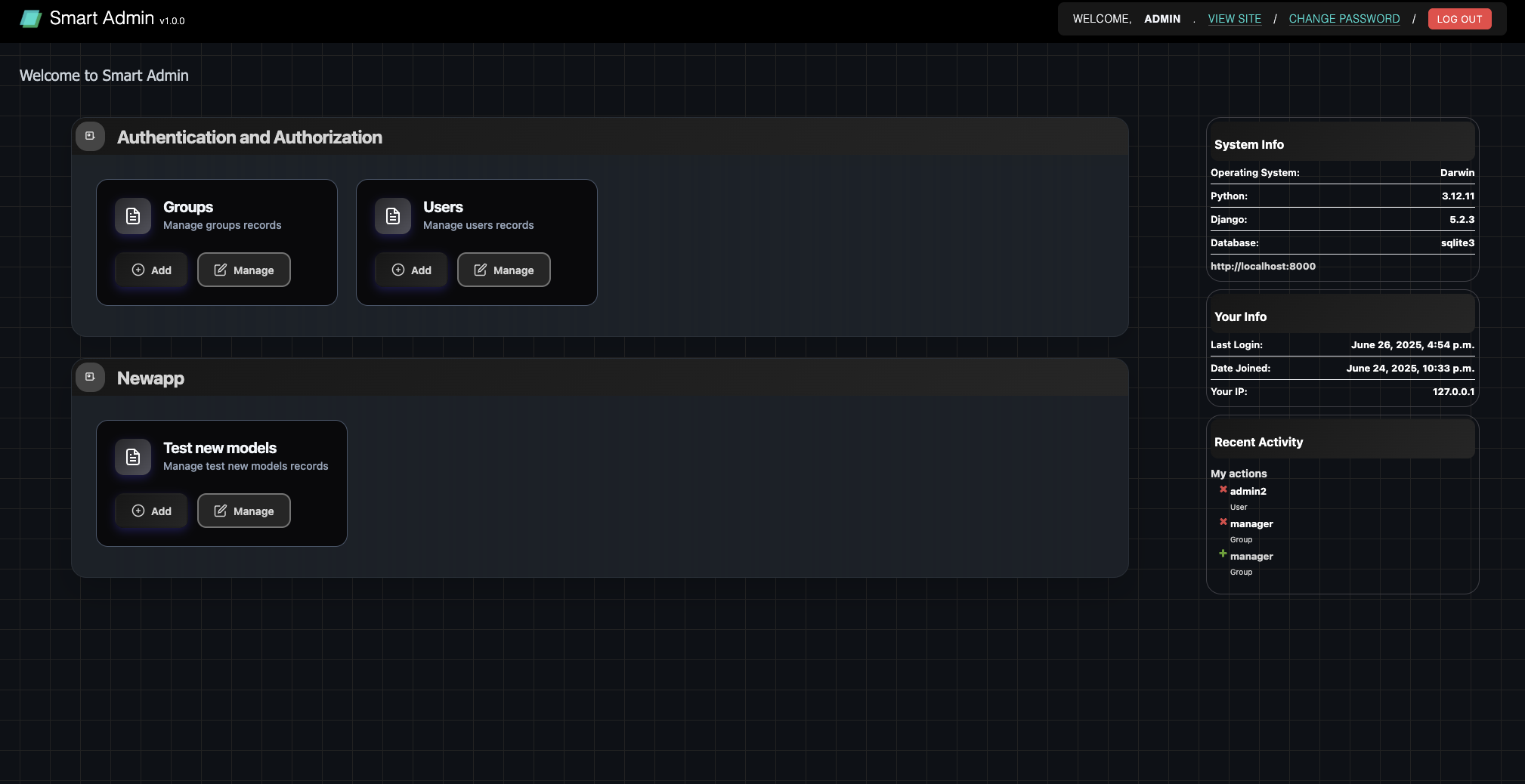
Features
- Custom admin site
- System information display (OS, Python version, Django version, database engine)
- SSL status indicator
- Custom CSS styling
- Responsive design
- NEW: Full compatibility with default Django admin.site.register()
Installation
Option 1: Copy the app to your project
- Copy the
hs_django_admindirectory to your Django project - Add
'hs_django_admin'to yourINSTALLED_APPSinsettings.py - Update your main
urls.pyto use the custom admin site
Option 2: Use as a reusable app
- Add
'hs_django_admin'to yourINSTALLED_APPSinsettings.py - Import and use the custom admin site in your
urls.py
Usage
Basic Integration
In you main settings.py
INSTALLED_APPS = [
    'hs_django_admin', # it must be at top
    'django.contrib.admin',
    'django.contrib.auth',
    'django.contrib.contenttypes',
    'django.contrib.sessions',
    'django.contrib.messages',
    'django.contrib.staticfiles',
    # ... your other apps
]
In your main urls.py:
from django.urls import path
from hs_django_admin.admin import hs_admin

urlpatterns = [
    path('admin/', hs_admin.urls),
    # ... your other URL patterns
]
Model Registration (Multiple Options)
Option 1: Use default Django admin.site.register() (Recommended)
# your_app/admin.py
from django.contrib import admin
from .models import Product

# This automatically works with the custom admin site!
admin.site.register(Product)
Option 2: Use the custom admin site directly
from hs_django_admin.admin import get_admin_site
from your_app.models import YourModel

admin_site = get_admin_site()
admin_site.register(YourModel)
Option 3: Import the admin site instance directly
from hs_django_admin.admin import hs_admin
from your_app.models import YourModel

hs_admin.register(YourModel)
Option 4: Create your own admin site instance
from hs_django_admin.admin import HSDjangoAdmin
from your_app.models import YourModel

custom_admin = HSDjangoAdmin(name='my_custom_admin')
custom_admin.site_header = "My Custom Admin"
custom_admin.site_title = "My Custom Admin Portal"
custom_admin.register(YourModel)
Advanced ModelAdmin Usage
Using the Mixin
from django.contrib import admin
from hs_django_admin.admin import HSDjangoAdminMixin
from .models import Product

class ProductAdmin(HSDjangoAdminMixin, admin.ModelAdmin):
    list_display = ['name', 'price']
    search_fields = ['name']

admin.site.register(Product, ProductAdmin)
Custom Admin Classes
from hs_django_admin.admin import get_admin_site
from django.contrib import admin
from .models import Product

class ProductAdmin(admin.ModelAdmin):
    list_display = ['name', 'price']
    search_fields = ['name']

admin_site = get_admin_site()
admin_site.register(Product, ProductAdmin)
Manual Compatibility Control
If you need to control when compatibility is enabled:
from hs_django_admin.admin import enable_default_admin_compatibility, disable_default_admin_compatibility

# Enable compatibility
original_register = enable_default_admin_compatibility()

# Your admin registrations here
from django.contrib import admin
from .models import Product
admin.site.register(Product)

# Disable compatibility (optional)
disable_default_admin_compatibility(original_register)
Configuration
The app automatically provides:
- System information in the admin context
- Custom styling via static files
- Enhanced admin templates
- Automatic compatibility with default admin.site.register()
No additional configuration is required for basic functionality.
Your own branding
- In in your django settings.py
    # Django Admin Settings
    ADMIN_SITE_HEADER = "Your Own Admin"
    ADMIN_SITE_TITLE = "Your Own Admin"
    ADMIN_INDEX_TITLE = "Welcome to Your Own Admin"
    ADMIN_LOGO_URL = "https://example.com/logo.png" # this will also work as admin shortcut icon
    ADMIN_FOOTER_ENABLED = False # this is a footer of himosoft info. You can disable it ❤️
Dependencies
- Django 5.2+ (tested with Django 5.2.3)
- No additional Python packages required
Notes
- The app includes a
TestModelfor demonstration purposes - Custom admin templates override the default Django admin templates
- Static files are automatically collected when running
python manage.py collectstatic - Default admin compatibility is automatically enabled when the app loads
- All existing
admin.site.register()calls will work without modification
License
This project is licensed under the MIT License - see the LICENSE file for details.
Contributing
Contributions are welcome! Please feel free to submit a Pull Request.
Support
If you encounter any issues or have questions, please open an issue on GitHub.
1 maintainer

Metadata
1 maintainer
Release files for hs-django-admin 1.0.0
For a detailed explanation of source distributions (sdists) and built distributions (wheels), please see the package formats documentation.
Source distribution (sdist)
| File | Size | Uploaded | Provenance | Actions |
|---|---|---|---|---|
| hs_django_admin-1.0.0.tar.gz | 43.4 kB | Without provenance | Details for hs_django_admin-1.0.0.tar.gz |
Built distribution (wheel)
| File | Interpreter | ABI | Platform | Actions Reset |
|---|---|---|---|---|
| hs_django_admin-1.0.0-py3-none-any.whl | Python 3 | none | any | Details for hs_django_admin-1.0.0-py3-none-any.whl |
Total release size: 90.1 kB
Release files / hs_django_admin-1.0.0.tar.gz
| Download URL | hs_django_admin-1.0.0.tar.gz |
|---|---|
| Size | 43.4 kB |
| Tags | Source |
|
SHA-256 checksum How to use checksums |
74147992365bca1c1056bb822d0e672628893cf2209a4e88fb38725130edccd9
|
|
BLAKE2b-256 checksum How to use checksums |
abdee0b31259a7188b6bc7555cb5fae1c39745d271f28507a7e3e3e3d0acf688
|
| Upload date | |
|
Uploaded using Trusted Publishing? What is trusted publishing? |
No |
| Uploaded via |
twine/6.1.0 CPython/3.12.11
|
Release files / hs_django_admin-1.0.0-py3-none-any.whl
| Download URL | hs_django_admin-1.0.0-py3-none-any.whl |
|---|---|
| Size | 46.7 kB |
| Tags | Python 3 |
|
SHA-256 checksum How to use checksums |
da5ab0537b713ca92ce12b9f1a57b9cf430a968e9744ae0a2d699a7c4749215e
|
|
BLAKE2b-256 checksum How to use checksums |
d9f147ee88595c36072c84369b18f25bcc6b37d13853f9b49c5efe260b2dbe0a
|
| Upload date | |
|
Uploaded using Trusted Publishing? What is trusted publishing? |
No |
| Uploaded via |
twine/6.1.0 CPython/3.12.11
|
Security for hs-django-admin 1.0.0
Provenance
Provenance describes where a file came from. On PyPI, provenance is shared via attestations, which provide a verifiable record of the build or publishing details. View details, limitations and caveats.
No provenance found
None of the files in this release were uploaded with provenance metadata.
A note on package security
PyPI is a repository for distributing packages, not a service for auditing them. While third-party security researchers and our staff do their best to detect and remove malicious packages, PyPI cannot guarantee the quality, security or suitability of any given package.
To learn more about protecting yourself from malicious actors, visit our package security documentation.














