
htbConsole
Terminal UI for Hack The Box platform and CTF competitions.
Built with Textual (Python TUI framework).
Inspired by HTBtui.
Screenshots
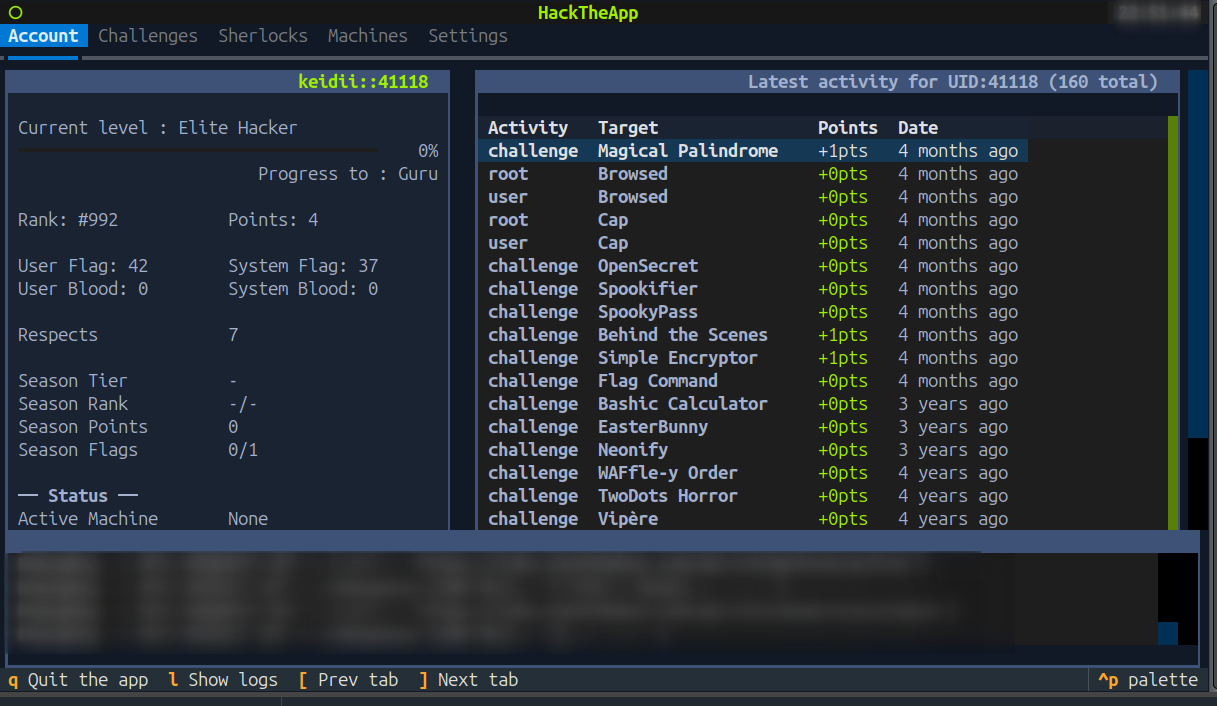
HTB Platform
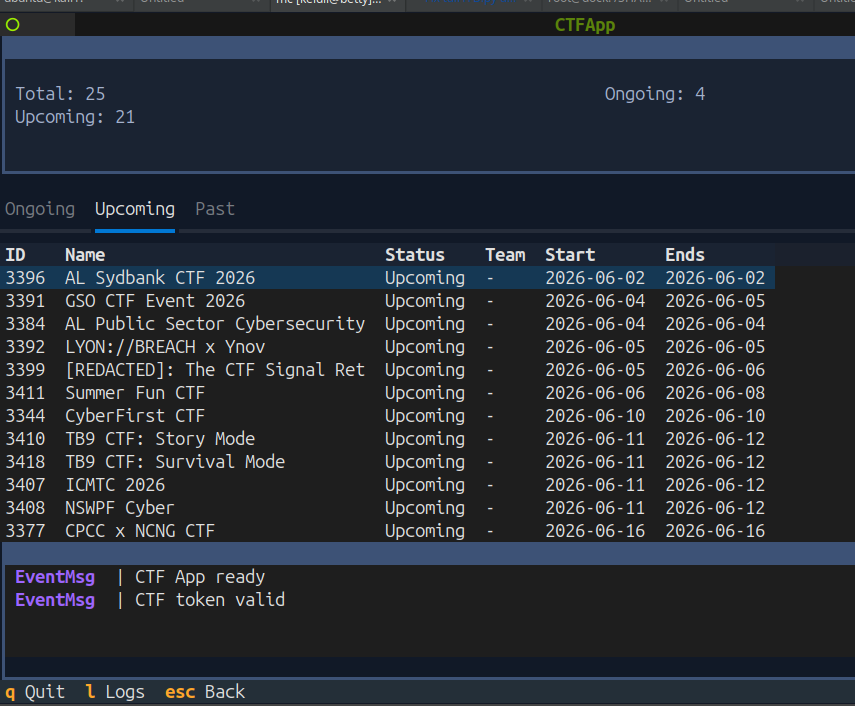
CTF Platform
Features
HTB Platform (tuiHTB)
- Challenges — browse, filter by category/difficulty, infinite scroll pagination, start/stop containers, submit flags, download & auto-extract task files, community writeups (lazy loaded), per-challenge notes
- Machines — current, retired, seasonal lists with infinite scroll, machine details with start/stop/reset/submit, VPN status, per-machine notes
- Sherlocks — DFIR/SOC investigation tasks, filter by category/difficulty/state, split task view with description/hints/answer submission, incident file downloads
- Player Profile — stats, rank progress, activity feed with incremental loading, active machine & VPN status
- Settings — API cache toggle, Burp proxy toggle, workdir path, zip password, custom unpack command, terminal emulator config
CTF Platform (tuiCTF)
- CTF List — ongoing (with join/play status), upcoming, past (lazy loaded with pagination)
- CTF Context — general info, categorized challenge browser with detail panel, notes per task, file downloads with auto-extract, ranking board, live scoreboard
- Workspace Management — auto-create directory trees per CTF (
{workdir}/CTF_{date}__{id}/{category}/{taskid}__{name})
Install
# From PyPI (once published)
pip install htbconsole

# From source
git clone https://github.com/k3idii/htbConsole
cd htbConsole
pip install .
Development (editable, run in place)
python -m venv .venv
source .venv/bin/activate
pip install -e .       # or: pip install -r requirements.txt
Configuration
Export your API tokens before launching:
export HTB_TOKEN="your-htb-api-token"
export CTF_TOKEN="your-ctf-api-token"
Get your HTB token from: https://app.hackthebox.com/account-settings (App Token)
Get your CTF token from: https://ctf.hackthebox.com (inspect requests after login)
Optional environment variables:
| Variable | Default | Description |
|---|---|---|
HTB_TOKEN |
— | HackTheBox platform API token |
CTF_TOKEN |
— | CTF platform API token |
HTB_WORKDIR |
./work |
Directory for downloads, notes, and task files |
USE_BURP |
— | Proxy address for Burp (e.g. http://127.0.0.1:8080) |
HTB_SETTINGS |
— | Explicit path to the settings YAML file |
Settings file resolution order: HTB_SETTINGS → ./htbSettings.yaml if it already exists (back-compat) → $XDG_CONFIG_HOME/htbconsole/htbSettings.yaml (default ~/.config/htbconsole/htbSettings.yaml).
Usage
# Installed console commands
htbconsole            # prompts: [h]tb or [c]tf ?
htbconsole htb        # launch HTB platform TUI
htbconsole ctf        # launch CTF platform TUI
tui-htb               # launch HTB platform TUI directly
tui-ctf               # launch CTF platform TUI directly

# Standalone (no install needed, from repo root)
python -m htbconsole [htb|ctf]
python htbConsole.py [htb|ctf]
CLI (one-shot, no TUI)
Query the same API headless and print JSON (default) or YAML. Uses the same tokens and settings as the TUI.
# read
htbconsole cli htb machine profile Fries
htbconsole cli htb machine active --pick info.ip
htbconsole cli htb chal list per_page=50 state=retired difficulty[]=easy --yaml   # filtered list
htbconsole cli htb user --pick info.name

# submit a flag
htbconsole cli htb chal submit 123 'HTB{...}'
htbconsole cli htb machine submit 808 'HTB{...}'
htbconsole cli htb sherlock submit 42 3 'my-answer'        # <sherlock-id> <task-id> <answer>

# CTF (per-CTF context: cli ctf <ctf-id> ...)
htbconsole cli ctf list                              # all your CTFs
htbconsole cli ctf 1434 info
htbconsole cli ctf 1434 list categories
htbconsole cli ctf 1434 list tasks category=Web solved=false
htbconsole cli ctf 1434 task 9876
htbconsole cli ctf 1434 submit 9876 'HTB{...}'

# raw POST escape hatch (any endpoint)
htbconsole cli htb post /api/v4/challenge/own challenge_id=123 flag='HTB{...}'
htbconsole cli ctf post /api/flags --data '{"challenge_id":9876,"flag":"HTB{...}"}'
- Resources — HTB:
chal {list|info <id>|categories|writeup <id>|submit <id> <flag>},sherlock {list|info <id>|tasks <id>|submit <id> <task> <ans>},machine {list|retired|active|profile <name>|info <name>|submit <id> <flag>},season list,profile <uid>,user. CTF:list,past, and per-CTF<id> {info|scores|list categories|list tasks|task <id>|submit <task> <flag>}. - Filtering — HTB
listfilters are server-side query params (state=,difficulty[]=,category[]=,per_page=,page=). CTFlist tasksfilters client-side bycategory=<name>andsolved=true|false. --pick a.b.0.cdrills into the result;--yamlfor YAML;--data '{...}'merges into a POST body;--debuglogs API calls to stderr. Runhtbconsole clifor the full list.- CTF flag endpoint — the CTF submit path isn't documented in the API references used
here;
ctf … submitposts to/api/flagsas a best effort. If your CTF uses a different route, usecli ctf post <endpoint> …(or--data).
Keybindings
| Key | Action |
|---|---|
q |
Quit |
l |
Toggle log console |
[ / ] |
Previous / next tab |
f |
Filter (challenges, sherlocks) |
Escape |
Focus list / go back |
Ctrl+S |
Save notes |
License
MIT
1 maintainer

Download files
Download the file for your platform. If you're not sure which to choose, learn more about installing packages.
Source Distribution
Built Distribution
Filter files by name, interpreter, ABI, and platform.
If you're not sure about the file name format, learn more about wheel file names.
Copy a direct link to the current filters
File details
Details for the file htbconsole-0.3.0.tar.gz.
File metadata
- Download URL: htbconsole-0.3.0.tar.gz
- Upload date:
- Size: 56.8 kB
- Tags: Source
- Uploaded using Trusted Publishing? Yes
- Uploaded via:
twine/6.1.0 CPython/3.13.14
File hashes
| Algorithm | Hash digest | |
|---|---|---|
| SHA256 |
0328016232d34d73549e8af834eb462f254d76d03e5ea06a8b88a24d531bce0d
|
|
| MD5 |
c1748c5c5031aa4b5e331273276c9931
|
|
| BLAKE2b-256 |
7c5b306fcd69d22637e31aa8dc86c46e15fb4b4f033fb971b0e4566bc44741dd
|
Provenance
The following attestation bundles were made for htbconsole-0.3.0.tar.gz:
Publisher:
publish.yml on k3idii/htbConsole
-
Statement:
-
Statement type:
https://in-toto.io/Statement/v1 -
Predicate type:
https://docs.pypi.org/attestations/publish/v1 -
Subject name:
htbconsole-0.3.0.tar.gz -
Subject digest:
0328016232d34d73549e8af834eb462f254d76d03e5ea06a8b88a24d531bce0d - Sigstore transparency entry: 2221072275
- Sigstore integration time:
-
Permalink:
k3idii/htbConsole@3122c7a0bcf7d723c6fcfe9c483e282196927f9b -
Branch / Tag:
refs/tags/v0.3.0 - Owner: https://github.com/k3idii
-
Access:
public
-
Token Issuer:
https://token.actions.githubusercontent.com -
Runner Environment:
github-hosted -
Publication workflow:
publish.yml@3122c7a0bcf7d723c6fcfe9c483e282196927f9b -
Trigger Event:
push
-
Statement type:
File details
Details for the file htbconsole-0.3.0-py3-none-any.whl.
File metadata
- Download URL: htbconsole-0.3.0-py3-none-any.whl
- Upload date:
- Size: 65.0 kB
- Tags: Python 3
- Uploaded using Trusted Publishing? Yes
- Uploaded via:
twine/6.1.0 CPython/3.13.14
File hashes
| Algorithm | Hash digest | |
|---|---|---|
| SHA256 |
d60064fd67c84e3cb635859e64c8800ebff2f8a20bddfb6277aabf240d36d297
|
|
| MD5 |
6a7289bf3610ee8f5a8ce5fffaea1647
|
|
| BLAKE2b-256 |
129c8a8a6ca36780c3af740409acd672e332906b2d55167be791fffa1c4e8503
|
Provenance
The following attestation bundles were made for htbconsole-0.3.0-py3-none-any.whl:
Publisher:
publish.yml on k3idii/htbConsole
-
Statement:
-
Statement type:
https://in-toto.io/Statement/v1 -
Predicate type:
https://docs.pypi.org/attestations/publish/v1 -
Subject name:
htbconsole-0.3.0-py3-none-any.whl -
Subject digest:
d60064fd67c84e3cb635859e64c8800ebff2f8a20bddfb6277aabf240d36d297 - Sigstore transparency entry: 2221072589
- Sigstore integration time:
-
Permalink:
k3idii/htbConsole@3122c7a0bcf7d723c6fcfe9c483e282196927f9b -
Branch / Tag:
refs/tags/v0.3.0 - Owner: https://github.com/k3idii
-
Access:
public
-
Token Issuer:
https://token.actions.githubusercontent.com -
Runner Environment:
github-hosted -
Publication workflow:
publish.yml@3122c7a0bcf7d723c6fcfe9c483e282196927f9b -
Trigger Event:
push
-
Statement type:







