
html-golive




Self-hosted one-command HTML deployment — Vercel-lite for your intranet.
Turn any HTML file, project folder or zip archive into a shareable URL on your own machine, NAS, VPS or intranet server.
v0.9.7: four databases, one page API. Start with SQLite, or use PostgreSQL, MySQL 8.4+ or Supabase. Manage everything in the light/dark admin workspace.
Backend setup and acceptance · WorkBuddy + MySQL guide · v0.9.7 release
30-second quickstart
pip install html-golive && golive init
That sets up everything and prints live URLs — open one and you're done. Then publish your own page:
golive publish report.html --name "Q3 Report" --slug q3
# → http://localhost:8787/q3

Something not working? Run golive verify and paste the output into an issue.
Table of contents
- Why html-golive
- Quickstart
- Upgrading
- Features
- Architecture
- Configuration
- Data layer
- Security scanning
- Docker
- Roadmap
📖 Full user manual: docs/manual.md — every feature, organised by task (publishing, editor, access control, data, security, identity, migration, FAQ).
Dark theme
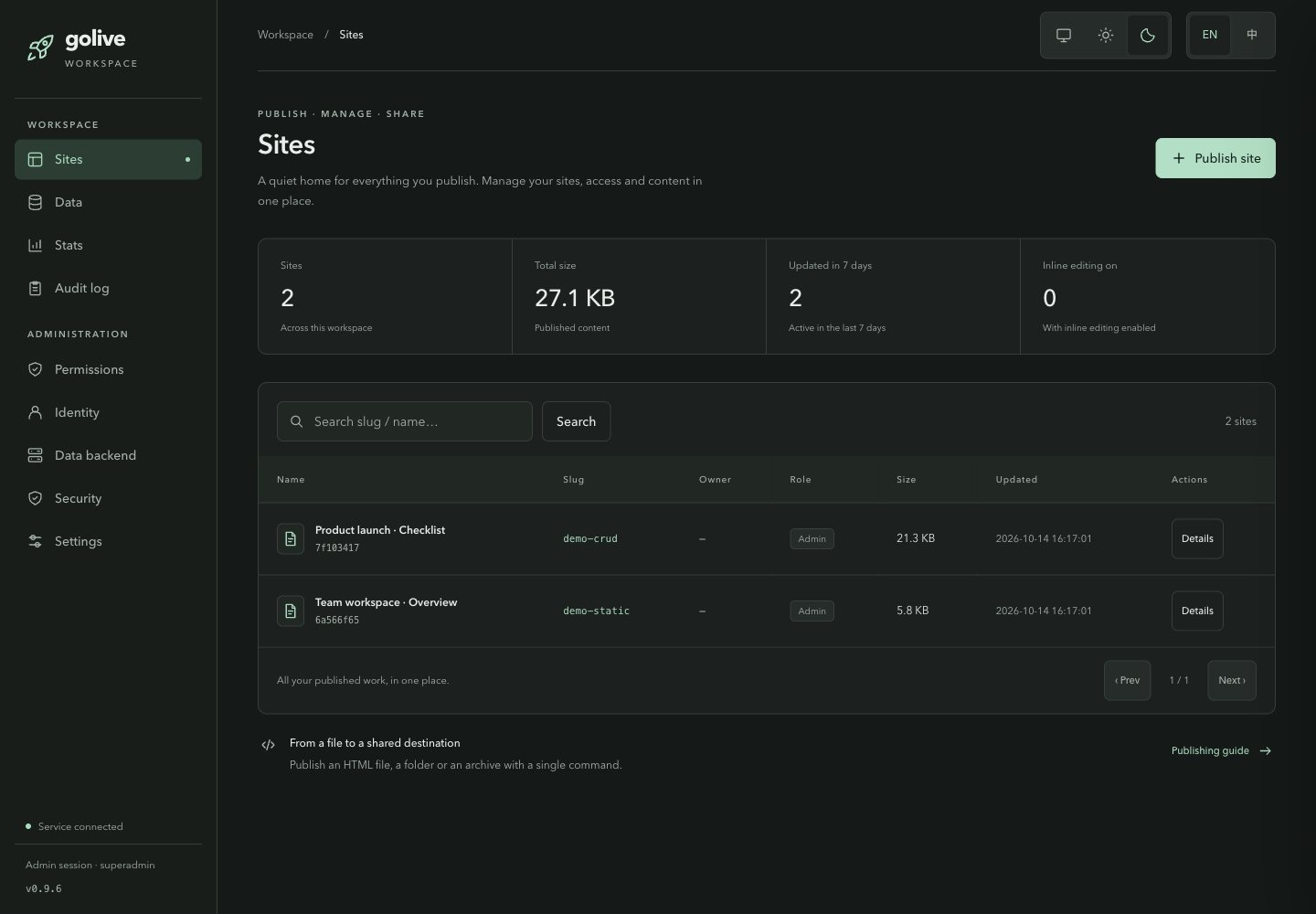
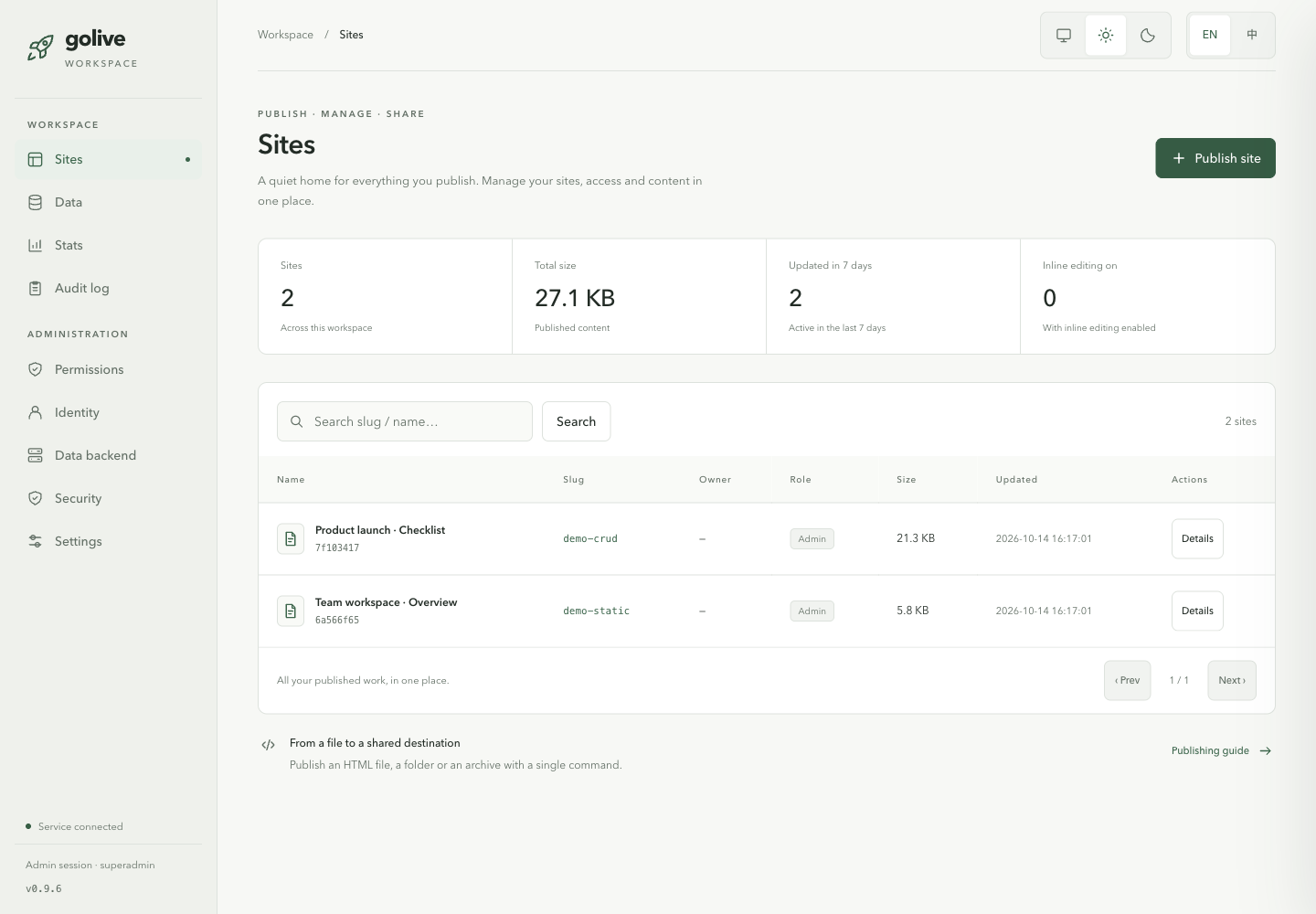
The built-in admin portal at /admin: sites, data, permissions,
stats, audit log, identity, data backend, security and settings —
dark/light themes, English and Chinese (toggle top-right).
Why html-golive
- One command, one URL. No build step, no server code, no cloud
account.
golive publish→ share the link. - Everything becomes a single file. Folders and zips are bundled — CSS/JS inlined, images compressed and embedded (or uploaded through your own image host).
- Static pages, real data. Publish a plain HTML file that reads and
writes a real database via
window.TemplateAPI/window.SupabaseAPI— no backend code required. - Own your stack. Runs entirely on your infrastructure. No outbound calls at publish/serve time (details).
- Production habits built in. Slug collision checks, 10-snapshot rollback, credential/PII scanning on every publish, audit log.
Quickstart
1 · Install
pip install html-golive              # core
pip install 'html-golive[oidc]'      # + SSO / OpenID Connect login
pip install 'html-golive[image]'     # + image compression (Pillow)
pip install 'html-golive[s3]'        # + S3-compatible backends (boto3)
pip install 'html-golive[postgres]' # + self-hosted Postgres (psycopg3)
pip install 'html-golive[mysql]'    # + MySQL 8.4+ (PyMySQL)
2 · Publish
golive publish index.html --name Demo --slug demo
golive publish ./my-project/ --slug app      # folder → bundled single HTML
golive publish site.zip                      # zip / tar.gz work too
golive publish page.html --style apple       # apply one of 19 CSS styles
3 · Serve
golive serve --port 8787          # foreground; Ctrl+C stops it
# → http://<your-host>:8787/demo

golive serve start                # or run it in the background
golive serve status               # pid, port, version
golive serve logs -f
golive serve stop
Everyday commands
golive list                                  # all published sites
golive publish new.html --update demo        # overwrite update
golive rollback demo --dry-run               # inspect snapshots, then --yes
golive preview draft.html                    # live preview + style panel
golive clone https://example.com --save-only # snapshot a public page
golive styles                                # list the 19 CSS styles
golive doctor                                # one-screen health check
golive serve status                          # is a server running? which version?
golive skill install                         # teach your AI agent to drive golive

# v0.3 — online editing & watermark
golive publish page.html --enable-editor --owner you@example.com
golive maintainer add demo teammate@example.com
golive publish page.html --watermark "CONFIDENTIAL"
Online editing (v0.3)
export GOLIVE_EDITOR_TOKEN=$(openssl rand -hex 16)
golive publish report.html --slug q3 --enable-editor --owner you@example.com
golive serve
# open http://localhost:8787/q3?editor_token=<token>&editor_user=you@example.com
# click ✏️ → edit text inline → 💾 save (snapshot taken automatically)
Saves go through the same security scanner as publishes, are limited to
the site owner + maintainers, and every overwrite is preceded by a
rollback snapshot. With auth.provider: oidc the editor accepts the
login session instead of the token+header pair.
SSO quickstart (v0.8.0)
Enable OpenID Connect login — Google, Keycloak, Authentik, Auth0, or any IdP with a discovery document:
auth:
  provider: oidc
  oidc:
    preset: google          # or auth0 / okta / azure / keycloak / authentik
    client_id: your-client-id
    redirect_uri: https://pages.example.com/auth/callback
Set the client secret via GOLIVE_OIDC_CLIENT_SECRET and a stable
GOLIVE_COOKIE_SECRET in production. Since v0.8.0 every id_token is
signature-verified against the IdP's published keys (requires pip install 'html-golive[oidc]').
Login ≠ admin. Signing in proves who someone is; it does not grant management access. List superadmin emails separately:
admin:
  admins: [alice@corp.example]
A common slip is putting
admins:at the top level — it has no effect there. See manual §16 for details.
Upgrading
pip install -U html-golive
golive serve restart     # a running server keeps the OLD code until restarted
golive doctor            # confirms CLI version == running service version
Two things bite people:
- Updating the code does not update a running server. Restart it, then
let
golive doctorconfirm the two versions match. - Clones made before v0.7.0 cannot
git pull. That release force-pushedmainand rewrote history. Recovery commands are in the guide below (force pushes tomainare now blocked).
📖 docs/upgrading.md — PyPI / pipx / git paths, the v0.7.0 history-rewrite recovery (with and without local changes), the 0.6→0.7 SQLite data-layer default change, and how to roll back.
Features
Publishing & content
- Single HTML / directory / zip / tar.gz publishing with asset bundling
- 19 built-in CSS beautification styles (
--style, custom font CDN viaGOLIVE_FONT_CDN_BASE) - Image compression (
--compress) and pluggable image upload (GOLIVE_UPLOADER_CMDcommand template, or native S3 uploader) - Website cloning (
golive clone <url>) with static snapshot mode
Operations
- Short slugs with reserved-word and collision checks
- Rollback with 10 snapshots per site
- Built-in static server with JSON API and health endpoint
- Live preview with hot reload and style-switch panel
golive doctorone-screen report: CLI vs running-service version, all three backends with paths and sizes, skill status, audit log- Background service management:
golive serve start|status|stop|restart|logs
Data & backends (v0.2, SQLite data layer in v0.7)
window.TemplateAPI/window.SupabaseAPIinjection — static pages get a real database with zero backend code- Three independent backend layers, each switchable on its own:
- storage (site HTML):
local(default) /s3/supabase - registry (site metadata):
sqlite(default) /postgres/mysql/supabase - data (TemplateAPI rows):
sqlite(default) /postgres/mysql/supabase/noneDefaults are fully local — SQLite files underGOLIVE_HOME, nothing to register. One Supabase project can back all three when you want them shared across machines.
- storage (site HTML):
golive migrate-check— port pages from other golive deployments- Docker Compose deployment (+ optional MinIO profile)
Editing, identity & watermarking (v0.3, signature-verified OIDC in v0.8)
- In-browser inline editor (
publish --enable-editor): contenteditable text editing with a save API that re-runs the full security pipeline, snapshots before every overwrite, and enforces owner/maintainer ACLs (golive maintainer add/remove/list) - Page watermarking (
--watermark [text]): canvas-tiled identity watermark — OIDC user, static text, or page meta tag; optional view-report webhook;GOLIVE_WATERMARK_OFF=1kill switch - Signature-verified OIDC login (v0.8.0):
auth.provider: oidcwith Google / Keycloak / Authentik / any discovery-document IdP; PKCE + signed session cookies; everyid_tokenchecked against IdP signing keys (iss/aud/exp/nonce,alg: nonerefused); presets for common providers; sessions accepted by the management and editor APIs - Optional LLM security review of weak scan hits via any
OpenAI-compatible endpoint (
security.llm.*), with a conservative degrade path and astrict_modegate
Admin portal (v0.5, config-store in v0.8)
- Web management portal at
/admin: site list/search, metadata editing, maintainer & ownership management, snapshot rollback, delete with slug confirmation — role-scoped (owner / maintainer / superadmin viaadmin.adminsorGOLIVE_ADMINS), plus superadmin stats dashboard and a JSONL audit trail (/api/admin/*JSON API for scripting) - 9-page admin console (v0.8.0): identity, data backends, security, global parameters — all configurable through the web UI with config-store: settings saved to the registry are live on next restart, no yaml editing required
AI agent skill (v0.7)
golive skill installdrops a ready-made AgentSkill into your agent's skills directory (auto-detected), teaching it to probe the environment before acting, publish and update by slug, wire upTemplateAPI, and never confuse this self-hosted CLI with a hosted deployment service- Ships inside the wheel, so installation works offline;
golive skill statusflags version drift
Safety
- Credential / PII scanning on every publish (YAML-extensible rules)
- Refusals identify the credential without reprinting it;
redact_mode: strictwithholds the host/database metadata too, for CI logs (v0.9) - Per-publish manifests +
golive doctor --siteto detect a page changed outside golive (v0.9) - Path-traversal-hardened server and archive extraction
- Token-protected management API (
GOLIVE_TOKEN)
Architecture
┌────────────── golive core (pure logic) ───────────────────┐
│ bundle / image compress / CSS styles / clone / preview /  │
│ security scanner / slug checker                           │
└──────┬──────────────────┬──────────────────┬──────────────┘
  StorageBackend    RegistryBackend     DataBackend
  site HTML/assets  site metadata       TemplateAPI/SupabaseAPI
       │                  │                  │
  local-fs / s3 /    sqlite / postgres / mysql /   sqlite (local file) /
  supabase storage   supabase             postgres / mysql / supabase (PostgREST) / none
       │
  AuthProvider: none (default) / token (GOLIVE_TOKEN) / oidc (generic OIDC)
All data lives under GOLIVE_HOME (default ~/.golive/):
~/.golive/
├── sites/<site_id>/index.html   published content
├── backups/<site_id>/           rollback snapshots (max 10)
├── registry.db                  SQLite registry + managed superadmins
├── data.db                      SQLite data layer (TemplateAPI rows)
├── audit.log                    admin action trail
├── logs/                        operation log
└── cache/                       style backups etc.
With the default backends the three SQLite/filesystem entries above are
the entire persistence story — no external service is involved. Pages
using TemplateAPI reach data.db through golive serve's
/api/data endpoint, so they must be loaded from the server rather than
opened as file://. See docs/data-layer.md.
Configuration
Everything works with zero config. Two layers of knobs, env always wins over yaml:
golive.yaml (backend selection)
Lookup order: --config <path> → $GOLIVE_CONFIG → ./golive.yaml →
$GOLIVE_HOME/golive.yaml. Full annotated example:
golive.example.yaml · backend combinations:
docs/backends.md
Environment variables
| Variable | Purpose |
|---|---|
GOLIVE_HOME |
data directory (default ~/.golive/) |
GOLIVE_TOKEN |
protect /api/sites (Bearer or X-Golive-Token) |
GOLIVE_EDITOR_TOKEN |
online-editor save token (falls back to GOLIVE_TOKEN) |
GOLIVE_WATERMARK_TEXT / GOLIVE_WATERMARK_OFF |
watermark text / global kill switch |
GOLIVE_OIDC_CLIENT_SECRET / GOLIVE_COOKIE_SECRET |
OIDC client secret / session-cookie HMAC key |
GOLIVE_LLM_BASE_URL / GOLIVE_LLM_MODEL / GOLIVE_LLM_API_KEY |
LLM security review endpoint |
GOLIVE_FONT_CDN_BASE |
swap fonts.googleapis.com for your font mirror |
GOLIVE_UPLOADER_CMD |
image-upload command template (mytool up {file}) |
GOLIVE_SUPABASE_URL / _ANON_KEY / _SERVICE_KEY |
Supabase backends |
GOLIVE_S3_AK / GOLIVE_S3_SK |
S3-compatible backends |
FIRECRAWL_API_KEY |
optional JS-heavy-page fallback for golive clone |
Network behavior
golive makes no outbound calls at publish/serve time. Exceptions:
golive clone <url> fetches the target page; golive preview downloads
a one-time Tailwind cache from cdn.tailwindcss.com on first run (fails
silently offline); injected styles reference public font CDNs
(override with GOLIVE_FONT_CDN_BASE); your own uploader command and
configured backends.
Data layer: give static pages a database
No server code to write. SQLite by default, so this works out of the box; point it at your own PostgreSQL or a Supabase project when you outgrow that:
golive publish app.html --data-model myapp_v1   # sqlite: nothing to set up
golive serve
Your page then simply calls:
// namespaced record store
await TemplateAPI.upsert({ name: 'vote:alice', content: {n: 1} });
const { total, list } = await TemplateAPI.listAll();

// or direct table access
const { rows } = await SupabaseAPI.query('feedback', { limit: 50 });
Four backends, two shapes:
| Backend | Shape | Setup |
|---|---|---|
sqlite |
server-proxied | none — the default |
postgres |
server-proxied | pip install 'html-golive[postgres]' + GOLIVE_PG_DSN |
mysql |
server-proxied | pip install 'html-golive[mysql]' + GOLIVE_MYSQL_DSN (MySQL 8.4+) |
supabase |
page-direct | Supabase project + anon key |
Server-proxied backends keep the database connection on the server; the
page calls golive's /api/data and no credentials (no database DSN) ever
reach the browser. Page-direct (Supabase) embeds the anon key in the
HTML, so RLS is mandatory there.
API signatures are stable contracts — pages built on any golive deployment run unchanged on yours. Full guide, including the RLS notes: docs/data-layer.md.
Note: if no data backend is configured,
--data-modelpublishes still succeed — the page gets a stub API that raises a clear "data backend not configured" error at call time (a warning is also printed at publish time).
Porting pages from another deployment?
golive migrate-check page.html reports anything deployment-specific
(migration guide).
Security scanning
Every publish is scanned against built-in rules — API keys, private
keys, database connection strings, PII patterns. Strong hits block the
publish; weak hits warn — and can optionally get a semantic second pass
from any OpenAI-compatible LLM (security.llm.base_url; works with
OpenAI / Azure / Ollama / self-hosted gateways). Unconfigured installs
keep pure rule verdicts; strict_mode: true refuses to publish without
AI review. Extend with your own YAML rules, or bypass a false positive
for content warnings with --skip-content-scan; credentials always block. Details: docs/security.md
Docker
docker compose up -d golive                 # golive serve on :8787
docker compose --profile minio up -d        # + local S3 stack for images
Roadmap
- WebDAV storage support.
- Large-table aggregation and multi-instance sessions.
- Editing conflict handling and group-based permissions.
Open an issue to help prioritise the next improvement.
Contributing
Issues and pull requests are welcome — see CONTRIBUTING.md for the development setup, code conventions and what a good bug report looks like. The whole test suite runs offline with no cloud account:
pip install -e '.[image,dev]'
python -m pytest tests/ -q
License
MIT © 2026 Songhonglei
中文文档请见 README.zh-CN.md。
1 maintainer

Metadata
1 maintainer
Release files for html-golive 0.9.7
For a detailed explanation of source distributions (sdists) and built distributions (wheels), please see the package formats documentation.
Source distribution (sdist)
| File | Size | Uploaded | Provenance | Actions |
|---|---|---|---|---|
| html_golive-0.9.7.tar.gz | 1.3 MB | Without provenance | Details for html_golive-0.9.7.tar.gz |
Built distribution (wheel)
| File | Interpreter | ABI | Platform | Actions Reset |
|---|---|---|---|---|
| html_golive-0.9.7-py3-none-any.whl | Python 3 | none | any | Details for html_golive-0.9.7-py3-none-any.whl |
Total release size: 2.6 MB
Release files / html_golive-0.9.7.tar.gz
| Download URL | html_golive-0.9.7.tar.gz |
|---|---|
| Size | 1.3 MB |
| Tags | Source |
|
SHA-256 checksum How to use checksums |
84c7a381a9b2ccd9b2f799ac784d06c3892d090b2f69935537505dc9ba599c5a
|
|
BLAKE2b-256 checksum How to use checksums |
f4db44183d03fa6bb4d7e78a73935912b783f4998bbf365e4a89768ef71ac9e5
|
| Upload date | |
|
Uploaded using Trusted Publishing? What is trusted publishing? |
No |
| Uploaded via |
twine/7.0.0 CPython/3.12.12
|
Release files / html_golive-0.9.7-py3-none-any.whl
| Download URL | html_golive-0.9.7-py3-none-any.whl |
|---|---|
| Size | 1.2 MB |
| Tags | Python 3 |
|
SHA-256 checksum How to use checksums |
0aa9a5c784425b5a19a15dde22b4a199338e7cdfaa33167c94d21ed44039bc0d
|
|
BLAKE2b-256 checksum How to use checksums |
a784046187dc9b37241a9491e4b599cd6d80ab90d18d4d964ae03905169533a6
|
| Upload date | |
|
Uploaded using Trusted Publishing? What is trusted publishing? |
No |
| Uploaded via |
twine/7.0.0 CPython/3.12.12
|
Security for html-golive 0.9.7
Provenance
Provenance describes where a file came from. On PyPI, provenance is shared via attestations, which provide a verifiable record of the build or publishing details. View details, limitations and caveats.
No provenance found
None of the files in this release were uploaded with provenance metadata.
A note on package security
PyPI is a repository for distributing packages, not a service for auditing them. While third-party security researchers and our staff do their best to detect and remove malicious packages, PyPI cannot guarantee the quality, security or suitability of any given package.
To learn more about protecting yourself from malicious actors, visit our package security documentation.














