

html-visual-compare
A command-line tool and Python library that screenshot a reference and a candidate page, then score and report the visual difference.
한국어 · Python 3.9+

Install · Quick start · Why · Reference
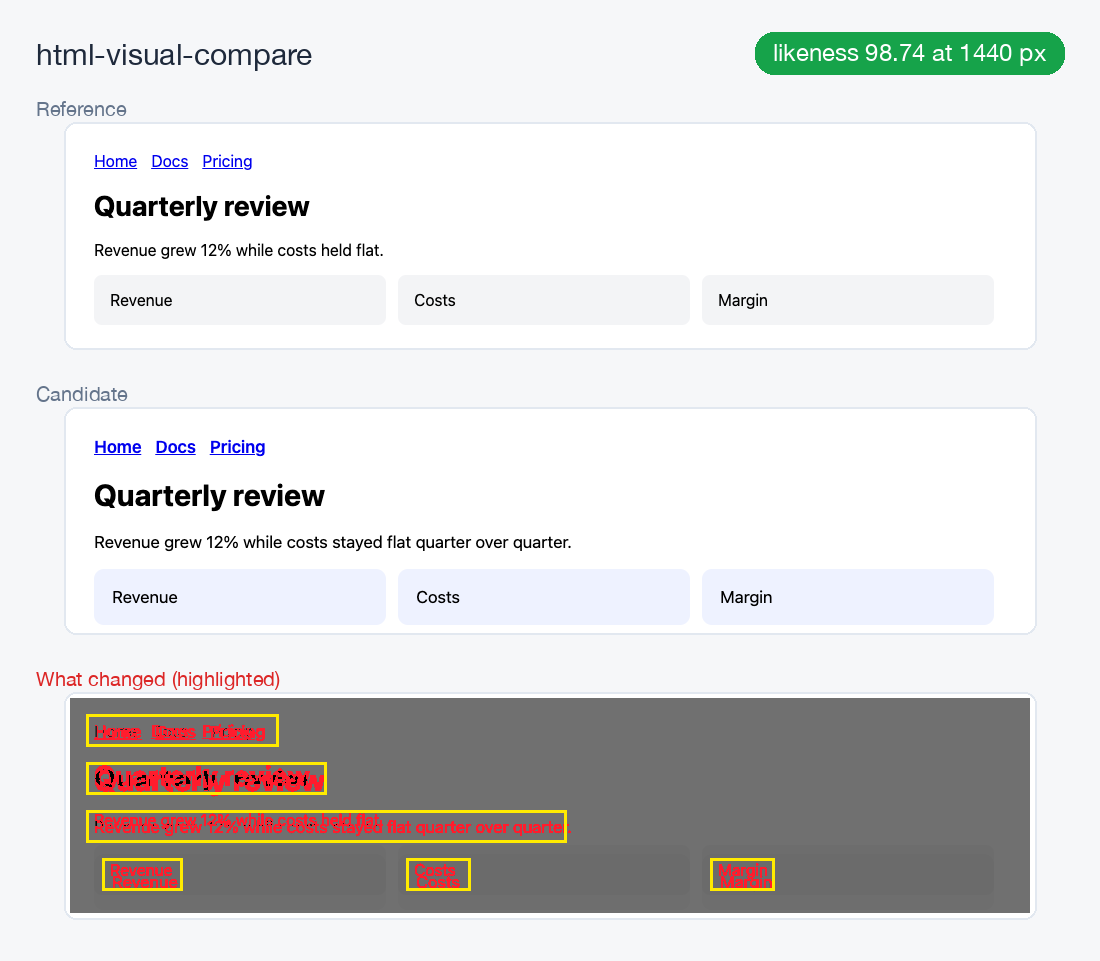
A tool that tells you, as a score, how alike two web pages look. It captures a reference page and your page at the same viewport and reports a likeness (0–100) per width, plus an image with every change marked.
- Did we build what the design shows? Compare the mock-up with the implementation.
- Did a code change move the page? Compare the previous version with the new one.
- Did the rebuild match the original site? Compare the original URL with the reconstruction.
Layout (element positions and sizes) and image (pixels) are scored separately, and an HTML report puts the three captures side by side with a list of changed regions, each tagged with the candidate's CSS selector. The picture above is a real run on the two pages in docs/demo/: 98.74, 97.75 and 95.99 at 1440, 768 and 390 px.
Install
pipx install html-visual-compare
uv tool install html-visual-compare
pip install html-visual-compare
python3 -m playwright install chromium
Python 3.9+, plus numpy, Pillow and playwright. The browser step is separate because Playwright downloads its own Chromium; pass --browser to use one you already have. Verified on macOS arm64 with Python 3.12.
Quick start
Compare a local draft against a reference page:
html-visual-compare \
  --reference https://example.com/pricing \
  --candidate-html ./build/pricing.html \
  --output-dir /tmp/compare
{
  "output_dir": "/tmp/compare",
  "report": "/tmp/compare/report.html",
  "results": [
    {"width": 1440, "layout_similarity": 99.82, "image_similarity": 97.66, "likeness": 98.74},
    {"width": 768,  "layout_similarity": 99.67, "image_similarity": 95.83, "likeness": 97.75},
    {"width": 390,  "layout_similarity": 99.36, "image_similarity": 92.62, "likeness": 95.99}
  ]
}
Compare against screenshots you already saved, one PNG per width:
html-visual-compare \
  --reference-images ./shots \
  --candidate https://staging.example.com \
  --output-dir /tmp/compare --widths 1440,768
From Python:
from html_visual_compare import compare

payload = compare(
    reference="https://example.com/pricing",
    candidate_html="./build/pricing.html",
    output_dir="/tmp/compare",
    widths=(1440, 768),
    title="Pricing, before and after",
)
print(payload["results"])
Why
The obvious way to compare two pages is a pixel diff. That reports a font change in the hero as "40% different" while missing a card that moved from the left column to the right, because a moved block and a repainted block look the same to a per-pixel count. This tool separates the two questions:
- Layout samples a 16×16 grid of average cell colours. It answers "is the same composition in the same places" and stays quiet about glyph shapes.
- Image computes local 8×8 SSIM windows over the full page. It answers "do the details match" and is not swamped by one large empty region.
likeness is their equal-weight mean, so neither can hide the other. The changed-pixel mask is then merged into regions and each region gets the selector and label of the candidate node under its centre, which is what a reviewer needs to find the thing that moved.
Prose is not the only output: the report is a single self-contained report.html with reference, candidate and diff for every width.
| html-visual-compare | Playwright toHaveScreenshot |
BackstopJS | Percy | |
|---|---|---|---|---|
| Compares | any two pages or images | a stored baseline screenshot | baselines from a scenario config | a baseline build in the cloud |
| Result | two scores per width + selectors of changed regions | pass / fail | pass / fail + report | a review UI |
| Needs | Python | its test runner | a Node config | a paid SaaS account |
| Best at | comparing two pages you have never baselined | blocking regressions in CI | managing many screen scenarios | team review and approval |
If you already keep baselines and tests, Playwright or BackstopJS fits better. Use this tool when you want to ask "how alike are these two pages?" without building a baseline first.
Reference
Command
| Option | Meaning |
|---|---|
--reference URL |
Reference page. Mutually exclusive with --reference-images. |
--reference-images DIR |
Directory of <width>.png files, or a JSON map of width to image path. |
--candidate URL |
Candidate page. |
--candidate-html FILE |
Candidate local HTML file. |
--output-dir DIR |
Where captures, results.json and report.html are written. Required. |
--widths LIST |
Comma-separated viewport widths. Default 1440,768,390; each must be at least 120. |
--viewport-height PX |
Viewport height. Default 1000. |
--keep-height LIST |
Crop every capture to its top N pixels: one value for all widths, or one per width in --widths order. Default: full page. |
--diff-threshold N |
Per-pixel mean channel difference counted as changed, 0–255. Default 28. |
--browser PATH |
Browser executable. Falls back to VISUAL_COMPARE_BROWSER, then PATH, then the macOS locations, then Playwright's download. |
--title TEXT |
Report heading. Default Visual comparison. |
--timeout-ms N |
Navigation and screenshot timeout. Default 45000. |
Library
compare(*, reference=None, reference_images=None, candidate=None, candidate_html=None,
        output_dir, widths=(1440, 768, 390), browser=None, viewport_height=1000,
        keep_heights=None, diff_threshold=28, title="Visual comparison", timeout_ms=45000) -> dict
Returns the same payload the command prints, including output_dir, report and per-width results.
Also exported: chrome_path() for the detected browser, page_url(value) for URL-or-path input, parse_widths(text) for the --widths syntax and parse_keep_heights(text) for --keep-height.
Output
| File | Contents |
|---|---|
results.json |
schema, widths, the keep_heights used, and per-width scores, layout_unavailable, image names, region list and candidate DOM nodes. |
report.html |
The visual report: three images per width, scores as percentages, ranked regions. |
candidate-<w>.png, reference-<w>.png, diff-<w>.png |
Full-page captures and the marked diff. |
One unit
likeness is the mean of layout_similarity and image_similarity, each a percentage. Both halves are printed next to it, so a score never hides which signal moved. A stored-image reference has no DOM: its layout_similarity is null with a layout_unavailable reason, and likeness is the image score alone.
Numbers
Measured on 2026-11-19 on macOS arm64 (M5 Pro), Python 3.12.8, from docs/bench/fixture.json.
| Fixture pair | 1440 | 768 | 390 |
|---|---|---|---|
docs/demo/a.html vs b.html, layout |
99.82 | 99.67 | 99.36 |
| same pair, image | 97.66 | 95.83 | 92.62 |
| same pair, likeness | 98.74 | 97.75 | 95.99 |
a.html against itself scored 100.00 at all three widths, which is the floor case the tool must not blur.
Limits
- Full-page captures only. Interaction, hover and below-fold state-changing behaviour are not exercised. A chart that shows its first step is not a defect this tool can see.
- Fonts and rendering differ per machine. Two machines with different font stacks produce different pixels for the same HTML. Compare on one host, or accept the noise in the image score.
- No perceptual tolerance for text reflow. Wrapping differences are real pixel differences; the layout score dampens them but does not ignore them.
- The comparison is not a test assertion. There is no threshold flag and no pass/fail exit code for scores; wire the JSON into your own gate when you know the tolerance for your pages.
- Linux and Windows have not been exercised. Browser discovery covers them by name, but no run has confirmed it.
- Prior art. The score split follows the measured website-check shape in storytold/craft-anything (MIT/Apache-2.0). This implementation is independent; no upstream source code is copied. See BackstopJS for full visual-regression suites.
FAQ
Why three widths by default? 1440, 768 and 390 cover a desktop, a tablet and a phone. Pass --widths for your own set; the reference images are matched by width, so a mismatch is a named error.
Why does a page with no visible change score below 100? Anti-aliasing and scrollbar rendering can differ between two runs of the same page on the same host. A page compared against itself scores 100; two separately captured pages usually score 99.x.
Can I compare two URLs? Yes: --reference URL --candidate URL. Two local files work through --candidate-html plus a reference image set.
Contributing
Bug reports and patches are welcome. See CONTRIBUTING.md for the fixture pair each behaviour change needs.
Licence
MIT, in LICENSE.
1 maintainer

Metadata
1 maintainer
Release files for html-visual-compare 0.2.0
For a detailed explanation of source distributions (sdists) and built distributions (wheels), please see the package formats documentation.
Source distribution (sdist)
| File | Size | Uploaded | Provenance | Actions |
|---|---|---|---|---|
| html_visual_compare-0.2.0.tar.gz | 20.3 kB | Without provenance | Details for html_visual_compare-0.2.0.tar.gz |
Built distribution (wheel)
| File | Interpreter | ABI | Platform | Actions Reset |
|---|---|---|---|---|
| html_visual_compare-0.2.0-py3-none-any.whl | Python 3 | none | any | Details for html_visual_compare-0.2.0-py3-none-any.whl |
Total release size: 36.0 kB
Release files / html_visual_compare-0.2.0.tar.gz
| Download URL | html_visual_compare-0.2.0.tar.gz |
|---|---|
| Size | 20.3 kB |
| Tags | Source |
|
SHA-256 checksum How to use checksums |
c5f25e3a77cf5cbcb26f9bbe39ee90c44a823d46de797d9821cc3e6d91fa1e28
|
|
BLAKE2b-256 checksum How to use checksums |
fb80ef989f1503190f55c379301b539adad575a63cb49126a1f7a8ce2a0294ca
|
| Upload date | |
|
Uploaded using Trusted Publishing? What is trusted publishing? |
No |
| Uploaded via |
twine/7.0.0 CPython/3.12.8
|
Release files / html_visual_compare-0.2.0-py3-none-any.whl
| Download URL | html_visual_compare-0.2.0-py3-none-any.whl |
|---|---|
| Size | 15.7 kB |
| Tags | Python 3 |
|
SHA-256 checksum How to use checksums |
4e720f8f795d65660230fedbd5f3b975fd0511b05e3cbed4ed76d601b7965a52
|
|
BLAKE2b-256 checksum How to use checksums |
cf79ce5bbbd252c5153b7d9e60afe323d668a862e1937df60b65b82eccf93eff
|
| Upload date | |
|
Uploaded using Trusted Publishing? What is trusted publishing? |
No |
| Uploaded via |
twine/7.0.0 CPython/3.12.8
|
Security for html-visual-compare 0.2.0
Provenance
Provenance describes where a file came from. On PyPI, provenance is shared via attestations, which provide a verifiable record of the build or publishing details. View details, limitations and caveats.
No provenance found
None of the files in this release were uploaded with provenance metadata.
A note on package security
PyPI is a repository for distributing packages, not a service for auditing them. While third-party security researchers and our staff do their best to detect and remove malicious packages, PyPI cannot guarantee the quality, security or suitability of any given package.
To learn more about protecting yourself from malicious actors, visit our package security documentation.













