
html2pic
Convert HTML + CSS to images — no browser required
A Python library that transforms HTML and CSS into images.
Features
- Browser-Free Rendering — No browser required
- CSS Support — Flexbox layout, gradients, shadows and more
- Output Formats — PNG, JPG, and SVG (basic support for SVGs)
Installation
pip install html2pic
Quick Start
from html2pic import Html2Pic

html = '''
<div class="card">
    <h1>Hello, html2pic!</h1>
    <p>Transform HTML to images with ease</p>
</div>
'''

css = '''
.card {
    display: flex;
    flex-direction: column;
    align-items: center;
    padding: 40px;
    background: linear-gradient(135deg, #667eea 0%, #764ba2 100%);
    border-radius: 20px;
    width: 400px;
}

h1 {
    color: white;
    font-size: 32px;
    font-weight: bold;
    margin: 0 0 12px 0;
}

p {
    color: rgba(255, 255, 255, 0.9);
    font-size: 18px;
    margin: 0;
}
'''

renderer = Html2Pic(html, css)
image = renderer.render()
image.save("output.png")
Result:

How It Works
html2pic translates web markup into PicTex rendering instructions:
HTML + CSS → DOM Tree → Style Application → PicTex Builders → Image
- Parse HTML with BeautifulSoup
- Parse CSS with tinycss2
- Apply Styles using CSS cascade, specificity, and inheritance
- Translate styled nodes to PicTex layout primitives (Canvas, Row, Column, Text, Image)
- Render using PicTex's Skia-based engine
CSS Support
html2pic supports a comprehensive subset of modern CSS. Here's what you can use:
Layout
| Property | Values | Notes |
|---|---|---|
display |
block, flex, none |
Flexbox is fully supported |
flex-direction |
row, column, row-reverse, column-reverse |
|
justify-content |
start, center, end, space-between, space-around, space-evenly |
|
align-items |
start, center, end, stretch |
|
align-self |
Same as align-items |
Override per-item alignment |
flex-grow |
Number | Control growth ratio |
flex-shrink |
Number | Control shrink ratio |
flex-wrap |
wrap, wrap-reverse, nowrap |
Multi-line containers |
gap |
px, % |
Spacing between flex items |
Box Model
| Property | Values | Notes |
|---|---|---|
width, height |
px, %, auto, fit-content |
|
min-width, max-width |
px, % |
Size constraints |
min-height, max-height |
px, % |
Size constraints |
aspect-ratio |
Number or ratio (e.g., 16/9) |
Maintain proportions |
padding |
px, %, em, rem |
Shorthand and individual sides |
margin |
px, %, em, rem |
Shorthand and individual sides |
border |
Width, style, color | Styles: solid, dashed, dotted |
border-radius |
px, % |
Shorthand or individual corners |
Individual corner radius:
border-top-left-radiusborder-top-right-radiusborder-bottom-left-radiusborder-bottom-right-radius
Visual Styling
| Property | Values | Notes |
|---|---|---|
background-color |
Hex, RGB, RGBA, named | Alpha channel supported |
background-image |
url(), linear-gradient() |
See gradients section below |
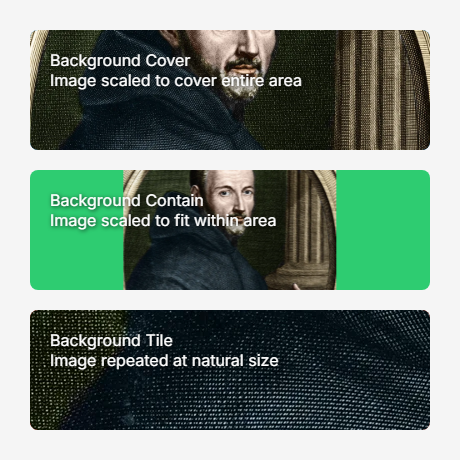
background-size |
cover, contain, tile |
For images |
box-shadow |
offset-x offset-y blur color |
RGBA supported |
Linear Gradients:
/* Angle-based */
background-image: linear-gradient(135deg, #667eea, #764ba2);

/* Direction keywords */
background-image: linear-gradient(to right, red, blue);

/* Color stops */
background-image: linear-gradient(90deg, #ff0000 0%, #00ff00 50%, #0000ff 100%);
Typography
| Property | Values | Notes |
|---|---|---|
font-family |
Font names, file paths | See @font-face below |
font-size |
px, em, rem |
|
font-weight |
normal, bold, 100-900 |
|
font-style |
normal, italic |
|
color |
Hex, RGB, RGBA, named | |
text-align |
left, right, center, justify |
|
line-height |
Number, px, % |
|
text-decoration |
underline, line-through |
|
text-shadow |
offset-x offset-y blur color |
@font-face Support:
@font-face {
    font-family: "CustomFont";
    src: url("./fonts/custom.ttf");
    font-weight: normal;
    font-style: normal;
}

@font-face {
    font-family: "CustomFont";
    src: url("./fonts/custom-bold.ttf");
    font-weight: bold;
}

h1 {
    font-family: "CustomFont", Arial, sans-serif;
    font-weight: bold;
}
Features:
- Multiple weights and styles per family
- Fallback chains (prioritizes @font-face, then system fonts)
- Relative, absolute paths, and URLs
Positioning & Transforms
| Property | Values | Notes |
|---|---|---|
position |
static, relative, absolute, fixed |
|
top, right, bottom, left |
px, %, em, rem |
|
transform |
translate(), translateX(), translateY() |
Only translate supported |
Centering with transforms:
.centered {
    position: absolute;
    top: 50%;
    left: 50%;
    transform: translate(-50%, -50%);
}
Selectors
- Tag:
div,p,h1, etc. - Class:
.my-class - ID:
#my-id - Universal:
*
Examples
Complete examples with source code are available in the examples/ directory.
Basic Card Layout
Simple flexbox card with centered content:
User Profile Card
Social media style card with avatar and information:

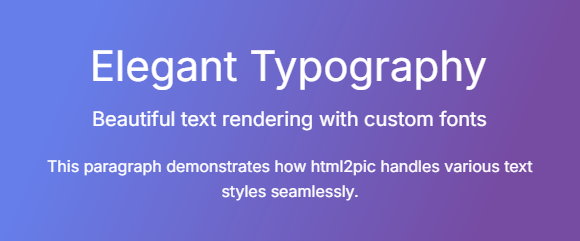
Typography Showcase
Advanced text styling and formatting:
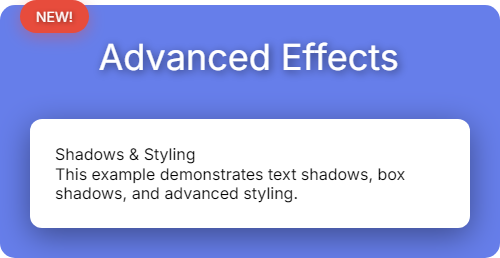
Visual Effects
Shadows, positioning, and advanced styling:
Background Images
Background image support with different sizing modes:
View all examples with source code
API Reference
Html2Pic(html: str, css: str = "")
Main renderer class.
Methods:
| Method | Returns | Description |
|---|---|---|
render(crop_mode=CropMode.CONTENT_BOX) |
BitmapImage |
Render to PNG/JPG |
render_as_svg(embed_font=True) |
VectorImage |
Render to SVG |
debug_info() |
dict |
Get parsing and styling details |
Output Formats:
The returned BitmapImage and VectorImage objects provide:
# Save to file
image.save("output.png")

# Convert to other formats
numpy_array = image.to_numpy()
pil_image = image.to_pillow()

# Display
image.show()
Limitations
html2pic supports a subset of CSS, several features are not implemented:
| Feature | Status | Alternative |
|---|---|---|
| CSS Grid | ❌ Not supported | Use Flexbox |
| Transforms (rotate, scale, skew) | ❌ Not supported | Only translate() works |
| Animations & Transitions | ❌ Not supported | Generate static images |
| Radial/Conic Gradients | ❌ Not supported | Use linear-gradient() |
| Complex Selectors | ❌ Not supported | Use simple tag, class, or ID selectors |
Pseudo-classes (:hover, :nth-child) |
❌ Not supported | Apply styles directly |
| Media Queries | ❌ Not supported | Set explicit dimensions |
| Overflow & Scrolling | ❌ Not supported | Content must fit container |
Contributing
Contributions are welcome! Please feel free to:
- Report bugs via GitHub Issues
- Suggest features or improvements
- Submit pull requests
For major changes, please open an issue first to discuss your ideas.
License
MIT License - see LICENSE file for details.
Acknowledgments
Built with:
- PicTex — High-performance rendering engine (Skia + Taffy)
- BeautifulSoup — HTML parsing
- tinycss2 — CSS parsing
Version & Status
See CHANGELOG.md for version history and migration guides.
Development Status
Note: This software is currently in early alpha stage. It lacks test coverage and may contain bugs or unexpected behavior. Use with caution in production environments and please report any issues you encounter.
1 maintainer

Metadata
1 maintainer
Release files for html2pic 0.2.2
For a detailed explanation of source distributions (sdists) and built distributions (wheels), please see the package formats documentation.
Source distribution (sdist)
| File | Size | Uploaded | |
|---|---|---|---|
| html2pic-0.2.2.tar.gz | 679.4 kB | Details |
Built distribution (wheel)
| File | Interpreter | ABI | Platform | Reset |
|---|---|---|---|---|
| html2pic-0.2.2-py3-none-any.whl | Python 3 | none | any | Details |
Total release size: 718.1 kB
Release files / html2pic-0.2.2.tar.gz
| Download URL | html2pic-0.2.2.tar.gz |
|---|---|
| Size | 679.4 kB |
| Tags | Source |
|
SHA-256 checksum How to use checksums |
81ce386411eecb80985de3c4d5a3dfa9bd4fb6bc4ffe5935c88a967f6ff1312c
|
|
BLAKE2b-256 checksum How to use checksums |
e503c3cc8951e9750b74d42d80d5bd84cc85cd8cf903af2660c42d4e5232b5a8
|
| Upload date | |
|
Uploaded using Trusted Publishing? What is trusted publishing? |
No |
| Uploaded via |
twine/6.2.0 CPython/3.12.10
|
Release files / html2pic-0.2.2-py3-none-any.whl
| Download URL | html2pic-0.2.2-py3-none-any.whl |
|---|---|
| Size | 38.8 kB |
| Tags | Python 3 |
|
SHA-256 checksum How to use checksums |
d5270d09c16f687b328bad9fe7bd9e5b479d3baa7daf6e892fa20182293d86e1
|
|
BLAKE2b-256 checksum How to use checksums |
9909cbbc561da1cf4349199c8b992222806621b5a394db7222533ca253878854
|
| Upload date | |
|
Uploaded using Trusted Publishing? What is trusted publishing? |
No |
| Uploaded via |
twine/6.2.0 CPython/3.12.10
|














