
Network-level traffic interceptor for reverse-engineering and debugging web APIs
Captures on the wire and saves everything to disk — no extensions, no injected code, the page runs untouched.






English · Русский · Español · 中文
Features · Install · Quick start · Command line · Session output · How it works · Security
⚡ 30-second start
pip install git+https://github.com/web3daemon/httpcrabber-client.git
httpcrabber
Answer three prompts, browse as usual, close Chrome — every request, response, WebSocket frame and script of the session is in LOGS/<name>/.
Why
DevTools is great for a quick look, but it is a poor recorder: the log lives only as long as the tab, large bodies and WebSocket frames are awkward to export, scripts are scattered across requests, and a HAR file is one huge snapshot of one tab.
httpcrabber records a whole session to disk. It is an HTTPS proxy based on
mitmproxy: every request, response, WebSocket frame and script is
captured on the wire and written to a per-session folder as line-by-line JSONL — ready for
grep, jq, diffs and scripts. Nothing is installed into the browser or injected into the
page, so the site runs exactly as it does on a normal visit, and any browser or device that
can use a proxy works.
Features
| 💚 Animated hacker CLI | Matrix rain, gradient glitch banner, typewriter, color-coded status badges, spinners for real waits |
| 📡 Live intercept feed | Requests in real time, colored methods and status codes, counters, traffic sparkline |
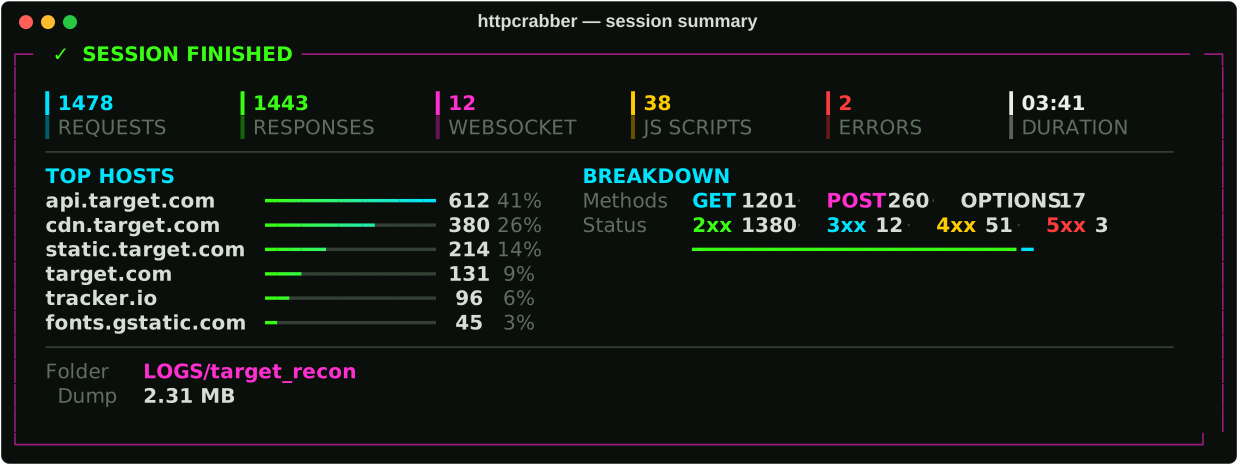
| 📊 Session analytics | Top hosts, method and status breakdown, duration and dump size when the session ends |
| 🧅 Any upstream proxy | socks5 / socks5h / socks4 / http / https, with or without auth, every common notation |
| 🗂 One folder per session | Network dump + every script together — archive or share a session as a unit |
| 📜 Full JavaScript capture | External bundles and inline <script> blocks, complete and deduplicated by SHA-256 |
| 🗺 Source maps → original sources | Maps are unpacked into the project's original file tree; --sourcemaps fetches the ones scripts reference |
| 🕶 Safe sharing | httpcrabber redact makes a copy with tokens, cookies and auth headers masked |
| 🌐 Chrome starts itself | Launched through the proxy with a dedicated profile — or bring your own browser with --no-browser |
| 🔐 Automatic CA setup | Certificate checked and installed on first run, on Windows, macOS and Linux |
| ⌨️ Scriptable | Every prompt has a flag; pass them all and nothing is asked |
| ⏹ Safe shutdown | Ends on Chrome close or Ctrl+C — the dump is saved and child processes are cleaned up either way |
| 🌍 Bilingual UI | Russian and English, chosen at startup or with --lang |
Requirements
- Python 3.11+
- Google Chrome or Chromium (optional with
--no-browser)
| OS | Browser discovery | CA certificate install |
|---|---|---|
| Windows | Program Files, LocalAppData | certutil -user into the user Root store — Windows shows one confirmation dialog |
| macOS | /Applications, ~/Applications |
security add-trusted-cert into the login keychain — macOS asks for your password once |
| Linux | google-chrome, chromium on PATH |
NSS database ~/.pki/nssdb via certutil from libnss3-tools (sudo apt install libnss3-tools) — this is what Chrome reads. Firefox keeps its own store; install from http://mitm.it there |
Set HTTPCRABBER_BROWSER=/path/to/chrome to override discovery on any OS.
Install
pip install git+https://github.com/web3daemon/httpcrabber-client.git
httpcrabber --version
Or from a clone, for development:
git clone https://github.com/web3daemon/httpcrabber-client.git
cd httpcrabber-client
python -m venv .venv && source .venv/bin/activate     # .venv\Scripts\Activate.ps1 on Windows
pip install -e ".[dev]"
No install at all? python run.py works straight from the clone.
Quick start
httpcrabber
The tool asks for three things and handles the rest:
- Language — Russian or English
- Upstream proxy — paste it in any format, or press Enter to go direct
- Session name — e.g.
TARGET RECON
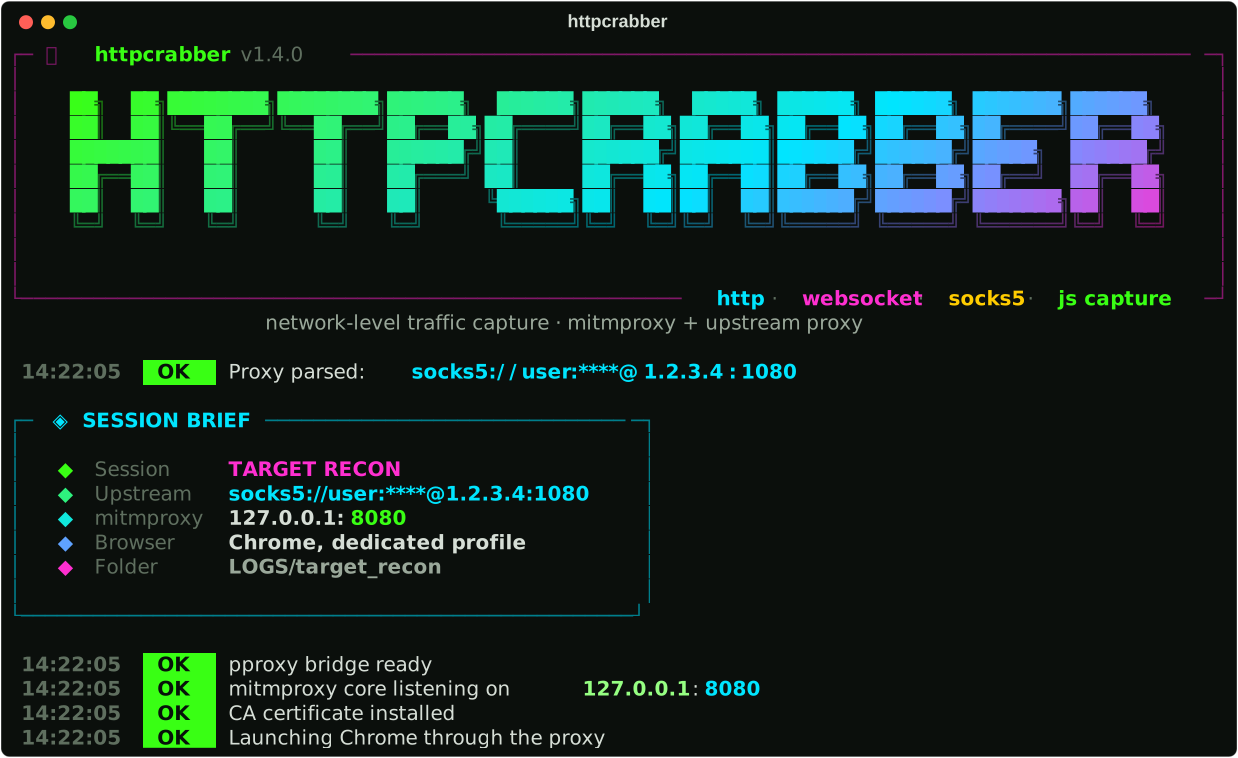
It shows a session brief, installs the CA certificate if needed, starts Chrome through the proxy, and streams everything into the session folder. Browse normally — every request, response, WebSocket frame and script is captured. Close Chrome (or press Ctrl+C) to finish; you get an analytics panel and the folder path.
Command line
Every prompt has a flag. Pass them all and httpcrabber asks nothing — handy for scripts.
httpcrabber --lang en --session "target recon" --proxy socks5://user:pass@1.2.3.4:1080
httpcrabber -l en -s quick --direct --no-browser          # use your own browser / device
httpcrabber --no-anim                                      # plain output, no animations
httpcrabber -s api --include '*.target.com' --sourcemaps  # only the target + original sources
| Flag | Meaning |
|---|---|
-l, --lang {ru,en} |
Interface language |
-s, --session NAME |
Session name → LOGS/<name>/ |
-p, --proxy PROXY |
Upstream proxy, any format |
--direct |
No upstream proxy |
--port PORT |
mitmproxy listen port (default 8080, next free one if busy) |
-o, --output DIR |
Where sessions go (default ./LOGS) |
--include HOST |
Record only matching hosts — glob, repeatable (*.target.com) |
--exclude HOST |
Never record matching hosts — glob, repeatable |
--sourcemaps |
Fetch source maps referenced by scripts and unpack the original sources |
--no-browser |
Don't launch Chrome — point any browser or device at 127.0.0.1:<port> |
--no-anim |
Disable animations |
-V, --version |
Print version |
Proxy formats
Every common notation is accepted. Press Enter with an empty input for a direct connection.
host:port
host:port:user:pass
user:pass@host:port
socks5://user:pass@host:port
http://host:port
https://user:pass@host:port
Schemes: http, https, socks5, socks5h, socks4. Passwords are masked in the interface.
Session output
Each session is a self-contained folder:
LOGS/
└── target_recon/
    ├── target_recon.jsonl                     # network dump
    └── js/
        ├── index.json                         # manifest: url, file, sha256, size, hits
        ├── cdn.target.com/
        │   ├── main.a3f1c8d4.js               # external scripts
        │   ├── maps/main.js.9c1d2e3f.map      # source maps
        │   └── sources/app/src/…              # original sources unpacked from maps
        └── target.com/
            └── inline/inline_0001.e5f6a7b8.js # inline <script> blocks
If a session name already exists, _2, _3 … is appended. Nothing is ever overwritten.
Network dump
One JSON object per line, with an event field:
request · response · ws_open · ws_msg · ws_close · error.
Each record is flushed to disk immediately, so a crash or a hard kill loses nothing.
Every record carries an id: a request, its response, its error and the WebSocket frames of
one connection share it, even when the same URL is fetched in parallel. Responses add
duration_ms and size. Headers are written twice — headers (a dict, as before) and
headers_raw (a list of pairs that keeps repeated headers such as several Set-Cookie).
WebSocket frames have a type, text or binary; binary frames are stored like binary bodies.
Captured JavaScript
- Scripts are stored complete. Bodies inside the
.jsonlare truncated at 200 KB, but files injs/are the full source — a 5 MB minified bundle is saved whole. - Duplicates collapse by SHA-256. One bundle requested a hundred times is stored once,
with
hits: 100in the manifest. - Inline scripts are extracted from HTML. Tags with
src=are skipped (they arrive as their own request), as areapplication/ld+jsonandtext/template— those are not code. - Filenames carry a short content hash, so different builds of the same
app.jsnever overwrite each other.
Source maps
Browsers download source maps only while DevTools is open, so normally they never cross
the wire. httpcrabber unpacks every map it does see — inline data: maps and any .map
response — into js/<host>/sources/. With --sourcemaps it also requests the maps that
scripts reference, through its own proxy and your upstream, so they land in the dump too,
marked fetched_by: "sourcemap". Many production sites don't publish maps; when one does,
you get the original project tree instead of a minified bundle.
How it works
flowchart LR
    B["🌐 Chrome"] -->|HTTPS| M["🦀 mitmproxy<br/><sub>capture</sub>"]
    M --> P["🔌 pproxy bridge<br/><sub>scheme adapter</sub>"]
    P -->|"socks5 · http"| U["🧅 your upstream proxy"]
    U --> T["🎯 target"]
    M -.-> F[("📁 LOGS/session<br/><sub>JSONL + JS</sub>")]

    classDef hop fill:#0b0f0c,stroke:#39ff14,color:#d6ded6,stroke-width:1.5px
    classDef core fill:#0b0f0c,stroke:#ff2fd0,color:#ffffff,stroke-width:2px
    classDef store fill:#0b0f0c,stroke:#00e5ff,color:#d6ded6,stroke-width:1.5px
    class B,P,U,T hop
    class M core
    class F store
mitmproxy natively supports only http/https upstream proxies. To make SOCKS5 work
transparently, httpcrabber starts a local pproxy
bridge that speaks HTTP to mitmproxy and any scheme to your proxy. Both hops are on
loopback, so the overhead is negligible.
src/httpcrabber/
  cli.py       arguments, prompts, main()
  session.py   orchestration: bridge → mitmproxy → CA → browser → live loop
  capture.py   mitmproxy addon: JSONL dump, JS collector, live stats
  proxy.py     upstream proxy parser        bridge.py   pproxy bridge
  ca.py        CA install per OS            browser.py  Chrome discovery per OS
  ui.py        animations, panels, feed     i18n.py     UI strings
⚠️ Security
Captured traffic contains live credentials. Session dumps routinely include
Cookie, Set-Cookie, Authorization headers, API keys and tokens for every site you
visited during the session.
LOGS/and*.jsonlare excluded by.gitignore— keep it that way.- To share a session, make a masked copy:
httpcrabber redact LOGS/target_recon→LOGS/target_recon_redacted/. Auth headers, cookies and tokens in URLs, forms and JSON become[REDACTED]; scripts are copied as is, the original session stays untouched. - Never commit, upload or share a session dump before reviewing it.
- Treat a session folder as if it were your password manager export. Because effectively, it is.
- The tool installs a locally generated root CA. SECURITY.md explains how to remove it when you are done.
Responsible use
This is a tool for security research, API debugging, and interoperability work on systems you own or are authorized to test. You are responsible for complying with applicable law, the terms of service of the sites you access, and the privacy of any third-party data you encounter. Do not use it to access systems without permission.
Contributing
Issues and pull requests are welcome — see CONTRIBUTING.md for setup, conventions and how to add a language. Security reports go through SECURITY.md.
ruff check src tests run.py && pytest
License
GNU General Public License v3.0 — see the license file for the full text.
1 maintainer

Release files for httpcrabber 1.2.0
For a detailed explanation of source distributions (sdists) and built distributions (wheels), please see the package formats documentation.
Source distribution (sdist)
| File | Size | Uploaded | |
|---|---|---|---|
| httpcrabber-1.2.0.tar.gz | 68.8 kB | Details |
Built distribution (wheel)
| File | Interpreter | ABI | Platform | Reset |
|---|---|---|---|---|
| httpcrabber-1.2.0-py3-none-any.whl | Python 3 | none | any | Details |
Total release size: 126.4 kB
Release files / httpcrabber-1.2.0.tar.gz
| Download URL | httpcrabber-1.2.0.tar.gz |
|---|---|
| Size | 68.8 kB |
| Tags | Source |
|
SHA-256 checksum How to use checksums |
900f597955bbf2af2c1200c2b0c70d20210a3ba9735567eccb29d94ad0159b00
|
|
BLAKE2b-256 checksum How to use checksums |
2386e6af5c42562d5fc07d287a84b212f6f46ba7e754c6f19638ea7d0625a95b
|
| Upload date | |
|
Uploaded using Trusted Publishing? What is trusted publishing? |
Yes |
| Uploaded via |
twine/7.0.0 CPython/3.13.14
|
Provenance
Provenance describes where a file came from. On PyPI, provenance is shared via attestations, which provide a verifiable record of the build or publishing details. View details, limitations and caveats.


PyPI Publish Attestation
PyPI verified that this artifact, at this checksum, originated from the publisher listed below.
Signed by GitHub Actions, verified by PyPI on Sep 24, 2026.
Transparency logRelease files / httpcrabber-1.2.0-py3-none-any.whl
| Download URL | httpcrabber-1.2.0-py3-none-any.whl |
|---|---|
| Size | 57.6 kB |
| Tags | Python 3 |
|
SHA-256 checksum How to use checksums |
266a24ac29f69be1c89f5ae18e26d1841b207bf03daf3f0c483441525803eefa
|
|
BLAKE2b-256 checksum How to use checksums |
f741282e5df6f423fc20a265b14afcfbb26f75765d2975f8c071db41a99aa92d
|
| Upload date | |
|
Uploaded using Trusted Publishing? What is trusted publishing? |
Yes |
| Uploaded via |
twine/7.0.0 CPython/3.13.14
|
Provenance
Provenance describes where a file came from. On PyPI, provenance is shared via attestations, which provide a verifiable record of the build or publishing details. View details, limitations and caveats.
PyPI Publish Attestation
PyPI verified that this artifact, at this checksum, originated from the publisher listed below.
Signed by GitHub Actions, verified by PyPI on Sep 24, 2026.
Transparency log













