
httpdbg
httpdbg is a tool for Python developers to easily debug the HTTP(S) client and server requests in a Python program.
To use it, execute your program using the pyhttpdbg command instead of python and that's it. Open a browser to http://localhost:4909 to view the requests:
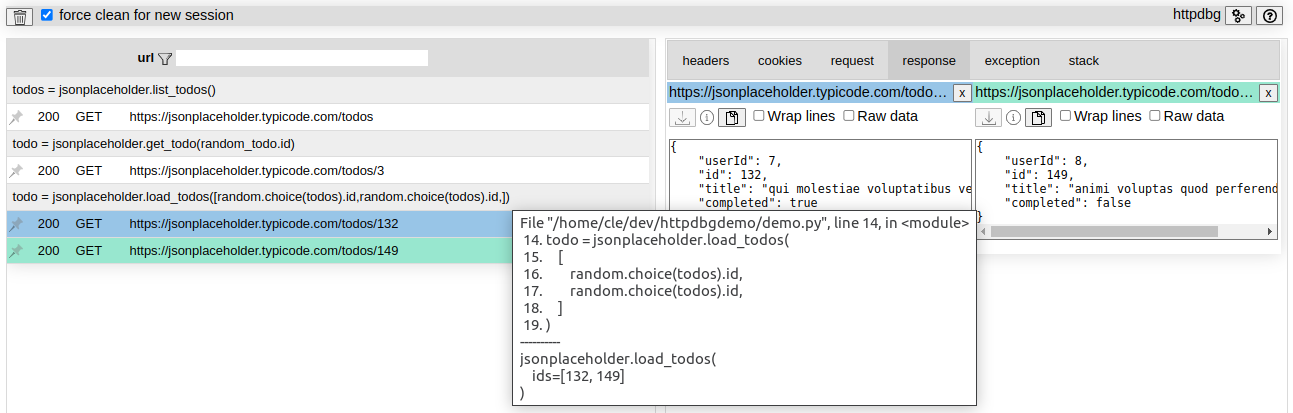
Supports HTTP/1.0, HTTP/1.1, and HTTP/2.
Full documentation => https://httpdbg.readthedocs.io/
installation
pip install httpdbg
usage
By default, both client and server requests are recorded. To record only client requests, use the --only-client command line argument.
interactive console
Open an interactive console using the command pyhttpdbg.
(venv) dev@host:~/dir$ pyhttpdbg
.... - - .--. -.. -... --. .... - - .--. -.. -... --. .... - - .--. -.. -... --.
  httpdbg - HTTP(S) requests available at http://localhost:4909/
.... - - .--. -.. -... --. .... - - .--. -.. -... --. .... - - .--. -.. -... --.
Python 3.10.6 (main, Aug 10 2022, 11:40:04) [GCC 11.3.0] on linux
Type "help", "copyright", "credits" or "license" for more information.
(InteractiveConsole)
>>>
Perform HTTP requests.
You can inspect the HTTP requests directly in your web browser at http://localhost:4909.
script
You can trace all the HTTP requests performed by a script
pyhttpdbg --script filename.py [arg1 --arg2 ...]
module
You can trace all the HTTP requests performed by a library module run as a script using the -m command line argument.
For example, you can view which HTTP requests are performed by pip when you install a package.
pyhttpdbg -m pip install hookdns --upgrade
test frameworks
You can trace all HTTP requests made during your tests (pytest, unittest).
pyhttpdbg -m pytest [arg1 --arg2 ...]
In that case, the requests will be grouped by test, and any requests made within a fixture or the setup/teardown methods will be identified by a tag.
HTTP server
You can trace all HTTP requests received by your HTTP server.
pyhttpdbg -m flask --app demoflask run
.... - - .--. -.. -... --. .... - - .--. -.. -... --. .... - - .--. -.. -... --.
  httpdbg - HTTP(S) requests available at http://localhost:4909/
.... - - .--. -.. -... --. .... - - .--. -.. -... --. .... - - .--. -.. -... --.
 * Serving Flask app 'demoflask'
 * Debug mode: off
WARNING: This is a development server. Do not use it in a production deployment. Use a production WSGI server instead.
 * Running on http://127.0.0.1:5000
Press CTRL+C to quit
127.0.0.1 - - [14/Mar/2025 17:47:42] "GET / HTTP/1.1" 200 -
127.0.0.1 - - [14/Mar/2025 17:47:50] "GET /hello/Ben HTTP/1.1" 200 -
127.0.0.1 - - [14/Mar/2025 17:47:56] "GET /oups HTTP/1.1" 404 -
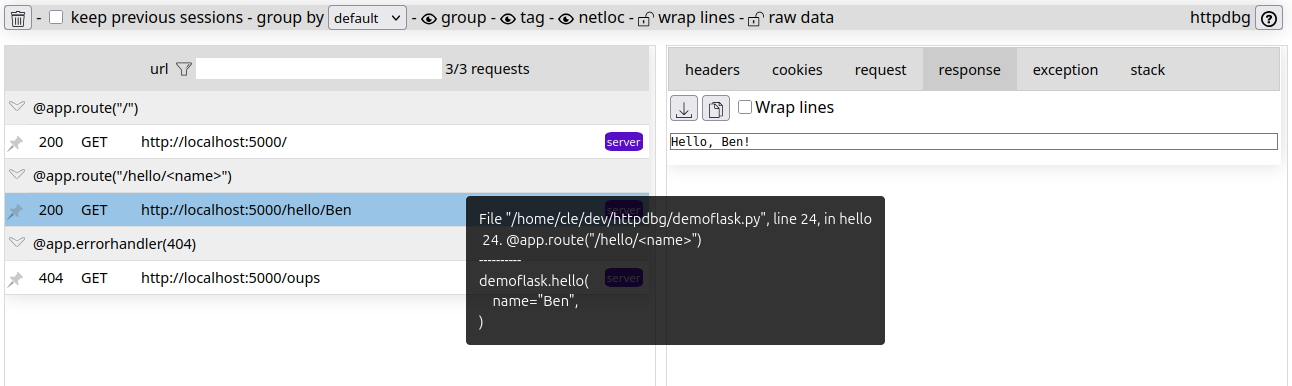
initiators and groups
An initiator is the function/method that is at the origin of the HTTP requests. By default, we already support some packages but you can add your own initiators.
To add a new package in the list of initiators, you can use the -i command line argument:
pyhttpdbg -i api_client_pck --script my_script.py
You can use any package as an initiator, this is not limited to HTTP requests.
supported HTTP client
The initiator is the highest-level method used to make the request through the client. The group and the initiator are identical. If a request to a URL generates multiple requests, as in the case of redirection, all these requests will be grouped together.
| packages | status | initiator | group |
|---|---|---|---|
| requests | supported | yes | yes |
| urllib3 | supported | yes | yes |
| httpx | supported | yes | yes |
| aiohttp | supported | yes | yes |
| your_package | yes, with the arg -i your_package | yes | yes |
supported HTTP server
The initiator is the low-level socket method that receives the data. The group is the endpoint method used to handle the request. A client request made within the endpoint method will be included in this group.
| packages | status | initiator | group |
|---|---|---|---|
| flask | supported | - | yes |
| fastapi | supported | - | yes |
supported test framework
The requests are grouped by tests.
| packages | status | initiator | group |
|---|---|---|---|
| pytest | supported | - | yes |
| unittest | supported | - | yes |
supported HTTP version
| version | status |
|---|---|
| 1.0 | supported |
| 1.1 | supported |
| 2 | supported (only through the h2 lib) |
configuration
No configuration is necessary to start but some few settings are available for particular use.
command line
usage: pyhttpdbg [-h] [--host HOST] [--port PORT] [--version]
                 [--initiator INITIATOR] [--only-client]
                 [--keep-up | --force-quit]
                 [--console | --module MODULE | --script SCRIPT]

httdbg - a very simple tool to debug HTTP(S) client requests

options:
  -h, --help            show this help message and exit
  --host HOST           the web interface host IP address
  --port PORT, -p PORT  the web interface port
  --version, -v         print the httpdbg version
  --initiator INITIATOR, -i INITIATOR
                        add a new initiator (package)
  --only-client         record only HTTP client requests
  --keep-up, -k         keep the server up even if the requests have been read
  --force-quit, -q      stop the server even if the requests have not been read
  --export-html EXPORT_HTML
                        the path to the export file
  --no-banner           do not print the banner in the console
  --console             run a Python console (default)
  --module MODULE, -m MODULE
                        run a Python module (like 'python -m'; remaining arguments are passed to the module)
  --script SCRIPT       run a Python script (remaining arguments are passed to the script)
web interace
Some options are available to customize the UI:
- Change the strategy to group the requests.
- Hide the scheme and the network location in the url.
- Hide the group rows.
- Hide the tags.
- ...
You can also pin a request or delete all unpinned requests.
To keep your configuration, bookmark the page with the full search query.
Fox example, if you want to hide the group rows by default, the url will be:
http://localhost:4909/?hi=on
web interface
All the requests recorded are available on the web interface.
The requests:
- are still available in the web page even if the python process stopped (except if you force quit before the requests have been loaded by the web page).
- are automatically cleaned if a new execution is detected.
export
You can export the HTTP traces in a single HTML file. In that case, the web interface is not available during the execution of the python command.
limitations
Theoretically, if your HTTP client or server uses a standard Python socket, the HTTP requests will be recorded.
Support for recording requests on the server side is new in httpdbg 1.0.0. In some cases, like with |FastAPI| using |uvloop|, we had to implement a new mechanism to make request recording possible. This is still a work in progress as we aim to support more frameworks.
documentation
1 maintainer

Release files for httpdbg 2.2.0
For a detailed explanation of source distributions (sdists) and built distributions (wheels), please see the package formats documentation.
Source distribution (sdist)
| File | Size | Uploaded | |
|---|---|---|---|
| httpdbg-2.2.0.tar.gz | 81.1 kB | Details |
Built distribution (wheel)
| File | Interpreter | ABI | Platform | Reset |
|---|---|---|---|---|
| httpdbg-2.2.0-py3-none-any.whl | Python 3 | none | any | Details |
Total release size: 169.2 kB
Release files / httpdbg-2.2.0.tar.gz
| Download URL | httpdbg-2.2.0.tar.gz |
|---|---|
| Size | 81.1 kB |
| Tags | Source |
|
SHA-256 checksum How to use checksums |
9e38e70bb4207ddda839ebc3f2395b1dc4ea7ed02ae1ccacec47588960cad153
|
|
BLAKE2b-256 checksum How to use checksums |
0381ad20af6ed10dc9fe51e8dd8f7570eafa24be61c74d51cb661e3cf508a286
|
| Upload date | |
|
Uploaded using Trusted Publishing? What is trusted publishing? |
Yes |
| Uploaded via |
twine/6.1.0 CPython/3.13.7
|
Provenance
Provenance describes where a file came from. On PyPI, provenance is shared via attestations, which provide a verifiable record of the build or publishing details. View details, limitations and caveats.


PyPI Publish Attestation
PyPI verified that this artifact, at this checksum, originated from the publisher listed below.
Signed by GitHub Actions, verified by PyPI on Sep 20, 2026.
Transparency logRelease files / httpdbg-2.2.0-py3-none-any.whl
| Download URL | httpdbg-2.2.0-py3-none-any.whl |
|---|---|
| Size | 88.2 kB |
| Tags | Python 3 |
|
SHA-256 checksum How to use checksums |
6e01524f0934af48cb391f23477b38519f0368f69e90d0739df8c98e2aef3fa2
|
|
BLAKE2b-256 checksum How to use checksums |
f36a49123939ae54a441a972e3f436f4ac489c42f632da2f67e5cab393b98a89
|
| Upload date | |
|
Uploaded using Trusted Publishing? What is trusted publishing? |
Yes |
| Uploaded via |
twine/6.1.0 CPython/3.13.7
|
Provenance
Provenance describes where a file came from. On PyPI, provenance is shared via attestations, which provide a verifiable record of the build or publishing details. View details, limitations and caveats.
PyPI Publish Attestation
PyPI verified that this artifact, at this checksum, originated from the publisher listed below.
Signed by GitHub Actions, verified by PyPI on Sep 20, 2026.
Transparency log













