
Local markdown/HTML browser with split-pane preview, full-text search, and a task board — stdlib-only.
Verified details
These details have been verified by PyPIProject links
GitHub Statistics
Maintainers

Project description
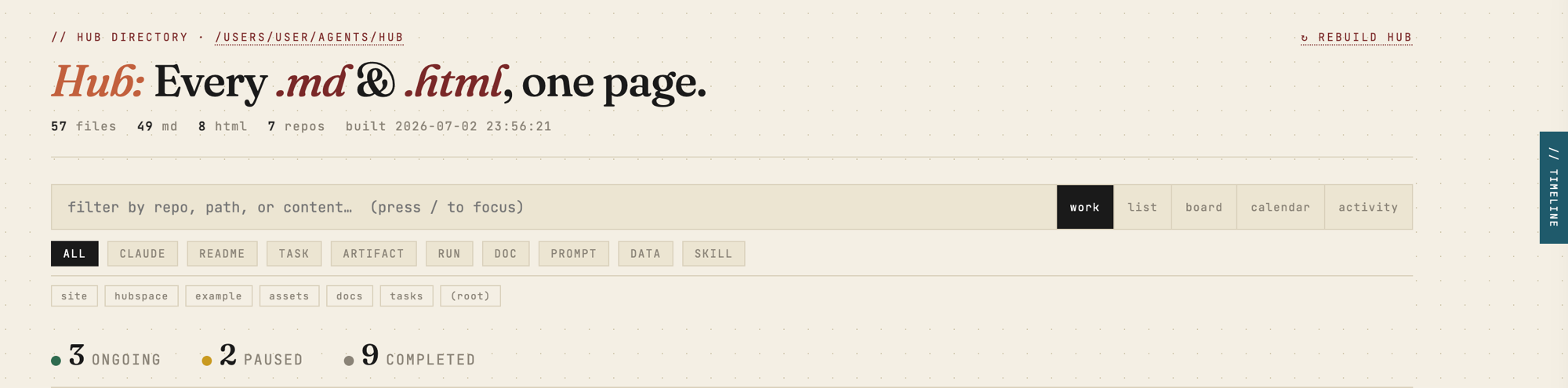




Hub scans a directory tree, indexes every document into SQLite with full-text search and task lineage, and serves a fast local browser at http://localhost:8787. No npm. No framework. No runtime dependencies — pure stdlib Python (3.11+).
Install
pipx install hubspaces       # isolated, recommended
# or
pip install hubspaces
From a clone (no publish needed):
git clone https://github.com/auth-02/hub && cd hub
pipx install .
This puts the hub command on your PATH: hub builds the index, and hub serve serves it and watches for changes.
Run
cd ~/my-project        # any folder you want to browse
hub serve              # serves http://localhost:8787 and rebuilds on change
Then open http://localhost:8787. That's it — Hub indexes the current directory by default.
Want to see it before pointing it at your own files? hub serve --demo builds and serves a bundled example repo.
hub serve --demo
Index — grouped by repo, filtered by kind, sorted by recency
Status badges on every task manifest. Click to cycle ongoing → completed → paused, saved instantly.

Split-pane preview with task trace
Click any row to open a live preview. The // trace panel links to related runs, artifacts, and the parent task.

Hub Timeline — daily work summary
Press Ctrl+T or click the // timeline tab. Answers What have I been working on? / yesterday? / this week? — grouped by task, with git commits, runs logged, artifacts generated, and task status inline.

Markdown & HTML document pages
Every file opened in its own tab gets a clean reading view with a // trace bar below the heading. HTML artifacts are served with the hub's own CSS injected.

Features
- Full-text search — filter by repo, path, title, and body simultaneously. Implicit AND,
repo:nameprefix supported. - Kind chips — one-click filters for TASK, RUN, ARTIFACT, CLAUDE, README, DOC, PROMPT. Stack with repo chips and search.
- Task status badges — every task manifest shows a clickable status pill. Cycles
ongoing → completed → paused. Persisted — survives DB resets, scan-root changes, and git branch switches. - Split-pane preview — click any row for a live rendered preview with lineage trace. No page navigation needed.
- Hub Timeline — drawer (
Ctrl+T) with a synthesised daily summary grouped by today / yesterday / this week, pulling from the activity log +git logacross all repos. - Activity view — a main view listing recent file events across the scan root: what changed, which task, how long ago.
- Auto-rebuild — file watcher triggers a rebuild within ~3 s of any change in the scan root.
- Keyboard-first — navigate the full list without a mouse.
Configuration
Everything is optional. Drop a hub.toml in the folder you run Hub from (or run hub init to scaffold one):
[hub]
scan_root    = "."                      # directory to index (default: CWD)
port         = 8787                      # local server port
exclude_dirs = ["vendor", "fixtures"]   # extra dirs to skip (added to built-ins)
default_view = "board"                   # work | list | board | calendar | activity
Environment variables override the file:
| Var | Default | Purpose |
|---|---|---|
HUB_SCAN_ROOT |
(current directory) | Directory to scan |
HUB_SERVER_PORT |
8787 |
Server port |
HUB_OUTPUT |
~/.local/state/hub/build/docs-index.html |
Generated HTML path |
HUB_DB |
~/.local/state/hub/hub.db |
SQLite database |
HUB_DEBUG |
off | 1 enables logging to ~/.local/state/hub/hub.log |
Scan-root priority: --root flag → HUB_SCAN_ROOT → hub.toml → .scan_root sidecar → current directory.
You can also change it live: click the scan-root path in the header → edit → Save & Rebuild.
Task structure
Hub understands this layout and builds a lineage graph automatically:
{repo}/tasks/{slug}/
    ├── manifest.md        ← TASK  (links to all below)
    ├── runs/YYYY-MM-DD/   ← RUN   (↑ back-link to manifest)
    ├── artifacts/         ← ARTIFACT
    └── prompts/           ← PROMPT
hub new task <slug> scaffolds a valid task for you.
Agent plugin (optional)
Hub is the viewer. If you drive work with Claude Code, the companion
hub-agent plugin is a self-sufficient producer + viewer: it bundles four
producer skills — manifest, stacked, kagaz, dak — that create the
tasks/<slug>/manifest.md structure above as you work, plus a /hub command
that builds and serves the dashboard. So the board, trace, and timeline fill
themselves in.
/plugin marketplace add auth-02/hub
/plugin install hub-agent@hub
Fully opt-in — Hub needs no plugin and no agent to deliver the full index/search/preview/trace experience.
Search
| Query | Finds |
|---|---|
session tokens |
files whose title or body contains both words |
repo:tasks manifest |
manifests in the tasks repo |
repo:docs architecture |
docs matching "architecture" |
Keyboard shortcuts
| Key | Action | Key | Action | |
|---|---|---|---|---|
/ |
Focus search | j / ↓ |
Next file | |
Ctrl+T |
Toggle timeline drawer | k / ↑ |
Previous file | |
Enter |
Open in new tab | Esc |
Close preview / drawer |
Keep it running (macOS)
Two launchd agents start Hub at login — the server (+ watcher) and a periodic rebuild:
bash scripts/setup-launchd.sh
# custom scan root:
HUB_SCAN_ROOT=~/work bash scripts/setup-launchd.sh
Reload after upgrading:
launchctl kickstart -k gui/$(id -u)/com.user.hub-server
launchctl kickstart -k gui/$(id -u)/com.user.hub
Development
git clone https://github.com/auth-02/hub && cd hub
python3 -m hubspace.cli.hub serve   # run from source, no install
python3 tests/run_tests.py          # stdlib unittest
Layout: code is the hubspace/ package; all generated/writable state (index, DB, log)
lives under ~/.local/state/hub/, never the package directory.
Project details
Verified details
These details have been verified by PyPIProject links
GitHub Statistics
Maintainers


Download files
Download the file for your platform. If you're not sure which to choose, learn more about installing packages.
Source Distribution
Built Distribution
Filter files by name, interpreter, ABI, and platform.
If you're not sure about the file name format, learn more about wheel file names.
Copy a direct link to the current filters
File details
Details for the file hubspaces-0.2.0.tar.gz.
File metadata
- Download URL: hubspaces-0.2.0.tar.gz
- Upload date:
- Size: 1.3 MB
- Tags: Source
- Uploaded using Trusted Publishing? Yes
- Uploaded via: twine/6.1.0 CPython/3.13.12
File hashes
| Algorithm | Hash digest | |
|---|---|---|
| SHA256 |
c0de6fe3c5ee9a927d79bd2a9190ef35bd3b7057208ba14a664ce4d2604db53c
|
|
| MD5 |
09aadb24b56cd27cf10319d2d1c28914
|
|
| BLAKE2b-256 |
7a819ac2ff5009f3c2f4aed576703caf2d2f52e96ae5614db6e65ee1cc64763e
|
Provenance
The following attestation bundles were made for hubspaces-0.2.0.tar.gz:
Publisher:
publish.yml on auth-02/hub
-
Statement:
-
Statement type:
https://in-toto.io/Statement/v1 -
Predicate type:
https://docs.pypi.org/attestations/publish/v1 -
Subject name:
hubspaces-0.2.0.tar.gz -
Subject digest:
c0de6fe3c5ee9a927d79bd2a9190ef35bd3b7057208ba14a664ce4d2604db53c - Sigstore transparency entry: 2048361963
- Sigstore integration time:
-
Permalink:
auth-02/hub@e449435697e57609b504b287834e8e1ae4ae9183 -
Branch / Tag:
refs/tags/v0.2.0 - Owner: https://github.com/auth-02
-
Access:
public
-
Token Issuer:
https://token.actions.githubusercontent.com -
Runner Environment:
github-hosted -
Publication workflow:
publish.yml@e449435697e57609b504b287834e8e1ae4ae9183 -
Trigger Event:
release
-
Statement type:
File details
Details for the file hubspaces-0.2.0-py3-none-any.whl.
File metadata
- Download URL: hubspaces-0.2.0-py3-none-any.whl
- Upload date:
- Size: 70.3 kB
- Tags: Python 3
- Uploaded using Trusted Publishing? Yes
- Uploaded via: twine/6.1.0 CPython/3.13.12
File hashes
| Algorithm | Hash digest | |
|---|---|---|
| SHA256 |
6c95e2a498e3be2919761e0bef7b4c6441f548fde1064b7f475c710f976f93ff
|
|
| MD5 |
84865a09487556e75e553aefc8101515
|
|
| BLAKE2b-256 |
f48878f76bc2d523551b112c040699a7f2f34656e8b9e45b47151e5b8153037d
|
Provenance
The following attestation bundles were made for hubspaces-0.2.0-py3-none-any.whl:
Publisher:
publish.yml on auth-02/hub
-
Statement:
-
Statement type:
https://in-toto.io/Statement/v1 -
Predicate type:
https://docs.pypi.org/attestations/publish/v1 -
Subject name:
hubspaces-0.2.0-py3-none-any.whl -
Subject digest:
6c95e2a498e3be2919761e0bef7b4c6441f548fde1064b7f475c710f976f93ff - Sigstore transparency entry: 2048361988
- Sigstore integration time:
-
Permalink:
auth-02/hub@e449435697e57609b504b287834e8e1ae4ae9183 -
Branch / Tag:
refs/tags/v0.2.0 - Owner: https://github.com/auth-02
-
Access:
public
-
Token Issuer:
https://token.actions.githubusercontent.com -
Runner Environment:
github-hosted -
Publication workflow:
publish.yml@e449435697e57609b504b287834e8e1ae4ae9183 -
Trigger Event:
release
-
Statement type:






