
hudini




A UI/HUD parser for the da Vinci Xi.
The da Vinci Xi draws part of its system state into the surgical video through its user interface: the instrument on each arm, the arms under surgeon control, each energy pedal press, and the instruments outside the view. hudini reads this display and turns the pixels back into a log of events with timestamps. You do not need the robot logs.
With this log you can, for example:
- find moments of interest in a video archive, such as stapler firings or energy activations
- label video for machine learning with instrument presence and arm activity, with no manual annotation
- describe a case by its events: the instruments used, the time each arm was under surgeon control, the number of pedal presses
- find the popups that show the surgeon's account name before you share a recording
[!NOTE] hudini recovers only the state that the heads-up display shows. A recording without the display contains nothing it can read, and it does not infer the robot state from the surgical scene. The display can lag the device by the rendering latency of the interface. The instrument catalogs used for fuzzy matching cover the English and German system locales.
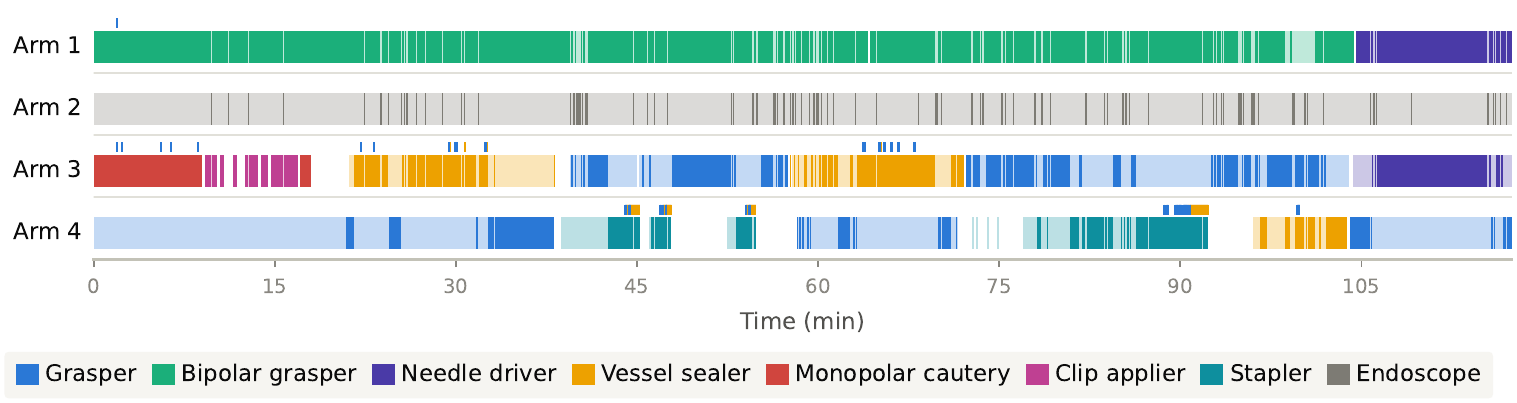
The instrument timeline of one SurgVU video, recovered by hudini. Each row is one arm. The color shows the instrument class. Saturated color marks the time under surgeon control. Ticks mark pedal presses.
Quick start
uv tool install "hudini[rfdetr] @ git+https://github.com/claasdeboer/hudini"
hudini fetch                             # download the model checkpoints once
hudini parse video.mp4                   # -> ./video.hudini.jsonl.gz
hudini timeline video.hudini.jsonl.gz    # -> ./video.html
hudini parse writes one compressed observation log. hudini timeline
turns this log into a self-contained HTML page. Open the page in a
browser. If the video is in the same folder, the page plays it at the
selected time.
A PyPI release will follow. Until then, install from GitHub. See Installation for the details.
Try it without your own data
The Surgical/utenn subset of
PhysicalAI-Robotics-Open-H-Embodiment
(NVIDIA, CC-BY-4.0) contains short da Vinci Xi clips with the display
in the frame. One of them is enough to see hudini work:
curl -LO https://huggingface.co/datasets/nvidia/PhysicalAI-Robotics-Open-H-Embodiment/resolve/main/Surgical/utenn/surgical_video_datasets/videos/chunk-000/observation.images.color/episode_000009.mp4
hudini parse episode_000009.mp4
hudini timeline episode_000009.hudini.jsonl.gz
Episode 009 contains two pedal presses. In the timeline, they appear as two ticks above the row of arm 3, at about 6 and 9 seconds.
What hudini extracts
| Signal | Output | Method |
|---|---|---|
status |
arm status: under surgeon control, inactive, or warning | color rule, CNN for the endoscope pod |
arm |
the arm digit, 1 to 4 | CNN |
instrument |
the mounted instrument, matched to the catalog | OCR, catalog match |
pedals |
yellow and blue pedal presses | color rule |
pedal_label |
the action of a press (CUT, COAG, ...) | catalog, OCR when necessary |
laser |
the Firefly laser readout | color rule |
popups, banner |
the message text of each column, the system banner | OCR |
offscreen |
off-screen indicator bars, with state and arm | RF-DETR, CNN |
tool_association |
tool-association badges, with arm | RF-DETR |
Every observation carries a timestamp and a confidence score. The layout, the popups, and the detected indicators also carry their bounding boxes in the frame.
Output
A parse writes one file, the observation log <video>.hudini.jsonl.gz.
Everything else is a view of this log, computed when you read it:
- timeline: a self-contained HTML page with the video and the
intervals of each arm (
hudini timeline) - frame view: the state at each sampled frame, for comparison with
frame-level labels (
hudini timeline --frames). The rate of the layout signal decides which frames are sampled. - interval view: the runs of each lane, for example instrument presence and time under surgeon control (the data that the timeline shows)
The views apply the correction rules of the run as patches on top of the log. The log itself never changes. To print the state at one moment:
hudini query video.hudini.jsonl.gz --at 98:23
Log format
The log stores observations, not one complete record for each frame. Each line records one reading of one signal:
{
  "t": 98.4,
  "f": 2952,
  "s": "pedals",
  "k": [2, "blue"],
  "v": {"type": "press", "pressed": true},
  "c": 0.99
}
| Field | Meaning |
|---|---|
t |
video time in seconds |
f |
frame index |
s |
signal |
k |
key of the reading, here arm 2 and the blue pedal |
v |
value, null clears the key |
c |
confidence |
The first line is the header with the run configuration, and the last line is the footer. The file is gzip JSONL, one object per line, so any JSON lines tool can read it:
zcat video.hudini.jsonl.gz | head -1 | jq .signals
zcat video.hudini.jsonl.gz | grep '"s":"pedals"' | head -3
Screening recordings for identifying information
When a user applies an energy preset, the Xi shows a popup with that
user's account name. If this is the real name of the surgeon, the
recording identifies the surgeon. hudini screen finds these popups in
a video or in a stored log. It reports each episode with the bounding
box of the popup, so you can redact the popup and keep the rest of the
frame.
hudini screen video.mp4
hudini screen video.hudini.jsonl.gz --json
Installation
hudini needs Python 3.12 or newer. A GPU makes parsing faster.
uv tool install "hudini[rfdetr] @ git+https://github.com/claasdeboer/hudini"
The [rfdetr] extra installs the two indicator detectors. Without it,
hudini reads every signal except offscreen and tool_association.
Skip the extra if you do not need these two signals.
The model weights are not in the package. hudini downloads them from nct-tso/hudini at a pinned revision on first use. To download them in advance:
hudini fetch
OpenCV dependency note
paddleocr pins opencv-contrib-python==4.10. This pin installs a
second cv2 next to opencv-python-headless. This is an upstream
issue in paddlex. The parser runs with both installed.
Commands
| Command | Description |
|---|---|
hudini parse video.mp4 |
parse a video into its observation log |
hudini timeline log |
build a self-contained HTML timeline (--frames also writes the per-frame export) |
hudini query log --at 98:23 |
print the state at one moment, as JSON |
hudini serve folder/ |
serve an overview of the logs in a folder |
hudini screen video.mp4 |
find the popups that show an account name |
hudini frame image.png |
parse one image, JSON to stdout |
hudini catalog --locale de |
list the known instruments and pedal actions |
hudini fetch |
download the model checkpoints |
Options of hudini parse:
hudini parse video.mp4 --signals pedals      # one signal, its dependencies enable themselves
hudini parse video.mp4 --rate pedals=30      # sample one signal at 30 fps
hudini parse video.mp4 --fast                # lower sampling rates for every signal
Python API
Parse from Python:
from hudini.parser import Parser

parser = Parser()                          # loads every model once
log = parser.parse_video("video.mp4")      # writes the log and returns it
A stored log opens without the models. The views take the log, the correction patches of the run, and the catalog:
from hudini.catalog import Catalog
from hudini.corrections import correct, rules_from_settings
from hudini.storage import load
from hudini.views import frame_view, interval_view

log = load("video.hudini.jsonl.gz")
catalog = Catalog.load()
patches = correct(log, rules_from_settings(log.header.corrections), catalog)
records = frame_view(log, patches, catalog)       # one dict for each sampled frame
intervals = interval_view(log, patches, catalog)  # the temporal runs of each arm and lane
Development
git clone https://github.com/claasdeboer/hudini && cd hudini
uv sync --extra dev --extra rfdetr
uv run pytest
uv run ruff check src/ tests/
uv run ty check src/hudini/
Citation
hudini is accepted at AE-CAI @ MICCAI 2026. The BibTeX entry will follow when it is available.
The interface annotations for DSAD, hSDB-instrument, and SurgVU are in nct-tso/hudini-annotations.
License
Apache-2.0.
1 maintainer

Download files
Download the file for your platform. If you're not sure which to choose, learn more about installing packages.
Source Distribution
Built Distribution
Filter files by name, interpreter, ABI, and platform.
If you're not sure about the file name format, learn more about wheel file names.
Copy a direct link to the current filters
File details
Details for the file hudini-0.1.0.tar.gz.
File metadata
- Download URL: hudini-0.1.0.tar.gz
- Upload date:
- Size: 395.6 kB
- Tags: Source
- Uploaded using Trusted Publishing? No
- Uploaded via:
uv/0.12.7 {"installer":{"name":"uv","version":"0.12.7","subcommand":["publish"]},"python":null,"implementation":{"name":null,"version":null},"distro":{"name":"Ubuntu","version":"24.04","id":"noble","libc":null},"system":{"name":null,"release":null},"cpu":null,"openssl_version":null,"setuptools_version":null,"rustc_version":null,"ci":null}
File hashes
| Algorithm | Hash digest | |
|---|---|---|
| SHA256 |
b1dec8afa21c09860d8d569a979124c9418cfdf59b7660f922d7be518e54e47c
|
|
| MD5 |
a0016a4289ad2aa9092fd7f34239382e
|
|
| BLAKE2b-256 |
b35faa96c706eae5ec4fabd996540eef2697b8cf9fb350b6ce039149fa39bc13
|
File details
Details for the file hudini-0.1.0-py3-none-any.whl.
File metadata
- Download URL: hudini-0.1.0-py3-none-any.whl
- Upload date:
- Size: 118.5 kB
- Tags: Python 3
- Uploaded using Trusted Publishing? No
- Uploaded via:
uv/0.12.7 {"installer":{"name":"uv","version":"0.12.7","subcommand":["publish"]},"python":null,"implementation":{"name":null,"version":null},"distro":{"name":"Ubuntu","version":"24.04","id":"noble","libc":null},"system":{"name":null,"release":null},"cpu":null,"openssl_version":null,"setuptools_version":null,"rustc_version":null,"ci":null}
File hashes
| Algorithm | Hash digest | |
|---|---|---|
| SHA256 |
afe86f63757fb046d59348dc467d40023f052b03d0f179e526f577ec00b5e3bd
|
|
| MD5 |
84d595d4ad742a7efdf0bc20e4aa8418
|
|
| BLAKE2b-256 |
1632881490938c36361ac6f264e5571d47b6a2555d3037615392e0650e93f5c1
|













