
Hugie 🐻
📖 Official documentation
Hugie is a Command Line Interface (CLI) for working with the Huggingface Inference Endpoints API (API docs)
Getting started
The package is pip installable and can be installed from PyPI
pipx install hugie
⚠️ To get started, you must set your individual or organisation Huggingface token into an env var called HUGGINGFACE_READ_TOKEN.
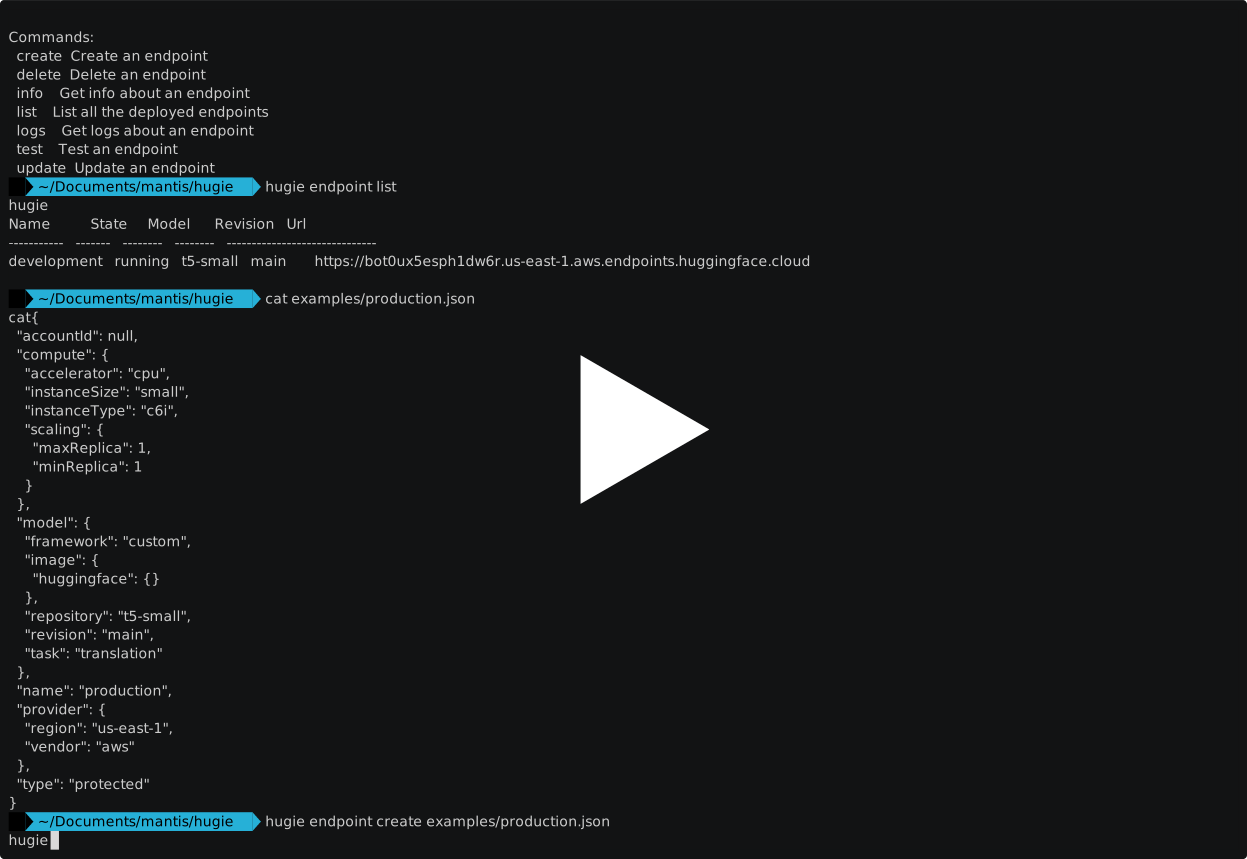
Usage 📺
tldr; watch the video:
Commands ⌨️
hugie
>>>
Usage: hugie [OPTIONS] COMMAND [ARGS]...

Options:
  --help                          Show this message and exit.

Commands:
  Commands:
  config
  endpoint
  ui        Open the Hugging Face Endpoints UI in a browser
  version   Print hugie version
Endpoint
hugie endpoint --help
>>>
Usage: hugie endpoint[OPTIONS] COMMAND[ARGS]...

Options:
  --help  Show this message and exit.

Commands:
  create  Create an endpoint
  delete  Delete an endpoint
  info    Get info about an endpoint
  list    List all the deployed endpoints
  logs    Get logs about an endpoint
  test    Test and endpoint
  update  Update an endpoint
Create
To create an endpoint:
Usage: hugie endpoint create [OPTIONS] [DATA]

  Create an endpoint

  Args:     data (str): Path to JSON data to create the endpoint

Arguments:
  [DATA]  Path JSON data to create the endpoint

Options:
  --account-id TEXT      ID of the account (for private endpoints)
  --name TEXT            Name of the endpoint  [default: hf-endpoint]
  --type TEXT            Type of endpoint, one of ['public', 'protected',
                         'private']
  --accelerator TEXT     Accelerator to use. One of ['CPU','GPU']  [default:
                         cpu]
  --instance-type TEXT   [default: c6i]
  --instance-size TEXT   [default: small]
  --min-replica INTEGER  Minimum number of replicas  [default: 1]
  --max-replica INTEGER  Maximum number of replicas  [default: 1]
  --framework TEXT       Framework to use  [default: custom]
  --repository TEXT      Name of the hf model repository  [default: t5-small]
  --revision TEXT        Revision of the hf model repository  [default: main]
  --task TEXT            Task of the model  [default: text-generation]
  --image TEXT           Image to use from huggingface or tgi  [default:
                         huggingface]
  --vendor TEXT          Vendor to use. One of ['aws','gcp']  [default: aws]
  --region TEXT          Vendor specific region, e.g. 'us-east-1'  [default:
                         us-east-1]
  --json                 Prints the full output in JSON.
  --help                 Show this message and exit.
List
To list all your endpoints:
hugie endpoint list

# Use --json option to view all content

hugie endpoint list --json
Update
To update an endpoint, edit examples/development.json
hugie endpoint update development examples/development.json
Logs
To see the logs:
hugie endpoint logs development
Delete
To delete the endpoint
hugie endpoint delete development
this will ask you if you are sure you want to delete before moving forward. If
you want to force the deletion you can use --force
JSON format
The endpoint create and endpoint update commands both require JSONs of the fomat:
{
  "accountId": null,
  "compute":
    "accelerator": "cpu",
    "instanceSize": "small",
    "instanceType": "c6i",
    "scaling": {
      "maxReplica": 1,
      "minReplica": 1
    }
  },
  "model": {
    "framework": "custom",
    "image": {
      "huggingface": {}
    },
    "repository": "t5-small",
    "revision": "main",
    "task": "text-classification"
  },
  "name": "aws-dev",
  "provider": {
    "region": "us-east-1",
    "vendor": "aws"
  },
  "type": "protected"
}
See examples/development.json for an example.
For development
Read our CONTRIBUTING.md then
Create a virtual environment and install the package
poetry install
Run tests
pytest
To upload to PyPi run
`` poetry publish
you need the mantisnlp password to proceed. Ask Nick or Matt.
1 maintainer

Release files for hugie 0.4.0
For a detailed explanation of source distributions (sdists) and built distributions (wheels), please see the package formats documentation.
Source distribution (sdist)
| File | Size | Uploaded | |
|---|---|---|---|
| hugie-0.4.0.tar.gz | 9.4 kB | Details |
Built distribution (wheel)
| File | Interpreter | ABI | Platform | Reset |
|---|---|---|---|---|
| hugie-0.4.0-py3-none-any.whl | Python 3 | none | any | Details |
Total release size: 20.2 kB
Release files / hugie-0.4.0.tar.gz
| Download URL | hugie-0.4.0.tar.gz |
|---|---|
| Size | 9.4 kB |
| Tags | Source |
|
SHA-256 checksum How to use checksums |
c19d638e5babf08ef7778b666240a765bf0dd214660821e5e17e90dc1f275a63
|
|
BLAKE2b-256 checksum How to use checksums |
5678c8ac20c38ae0f4ece8ccbbb11c73546b2be7bb5d8b28f66665d79df6b6c3
|
| Upload date | |
|
Uploaded using Trusted Publishing? What is trusted publishing? |
No |
| Uploaded via |
poetry/1.5.1 CPython/3.10.0 Darwin/21.6.0
|
Release files / hugie-0.4.0-py3-none-any.whl
| Download URL | hugie-0.4.0-py3-none-any.whl |
|---|---|
| Size | 10.9 kB |
| Tags | Python 3 |
|
SHA-256 checksum How to use checksums |
4f4a9daae6d8c6ab12f2057ceeb9f8a6b15e4ef81f908ff44d65ddec62b62ff3
|
|
BLAKE2b-256 checksum How to use checksums |
74069da301dd0d771052fbffba965fdde8d7a864f22b3366daf9d3a403f576d7
|
| Upload date | |
|
Uploaded using Trusted Publishing? What is trusted publishing? |
No |
| Uploaded via |
poetry/1.5.1 CPython/3.10.0 Darwin/21.6.0
|














