
hugpy-wrapper (fitevict)
The per-box evict-to-fit front door of a Hugpy fleet: an OpenAI-compatible
/v1 server over llama.cpp, transformers and every task engine. Point any
OpenAI client's base URL at it and one address becomes a self-managing model
server.
A /v1 call carries only a model name, never a location. For each request
the wrapper:
- resolves the name to its weights
- runs an evict-to-fit plan against what is resident and what is being called
- places the model, launching it and evicting others as needed
- forwards the call
- splits the model's
<think>out of the answer - records the call (raw stamps and engine geometry) in its own store, which it reads back to place the next model better
A user installation needs no sudo or database server. The Python distribution
installs its shared Hugpy library dependencies; engine runtimes are managed separately.
Hardware facts come from nvidia-smi, NVML and /proc; model facts come from
the files on disk.
The distribution is hugpy-wrapper, imported as fitevict. Its base dependencies
include Discovery, Terminal, Resources, Settings and Abstract Transfer; exact
version requirements are in pyproject.toml.
Wrapper is the inference worker on a box. Core may also import its auth, store,
marker and transfer helpers as a library; that import does not start a second
Wrapper service. The retired hugpy-worker distribution is not the worker
installation path.
This README describes staged source. It does not certify a host deployment or that every catalog model has passed inference. Check source, installed and running versions separately. Start with the operator guide and documentation index.
See also:
- package index: every package
- fleet architecture: how the wrapper, core and arms fit together
- installation and operations: procedures
Install
From the Hugpy APT repository
sudo apt-get install hugpy-wrapper # from https://dev.hugpy.ai/apt; Recommends hugpy-llama-server
The .deb is built from this bundle by ../installers/debian/build.sh and named
build/debian/hugpy-wrapper_<version>_all.deb by default. It contains the Wrapper wheel, the pinned transfer wheel, and /usr/bin/fitevict
and /usr/bin/hugpy-wrapper launchers.
Its postinst:
- creates
/opt/hugpy-wrapper/venv - installs those base wheels offline
- runs
fitevict install --system --port auto --yeson a fresh box, orfitevict install --system --yeswhen/etc/hugpy/wrapper.envalready exists
A re-run keeps the configured host, port and box key. Normal installation also
provisions the separate Transformers engine and may download its Python
packages. Model weights are not downloaded by that installer step. For a host
whose engines are managed separately, the Debian recipe supports the explicit
HUGPY_WRAPPER_INSTALL_NO_TF=1 installation mode. An offline base wheel install
does not imply that engine provisioning can run offline without local wheels.
apt removerunsfitevict uninstall --system.apt purgealso removes/etc/hugpy/wrapper.env, the endpoint file,/var/lib/hugpy-wrapper,/var/cache/hugpy-wrapperand thehugpy-wrapperuser. The shared model store is kept.
The GGUF engine is the separate
hugpy-llama-server deb (/opt/hugpy-llama).
Engine discovery finds /opt/*/bin/llama-server.
To join a worker to a central:
- On the central's console, + Worker mints a worker key (
hpk_wk_…) and prints the one command for the new box. - Or, from the central host, run
hugpy-core workers add --ssh USER@HOST(see hugpy_core). - Both end in
fitevict install --system --central <URL> --central-key <KEY> --host <addr>. With these flags, the wrapper registers itself with that central. - A central on the same box is found through
/etc/hugpy/core.endpoint.json, and the install'scentralstep runshugpy-core register. - A central that refuses never fails the wrapper install.
With pip and fitevict install
pip only delivers the package; fitevict install is the install.
pip install hugpy-wrapper            # or: pipx install hugpy-wrapper

fitevict install --user --port auto                         # your own service, no root (the default mode)
sudo "$(command -v fitevict)" install --system --port auto  # a system service (root once)
fitevict install ... --dry-run                              # print the plan, change nothing
No port is ever assumed. Give a number, or auto for a free one; the port is
printed and written to the config. The host defaults to the configured one,
else 127.0.0.1. Use --host <LAN address> (or 0.0.0.0) to serve a
network.
--system sets up the hugpy layout. Each hugpy component runs as its own
user, and the group hugpy shares only the model store:
| what | where |
|---|---|
| user | hugpy-wrapper (system, no login), member of group hugpy |
| code | /opt/hugpy-wrapper/venv (this exact version) |
| config | /etc/hugpy/wrapper.env (root:hugpy-wrapper 0640): host, port, box key, every path |
| state (the store) | /var/lib/hugpy-wrapper (0700, created by systemd) |
| cache | /var/cache/hugpy-wrapper |
| models | /var/lib/hugpy/models (root:hugpy 2775), or --models DIR |
| service | hugpy-wrapper.service: fitevict-serve --host ${FITEVICT_HOST} --port ${FITEVICT_PORT}, hardened (read-only system; writes only its own dirs and the models) |
| endpoint | /etc/hugpy/wrapper.endpoint.json: where it listens, the engine it found, the Python engine discovery (no secret) |
| logs | the journal: journalctl -u hugpy-wrapper |
--user uses the environment you installed into, plus
~/.config/hugpy/wrapper.env and a user unit (systemctl --user;
loginctl enable-linger keeps it running after logout).
Every step is safe to repeat. A re-run repairs or upgrades, and keeps the box
key, the port and the host. A slow first start is allowed 180 s before the
health check gives up (FITEVICT_HEALTH_WAIT_S).
fitevict install options:
| option | meaning |
|---|---|
--system / --user |
the install mode |
--host, --port |
where the front door listens |
--worker NAME |
this box's worker name (default: the host name) |
--models DIR |
the model store |
--package SPEC |
the code to install, such as a wheel file |
--engine SPEC |
pip-installs an engine |
--tf / --no-tf |
provision the owned Transformers engine (default), or explicitly skip it |
--tf-device auto|cuda|cpu |
auto requires CUDA when NVIDIA is detected; CPU is an explicit alternative |
--tf-python PYTHON |
interpreter used to create the engine, including matching existing overlay ABIs |
--tf-torch-index URL |
override the official CPU/CUDA wheel channel |
--tf-spec S, --tf-find-links DIR |
override engine dependencies or supply local wheels |
--minimal |
service, config and store only |
--central URL --central-key KEY [--advertise HOST] |
registers this worker with a remote central |
--vram-max/--ram-max GIB, --cpu-max CORES, --storage-max GIB |
capacity designations |
--env KEY=VALUE |
an extra service setting (repeatable) |
--yes |
no questions or confirmations, for scripts |
--dry-run |
prints the plan and changes nothing |
Platforms: Linux with systemd today. macOS (launchd) and Windows services are not supported; the command says so rather than half-installing.
The engines
- GGUF models need
llama-server. The wrapper looks for it asLLAMA_SERVER_BIN, then underHUGPY_ENGINE_DIR, then onPATH(the service'sPATHstarts with its own venv), then at/opt/*/bin/llama-server.fitevict installreports whether one resolves. Without one, the wrapper still runs, but GGUF calls fail until an engine is there. - Transformers, vision, embeddings and diffusers run in a separate Python
engine, never the front door's venv.
- A normal
fitevict installprovisions<HUGPY_ENGINE_DIR>/tffromhugpy-wrapper[transformers]. The front door stays free of the heavy engine stack. Engine dependencies require downloads unless supplied as local wheels; model weights and a brain model are never bundled or downloaded here. - The installer selects the official PyTorch CPU/CUDA channel, pins torch
and torchvision, and constrains that concrete build during dependency
installation. NVIDIA detection requires working CUDA; import success with
CPU-only torch does not satisfy the install. Chat/vision imports and a
small CUDA operation are verified as the service identity, without loading
a model.
requirements.lockandruntime.jsonrecord the result. --no-tfand--minimalskip engine provisioning. Discovery still checks conventional virtualenv and Conda locations, verifies the engine imports as the service account, and reuses a compatible environment.fitevict engines --systemreports the candidates and which one was selected.FITEVICT_TF_PYTHONputs a preferred interpreter first; discovery still records other capable environments. Explicit model/profile selection has its own precedence.
- A normal
Repair an installed worker without restarting its service or reloading models:
sudo /opt/hugpy-wrapper/venv/bin/fitevict engines --system --install --tf-device cuda
This writes the verified interpreter selection for the next service startup.
Existing processes keep their imported code. With --rebind-overlays NAME ..., selected built
worker overlays are atomically reconnected to the owned base and import-checked;
an import regression restores their previous links. Use --tf-python to match
the Python version of those overlays. Other environments remain separate, including
worker overlays using a different Python ABI.
An unhealthy owned runtime in use by a child is refused rather than modified.
Command-line tools
Central is the archive/source tier; SSD worker copies remain the preferred load source. If staging cannot complete, Wrapper can read central directly as a last resort when request constraints allow. Unmeasured central loading cannot certify an explicit fast/slow tolerance or latency target; unrestricted and slowest/low-quality requests can use it. Memory fit still uses the same planner. Operator observations put direct central loading around or slower than upload plus SSD loading; numerical estimates remain unknown until measured.
Drives are hugpy-discovery's: it inventories, hashes, copies, reaps and deletes model files and designates each drive's role. The wrapper asks Discovery for the time until a model is on a worker drive and for that placement to be carried out; it never moves or verifies files itself.
| command | what it does |
|---|---|
fitevict install | uninstall [--purge] | status |
Installs, removes or inspects the service (--system or --user). |
fitevict engines |
Discovers existing Python engines. |
fitevict keys create --name N [--scope use|admin] [--expires-days D] | list [--all] | revoke ID |
API keys for callers outside the trusted networks. A key is printed once; only its hash is stored. |
fitevict setup [--harness hugpy-harness|hugpy-chat|aider|opencode|continue|env] [--base URL] [--model M] [--write FILE] [request] |
Generates harness configuration grounded in the live wrapper. |
fitevict-serve --host H --port P |
The front door. The unit runs this. |
fitevict-run |
The engine-juggle harness (serve/run_engine.py). |
fitevict-console |
The terminal console. |
hugpy-wrapper helper [status|models|ask|chat] |
Direct Wrapper interaction and plain terminal chat; no Harness or extra dependencies. Also available as fitevict helper. |
fitevict-assist |
The small coreless assistant. See below. |
fitevict tui|launch|chat prints a pointer to the separate hugpy-harness
package, which provides the terminal UI and chat loop.
Use
curl -s http://<host>:<port>/v1/chat/completions -H 'Content-Type: application/json' \
  -d '{"model":"<name>","messages":[{"role":"user","content":"hi"}],"max_tokens":128}'
Any OpenAI client works: base_url=http://<host>:<port>/v1. Name the model;
the wrapper finds it, fits it, serves it and logs it. Variants and pins ride
on the name (model@moe, @4bit, @max-gpu, @fit, a quant), with or
without a core in front.
/v1/models always lists HugpyHelper (hugpy is also accepted). It is a
route model, not weights. It offers guided menus for the box's preferences and
per-model settings, and the config [harness] [model] command, which prints
the block that points a harness at this box. When the box names an
assist_model, plain sentences are mapped onto the menu by that model.
API keys
Keys look like hpk_<id>_<secret> and are sent as Authorization: Bearer ….
That is what every OpenAI client sends as its api_key, so a user only has to
set OPENAI_API_KEY=hpk_….
- The box key (
hpk_box_…, admin) is written once byfitevict installinto the service config. It is the root of trust for the box. hugpy-core holds it and uses it to manage the box. - More keys are made through the running service with
fitevict keys …. Revoked and expired keys stop working at once.
| route | rule |
|---|---|
OpenAI routes (/v1/chat/completions, /v1/models, …) |
FITEVICT_REQUIRE_KEY: outside (default: no key from loopback or private networks, a key from anywhere else), never or always |
management (/v1/telemetry*, /v1/queue, /v1/settings/*, /v1/operator/*, /v1/keys, /v1/cores, /v1/verdicts, POST /limits) |
an admin key, except from the box itself |
/health |
never |
What counts as inside is FITEVICT_TRUSTED_NETS (default: loopback, 10/8,
172.16/12, 192.168/16, fd00::/8, fe80::/10).
"The box itself" (0.1.110) covers loopback and also a peer that arrives on the address the service listens on. A LAN-bound wrapper is therefore still managed without a key by the harness on its own box, while the rest of the LAN needs an admin key.
Behind a proxy (nginx, a tunnel), every request arrives from 127.0.0.1. A
request with forwarding headers counts as outside unless its immediate peer
is listed in FITEVICT_TRUSTED_PROXIES; only then is X-Forwarded-For
believed. A public proxy can never make the internet "local".
HTTP surface
| route | what |
|---|---|
POST /v1/chat/completions, /v1/completions |
chat and completions (GGUF through llama-server, transformers through tf_child, vision through vision_child) |
POST the task routes |
see Every model kind |
GET /v1/models |
the catalog. HugpyHelper is always listed. |
GET /health, /v1/health |
{"status","service":"hugpy-wrapper","worker","version"}: the worker's identity, which central registers under |
GET /harness/v1/models |
the per-quant fit map that central's allocation reads. Variants are expanded when no preference is set. |
GET /models, /residents, /limits (POST for central's settings), /storage, /profiles |
catalog, residents, capacity tiers, drives holding models, env-profile state |
GET /v1/telemetry?table=&since=&limit=, /v1/telemetry/state[?wait=&since=], /v1/telemetry/tables, /v1/telemetry/rows?table=, /v1/telemetry/resources |
cursor tables, long-poll state, a read-only table browser, resource snapshots |
GET /v1/queue |
the admission queue, with each ticket's eta and the reason the next one runs; plus loading and serving lists ([{model_key, pid, since, phase}]) and busy true while any ticket, loading child, or serving child exists |
GET|POST /v1/settings/pair, /v1/settings/box; POST /v1/settings/quant-facts, /v1/settings/env-profile |
per-pair knobs, the box blanket, quant facts, env profiles |
POST /v1/operator/actions, GET /v1/operator/actions/{id} |
evict, evict-all, free-ram, restart, refresh-models, copy-model (asks hugpy-discovery to place the model on a worker drive), build-profile ({"action":"build-profile","profile":"videogen"|"imagegen"} materializes the engine env profile off the request path; result reports state/state_before) |
GET /v1/verdicts[?model_key=] |
pair verdicts per quant file and placement mode |
GET /v1/cores |
CPU topology, per-CPU load, engine claims, fitted constants |
GET /v1/drives |
hugpy-discovery's drive roles and measured room, the mirrored switches, per-drive load rates |
GET /v1/attributions?model_key=; POST /v1/attributions; POST /v1/attributions/derive |
what a model is to this device: declared rows (operator, auto, core) and derived rows materialized from stored SQL over hugpy-discovery's facts and this device's measurements |
GET /v1/artifacts/{artifact_id} |
stream a render's bytes (mp4/png/…) with its content-type, for a same-box client that cannot read the 0750 render dir (gated by the box key or loopback/trusted net). artifact_id is the file name the scaffold minted, carried next to path on every image/video artifact. |
GET /v1/requests/{request_id} |
a live request's state/phase; during a render also its step/steps/progress_at |
POST /v1/requests/{request_id}/cancel |
request an authenticated stop; accepted cleanup can remain pending. See request cancellation. |
GET|POST /v1/keys, POST /v1/keys/{id}/revoke |
API keys |
python -m fitevict.observability.calls_view --port <n|auto> serves a
read-only page of the latest calls on 127.0.0.1. It shows every call's bodies,
so run it as the service's user and keep it local.
Load reservations and unsupported splits
An admitted load reserves host memory while the child is loading. A deadline,
stall, cancellation request or unreported load outcome is not proof that the
process released that memory. A live child retains its reservation until an
explicit successful load consumes it or process exit is confirmed. The failure
reason is retained as load_error. Inspect /v1/queue, request state and
telemetry together before retrying.
Placement is accounted per device. Unsupported tensor/pipeline parallelism or a
cross-card device map is refused with placement_unsupported; adding GPU totals
or finding a sharded checkpoint does not establish an engine split contract.
These rules preserve the existing eviction eligibility and victim order.
The store (telemetry)
By default, Wrapper keeps its calls and measurements in one SQLite file,
created on first use. An explicitly selected PostgreSQL backend is also available;
see database backend selection. Choosing another
backend does not migrate existing records. The default SQLite file lives in
FITEVICT_HOME, else systemd's state directory,
else the per-OS data directory (0700 / 0600). Placement decisions read it
back: the measured CUDA context, llama.cpp's projections, serving growth, KV
structure, host memory, and a model's largest real use. Every measurement
points at the call that took it, and views compute the figures.
For the SQLite backend, a damaged file is set aside and recreated. SQLite
migrations are numbered under src/fitevict/observability/schema/; the optional
PostgreSQL backend has its own reviewed migrations under schema_postgres/ and
fails on an unsupported schema version. Back up the selected backend and local
artifact state according to their storage requirements.
The store is quiet. Nothing is written that did not change. Sensor readings (GPU, host and CPU every 250 ms) are stored without moving the change counter. Events move it: a load, an eviction, a call row, an operator action, a process on the card. Long-poll readers such as core's collector wake only on events.
The Core collector mirrors selected state snapshots on each sync and replays
call_log, resource_log, evictions, and operator_actions by source row ID.
Core derives across the fleet from these Wrapper records. Wrapper settings
such as pair_settings are not raw telemetry mirrors.
The pre-SQLite PostgreSQL migrations are archived in
docs/original/legacy-postgres-sql/. They are historical records and are not
part of the Wrapper's install or migration path.
Every model kind, one front door
Chat (GGUF via llama-server, transformers via tf_child), vision
(vision_child) and every non-chat engine go through the SAME placement
(evict-to-fit), the SAME call log row and the SAME residents and models
catalog. Non-chat engines are runners on one generic child
(engines/task_child.py). Each is one file in engines/runners/ plus one
RunnerSpec:
| route | runner | serves |
|---|---|---|
POST /v1/embeddings |
embed |
sentence-transformers encoders |
POST /v1/audio/transcriptions, /v1/audio/translations |
asr |
whisper (multipart file, or file_path / file_b64) |
POST /v1/audio/speech |
tts (chatterbox); tts_kokoro, tts_dia, tts_parler |
raw audio bytes |
POST /v1/images/generations, /edits, /variations |
imagegen |
diffusers image pipelines: b64_json (or response_format: path) |
POST /v1/videos/generations |
videogen |
diffusers video pipelines (Wan, LTX, CogVideoX, Mochi, …): t2v / i2v / v2v (VACE) → an mp4 path |
POST /v1/videos/upscale |
videoupres |
LTX latent spatial upsampler (ltxv-spatial-upscaler): a 2x-upscaled mp4 path |
POST /v1/summarize |
summarize |
seq2seq summarizers (bart, pegasus, t5, led) |
POST /v1/keywords |
keywords |
KeyBERT over a stamped embedding model |
Binary outputs are written to FITEVICT_ARTIFACT_DIR and returned in the
endpoint's OpenAI shape. The call log stores their exact byte count and
sha256, never the bytes. Uploads are spooled to FITEVICT_SPOOL_DIR and
removed after the call.
A ComfyUI bundle served through /v1/images/generations with the built-in
workflow (no workflow file) takes prompt, negative_prompt, size, n,
seed, steps, and — since 0.1.149 — the KSampler knobs cfg (alias
guidance_scale), sampler_name, scheduler, and denoise. Defaults equal the
workflow's (steps 20, cfg 7.0, euler/normal, denoise 1.0), so a request that
sends none is byte-identical; a distilled checkpoint (sd-turbo) needs cfg ≈ 1
with steps ≈ 4 or it renders flat gray. See docs/ENGINES.md.
Flux.1, Qwen-Image and Z-Image bundles declare separate diffusion-model,
text-encoder and VAE files under components instead of one checkpoint. See
docs/COMFY_MODEL_FAMILIES.md.
POST /v1/videos/generations takes prompt, negative_prompt (alias
negative), size/width/height, num_frames, fps, steps, guidance,
seed, the Wan flow_shift knob, and — for i2v — an image (path / b64 /
multipart). When the resident is a WanVACEPipeline it also takes a video
source (path / video_path / video_b64), reference_images (a list of up to 4
paths or base64 strings, prepended as VACE reference latents), a single
control_image with control_kind (pose|depth|sketch|none) repeated
across the clip, a per-frame mask, context_frames/source_frames (int K — the
extend idiom: keep the source clip's trailing K frames and generate the rest), and
operation (t2v|i2v|v2v|extend, inferred from the inputs when absent). The
artifact carries operation and source next to the geometry. A plain (non-VACE)
Wan pipeline given a video is a 400 — model X does not take a video input (WanPipeline); use a VACE model — never a silent t2v render.
Since 0.1.149 (batch E) the request also takes free_text_encoder (default on for
a text encoder over 8 GB, e.g. umt5-xxl): the prompt is encoded first and the text
encoder kept off the card for the denoise, so the artifact/call row carry
text_encoder_released_bytes. Any geometry/schedule field the request omits is
filled from the pipeline FAMILY default (Wan / CogVideoX / Mochi / LTX / LTX-2 /
Hunyuan / AnimateDiff) — e.g. {model:"CogVideoX-5b", prompt} renders 720×480×49,
50 steps, guidance 6, use_dynamic_cfg — and what was filled is recorded in the
artifact defaults_applied. An LTX-2 render muxes its audio track into the mp4;
the artifact gains audio:{sample_rate, channels}.
Two new hugpy-engine.json bundle kinds feed videogen (see
docs/ENGINES.md):
diffusers-single (a single-file GGUF/fp8 transformer + a base diffusers dir —
the pipeline-specific from_single_file(…, GGUFQuantizationConfig) for
quantization:"gguf"; VACE uses WanVACETransformer3DModel and needs a
matching local transformer config, e.g. Wan2.1-VACE-14B-Q8-gguf) and animatediff (an
AnimateDiff motion adapter + an SD1.5 base; e.g.
animatediff-lightning-dreamshaper8). Put the bundle dir under
transformers/<owner>/<name>/.
POST /v1/videos/upscale (runner videoupres) takes a required video (path /
b64 / multipart), optional width/height (the INPUT processing geometry, snapped
to a multiple of 32; default the clip's native size), fps (default the source
clip's), and seed. The LTX latent upsampler performs a fixed 2x spatial
upscale, so a scale other than 2 is a 400; a 448×256 clip returns an 896×512
mp4. Upscale calls log task video-upscale.
Env profiles (engines/profiles.py, declared in imports.constants.RUNNER_PROFILES):
- A runner's extra pip dependencies live in a per-profile venv at
<engine>/envs/<name>. That venv is either an overlay on the box's worker base (FITEVICT_TF_PYTHON) or, when a model pins its own torch (chatterbox), an isolated venv. POST /v1/settings/env-profileoverrides a profile's declaration.POST /v1/settings/pairwithenv_profilepins a model to a profile.- A profile is built on first use, off the request path. Until it is ready,
the call fails as data (503
profile_materializing). GET /profilesreports every profile's state.- Every profile event is an
operator_actionsrow (action = 'env-profile') attributed to its model.
Serving a local PEFT adapter
- Give a trained variant its own model directory and model name. Put in it the base model configuration, the tokenizer and the weight files (these may be symlinks).
- Set
"adapter_dir": "/absolute/path/to/adapter"in that directory'shugpy.json. A relative path is resolved against the model directory. - The adapter directory must contain
adapter_config.jsonandadapter_model.safetensors. A missing adapter fails the launch instead of silently serving the base.
The transformers engine's peft dependency loads the adapter on CPU or GPU,
including over a 4-bit base. Memory pricing includes the unquantized adapter
at PEFT's default fp32 promotion size. Keep the adapter immutable under its
registered model name so cached sizing stays valid.
Drives and the movers (0.1.111 and later)
serve/drives.py gives every drive a role:
central: the source of record. Models are loaded from it, uploaded from it and copied to it. Never reaped.worker: the fast drive the box loads from, within its storage budget. Reaped to fit, but only for copies central holds exactly.immutable: read in place, never written.
Roles are resolved in this order:
- the box knob
drive_roles - the environment (
HUGPY_CENTRAL_DRIVES/HUGPY_WORKER_DRIVES, aspath:max_gib,…) - auto:
MODELS_HOMEis a worker drive, andHUGPY_CENTRAL_MODELS_HOMEis a central drive
Per-drive budgets follow the capacity tiers (drive_budgets).
The three switches (copy_to_central, upload_to_worker, reap_to_fit) are
hugpy-discovery's; the wrapper only mirrors them. Discovery copies, reaps and
deletes; the wrapper asks it to place a model on a worker drive before loading
(serve/drives.py::stage) and reads the predicted seconds from its placements.
Under a core (HUGPY_CENTRAL_URL is set, or hugpy-core is on the box),
upload_to_worker and reap_to_fit default on and copy_to_central stays
off. Wrapper-only builds keep all three off (0.1.120). Also under a core,
central_serves (HUGPY_CENTRAL_SERVES) defaults off (0.1.119): a load
must read a staged worker copy, or is refused with 503
central_does_not_serve. A wrapper-only build loads from central as before.
Every copy is the wrapper's verified pull: .part staging, sha256 against the
hash-once row, then an atomic rename. Each copy is recorded as a pulls row.
load_estimates (0.1.115) gives the box's own time to load and complete per
model, quant file, drive and placement class, and central's queue reads it.
Cores
Every engine gets its own cores, claimed once at load from the plan's RAM:VRAM split (CORES.md):
- An engine with nothing in RAM gets one core, which is all it uses.
- An engine that reads weights from RAM gets as many cores as still make it faster, judged by the box's measured bandwidth curve. Until that curve is known, it gets every free core.
- Two engines never share a core.
- Cores busy with other work are avoided. One core stays reserved for the wrapper and the OS.
- An idle engine's cores can be taken by the next claim; the donor is re-pinned or evicted.
llama.cpp gets -t N --cpu-mask … --cpu-strict 1. CPU affinity confines the
engine process to its claim, which needs no privilege. Each call row records
the claim (cpu_set, threads, cpu_source) and the CPU time the call used
(cpu_user_ms, cpu_sys_ms). GET /v1/cores shows the topology, per-CPU
load, every engine's claim and the fitted speed constants. Per model, you can
raise the claim with cpu_priority, or pin it with cpu_cores (a count or a
CPU list), in POST /v1/settings/pair.
Capacity tiers (0.1.92, hardware/capacity.py) apply to VRAM, RAM, cores
and storage. The device minus unmanaged use must be at least the env
designation (--vram-max and friends), which must be at least central's
setting (POST /limits). A setting above its parent tier is refused with the
reason. GET /limits carries the tiers.
Configuration
fitevict install writes these into the service config; you rarely set them
by hand.
| variable | meaning |
|---|---|
FITEVICT_HOST, FITEVICT_PORT |
where the front door listens (auto means a free port). When FITEVICT_HOST is a specific LAN address the front door also binds a second listener on 127.0.0.1:FITEVICT_PORT (same handler), so same-box scripts reach it at loopback as well as on the LAN address; a loopback bind that fails is logged and non-fatal (the LAN listener still serves). |
FITEVICT_TOKEN |
the box key |
FITEVICT_REQUIRE_KEY, FITEVICT_TRUSTED_NETS, FITEVICT_TRUSTED_PROXIES |
who needs a key (above) |
FITEVICT_WORKER |
this box's worker name (default: the host name). The name is kept across reinstalls. |
FITEVICT_ADVERTISE |
the address central reaches this worker at |
FITEVICT_HOME |
the store's directory |
HUGPY_DATA_DIR, HUGPY_CACHE_DIR, HUGPY_ENGINE_DIR |
the data, cache and engine directories |
MODELS_HOME, DEFAULT_ROOT, FITEVICT_MODEL_PATHS |
the model store, the directory that contains it, and extra model roots (core's legacy-worker join writes these) |
EXCLUDE_DIR_NAMES |
Comma-separated directory names omitted from model discovery (defaults include _archive, incoming, and dedupes). |
EXCLUDE_DIR_PATHS |
Colon-separated absolute directory paths whose entire subtrees are omitted from model discovery. Symlink targets are checked too. |
LLAMA_SERVER_BIN, FITEVICT_TF_PYTHON |
explicit engines |
HUGPY_CENTRAL_URL, HUGPY_CENTRAL_KEY |
the central this worker registers with. Its presence also means "under a core". |
HUGPY_CENTRAL_DRIVES, HUGPY_WORKER_DRIVES, HUGPY_CENTRAL_SERVES |
drive roles and whether central drives may be loaded from |
HUGPY_VRAM_MAX_GIB, HUGPY_RAM_MAX_GIB, FITEVICT_CPU_MAX, HUGPY_STORAGE_MAX_GIB |
capacity designations |
FITEVICT_CPU_PIN, FITEVICT_CPU_RESERVE, FITEVICT_CPU_BUSY |
core claims on or off, cores kept back (1), the busy threshold (0.5). See CORES.md. |
HUGPY_QUANT_FALLBACK |
the box-wide ceiling over AUTO quant stepping: auto (default: every quant on the drive, descending), off (never step; the per-pair knob is ignored), or a comma list of quant labels in priority order. The per-pair quality_alternatives can only narrow or reorder inside it. |
HUGPY_QUEUE_POLICY, HUGPY_QUEUE_BYPASS_MAX |
the admission queue: eta (default since 0.1.74), smart or fifo; how many times a waiting head may be bypassed (default 3) |
FITEVICT_HEALTH_WAIT_S |
the installer's health wait (default 180 s) |
Set any of these at install with fitevict install --env KEY=VALUE
(repeatable). They are rendered into the service's env file like the rest.
Auto policy
The target design for Auto is
/srv/hugpy/app/docs/wrapper-auto.md: one preference, speed or quality, over the priced spill space from hugpy-resources'placement_space; residency is separate. This section describes the code as it runs today, until that roadmap's step 4 lands.
When a call arrives by model name alone (no pin), the front door places it Auto. The fallback rung order, per candidate artifact, is:
gpu-only → MoE CPU-expert split (MoE models) → 4-bit → ram-only → max-ram → max-gpu
When every rung of an artifact fails, Auto steps the quant down to the next approved variant of the same model and restarts at gpu-only.
- 4-bit means the approved 4-bit representation of the same model. For transformers, that is the bnb 4-bit runtime quant of the artifact. For GGUF, it is an approved Q4-class variant file in the catalog, and the rung is skipped when there is none.
- When every rung is exhausted, the result is terminal with a specific reason:
- resource: steps the quant
- bad artifact or incompatible engine: terminal, never a quant change
- An identical failed plan (artifact, mode, ctx, KV type) is not retried in the same request without evidence that the room changed.
- The stepping runs live in the placement driver. Each variant is loaded with its own facts, and the call row records the artifact that actually loaded.
- The box env
HUGPY_QUANT_FALLBACKis the ceiling over which variants may be stepped to. The per-pairquality_alternativescan only narrow or reorder inside it. The applied policy is written to the decision andplan_note.
Concurrent calls enter placement through an admission queue
(HUGPY_QUEUE_POLICY: eta by default, or smart or fifo).
- eta orders by shortest predicted time-to-output, the sum of:
ready_in: how long until the call's resources free upload: the model's measured time to loaded, 0 when residentoutput: prompt tokens × measured ms per prompt token, plus expected output tokens × measured ms per output token
- A model with no decode history yet keeps its arrival slot.
- A group (session) is never reordered.
- Background tickets run after every foreground one. A call is background when
its
metadata.intentisgrading,smoke-test,benchmarkorwarmup, or itsmetadata.priorityisbackground. - A ticket that has waited its
max_wait_s, or whose predicted start would pass it, is next in line. GET /v1/queueshows the live queue. Each call row's queue block records the call's position, kind, eta and why it ran.
Placement is serialized; serving is not. The placement lock covers only
the evict and load decision. Once a call is serving, its model is pinned busy:
never an eviction victim, never shrunk. Calls to the SAME model queue on its
serve slot, which is 1 for a transformers child and FITEVICT_PARALLEL for
llama-server.
A rung whose weights live in host RAM (the MoE split, ram-only, max-ram or
max-gpu) is admissible only if its CPU claim would get at least
cpu_floor_cores free physical cores. Memory fit alone never admits it.
Among the admissible candidates, the goal profile ranks them, minimizing left to right:
quality:(q, T+R, T)fast:(T, q, R)resident:(q, E_hot, T+R)
Where:
qis the index in the approved-representation list (0 = the selected one).Tis the estimated seconds to complete, from the box's measured rates. Unmeasured candidates fall back to ladder order; a bandwidth is never invented.Ris the reload cost of the residents a candidate would displace.E_hotis the number of pinned or high-priority residents displaced.
Waiting is a candidate only when a resource change is expected within
max_wait_s.
Context has three explicit states per (model × mode × KV type):
- range: shrinks over
[feasible_min, feasible_max] - point: a single feasible tick; shrink is off
- infeasible: no tick fits the worker budget. The model is refused, never loaded as a point.
A resident loaded below its ctx_max grows back with an idle rebuild when
all of these hold: there is demand, there is sustained headroom with a margin,
a cooldown has passed, and the resident is idle (ctx_restore).
Per-pair knobs (user_settings, sent by core through
POST /v1/settings/pair; an absent knob means Auto). The box blanket
GET|POST /v1/settings/box holds box-wide defaults that every pair inherits
key by key.
| knob | values | default |
|---|---|---|
ctx_pct |
1–100 (% of trained → applied ctx_max) | Auto = feasible_max |
ctx_min_pct |
1–100 (% of trained → applied ctx_min) | Auto = feasible_min |
ctx_range_enabled |
bool: range on or off (old ctx_range is still read) |
Auto rule |
ctx_yield |
bool: shrink on or off | Auto rule |
ctx_restore |
bool: grow a shrunk resident back to ctx_max | Auto = on when shrink is on |
auto_goal |
quality | fast | resident; ranks within GPU-only, mixed, then RAM-only tiers |
quality |
quality_alternatives |
auto | none | an ordered list of variant keys |
auto |
allowed_placements |
a subset of gpu-only, moe, 4bit, ram-only, max-ram, max-gpu | all |
wait_before_quality, resident_priority, latency_target_s |
the blanket preferences | unset |
cpu_floor_cores |
integer ≥ 1 (physical cores floor) | 4 |
max_wait_s |
seconds (bounded wait budget) | 120 |
alloc_mode |
gpu-only | ram-only | max-gpu | max-ram | explicit (pin); use ram-only to request RAM first |
Auto |
moe, kv_cache_type |
MoE expert split; f16/q8_0/q4_0 |
Auto; f16 |
env_profile, cpu_priority, cpu_cores |
the env profile, the CPU claim | unset |
The math behind these is in FORMULAS.md.
Glossary
These are shared names for quantities the code already carries. The DB columns and API fields do not change; this table maps the existing names to the shared ones.
| shared name | the existing quantity |
|---|---|
worker_vram_budget_bytes |
the worker budget: the card with nothing of ours resident |
available_vram_bytes |
current usable headroom after the reserve (not raw NVML free) |
worker_feasible_context_max_tokens |
feasible_max: the largest ladder tick that fits the worker budget |
auto_context_floor_tokens |
feasible_min: the smallest tick ≥ 0.25 × the trained window |
context_shortfall_tokens |
theoretical_max − feasible_max, in tokens |
target_context_tokens |
ctx_max: the upper handle (where a load starts) |
minimum_retained_context_tokens |
ctx_min: the lower handle (the shrink floor) |
resident_context_tokens |
the loaded engine's capacity (a resident's ctx) |
model_context_ceiling_tokens |
theoretical_max (the trained window, ctx_train) |
model_context_floor_tokens |
theoretical_min (the ladder's smallest tick) |
tok_bytes_gpu / tok_bytes_ram |
weight bytes read per generated token (the split), not context growth |
non_expert_bytes |
estimated GPU weight bytes including GPU-resident experts |
free_vram_before / free_vram_after |
the budgetable headroom, not raw NVML free |
Layout
fitevict/
  core/           pure allocator: types, evict (victim selector), plan (staged fit + quant ladder),
                  flex (ctx-band compress, layers-that-fit), host (EngineHost + drive loop)
  cores/          the CPU side of a slot: topology, usage, rates, claims (CORES.md)
  estimate/       sizing, predict, ctx_probe, ticks, GGUF need, spill reserves
  serve/          front_door (the OpenAI server), manage (management API), auth (API keys), admission,
                  eta, drives (Discovery placements client), verdicts, variants, helper (HugpyHelper),
                  assist, gpu_state, run_engine
  observability/  store (SQLite) + schema/ migrations, resource_log, calls_view, blobs
  cli/            installer (`fitevict`), console, assist, setup_harness, setup_client, endpoint
  adapters/       llama_cpp (measure / price / launch / evict), transformers, vision, tasks, marker,
                  db (call log + measurements over the store)
  engines/        runtime discovery, locations, dependency profiles, native backends, children, task runners
  models/         artifact discovery and model-resolution workflows
  hardware/       capacity designations and device-install workflows
  storage/        storage settings and complete-directory staging
  imports/        shared constants / functions / classes (no heavy imports; docs/packages.md#the-imports-layout-convention)
More docs:
Basic direct helper
The package entry point also offers built-in package-aware removal:
hugpy-wrapper --uninstall --plan
sudo hugpy-wrapper --uninstall
sudo hugpy-wrapper --uninstall --purge
The default retains application state and the separate native engine. Add
--with-engine to explicitly select the hugpy-llama-server package as well.
--purge stops selected writers and creates a read-verified, checksummed backup
before resetting their managed state. Models and unrelated toolservers remain.
Package-managed installations use their package manager; a user installation can
be selected explicitly with --user. The lifecycle code is bundled, so this
command does not download the web uninstaller. The lower-level fitevict uninstall
remains available for package maintainer scripts and manual service removal.
The helper uses only Python's standard library, talks directly to Wrapper, and discovers the installed local endpoint (including an automatically chosen port). It requires no Harness, Agent, Core, extra package, or assistant model.
Run hugpy-wrapper in a terminal to open status and an arrow-key model list.
Rows show model size, tasks, loaded state, storage role, and engine, with file,
path, and quant details below the selected row. Type words to search, use Tab to
cycle engines, Up/Down or Page Up/Down to select, and Enter to open chat.
F2 opens settings for the selected model, F5 refreshes, Escape clears the search
or leaves the picker, and F10 exits. Leaving chat with /exit returns to the picker.
This screen uses Python's standard-library curses;
the commands below remain usable without a terminal or curses.
fitevict helper status
fitevict helper models
fitevict helper ask "Hello" --model MODEL_ID
fitevict helper chat --model MODEL_ID
fitevict helper browse
hugpy-wrapper settings
hugpy-wrapper settings --model MODEL_ID --json
hugpy-wrapper helper is the equivalent package entry point. Supply --url URL
to choose another Wrapper and HUGPY_WRAPPER_API_KEY when it requires a key.
Chat supports /model (picker), /models, /model ID, /settings, /health, /reset, and /exit. Its history
stays in memory; it runs no shell commands or tools and downloads no models.
Sending a prompt performs normal Wrapper inference and may load the selected
model. The model can be omitted only when the catalog contains exactly one.
Tab switches between connections/access, Auto, model knobs, worker limits,
central, and drives. Up/Down selects a highlighted setting; Enter or E opens
that setting directly. Fields marked [v] open a pop-up choice list. Mouse
clicks select sections, settings, and options when supported by the terminal.
I switches between editable rows and the detailed
report. Refresh keeps the section and selection. Fixed choices use
menus; lists with defined choices use toggles; numbers and paths use input
fields. The save screen sends only the selected setting, then refreshes from
the Wrapper. Escape cancels. Noninteractive text and --json remain read-only.
In Drives (or Central), choose Drive roles, select a listed drive or enter an absolute directory path on the Wrapper host, then select its designation. Browse disks and folders opens a picker backed by the Wrapper host's filesystem, including mounted disks and currently configured drives. Enter or click opens a folder; Left/Backspace goes to its parent; Space or Use this directory selects it. D returns to disks, G enters a path, / searches folder names, H toggles hidden folders, and F5 refreshes. Browsing only reads directory metadata. It never creates, deletes, or moves files. Save remains a separate step. Drive budgets take GiB; empty removes that path's override. Transfer switches offer on/off/inherit. Drive changes use the existing API and may trigger model rediscovery and background movers according to the current switches. Live worker resource limits can be edited, but Core may replace them on registration. Server connection and access configuration remains a report from the installation.
The settings editor lives in the standalone hugpy-settings package, shared
with hugpy-harness. Both applications depend on it; it depends on neither.
Settings views import their canonical definitions from hugpy-settings.
Develop the shared layer in ../../hugpy-settings/package; Debian builds
bundle its wheel for offline installation. Model knobs identify model
overrides, inherited box settings, and reported effective values. API keys are
masked; unavailable admin-only fields are identified. Drive roles are presented
as Central library, Worker storage, and Read-only source (immutable
to Wrapper, regardless of the filesystem's mount permissions).
GET /v1/drives/browse?path=/absolute/path provides the admin-only, read-only
directory listing used by the terminal picker. It lists directories and symlinks
to directories, with paged results, optional q filtering and hidden=1.
offset and limit control paging. The mount list comes from the Wrapper's
mount namespace; the picker never substitutes the client's filesystem.
GET /v1/settings/runtime reports the current Wrapper database identity,
connection endpoints, and access policy without credential values. An older
running service can use a dated local endpoint-record snapshot until its next
restart; the viewer identifies that source. The current backend is SQLite;
PostgreSQL can be explicitly configured as described below. A remote Core's
database is configured separately from this Wrapper's store.
Small coreless assistant
fitevict-assist searches a drive with a bounded filesystem walk. It then
uses the wrapper's direct OpenAI endpoint for optional small-model ranking and
chat. It does not require hugpy-core. The bootstrap command can fetch Qwen's
official Apache-2.0 Qwen2.5-0.5B-Instruct Q4_K_M GGUF (491 MB) into
MODELS_HOME. The download is checked against its published SHA-256 before
it is made visible.
fitevict-assist bootstrap
fitevict-assist scan --query 'small coder'       # discover mounted drives automatically
fitevict-assist scan /mnt/models --query 'small coder'
fitevict-assist scan /mnt/models --query 'specific model name' --add
fitevict-assist add /other/drive/my-model
fitevict-assist call 'Which model did we just add?'
fitevict-assist call 'Explain this model' --model My-MoE-GGUF \
    --quant Q4_K_M --alloc max-gpu --moe --ctx high --knob n_cpu_moe=12
scan:
- Without a root argument, it checks mounted drives, Hugpy stores, Hugging Face caches and known local harness locations. It also checks model paths in running llama.cpp, vLLM and KoboldCpp command lines.
- Each result records the source hints that led to it. These hints are verified against files on disk; a hint alone never makes an unknown model runnable.
- Scanning has depth, directory-count and result limits.
- Unsupported weight-only folders are shown but refused by
add.
add:
- makes a catalog symlink; it does not copy model weights
- establishes
hugpy.jsonfrom disk evidence, beside the model if the directory is writable, otherwise in a wrapper sidecar - requests an immediate catalog refresh
call passes model options and explicit per-call knobs to the wrapper, so its
fit and feasibility checks stay in force. The assistant never executes a path
or command returned by the small model.
Decisions in SQL, data from Discovery
The wrapper owns the resources (VRAM, RAM, swap, CPU), their recorded state, evict-to-fit, predict-to-fit, placement and the call history. hugpy-discovery owns the drives and what a model is. The wrapper's decisions are stored SQL over its own ledgers, with Discovery's database attached read-only; Python binds identities and acts on the rows.
| Store objects | What they hold |
|---|---|
stored_queries |
every named SQL the wrapper executes, with its parameters |
model_attributions |
what a model is to this device, keyed by Discovery's model_uid / unit_id and host:<worker>[/gpu:<uuid>]: declared rows (operator > auto > core, narrowest device wins) and derived rows (derived:<query>), re-materialized only when their basis changes |
eviction_decisions, eviction_candidates |
every evict-to-fit decision: the frozen resident snapshot, the victims in order, the spared and blocking keys. The policy is the eviction_band_plan query (bands, oldest-first walk, least-reaping drop pass, least-bytes single victim) |
placement_plans, layer_placements |
the sorted fill per weights unit: KV (Discovery's bytes per token), global weights and every layer's non-experts first, then the routed experts, each on the fastest tier with room; layer_tiers, n_gpu_layers and n_cpu_moe declarations pin layers. The launch argv is built from this plan (--override-tensor) |
query_executions |
a receipt per stored-query run: SQL hash, bindings, rows, timing, error |
Routes: GET/POST /v1/attributions, POST /v1/attributions/derive, GET /v1/evictions/decisions,
GET/POST /v1/placements/layers, GET /v1/sql/queries, POST /v1/sql/query.
Foreign GPU processes
Finding models on drives is hugpy-discovery's job; the wrapper has no model
search of its own. When the GPU watcher sees a PID outside its own residents and
probes, a background check reads that process's model arguments, open files,
memory maps, parent and local Ollama API (never a directory walk). The finding
and GPU bytes per card are stored in scout_observations and exposed at
GET /v1/telemetry/scout. This is read-only and does not alter placement.
Optional terminal harness
The TUI, chat loop, sessions and agent tools are packaged separately as
hugpy-harness. Installing hugpy-wrapper
neither installs nor runs them. The harness connects over HTTP, so it also
works from another host.
fitevict setup --harness hugpy-harness --model MODEL_ID --write connection.json
generates a connection configuration. Launch it with
hugpy-harness --config connection.json. The same command writes
configuration for aider, OpenCode, Continue and plain shell env without the
Hugpy harness. /v1/telemetry/resources supplies the resource snapshots that
the harness shows with /resources and /resources full.
Test
pip install "hugpy-wrapper[test]"
pytest          # every test runs on its own empty store; nothing touches a real one
See the release runbook for the workspace and artifact-validation flow.
Engine inventory and server backends
Python discovery inventories all candidate environments and selects a runtime per capability. ComfyUI workflows and wrapper-managed Ollama, vLLM, and SGLang servers are supported alongside the existing adapters. See docs/ENGINES.md for local model configuration, runtime requirements, and placement restrictions.
Runtime compatibility profiles (0.1.148): GPTQ checkpoints select the declared
gptq profile (Torch 2.14.0, torchvision 0.29.0, Transformers 5.17.0,
optimum 2.3.0, GPTQModel 7.6.0). Installation and runtime readiness are separate
from successful inference on any particular checkpoint. Worker overlays constrain
Torch, torchvision, torchaudio, Triton and NVIDIA packages to the base CUDA stack.
A dependency resolver conflict rebuilds only the owned profile as a separate
venv, using the base Torch channel and resolving its compiled stack together.
Network/build failures remain errors. Active engine profiles cannot be rebuilt.
Profile state records both its own freeze and the complete visible dependency
set, Python version and effective isolated/overlay base. A CUDA base requires a
CUDA-visible child interpreter; the GPTQ profile additionally verifies imports.
Explicitly unsupported pipeline text-encoder components and unresolved packed
quantization formats have preflight explanations and are omitted from the Harness
picker. Unknown readiness remains selectable. Existing TUI processes need to be
reopened after a Harness update to use the updated picker.
Downloads and feature gallery
Get the Debian packages, architecture details, SHA-256 checksums and installation commands from Hugpy Downloads. The feature gallery shows the console, Agent, Station, Media and Video interfaces. Screenshots reflect the versions captured; the current interface may differ.
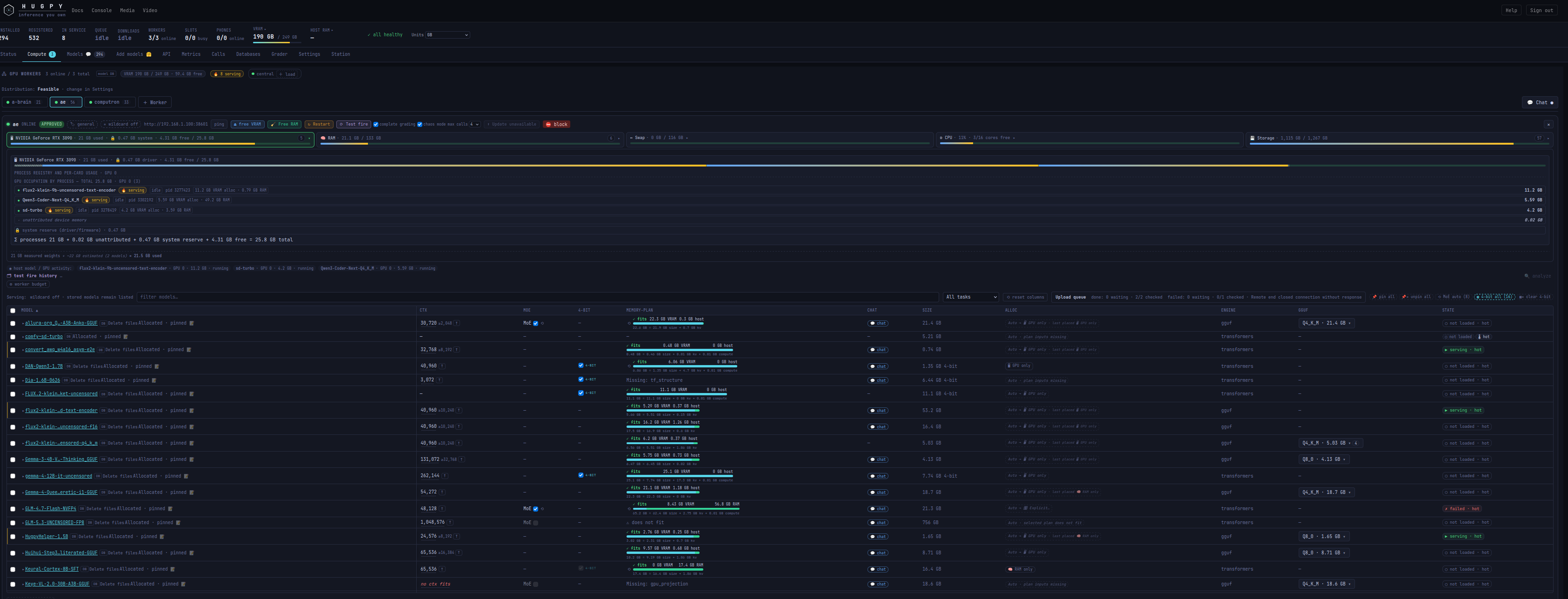
Compute resources
Model placement, GPU process usage, memory plans and per-model controls.
Database backend selection
SQLite remains the default: the existing local database and numbered migrations are preserved on upgrade. To use PostgreSQL, provision a database/role first, then explicitly configure Wrapper:
sudo hugpy-wrapper install --system --no-tf \
  --database-url 'postgresql://wrapper@db-host:5432/hugpy_wrapper' \
  --database-schema hugpy_wrapper
The installer retains configured host/port/model settings, installs
abstract_database==0.0.2.201 and its PostgreSQL driver only when selected,
initializes the Wrapper-owned schema, and verifies access as the service user.
Python 3.11+ is required for this optional backend. The default SQLite install
adds no database-driver dependency. A pip environment can install the equivalent
extra with pip install 'hugpy-wrapper[postgres]'.
HUGPY_WRAPPER_DATABASE_URL in the protected service env file selects a persistent
sqlite:///file URL or a postgresql:// URL. HUGPY_WRAPPER_DATABASE_SCHEMA
defaults to hugpy_wrapper; Wrapper's tables/functions and migration history are
isolated in this namespace. PostgreSQL access requires privileges to initialize
and manage that namespace. Use libpq password files or protected environment
configuration for credentials; do not place passwords in shell history.
The settings viewer reports the backend and sanitized endpoint, never the
password or connection-query credentials.
Selecting another backend starts/opens that backend; it does not copy existing records. Existing SQLite files are retained. PostgreSQL backups are managed separately; uninstall/purge never drops an external database. Request body blobs and model files remain on the worker, so back up local state together with the external database. A URL change alone is not a data migration.
Wrapper uses the shared abstract_database.Database connection/transaction and
parameter interfaces behind its PostgreSQL adapter. Its historical SQLite
migrations and measurement rules remain intact. The PostgreSQL baseline matches
SQLite schema version 30, including call-derived views and artifact identity
guards, with additive migrations through version 32 for drive telemetry and
per-step render progress. Future schema revisions must supply reviewed PostgreSQL migrations too;
a version mismatch fails explicitly. A lost connection fails the current
operation and is re-opened for the next; uncertain writes are never replayed.
The Debian package bundles the default front door and transfer dependency for
offline installation. Normal installs still provision the Transformers engine.
For an explicitly engine-managed or lightweight installation use
sudo env HUGPY_WRAPPER_INSTALL_NO_TF=1 apt install hugpy-wrapper.
Preseed a root-protected /etc/hugpy/wrapper.env with the database URL/schema to
select PostgreSQL during APT installation; optional adapter requirements are
then fetched through pip. A file without a port uses automatic port selection.
Both hugpy-wrapper and fitevict launchers are installed on PATH.
Local terminal and bare installation
hugpy-wrapper (in a terminal), hugpy-wrapper tui, and hugpy-wrapper chat
open the shared chat shell with live resource details and complete local settings.
The splash says hugpy-wrapper. It stays on this Wrapper's endpoint; Core,
Harness and Toolserver services are not required. Settings are saved through
Wrapper's API; selecting a model does not load it or start inference.
The standalone hugpy-harness uses the same hugpy-terminal library but presents
itself as hugpy-fleet on its splash. It adds multiple Wrapper/Core connections
and Core allocation management. Wrapper remains autonomous.
Normal Debian installs include the terminal. Python users can install
hugpy-wrapper[terminal]; the base distribution retains API/admin commands.
For a fresh Debian configuration, HUGPY_WRAPPER_INSTALL_BARE=1 skips adding the
terminal dependencies. The service installer accepts --no-terminal; --minimal
skips engines and adding the terminal. Neither flag uninstalls an existing UI.
Local tools service
A normal install provisions the local toolserver server runtime, separately from the inference engines. The terminal starts one user-owned local service on first tool discovery, with a private local credential. Existing advertised services are reused. /settings → Tools connection (or /toolserver) selects the default local service or an explicit external URL and its own masked access token. Connection preferences are stored privately in ~/.config/hugpy/toolserver.json; explicit environment/config overrides retain precedence.
install --no-toolserver skips runtime provisioning when a local/external service is already managed; --minimal skips it too. APT supports HUGPY_WRAPPER_INSTALL_NO_TOOLSERVER=1; HUGPY_WRAPPER_INSTALL_BARE=1 omits the terminal and local tools runtime. Server dependencies are fetched during provisioning; the bundled terminal/client wheels remain installable offline. The tools service keeps its own SQLite state and lifecycle.
Runtime package organization
engines/ owns discovery, locations, dependency profiles, backend launch, child
processes and task runners. models/ owns Wrapper artifact resolution workflows;
hardware/ owns its capacity designations. Generic environment, application-path,
process, hardware, file-format and protocol implementations live in
hugpy_resources.imports, grouped into functions/, classes/ and constants/.
Wrapper's imports/ retains its own static contracts, path conventions, worker
identity, placement guard, GGUF election policy and runner metadata. Its normal
initializers distribute canonical symbols lazily. Standard-library and external
imports resolve through imports/init_imports.py at the original feature call
stage. Optional engines remain deferred.
Discovery owns discovery/provider workflows; Toolserver owns service discovery and dispatch. Wrapper retains engine provisioning, records, schema, persistence and runtime orchestration. There are no forwarding modules or runtime aliases. Memory eviction, CPU lending, Auto previews and forecasting retain their existing boundaries. See package ownership.
1 maintainer

Metadata
1 maintainer
Release files for hugpy-wrapper 0.1.184
For a detailed explanation of source distributions (sdists) and built distributions (wheels), please see the package formats documentation.
Source distribution (sdist)
| File | Size | Uploaded | Provenance | Actions |
|---|---|---|---|---|
| hugpy_wrapper-0.1.184.tar.gz | 1.1 MB | Without provenance | Details for hugpy_wrapper-0.1.184.tar.gz |
Built distribution (wheel)
| File | Interpreter | ABI | Platform | Actions Reset |
|---|---|---|---|---|
| hugpy_wrapper-0.1.184-py3-none-any.whl | Python 3 | none | any | Details for hugpy_wrapper-0.1.184-py3-none-any.whl |
Total release size: 2.2 MB
Release files / hugpy_wrapper-0.1.184.tar.gz
| Download URL | hugpy_wrapper-0.1.184.tar.gz |
|---|---|
| Size | 1.1 MB |
| Tags | Source |
|
SHA-256 checksum How to use checksums |
3e9e1666d32eb3da91f50e2765f965932b7e8765adf522bce06e399e3540d669
|
|
BLAKE2b-256 checksum How to use checksums |
7f4b9932d6d8e47af78c535b38889788c5a27f6df55a368fe8345410cf841181
|
| Upload date | |
|
Uploaded using Trusted Publishing? What is trusted publishing? |
No |
| Uploaded via |
twine/7.0.0 CPython/3.12.3
|
Release files / hugpy_wrapper-0.1.184-py3-none-any.whl
| Download URL | hugpy_wrapper-0.1.184-py3-none-any.whl |
|---|---|
| Size | 1.0 MB |
| Tags | Python 3 |
|
SHA-256 checksum How to use checksums |
acbb99eb3caffa607adb6fa7e6efc39e59f45b4cb6c2ce66ae2b026e46e216ba
|
|
BLAKE2b-256 checksum How to use checksums |
c9f50d0c39510dfecaf36d1a0bbf5b2939cb71e5cc1167fcd5f69847540ec407
|
| Upload date | |
|
Uploaded using Trusted Publishing? What is trusted publishing? |
No |
| Uploaded via |
twine/7.0.0 CPython/3.12.3
|
Security for hugpy-wrapper 0.1.184
Provenance
Provenance describes where a file came from. On PyPI, provenance is shared via attestations, which provide a verifiable record of the build or publishing details. View details, limitations and caveats.
No provenance found
None of the files in this release were uploaded with provenance metadata.
A note on package security
PyPI is a repository for distributing packages, not a service for auditing them. While third-party security researchers and our staff do their best to detect and remove malicious packages, PyPI cannot guarantee the quality, security or suitability of any given package.
To learn more about protecting yourself from malicious actors, visit our package security documentation.














