
A python package containing two statistical tests for HWE testing: Gibbs Sampling tests and a modified Chi Squared tests that handles ambiguity

Project description



The Hardy-Weinberg Equilibrium (HWE) assumption is essential to many population genetics models, which assumes that allele pairs from a given population are random. An HWE test needs to test whether the pairing are random or not.
Our python package contains three statistical tests for HWE testing:
- ASTA
- UMAT
- UMAT with uncertainty
Both ASTA and UMAT with sampling assume ambiguity in the observations while UMAT does not.
Table of Contents
Installation
Use the package manager pip to install hwetests.
pip install hwetests
Quick tour
To immediately use our package, you only need to run a single function.
First you have to prepare a csv file which have a different format for the ambiguous and the unambiguous case.
Ambiguous case
The csv should look like this:
ID,Allele1,Allele2,Probability
0,2,12,0.1
0,6,7,0.9
1,0,17,1.0
- ID: the ID of the individual
- Allele1: the first allele
- Allele2: the second allele
- Probability: the probability of the pair (Allele1, Allele2) to be the true pair for the given ID.
A few notes:
- The csv file is not required to have the column names in the first row.
- The probabilities are not required to sum to 1 for each ID (they are normalized in the code).
- A row that contains the pair (Allele1, Allele2) and another row that contains the pair (Allele2, Allele1) are treated as the same pair.
You can then run ASTA or UMAT with uncertainty using one function:
ASTA
def full_algorithm(file_path,
                   is_first_row_contains_columns_names=False,
                   cutoff_value=0.0,
                   should_save_csv=False,
                   should_save_plot=False,
                   title=''):
Where:
file_path: A path to a csv file with columns: 1) index or id of a donor (integer or string). Assuming columns are separated with , or + and no whitespaces in the csv file. 2) first allele (integer or string). 3) second allele (integer or string). 4) probability (float).is_first_row_contains_columns_names: True if the first row in the csv file contains the columns names, False otherwise.cutoff_value: (optional, default value is 0.0) A float value that decides to not account (O-E)^2 / E in the summation of the Chi-Squared statistic if E < cutoff.should_save_csv: (optional, default value is False) Either boolean or string, if it's True then a csv with the columns:[first allele, second allele, observed, expected, variance]is saved (named 'alleles_data.csv') and if it's a string then a csv with the given string name is saved.should_save_plot: (optional, default value is False) Either boolean or string, if it's True then an image containing 2 bar plots is saved (named 'alleles_barplot.png') for each allele showing its chi squared statistic over degrees of freedom (summing over the observations only associated with this allele) and -log_10(p_value). If it's a string and ends with '.pdf' then the plot is saved in pdf format. Otherwise, it's saved in png format. If it's a string then a png with the given string name is saved.title: (optional, default value is '') A string that will be the title of the plot.
Returns: p-value (float), Chi-Squared statistic (float), degrees of freedom (integer)
UMAT with uncertainty
def full_algorithm(file_path,
                   start_from=30000,
                   iterations=100000,
                   is_first_row_contains_columns_names=False):
Where:
file_path: A path to a csv file with columns: 1) index or id of a donor (integer or string). 2) first allele (integer or string). 3) second allele (integer or string). 4) probability (float). Assuming columns are separated with , or + and no whitespaces in the csv file.start_from: The index to start from when calculating the p-value.iterations: The amount of iterations to perform.is_first_row_contains_columns_names: If True then it is assumed that the first row contains the columns names: i.e. 'column1,column2,...'.
Returns: A p-value under the null Hypothesis that observations are distributed around HWE.
Unambiguous case
The csv should look like this:
0,2,12
3,6,7
1,0,17
Which represents a square matrix where each element a_ij is the number of times the pair (i, j) or (j, i) was observed.
You can then run UMAT with one function:
UMAT
def full_algorithm(observations,
                   start_from=30000,
                   iterations=100000,
                   should_save_plot=False):
Where:
observations: A numpy square matrix where a_ij is the amount of donors observed alleles i,j.should_save_plot: Either boolean or string, if it's True then plot of the perturbations is saved (named 'umat_plot.png') and if it's a string then a plot with the given string name is saved.start_from: The index to start from when calculating the p-value.iterations: The amount of iterations to perform.
Returns: A p-value under the null Hypothesis that observations are distributed around HWE.
Examples
Here we show how to use our package with simulated data given in our package.
ASTA test
from HWE_Tests.hwetests import asta
from HWE_Tests.hwetests.tests import dataloader

if __name__ == '__main__':
    # getting the absolute path to the 'ambiguous_data.csv' file
    ambiguous_data_path = dataloader.get_path(is_ambiguous=True)
    # Perform ASTA
    p_value, statistic, dof = asta.full_algorithm(file_path=ambiguous_data_path,
                                                  cutoff_value=4.0)
    print(f'p-value: {p_value}')
    print(f'statistic: {statistic}')
    print(f'degrees of freedom: {dof}')
UMAT test
from HWE_Tests.hwetests import umat
from HWE_Tests.hwetests.tests import dataloader
import numpy as np

if __name__ == '__main__':
    # getting the absolute path to the 'unambiguous_data.csv' file
    unambiguous_data_path = dataloader.get_path(is_ambiguous=False)
    # import data from csv file as a numpy array
    data = np.genfromtxt(unambiguous_data_path, delimiter=',')
    # Perform UMAT
    p_value = umat.full_algorithm(data)
    print(f'p-value: {p_value}')
UMAT with uncertainty test
from HWE_Tests.hwetests import umat_with_uncertainty
from HWE_Tests.hwetests.tests import dataloader

if __name__ == '__main__':
    # getting the absolute path to the 'ambiguous_data.csv' file
    ambiguous_data_path = dataloader.get_path(is_ambiguous=True)
    # Perform UMAT with sampling
    p_value = umat_with_uncertainty.full_algorithm(file_path='../data/ambiguous_data.csv')
    print(f'p-value: {p_value}')
You can find the scripts and the simulated data in:
├───hwetests
│   ├───tests
│   │   ├───data
│   │   │   └───unambiguous_data.csv # for ASTA and UMAT with sampling (contains 50k population, 20 alleles, 0.2 uncertainty, in HWE)
│   │   │   └───ambiguous_data.csv # for UMAT (contains 100k population, in HWE)
│   │   ├───scripts
│   │   │   └───asta_test.py
│   │   │   └───umat_test.py
│   │   │   └───umat_with_sampling_test.py
│   │   └───dataloader.py
Working with freqs files
If you want to directly work with freqs files, that should be of the form:
553,A*01:01~B*49:01~C*07:01~DQB1*02:01~DRB1*07:01+A*03:01~B*07:02~C*07:02~DQB1*03:01~DRB1*11:04,8.807681966366988e-06,0
553,A*03:01~B*49:01~C*07:01~DQB1*02:01~DRB1*07:01+A*01:01~B*07:02~C*07:02~DQB1*03:01~DRB1*11:04,2.7491553814098375e-07,1
553,A*03:01~B*07:02~C*07:02~DQB1*02:01~DRB1*07:01+A*01:01~B*49:01~C*07:01~DQB1*03:01~DRB1*11:04,1.2764664565168216e-08,2
207,A*01:01~B*58:01~C*07:01~DQB1*02:01~DRB1*07:01+A*02:01~B*38:01~C*12:03~DQB1*06:03~DRB1*13:01,1.682524331112655e-05,0
Notice that the last value is the person index. The person index is 0 if it's the first time we see this person. Also, it is assumed that the same ids are grouped together.
You can run ASTA on such a file, using this simple code:
import os
import pandas as pd
from HWE_Tests.hwetests import asta
from HWE_Tests.hwetests.tests import utils
from matplotlib import pyplot as plt


if __name__ == '__main__':
    # path to the freqs file
    data_file_path = '../data/data.freqs'
    # A directory path (including the name of the directory) of where you want to store all the results and plots
    directory_path = 'my_directory'

    utils.save_plots_and_data(data_file_path, directory_path)
After performing the above code, you will find the results in the directory you specified. The results will be stored in the form:
├───my_directory
│   ├───levels
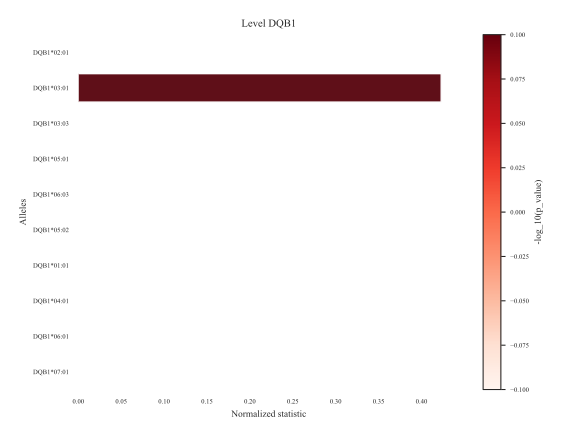
│   ├───plots  # here you can find all the plots, each level (A, B, C, DQB1, DRB1) has its own plot
│   ├───races
│   ├───results  # here you can find the dof, p_value, statistic for each level
An example of a plot for the level DQB1:
MIT License
Copyright (c) 2024 Or Shkuri
Permission is hereby granted, free of charge, to any person obtaining a copy of this software and associated documentation files (the "Software"), to deal in the Software without restriction, including without limitation the rights to use, copy, modify, merge, publish, distribute, sublicense, and/or sell copies of the Software, and to permit persons to whom the Software is furnished to do so, subject to the following conditions:
The above copyright notice and this permission notice shall be included in all copies or substantial portions of the Software.
THE SOFTWARE IS PROVIDED "AS IS", WITHOUT WARRANTY OF ANY KIND, EXPRESS OR IMPLIED, INCLUDING BUT NOT LIMITED TO THE WARRANTIES OF MERCHANTABILITY, FITNESS FOR A PARTICULAR PURPOSE AND NONINFRINGEMENT. IN NO EVENT SHALL THE AUTHORS OR COPYRIGHT HOLDERS BE LIABLE FOR ANY CLAIM, DAMAGES OR OTHER LIABILITY, WHETHER IN AN ACTION OF CONTRACT, TORT OR OTHERWISE, ARISING FROM, OUT OF OR IN CONNECTION WITH THE SOFTWARE OR THE USE OR OTHER DEALINGS IN THE SOFTWARE.
Release history Release notifications | RSS feed


Download files
Download the file for your platform. If you're not sure which to choose, learn more about installing packages.
Source Distribution
Built Distribution
Filter files by name, interpreter, ABI, and platform.
If you're not sure about the file name format, learn more about wheel file names.
Copy a direct link to the current filters
File details
Details for the file hwetests-1.0.0.tar.gz.
File metadata
- Download URL: hwetests-1.0.0.tar.gz
- Upload date:
- Size: 493.9 kB
- Tags: Source
- Uploaded using Trusted Publishing? No
- Uploaded via: twine/4.0.2 CPython/3.8.0
File hashes
| Algorithm | Hash digest | |
|---|---|---|
| SHA256 |
34d648ea0dfe84e12c8f2bb0141df279e784bb2604f117ae94911ff46950bf9d
|
|
| MD5 |
cd600f12dbd14a4d604a83dfc38ae62c
|
|
| BLAKE2b-256 |
322fdb11cfaa49fa309d330b3b40f9656a10dddcce3780b256066c4c417635c1
|
File details
Details for the file hwetests-1.0.0-py3-none-any.whl.
File metadata
- Download URL: hwetests-1.0.0-py3-none-any.whl
- Upload date:
- Size: 492.8 kB
- Tags: Python 3
- Uploaded using Trusted Publishing? No
- Uploaded via: twine/4.0.2 CPython/3.8.0
File hashes
| Algorithm | Hash digest | |
|---|---|---|
| SHA256 |
640f2711eb257bba91fb79bd900e4209b7ee3700f0eb27bd0f70e5235ea52142
|
|
| MD5 |
ca739818f0ab2e33336136a15d0f3636
|
|
| BLAKE2b-256 |
7e0dad20cb2f47c77d62936e1b66eaa046df270249f20d0066bd78fed6e41016
|






