
Hycrypt
Stateless-overwrite hybrid cryptosystem for Python




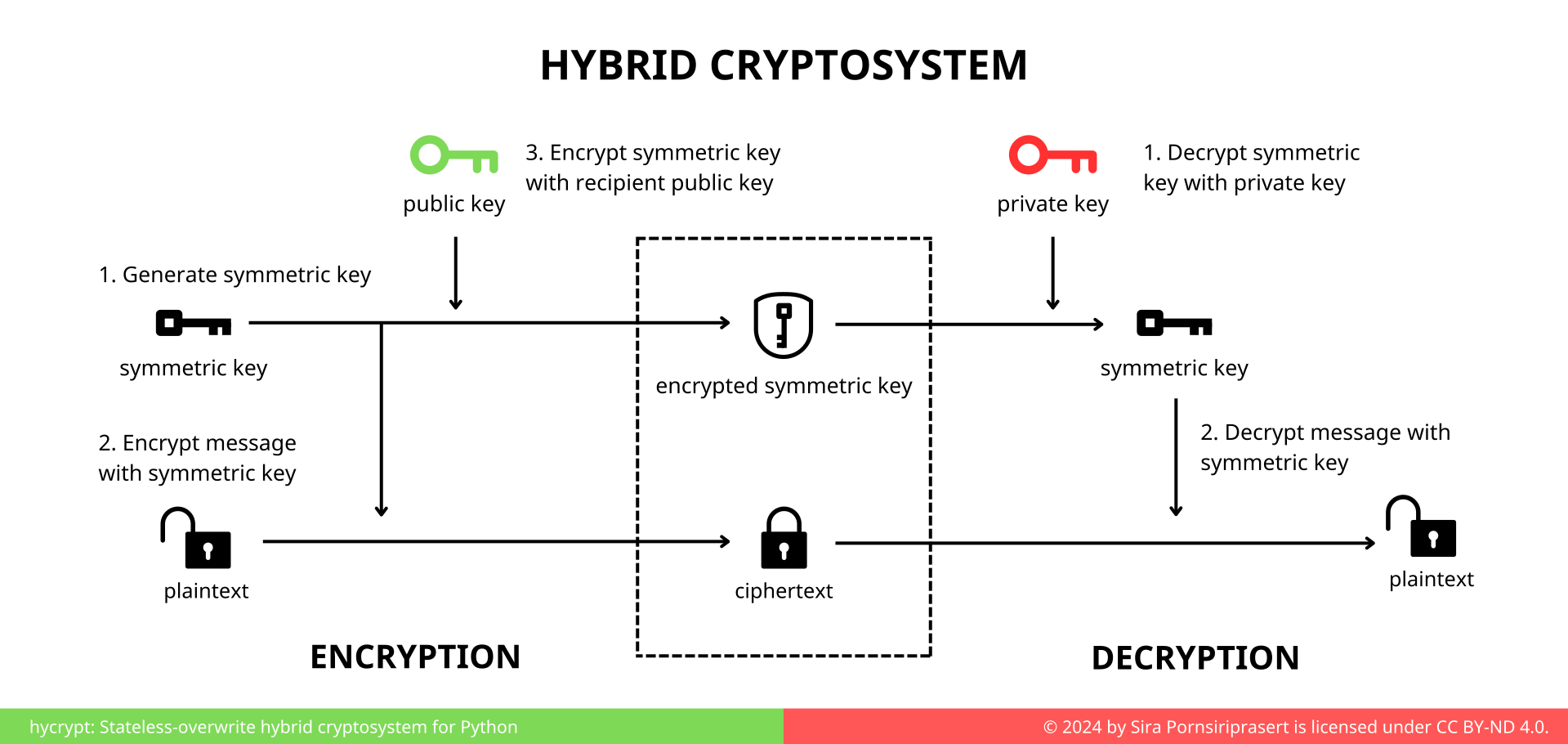
Hycrypt is a stateless-overwrite hybrid cryptosystem designed for secure data encryption and password-free updates. This makes it ideal for secure communication and storage systems where only the recipient can decrypt the data — yet the data can be updated without the password.
The caveat is that this cryptosystem does not guarantee authenticity of the message. Anyone with the public key can overwrite the message. However, without the private key (or password), they cannot read the encrypted message.
Features
- 🔒 Hybrid encryption using RSA + AES-CBC + HMAC
- 🔁 Stateless overwrite using only the public key, removing the need to retain user secrets
- 🔑 Password-based protection using PBKDF2
- 📦 Simple, yet flexible API for file-based and in-memory encryption
Quick Start
Using FileCipher to manage file encryption,
from hycrypt.file_cryptosystem import FileCipher

file = "home/data.txt"
plaintext = b"secret"
password = b"correcthorsebatterystaple"
cipher = FileCipher(file)

cipher.create(password)
cipher.write(plaintext)
decrypted_text = cipher.read(password)
For more flexible use,
import hycrypt

plaintext = b"secret"
ciphertext, public_key = hycrypt.encrypt_with_password(plaintext, password=b"password1")

decrypted_message = hycrypt.decrypt_with_password(ciphertext, password=b"password1")
assert decrypted_message == plaintext

new_plaintext = b"my new secret"
new_ciphertext = hycrypt.encrypt_with_public_key(previous_data=ciphertext, plaintext=new_plaintext, public_key=public_key)

new_decrypted_message = hycrypt.decrypt_with_password(new_ciphertext, password=b"password1")
assert new_decrypted_message == new_plaintext
See examples and use cases in examples/.
To install hycrypt using pip:
pip install hycrypt
How It Works
Encryption
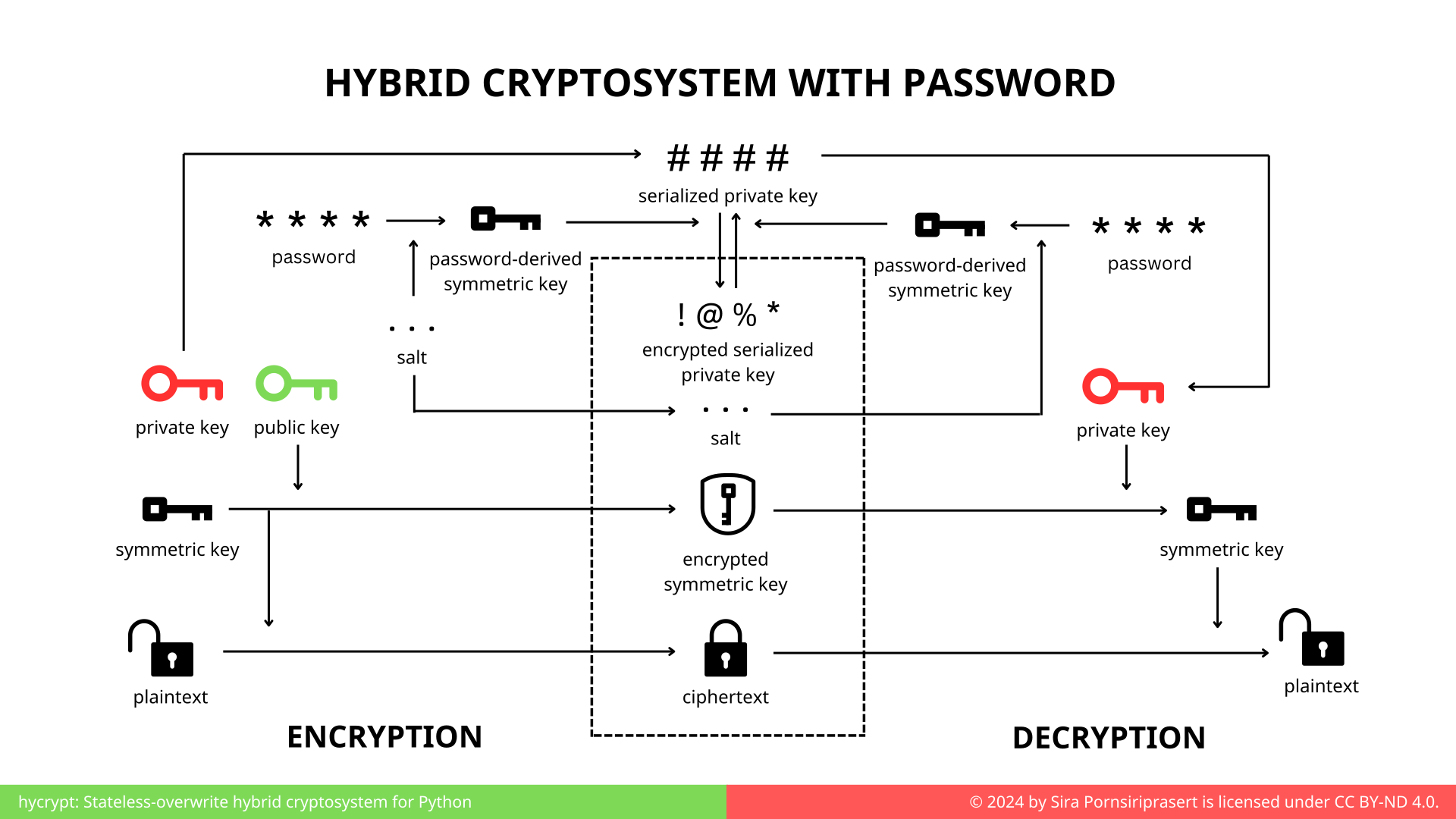
- A symmetric key is randomly generated to encrypt to plaintext into ciphertext. The encryption uses Fernet implementation by cryptography.
- An RSA key pair (private and public key) is generated.
- The public key is used to encrypt the symmetric key. The public key can be shared safely.
- The user selects a password.
- The password is combined with a random salt to produce a password-derived symmetric key using
PBKDF2(Password-Based Key Derivation Function 2). - The password-derived key is used to encrypt the private key.
- The ciphertext is stored along with the encrypted symmetric key, the salt, and the encrypted private key.
Decryption
- The user inputs the password.
- The password is combined with the stored salt using
PBKDF2to recreate the same password-derived symmetric key. - The password-derived key decrypts the private key in the file.
- The recovered private key decrypts the symmetric key that was used to encrypt the file data.
- The symmetric key decrypts the ciphertext into plaintext.
Overwriting Data Without Password
- A new symmetric key is generated randomly.
- The symmetric key encrypts the new plaintext into ciphertext.
- The original public key is used to encrypt the new symmetric key.
- The file is updated with the new encrypted symmetric key and the new ciphertext.
Despite the writer not knowing the password, the data can be overwritten using public key. The encrypted private key remains a secret. Because the encrypted private key corresponds to the public key, the recipient who knows the password can still decrypt the data.
Disclaimer
Hycrypt is intended for educational and experimental uses. While it employs reasonably secure cryptographic practices, it has not undergone formal security audits. Hence, it is not recommended for production environment without thorough review and modification. Consider opening an issue or submitting a pull request for potential issues and improvement.
1 maintainer

Metadata
1 maintainer
Release files for hycrypt 1.1
For a detailed explanation of source distributions (sdists) and built distributions (wheels), please see the package formats documentation.
Source distribution (sdist)
| File | Size | Uploaded | Provenance | Actions |
|---|---|---|---|---|
| hycrypt-1.1.tar.gz | 10.1 kB | With provenance | Details for hycrypt-1.1.tar.gz |
Built distribution (wheel)
| File | Interpreter | ABI | Platform | Actions Reset |
|---|---|---|---|---|
| hycrypt-1.1-py3-none-any.whl | Python 3 | none | any | Details for hycrypt-1.1-py3-none-any.whl |
Total release size: 20.4 kB
Release files / hycrypt-1.1.tar.gz
| Download URL | hycrypt-1.1.tar.gz |
|---|---|
| Size | 10.1 kB |
| Tags | Source |
|
SHA-256 checksum How to use checksums |
becfd0bc05e904ce67d2c0196a7fa3eadfe33089d409c8cba44330113ed25ef3
|
|
BLAKE2b-256 checksum How to use checksums |
d96262367bd447751ab885fcb8939513f98b419410849a992c567e363ddd7f27
|
| Upload date | |
|
Uploaded using Trusted Publishing? What is trusted publishing? |
Yes |
| Uploaded via |
twine/6.1.0 CPython/3.12.9
|
Provenance
Provenance describes where a file came from. On PyPI, provenance is shared via attestations, which provide a verifiable record of the build or publishing details. View details, limitations and caveats.


PyPI Publish Attestation
PyPI verified that this artifact, at this checksum, originated from the publisher listed below.
Signed by GitHub Actions, verified by PyPI on Jun 1, 2025.
Transparency logRelease files / hycrypt-1.1-py3-none-any.whl
| Download URL | hycrypt-1.1-py3-none-any.whl |
|---|---|
| Size | 10.2 kB |
| Tags | Python 3 |
|
SHA-256 checksum How to use checksums |
d0d9679444a87613e8661a718bc9804c21baecaaae21be9400062009c66ca5da
|
|
BLAKE2b-256 checksum How to use checksums |
390a5c30de656d7a3666c596bcbaa6256c8eb499328d30af9ee5ee5edd94dcdb
|
| Upload date | |
|
Uploaded using Trusted Publishing? What is trusted publishing? |
Yes |
| Uploaded via |
twine/6.1.0 CPython/3.12.9
|
Provenance
Provenance describes where a file came from. On PyPI, provenance is shared via attestations, which provide a verifiable record of the build or publishing details. View details, limitations and caveats.
PyPI Publish Attestation
PyPI verified that this artifact, at this checksum, originated from the publisher listed below.
Signed by GitHub Actions, verified by PyPI on Jun 1, 2025.
Transparency logSecurity for hycrypt 1.1
Provenance
Provenance describes where a file came from. On PyPI, provenance is shared via attestations, which provide a verifiable record of the build or publishing details. View details, limitations and caveats.
Full provenance
All 2 files in this release have been uploaded with provenance metadata.
Attestation for hycrypt-1.1.tar.gz
PyPI Publish Attestation
PyPI verified that this artifact, at this checksum, originated from the publisher listed below.
Signed by GitHub Actions, verified by PyPI on Jun 1, 2025.
Transparency logA note on package security
PyPI is a repository for distributing packages, not a service for auditing them. While third-party security researchers and our staff do their best to detect and remove malicious packages, PyPI cannot guarantee the quality, security or suitability of any given package.
To learn more about protecting yourself from malicious actors, visit our package security documentation.














