
DEM reconditioning for hydrological applications

Project description
hydro-snap

Hydro-snap is an efficient tool for seamlessly aligning digital elevation models (DEMs) with mapped stream networks, ensuring accurate hydrological flow paths with minimal terrain alteration.
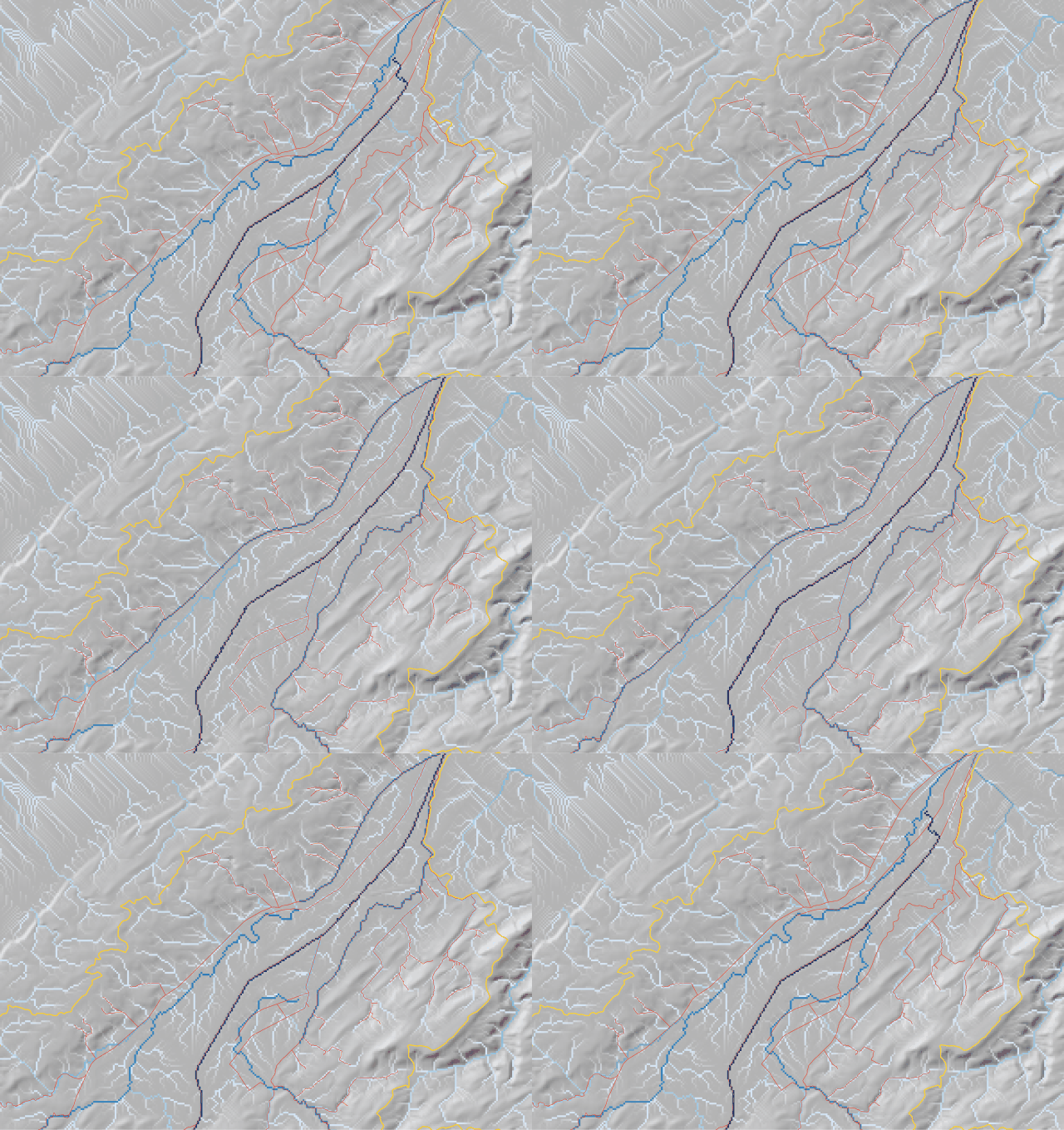
Example of a flow accumulation before (left) and after (right) alignment with hydro-snap. The DEM on the right has been aligned with the mapped stream network, ensuring accurate hydrological flow paths.
Hydro-snap allows users to:
- Align a DEM with a mapped stream network
- (Optionally) delineate a catchment from a provided outlet point
- (Optionally) force the flow accumulation to be consistent with a provided catchment boundary
The flow direction and accumulation are computed after the DEM has been aligned with the stream network, using the pysheds library.
The outputs of hydro-snap are:
- A reconditioned DEM (corrected_dem_final.tif)
- An intermediate pre-pysheds DEM (corrected_dem_pre_pysheds.tif) — retained in the output directory
- A flow direction raster (flow_direction.tif)
- A flow accumulation raster (flow_accumulation.tif)
- A catchment delineation raster (catchment.tif) — only when a shapefile of the outlet is provided
- The stream network shapefile with an additional incremental rank attribute (streams.shp)
- The stream start points shapefile (stream_starts.shp) — useful for identifying topology issues in the stream network
- The stream end points shapefile (stream_ends.shp) — useful for identifying topology issues in the stream network
Installation
Hydro-snap can be installed using pip:
pip install hydro-snap
The proj library is required to handle the spatial reference system of the DEM and stream network. If you are using Windows, you can install the proj library using conda:
conda install -c conda-forge proj
If you are using Linux, you can install the proj library using apt:
sudo apt-get install libproj-dev
If you are using macOS, you can install the proj library using brew:
brew install proj
Cannot find proj.db? Set the PROJ_DATA environment variable to the directory containing the proj.db file (see https://proj.org/en/9.4/faq.html#why-am-i-getting-the-error-cannot-find-proj-db).
Data requirements
You will need the following data to use hydro-snap:
- A digital elevation model (DEM) in GeoTIFF format (with a spatial reference system)
- A mapped stream network in shapefile format (with a spatial reference system). Lines should be oriented in the
direction of flow (from upstream to downstream). If your lines go from downstream to upstream, use
stream_orientation='upstream'. - (Optional) A shapefile containing the outlet point of the catchment
- (Optional) A shapefile containing the catchment boundary
- (Optional) A shapefile containing breach lines in the catchment boundary. If not provided, the stream network is used as breaches; any catchment polygon with no stream crossing is opened at its lowest-elevation boundary cell automatically.
All inputs must share the same coordinate reference system (CRS).
Usage
Hydro-snap can be used to align a DEM with a mapped stream network using the following code:
from hydro_snap import recondition_dem

recondition_dem('path/to/DEM', 'path/to/streams.shp', 'output/dir')
If your stream lines are digitized from downstream to upstream, use stream_orientation='upstream':
from hydro_snap import recondition_dem

recondition_dem('path/to/DEM', 'path/to/streams.shp', 'output/dir',
                stream_orientation='upstream')
When the catchment outlet is provided, the catchment delineation raster is computed. The
min_accumulation threshold controls how the outlet point is snapped to a stream cell:
from hydro_snap import recondition_dem

recondition_dem('path/to/DEM', 'path/to/streams.shp', 'output/dir',
                outlet_shp='path/to/outlet.shp',
                min_accumulation=10000)
A catchment boundary can be provided to constrain flow within it. Breaches (e.g. the river crossing the boundary) are detected from the stream network automatically, or can be supplied explicitly:
from hydro_snap import recondition_dem

# Stream network used as breaches automatically
recondition_dem('path/to/DEM', 'path/to/streams.shp', 'output/dir',
                catchment_shp='path/to/catchment.shp')

# Or provide explicit breach lines
recondition_dem('path/to/DEM', 'path/to/streams.shp', 'output/dir',
                catchment_shp='path/to/catchment.shp',
                breaches_shp='path/to/breaches.shp')
Parameters
| Parameter | Default | Description |
|---|---|---|
delta |
0.0001 |
Elevation step (m) applied when lowering cells along the stream |
walls_height |
1000 |
Height (m) of temporary walls placed at the catchment border |
epsg_code |
None |
EPSG code to assign when the CRS is missing from an input file |
stream_orientation |
'downstream' |
'upstream' reverses line direction before processing |
min_accumulation |
10000 |
Minimum accumulation cell count for outlet snapping |
simplification_tolerance |
0.5 |
Simplify geometries before processing, as a fraction of the DEM pixel size. Set to 0 or None to disable. Improves performance on high-resolution datasets. |
Diagnosing stream network issues
The start and end points of unconnected stream segments are written to stream_starts.shp and
stream_ends.shp. You can also generate them independently to inspect your stream network before
running recondition_dem:
import geopandas as gpd
from hydro_snap.hydro_snap import extract_stream_starts_ends

streams = gpd.read_file('path/to/streams.shp')
starts, ends = extract_stream_starts_ends(streams, output_dir='output/dir')
Unconnected start points indicate stream sources; unconnected end points indicate outlets or disconnected segments. Reviewing these can help identify gaps or direction errors in the stream network data.
Release history Release notifications | RSS feed


Download files
Download the file for your platform. If you're not sure which to choose, learn more about installing packages.
Source Distribution
Built Distribution
Filter files by name, interpreter, ABI, and platform.
If you're not sure about the file name format, learn more about wheel file names.
Copy a direct link to the current filters
File details
Details for the file hydro_snap-1.0.3.tar.gz.
File metadata
- Download URL: hydro_snap-1.0.3.tar.gz
- Upload date:
- Size: 13.0 kB
- Tags: Source
- Uploaded using Trusted Publishing? No
- Uploaded via: twine/6.1.0 CPython/3.13.12
File hashes
| Algorithm | Hash digest | |
|---|---|---|
| SHA256 |
74fc3947dacb306c05de3475354e2ebaf13fc09c25b15eeebd227078bb925672
|
|
| MD5 |
23b961b16688ab0e3ecd86ea82faee3b
|
|
| BLAKE2b-256 |
69ae73691c59af499356e3b1fa8ec54a1a2d56d32527ba65ee330fcb177da1bb
|
File details
Details for the file hydro_snap-1.0.3-py3-none-any.whl.
File metadata
- Download URL: hydro_snap-1.0.3-py3-none-any.whl
- Upload date:
- Size: 10.4 kB
- Tags: Python 3
- Uploaded using Trusted Publishing? No
- Uploaded via: twine/6.1.0 CPython/3.13.12
File hashes
| Algorithm | Hash digest | |
|---|---|---|
| SHA256 |
e937fcb8ff0ddf3c3bbcd31c42f99392440d3a233ee75c4269e984e7d4b69f70
|
|
| MD5 |
31e7be6e6cd682ec065c01feed8f2ad5
|
|
| BLAKE2b-256 |
da477ba974d1482c4ed1070219f0eac4b5dcb200da6297d0dee3663166de1a0e
|






