
A dummy/mocking server to inspect incoming HTTP connections. Use it to test/debug Webhooks. Provides nice console logging + a dump of every request as a file.
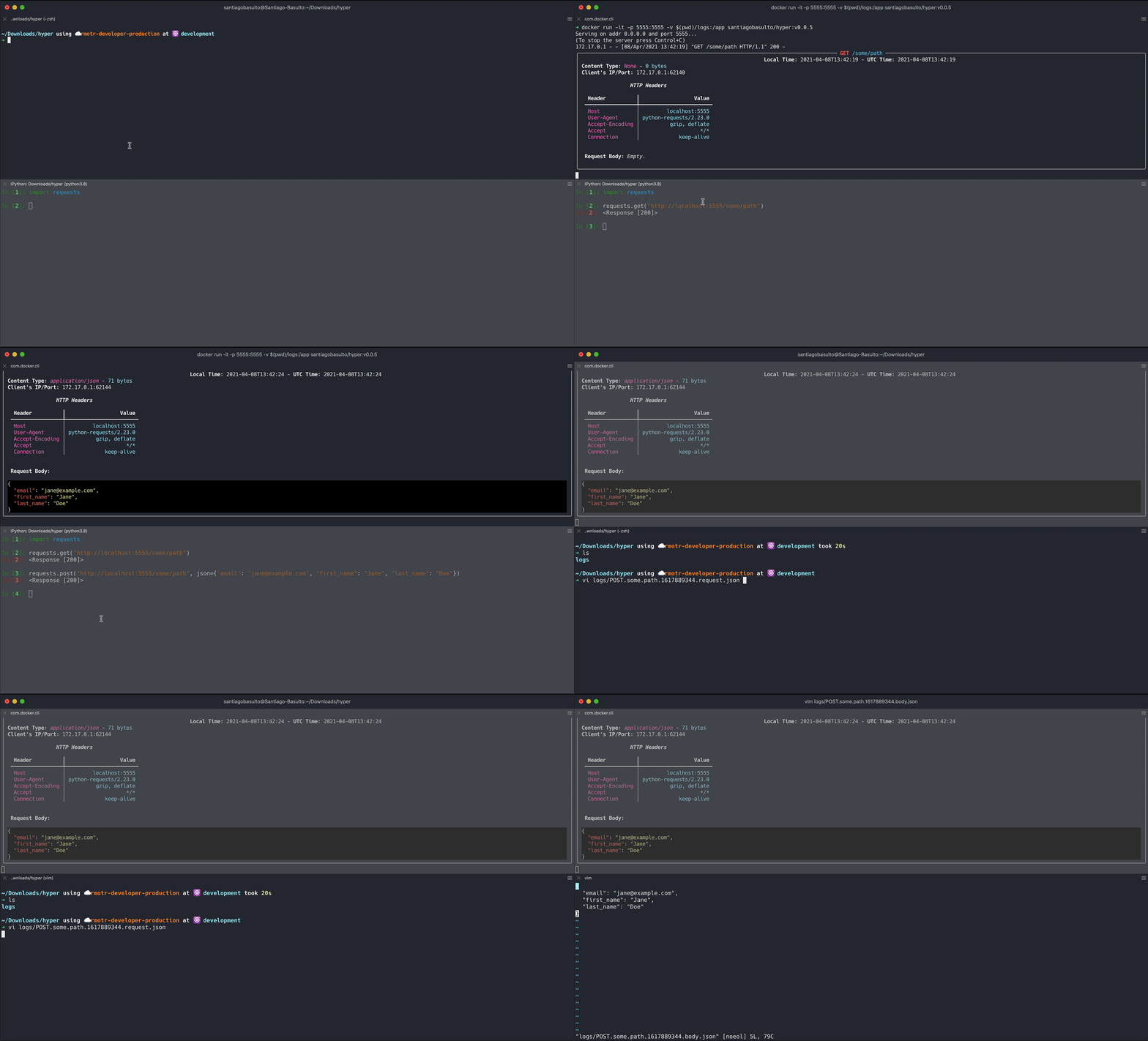
$ docker run -it -p 5555:5555 -v $(pwd)/logs:/app santiagobasulto/hyper
Explanation:
-p P1:5555,P1is the local port in your host.-v YOUR_PATH:/app,YOUR_PATHis a volume in your file system to store the logs of the requests.
Logs names have the convention METHOD.PATH.TIMESTAMP.request.json and METHOD.PATH.TIMESTAMP.body.EXTENSION (if a body is sent). For example, POST.some.path.1617889344.request.json and POST.some.path.1617889344.body.json
If you don't want to store the logs, don't pass a -v option.
Installation
Using pip:
$ pip install hyper-inspector
Using pipx:
$ pipx install hyper-inspector
Usage
$ hyper --help
usage: http_inspector [-h] [-r RESPONSE] [-f [ENABLE_FILE_LOGGING]] [-d LOGGING_DIRECTORY] [--log-body [LOG_BODY]] [--ip IP] [--port PORT]

Inspect and debug HTTP requests

optional arguments:
  -h, --help
            Show this help message and exit
  -r, --response [default 200]
            Default response for every incoming request
  -f, --enable-file-logging [default True]
            Enable file logging
  -d, --logging-directory [default .]
            Directory path to store logs
  --log-body [default True]
            Should it log the whole body to the console.
  --ip [default '']
            IP Addr to serve
  --port [default 555]
            Server Port to listen to
1 maintainer

Metadata
1 maintainer
Release files for hyper-inspector 0.0.5
For a detailed explanation of source distributions (sdists) and built distributions (wheels), please see the package formats documentation.
Source distribution (sdist)
| File | Size | Uploaded | |
|---|---|---|---|
| hyper-inspector-0.0.5.tar.gz | 6.9 kB | Details |
Built distribution (wheel)
| File | Interpreter | ABI | Platform | Reset |
|---|---|---|---|---|
| hyper_inspector-0.0.5-py3-none-any.whl | Python 3 | none | any | Details |
Total release size: 15.0 kB
Release files / hyper-inspector-0.0.5.tar.gz
| Download URL | hyper-inspector-0.0.5.tar.gz |
|---|---|
| Size | 6.9 kB |
| Tags | Source |
|
SHA-256 checksum How to use checksums |
40c507e9cbbcfd503403d4ee940b88e7e4af63ad70e018f95917f4e864ee698d
|
|
BLAKE2b-256 checksum How to use checksums |
2e045d5434cccdd94ba36af4c76b9d9fe334fbddc5e1a6c669abe2a34cc3f41e
|
| Upload date | |
|
Uploaded using Trusted Publishing? What is trusted publishing? |
No |
| Uploaded via |
poetry/1.0.0b8 CPython/3.8.0 Darwin/19.6.0
|
Release files / hyper_inspector-0.0.5-py3-none-any.whl
| Download URL | hyper_inspector-0.0.5-py3-none-any.whl |
|---|---|
| Size | 8.1 kB |
| Tags | Python 3 |
|
SHA-256 checksum How to use checksums |
dda0ee62ce438c83a398855220db38bb08f080744ae50db06f44c276e6d84586
|
|
BLAKE2b-256 checksum How to use checksums |
787c8710546c5d12bc3883588ed9d128f5147427a65fe7cb5d260fbe56eaf618
|
| Upload date | |
|
Uploaded using Trusted Publishing? What is trusted publishing? |
No |
| Uploaded via |
poetry/1.0.0b8 CPython/3.8.0 Darwin/19.6.0
|














