This release is a pre-release and may not be stable for production use.
 HyperGAN
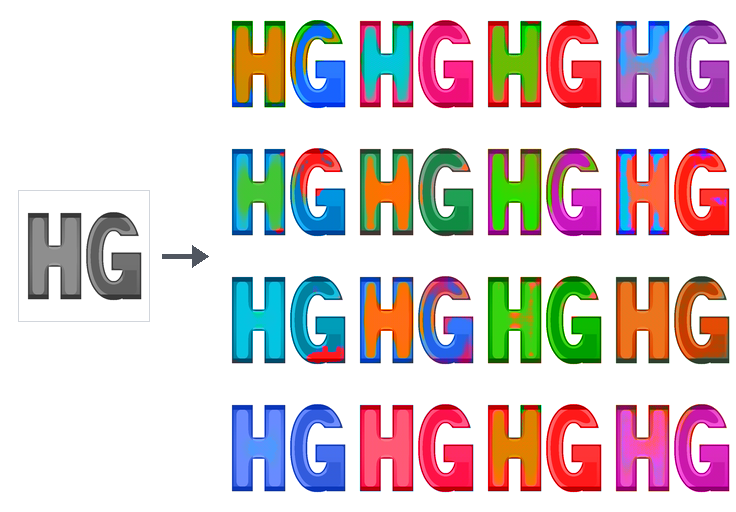
HyperGAN 2.0 logo (single badge · 4×4 colorized grid · grayscale HG source) generated by conditioning the 128×128 HNDL particle colorizer (examples/archive/logos-colorization-128.toml) on a single grayscale HG monogram across 16 particle draws.
HyperGAN 2.0.0a2 is the second alpha release of HG 2: declarative hypergan-model/1 TOML model files, HNDL neural graphs, configurable ParticleGAN primitives, distributed multi-GPU & multi-node training, a typed Python API (import hypergan as hg), a real-time Web Observatory, and standalone privacy-preserving model export.
The engine provides native CUDA acceleration, multi-GPU scaling (2.20× on dual RTX A6000), complete training checkpoints, a Docker-style CLI for managing runs, and packaged production recipes including CIFAR-10 TransGAN and 128×128 / 256×256 Logo Colorization. Lightweight CLI commands (new, validate, ps, status, logs, inspect, tag, runs, queue, prune, rm) do not import PyTorch.
Install
Use Python 3.12+ for the tested training runtime. Lightweight package checks cover Python 3.11–3.14 on Linux, macOS and Windows; the CPU reference profile is tested on Linux.
Install the HyperGAN 2.0.0a2 alpha from PyPI:
python -m venv .venv
. .venv/bin/activate
python -m pip install "hypergan[all]==2.0.0a2"
hypergan --help
python -m hypergan --version
For NVIDIA GPU acceleration:
python -m pip install torch torchvision --index-url https://download.pytorch.org/whl/cu124
python -m pip install "hypergan[all]==2.0.0a2"
Or install from a source checkout:
git clone https://github.com/HyperGAN/HyperGAN.git
cd HyperGAN
python -m venv .venv
. .venv/bin/activate
python -m pip install -e .
hypergan --help
python -m hypergan --version
For local NVIDIA GPU training from source:
python -m pip install torch torchvision --index-url https://download.pytorch.org/whl/cu124
python -m pip install -e ".[all]"
For a CPU correctness fixture, install the CPU PyTorch wheel instead (--index-url https://download.pytorch.org/whl/cpu) and pass --device cpu (or -d cpu). Lightweight CLI commands (new, validate, ps, status, logs, inspect, tag, runs, queue, prune, rm) do not import PyTorch or ParticleGAN.
Quickstart: Project Scaffolding & Starter Templates
Explore starter architectures (dcgan, tiny-transformer, resnet, gaussian-grid) or packaged recipes:
hypergan new --list
hypergan recipes
Scaffold a complete project workspace (hypergan.toml, runs/, and configs/<template>.toml). When --dataset points at an image folder, hypergan new inspects image headers without loading pixels into RAM, auto-detects the resolution (32, 64, 128, or 256) and color mode (RGB or L), and sizes the generator/critic HNDL architectures automatically:
# Image GAN project sized automatically from a folder of images
hypergan new --project my_gan --dataset ./images

# Or specify an explicit template and resolution (or 2D toy fixture on CPU)
hypergan new --project my_transformer --template tiny-transformer --resolution 64
hypergan new --project my_toy --template gaussian-grid --device cpu
Validate the generated format = "hypergan-model/1" configuration (or the project directory itself):
# Fast structural validation (no Torch imports)
hypergan validate my_gan/configs/dcgan.toml
hypergan validate my_gan

# Validate with inline overrides and emit resolved JSON
hypergan validate my_gan/configs/dcgan.toml -s train.batch_size=32 -s optimizer.lr=0.0002 --json

# Verify image dataset inventory/hashes (--data) and construct networks in a worker (--runtime)
hypergan validate my_gan/configs/dcgan.toml --data
hypergan validate my_gan/configs/dcgan.toml --runtime
Training & Docker-Style Live Run Management
Start training from a model .toml file. You can customize the run name (-n), override any config setting (-s KEY=VALUE), or select the execution device (-d):
hypergan train my_gan/configs/dcgan.toml --steps 1000
hypergan train my_gan/configs/dcgan.toml -n exp-lr2e4 -s train.lr=0.0002 -s train.batch_size=32
hypergan train my_toy/configs/gaussian-grid.toml --steps 20 -d cpu --no-server
Every run is registered in a daemonless global registry with a unique Run ID (<short_id>, e.g. 0608d849), a memorable Docker-style Slug (<adj>-<noun>, e.g. fleet-hawk), and an experiment Name / tag. You can inspect and control runs from any working directory using zero arguments (which automatically targets the active or most recent run) or by passing <slug>, <short_id>, <tag>, or <run_dir>:
# List active runs, live GPU VRAM usage, and queued jobs
hypergan ps

# List all historical runs (active, completed, stopped, failed) across the host/workspace
hypergan ps -a
hypergan ps -a --json

# Concise single-screen status summary (progress, speed, ETA, latest losses, best FID, checkpoints)
hypergan status
hypergan status fleet-hawk

# View or follow (-f) formatted training logs (Ctrl-C detaches without stopping training)
hypergan logs -n 50
hypergan logs -f fleet-hawk

# Request an immediate durable checkpoint at the next update boundary
hypergan checkpoint
hypergan checkpoint fleet-hawk

# Gracefully stop an active run (saves a complete checkpoint before exiting)
hypergan stop
hypergan stop fleet-hawk
hypergan stop --all
Post-Run Inspection, Tagging, Resuming, Sampling, Evaluation, Export & Cleanup
Tagging & Inspecting Runs
# Rename or tag a run in its manifest, summary, and global registry
hypergan tag fleet-hawk baseline-dcgan32

# Inspect full run manifest JSON or model architecture/loss/optimizer summary
hypergan inspect baseline-dcgan32
hypergan model baseline-dcgan32
hypergan model baseline-dcgan32 --write   # build on meta device and save RUN/model.json
Resuming Training
Continue a stopped or completed run from its latest checkpoint (or a specific --checkpoint). When lr_floor = 1.0 (constant learning rate), --steps can extend the total step budget seamlessly:
hypergan resume baseline-dcgan32 --steps 2000
Sampling, Evaluation & Standalone Export
# Draw fresh samples from the EMA generator (writes PNG grid for image models or JSON)
hypergan sample baseline-dcgan32 --count 16 --seed 42

# Condition a trained colorizer on a single grayscale input image across 16 particles
hypergan sample logos-colorization-128 --input docs/assets/hg-bw-128.png --count 16 --output hg-grid.png

# Run configured snapshot evaluations (e.g. FID, color moments, sample diversity)
hypergan eval baseline-dcgan32
hypergan evaluate baseline-dcgan32 --metric sample_diversity

# Export a standalone, hash-verified EMA inference bundle (model.pt + model.sha256)
hypergan export baseline-dcgan32 --checkpoint latest -o exported_model.pt
Comparing Runs & Multi-GPU Job Queue
# List and filter runs, or compare metrics across step milestones side-by-side
hypergan runs ls --sort fid
hypergan runs compare baseline-dcgan32 exp-lr2e4
hypergan runs compare baseline-dcgan32 exp-lr2e4 --metric loss_g --at 500,1000,best,latest --json

# Schedule and run experiments sequentially across GPUs
hypergan queue status
hypergan queue add my_gan/configs/dcgan.toml -n job1 --steps 5000 -s train.lr=0.0005 -d gpu0
hypergan queue ls --json
hypergan queue run --once
hypergan queue stop --all
Garbage Collection & Run Removal
# Reclaim disk space by cleaning rebuildable views and compacting routine train events
hypergan prune baseline-dcgan32 --dry-run
hypergan gc baseline-dcgan32
hypergan checkpoints prune baseline-dcgan32 --dry-run

# Delete a run directory and unregister it from the global registry (-f stops if active)
hypergan rm exp-lr2e4
Web Observatory (hypergan view)
With .[web] installed, interactive training runs launch the local Web Observatory on 127.0.0.1:8765 by default. To bind across local network interfaces, pass -b 0.0.0.0 (or --bind 0.0.0.0):
# Start the global runs dashboard and per-run observatory
hypergan view
hypergan view my_gan/runs --port 8765 --open
hypergan view baseline-dcgan32 --port 8765
hypergan view -b 0.0.0.0

# Check status or stop a background dashboard
hypergan view --status
hypergan view --stop
In non-interactive environments (CI, background jobs, AI coding agent sandboxes), viewer autostart is automatically suppressed (can also be disabled via HYPERGAN_NO_SERVER=1 or --no-server).
The Web Observatory provides:
- Global Runs Dashboard (
GET /andGET /api/runs): Live-updating table of all runs with search/status filtering, sortable columns, progress bars, active throughput (steps/sandsamples/s), latest/best FID, hardware topology, batch size, and disk usage. Click a row to open its Observatory and use the per-run controls. - Per-Run Observatory (
GET /runs/<id_or_slug_or_tag>): Real-time learning curves backed by a WebAssembly streaming reducer, retained EMA sample history sliders, snapshot evaluation charts, and an inline Model section showing the ParticleGAN integration, loss metrics, and per-layer HNDL network tables.
See Local browser and streaming API for authentication (--auth token), TLS proxy setup (--public-origin), and the full /api/runs/* and /api/v1/runs/* REST/SSE contract.
Distributed Multi-GPU Scaling
HyperGAN features first-class distributed multi-GPU and multi-node training:
- Zero-TOML CLI flags:
--devices 0,1,--nodes 2,--strategy gradient_allreduce. - Memory-contiguous gradient bucketing and barrier elimination.
- Documented 2.20× scaling speedup (110.2% efficiency) on dual NVIDIA RTX A6000 at
batch_size >= 256, cutting per-GPU VRAM in half (see Scaling Benchmark).
Python Developer API (import hypergan as hg) & Environment Variables
Everything available in the CLI is exposed as a clean, functional Python API at the top level of hypergan (lazy-loaded so importing hypergan never imports PyTorch until training or sampling runs):
import hypergan as hg


def main():
    # 1. Scaffold or load a model configuration
    info = hg.new(project="my_gan", template="dcgan", data_dir="./images", device="cpu")
    model = hg.load(info["recipe_path"])
    model = hg.override(model, {"train.steps": 100, "train.batch_size": 16})
    warnings = hg.validate(model)

    # 2. Train and inspect runs by slug, short ID, custom tag, or path
    run = hg.train(model, "my_gan/runs/exp1", steps=100)
    active_and_all = hg.ps(all_runs=True)
    all_runs = hg.list_runs()

    st = hg.status("exp1")                  # typed RunStatus with step, status, latest_metrics, best_fid, etc.
    log_lines = hg.logs("exp1", tail=20)    # list[str] of formatted log lines (silent on stdout)
    manifest = hg.inspect("exp1")           # dict of the run's manifest.json
    hg.tag("exp1", "my-best-gan")

    # 3. Sample, export, and reload standalone generator
    sample = hg.sample("my-best-gan", count=8, seed=42)
    bundle_path = hg.export("my-best-gan", checkpoint="latest")
    generator = hg.load_bundle(bundle_path, device="cuda")    # nn.Module LoadedGenerator
    samples = generator.sample(count=16, seed=42)
    walk = generator.interpolate(seed_a=100, seed_b=200, steps=10, mode="slerp")

    # 4. Clean up
    hg.prune("my-best-gan", dry_run=True)
    hg.rm("my-best-gan")


# Training starts worker processes that re-import this script, so keep the
# work under the main guard.
if __name__ == "__main__":
    main()
hg.train(model) without a run directory starts a fresh <runs_root>/<stem>-<adj>-<noun> run on every call, as hypergan train does (an overridden model still uses its file's workspace and stem). Pass name= to name the directory instead; if that directory already holds a different configuration, the run starts in a sibling <name>-<adj>-<noun> directory, as the CLI does.
Environment Variables
| Variable | Purpose |
|---|---|
HYPERGAN_HOME / HYPERGAN_STATE_DIR |
Override the directory used for the global run registry (runs.json and registry.lock). Defaults to ~/.local/share/hypergan (or $XDG_DATA_HOME/hypergan). Setting either variable isolates run discovery to that state directory. |
HYPERGAN_WORKSPACE |
Explicitly point to a workspace hypergan.toml file (or its parent directory) when running outside the workspace directory tree. |
HYPERGAN_QUEUE_FILE |
Override the path to the multi-GPU job queue state file (defaults to <workspace>/.hypergan/queue.json or ./.hypergan/queue.json). |
HYPERGAN_DEBUG |
Set to 1 (true/yes/on) to print the full traceback when a CLI command fails (same as hypergan --debug). |
HYPERGAN_VIEWER_DEV |
Set to 1 (true/yes/on) to serve Web Observatory frontend assets fresh from disk on every request with auto-reload. |
Configure the recipe
hypergan new generates format = "hypergan-model/1" TOML model files ([data], [prior], [networks.generator], [networks.discriminator], [[losses]], [train], [metrics], [evaluations.<id>], [checkpoints], [sampling]). During validation and training, HyperGAN lowers the model file into the engine's resolved numerical recipe.
ParticleGAN supplies the released GAN formulation and its selected defaults for loss, learning rates, hyperparameters, normalization and optimizers. HyperGAN consumes its public recipe and owns networks, data, execution, checkpoints and metrics. See the integration boundary. Networks are declared in HNDL (source = "..." or hndl = "file.hndl") or importable Python modules (module = "pkg.mod:Class"), with full source recorded in every run.
See:
- Configuration and component contracts and the paired synthetic example
- Image data and preprocessing
- Recovery and compatibility and Run observation contract
- Public execution profiles, Execution profiles and preflight, Replicated run service, CUDA/NCCL workers, and Bounded previews and progress
Development and migration
The map/reduce storage and shared Rust reducers now live in Foldlite DB.
This branch requires foldlitedb>=0.1.2,<0.2:
python -m pip install "foldlitedb>=0.1.2,<0.2"
python -m pip install -e '.[dev,web]'
CI accepts the repository variable FOLDLITEDB_SOURCE as a wheel URL or a pip
source reference pinned to an exact revision. Without that variable it uses the
configured package index, which requires Foldlite DB to have been released.
See the Foldlite integration and cache contract.
Install .[dev,train,image,web] in the tested runtime environment, then run python -m pytest for CPU and lightweight correctness tests. That default selection deselects the heavy marker, which gates the tests that start real subprocesses, multi-rank jobs and worker services; run those deliberately with python -m pytest -m heavy. The default run covers tests/foundation, tests/reference, tests/unit, tests/playbooks, tests/e2e and tests/e2e_integration; the viewer, browser, reducer and CUDA tiers need extra dependencies or hardware and are run by path. tests/README.md lists every tier and how to run it; see also CUDA execution and validation and CI and PyPI releases. All guides are indexed in docs/README.md, and CONTRIBUTING.md covers the pull-request workflow.
Historical HyperGAN code and experiments are preserved in archive tags. Legacy configurations and checkpoints require their archived runtime; see migration notes, preservation evidence, the September 2026 execution ledger, and resurrection plan.
3 maintainers


Metadata
3 maintainers
Release files for hypergan 2.0.0a2
For a detailed explanation of source distributions (sdists) and built distributions (wheels), please see the package formats documentation.
Source distribution (sdist)
| File | Size | Uploaded | Provenance | Actions |
|---|---|---|---|---|
| hypergan-2.0.0a2.tar.gz | 1.7 MB | With provenance | Details for hypergan-2.0.0a2.tar.gz |
Built distribution (wheel)
| File | Interpreter | ABI | Platform | Actions Reset |
|---|---|---|---|---|
| hypergan-2.0.0a2-py3-none-any.whl | Python 3 | none | any | Details for hypergan-2.0.0a2-py3-none-any.whl |
Total release size: 2.5 MB
Release files / hypergan-2.0.0a2.tar.gz
| Download URL | hypergan-2.0.0a2.tar.gz |
|---|---|
| Size | 1.7 MB |
| Tags | Source |
|
SHA-256 checksum How to use checksums |
73ba649b05e14edcf21a2493d85d3596314650d66d9e28350d38d09dd076c203
|
|
BLAKE2b-256 checksum How to use checksums |
c225542204e8bc5664f2ac7225bb54deab94d6732cee9995b9b3160ef876b144
|
| Upload date | |
|
Uploaded using Trusted Publishing? What is trusted publishing? |
Yes |
| Uploaded via |
twine/7.0.0 CPython/3.13.16
|
Provenance
Provenance describes where a file came from. On PyPI, provenance is shared via attestations, which provide a verifiable record of the build or publishing details. View details, limitations and caveats.


PyPI Publish Attestation
PyPI verified that this artifact, at this checksum, originated from the publisher listed below.
Signed by GitHub Actions, verified by PyPI on Nov 6, 2026.
Transparency logRelease files / hypergan-2.0.0a2-py3-none-any.whl
| Download URL | hypergan-2.0.0a2-py3-none-any.whl |
|---|---|
| Size | 838.2 kB |
| Tags | Python 3 |
|
SHA-256 checksum How to use checksums |
4e0b0ef1566da80e91a92dc93c642de48a1776e54c38405ca1de6624cecbd25c
|
|
BLAKE2b-256 checksum How to use checksums |
0f8ec8dd5615b5f6bf84ce9f64a769e624110351d744800d596fd10b5d2979a5
|
| Upload date | |
|
Uploaded using Trusted Publishing? What is trusted publishing? |
Yes |
| Uploaded via |
twine/7.0.0 CPython/3.13.16
|
Provenance
Provenance describes where a file came from. On PyPI, provenance is shared via attestations, which provide a verifiable record of the build or publishing details. View details, limitations and caveats.
PyPI Publish Attestation
PyPI verified that this artifact, at this checksum, originated from the publisher listed below.
Signed by GitHub Actions, verified by PyPI on Nov 6, 2026.
Transparency logSecurity for hypergan 2.0.0a2
Provenance
Provenance describes where a file came from. On PyPI, provenance is shared via attestations, which provide a verifiable record of the build or publishing details. View details, limitations and caveats.
Full provenance
Both files in this release have been uploaded with provenance metadata.
Attestation for hypergan-2.0.0a2.tar.gz
PyPI Publish Attestation
PyPI verified that this artifact, at this checksum, originated from the publisher listed below.
Signed by GitHub Actions, verified by PyPI on Nov 6, 2026.
Transparency logA note on package security
PyPI is a repository for distributing packages, not a service for auditing them. While third-party security researchers and our staff do their best to detect and remove malicious packages, PyPI cannot guarantee the quality, security or suitability of any given package.
To learn more about protecting yourself from malicious actors, visit our package security documentation.