
A graph based functional execution library. Connect functions arbitrarily through a unique API
Verified details
These details have been verified by PyPIProject links
GitHub Statistics
Maintainers

Project description






Hyperway
A Python graph based functional execution library, with a unique API.
Hyperway is a graph based functional execution library, allowing you to connect functions arbitrarily through a unique API. Mimic a large range of programming paradigms such as procedural, parallel, or aspect-oriented-programming. Build B-trees or decision trees, circuitry or logic gates; all with a simple wiring methodology.
📦 Install
Hyperway has no enforced dependencies.
Install via pip:
pip install hyperway
If you want to render graphs, ensure graphviz is installed. This can be done through your own methods, or by installing the optional dependency:
pip install hyperway[graphviz]
🚀 Quick Example
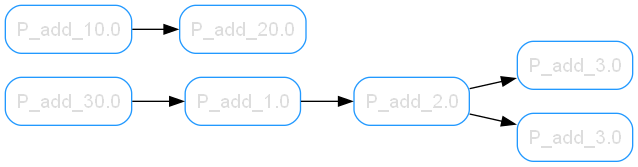
For a quick example of the important parts, let's connect some functions and run the chain:
import hyperway
from hyperway.tools import factory as f

# Store
g = hyperway.Graph()

# Connect
first_connection = g.add(f.add_10, f.add_20)
# More connections
many_connections = g.connect(f.add_30, f.add_1, f.add_2, f.add_3)
# Cross connect
compound_connection = g.add(many_connections[1].b, f.add_3)

# Prepare to run
stepper = g.stepper(first_connection.a, 10)

# Run a step
concurrent_row = stepper.step()
[!NOTE] The stepper yields rows of
(Unit, ArgsPack)tuples representing the next functions to execute. Continue callingstep()until no rows remain. Final results accumulate instepper.stash.
That's it! You're a graph engineer.
Render this graph (if graphviz is installed):
g.write('intro-example', directory='renders', direction='LR')
Getting Started
Hyperway aims to simplify graph based execution chains, allowing a developer to use functional graphs without managing the connections.
[!TIP] TL;DR: The
Unit(or node) is a function connected to other nodes throughConnections. TheStepperwalks theGraphof all connections.
Glossary
The Hyperway API aims to simplify standard graph-theory terminology, by providing more intuitive names for common graph components. Developers and mathematicians can extend the base library with preferred terms, without changing the core functionality:
class Vertex(Unit):
    """Alias for Unit (Node)"""
    pass
Hyperway components, and their conventional siblings:
| Hyperway | Graph Theory | Description |
|---|---|---|
Graph |
Graph, or Tree | A flat dictionary to hold all connections |
Unit |
Node, Point, or Vertex | A function on a graph, bound through edges |
Connection |
Edge, link, or Line | A connection between Units |
Stepper |
Walker, or Agent | A graph walking tool |
Graph
The Graph is a fancy defaultdict of tuples, used to store connections:
import hyperway

g = hyperway.Graph()
There are a few convenience methods, such as add() and connect(), but fundamentally it's a dictionary of connections.
All Connections are stored within a single Graph instance. We can consider the graph as a dictionary register of all associated connections.
from hyperway.graph import Graph, add
from hyperway.nodes import as_units
from hyperway.tools import factory as f

g = Graph()
unit_a, unit_b = as_units(f.add_2, f.mul_2)

connection = add(g, unit_a, unit_b)
Under the hood, The graph is just a defaultdict and doesn't do much.
Connections (Edges)
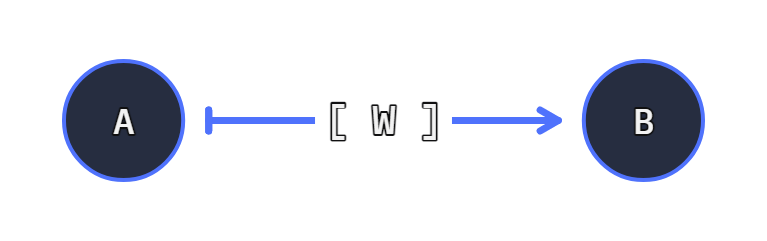
A Connection binds two functions (or Unit objects) together. It represents an edge between two nodes.
A connection needs a minimum of two nodes:
from hyperway.edges import make_edge

c = make_edge(f.add_1, f.add_2)
# <Connection>
Create
We can create a connection in two ways:
Hyperway
The Graph has an add() method to create a connection between two functions:
import hyperway
from hyperway.tools import factory as f

g = hyperway.Graph()

connection = g.add(f.add_1, f.add_2)
# <Connection>
Functional
Alternatively we can use the make_edge function directly (without a graph):
from hyperway.edges import make_edge
from hyperway.tools import factory as f
c = make_edge(f.add_1, f.add_2)
# <Connection>
Run a Connection
We can run a connection, calling the chain of two nodes. Generally a Connection isn't used outside a graph unless we're playing with it.
[!IMPORTANT] A
Connectionhas two processing steps due to a potential wire function. Consider usingpluck()to run both steps.
A standard call to a connection will run node a (the left side):
# connection = make_edge(f.add_1, f.add_2)
>>> value_part_a = connection(1) # call A-side `add_1`
2.0
Then process the second part b (providing the value from the first call):
>>> connection.process(value_part_a) # call B-side `add_2`
4.0
Alternatively use the pluck() method.
Plucking
We can "pluck" a connection (like plucking a string) to run the functions with any arguments:
from hyperway.tools import factory as f
from hyperway.edges import make_edge

c = make_edge(f.add_1, f.add_2)
# Run side _a_ (`add_1`) and _b_ (`add_2`) with our input value.

c.pluck(1)    # 4.0 == 1 + 1 + 2
c.pluck(10)   # 13.0 == 10 + 1 + 2
The pluck() executes both nodes and the optional wire function, in the expected order. Fundamentally a connection is self-contained and doesn't require a parent graph.
Wire Function
An optional wire function exists between two nodes
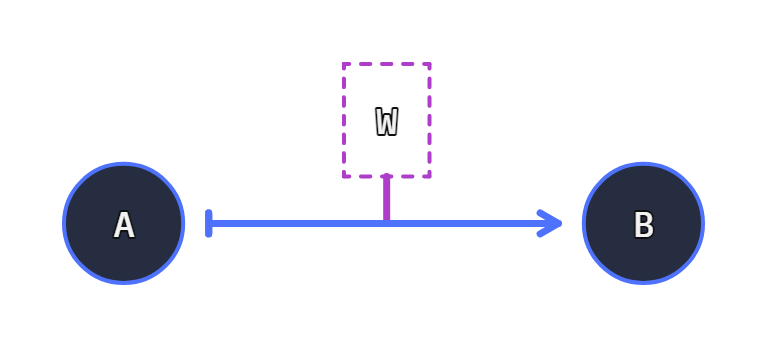
The Connection can have a function existing between its connected Units, allowing the alteration of the data through transit (whilst running through a connection):
from hyperway.tools import factory as f
from hyperway.edges import make_edge, wire

c = make_edge(f.add_1, f.add_2, through=wire(f.mul_2))
# <Connection(Unit(func=P_add_1.0), Unit(func=P_add_2.0), through="P_mul_2.0" name=None)>
When using the connection side A (the f.add_1 function), the wire function wire(f.mul_2) can inspect the values as they move to f.add_2.
It's important to note Hyperway is left-associative. The order of operation computes linearly:
assert c.pluck(1) == 6   # (1 + 1) * 2 + 2 == 6
assert c.pluck(10) == 24 # (10 + 1) * 2 + 2 == 24
Why use a wire function?
It's easy to argue a wire function is a node, and you can implement the wire function without this connection tap.
- Wire functions are optional: node to node connections are inherently not optional.
- Removing a wire function does not remove the edge: Edges are persistent to the graph
- Wire functions may be inert (e.g. just logging); Nodes cannot be inert as they must be bound to edges.
Fundamentally a wire function exists for topological clarity and may be ignored.
make_edge can accept the wire function. It receives the concurrent values transmitting through the attached edge:
from hyperway.edges import make_edge
from hyperway.packer import argspack

import hyperway.tools as t
f = t.factory

def doubler(v, *a, **kw):
    # The wire function `through` _doubles_ the given number.
    # response with an argpack.
    return argspack(v * 2, **kw)


c = make_edge(f.add_1, f.add_2, through=doubler)
# <Connection(Unit(func=P_add_1.0), Unit(func=P_add_2.0), name=None)>

c.pluck(1)  # 6.0
c.pluck(2)  # 8.0
c.pluck(3)  # 10.0
[!IMPORTANT] Wire functions must return an
ArgsPackviaargspack(). Returning raw values will break the execution chain. See Extras forargspackdetails.
The wire function is the reason for a two-step process when executing connections:
# Call Node A: (+ 1)
c(4)
5.0

# Call Wire + B: (double then + 2)
c.process(5.0)
12.0
Or a single pluck():
c.pluck(4)
12.0
Self Reference
A connection A -> B may be the same node, performing a loop or self-referencing node connection.
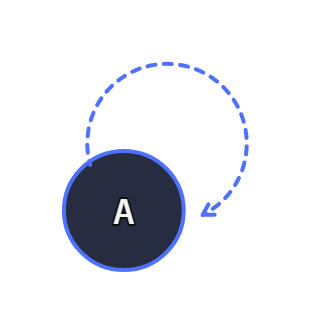
We can use the as_unit function, and reference the same unit on the graph:
# pre-define the graph node wrapper
u = as_unit(f.add_2)
# Build an loop edge
e = make_edge(u, u)

g = Graph()
g.add_edge(e)

# Setup the start from the unit (side A)
g.stepper(u, 1)

# Call the stepper forever.
g.step()
g.step()
...
# 3, 5, 7, 9, 11, ...
Functions
A function is our working code. We can borrow operator functions from the tools:
from hyperway.tools import factory as f
add_10 = f.add_10
# functools.partial(<built-in function add>, 10.0)
add_10(1)
# 11.0
add_10(14)
# 24.0
Units (Nodes)
The Unit (or node) is a function connected to other nodes through a Connection. A Unit is a wrapper for any python function. Everything in the graph (and in a Connection) is a Unit.
When we create a new connection, it automatically wraps the given functions as Unit types:
c = make_edge(f.mul_3, f.add_4)
c.a
# <Unit(func=P_mul_3.0)>
c.b
# <Unit(func=P_add_4.0)>
A Unit has additional methods used by the graph tools, such as the process method:
# Call our add_4 function:
>>> c.b.process(1)
5.0
A new unit is very unique. Creating a Connection with the same function for both sides a and b, will insert two new nodes:
c = make_edge(f.add_4, f.add_4)
c.pluck(4)
12.0
We can cast a function as a Unit before insertion, allowing the re-reference to existing nodes.
Very Unique Unit
[!IMPORTANT] A
Unitis unique, even when using the same function:Unit(my_func)!=Unit(my_func)
If you create a Unit using the same function, this will produce two unique units:
unit_a = as_unit(f.add_2)
unit_a_2 = as_unit(f.add_2)
assert unit_a != unit_a_2  # Not the same.
Attempting to recast a Unit, will return the same Unit:
unit_a = as_unit(f.add_2)
unit_a_2 = as_unit(unit_a) # unit_a is already a Unit
assert unit_a == unit_a_2  # They are the same
With this we create a linear chain of function calls, or close a loop that will run forever.
Linear (not closed)
Generally when inserting functions, a new reference is created. This allows us to use the same function at different points in a chain:
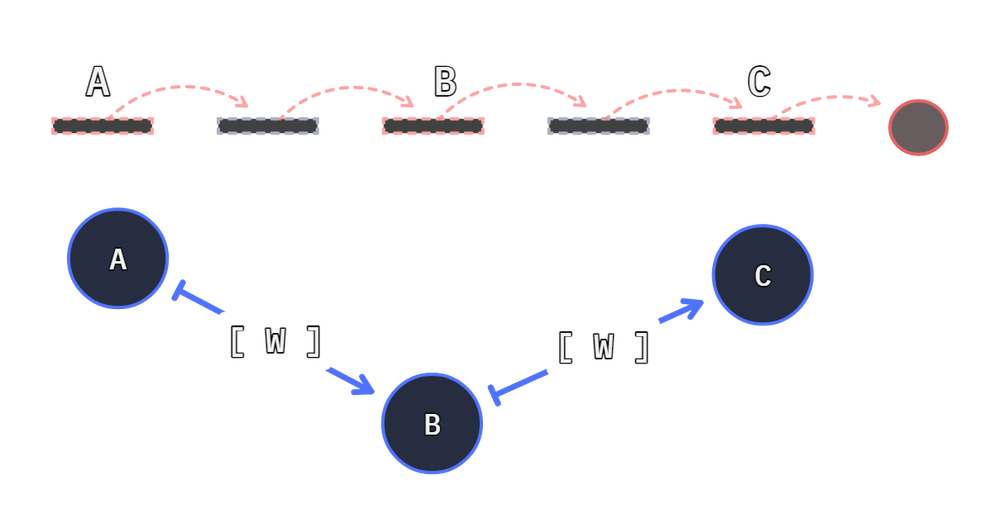
a = f.add_1
b = f.add_2
c = f.add_2

# a -> b -> c | done.
connection_1 = make_edge(a, b)
_ = make_edge(b, c)
_ = make_edge(c, a)
Loop (closed)
Closing a path produces a loop. To close a path we can reuse the same Unit at both ends of our path.
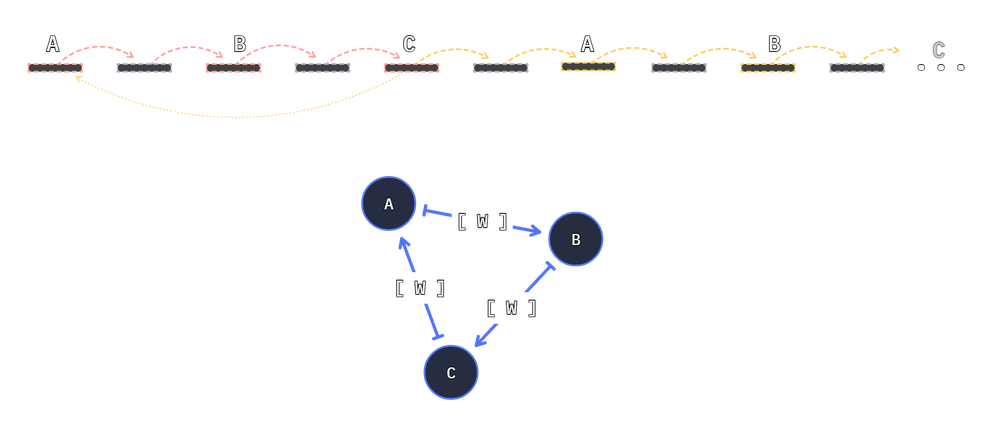
To ensure a node is reused when applied, we pre-convert it to a Unit:
a = as_unit(f.add_1) # sticky reference.
b = f.add_2
c = f.add_2

# a -> b -> c -> a ... forever
connection_1 = make_edge(a, b)
_ = make_edge(b, c)
_ = make_edge(c, a)
👣 Stepper
The Stepper run units and discovers connections through the attached Graph. It runs concurrent units and spools the next callables for the next step.
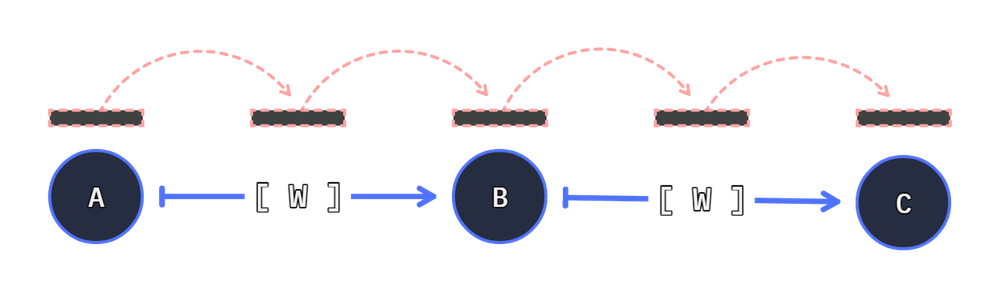
from hyperway.graph import Graph
from hyperway.tools import factory as f

g = Graph()
a_connections = g.connect(f.add_10, f.add_20, f.add_30)
b_connections = g.connect(f.add_1, f.add_2, f.add_3)
c_connection = g.add(b_connections[1].b, f.add_3)

first_connection_first_node = a_connections[0].a
stepper = g.stepper(first_connection_first_node, 10)
# <stepper.StepperC object at 0x000000000258FEB0>

concurrent_row = stepper.step()
# rows. e.g: ((<Unit(func=my_func)>, <ArgsPack(*(1,), **{})>),)
For each step() call, we yield a step. When iterating from first_connection_first_node (f.add_10), the stepper will pause half-way through our call. The next step will resolve the value and prepare the next step:
# From above:
# g.stepper(first_connection_first_node, 10)

stepper.step()
(
    # Partial edge (from add_10 to add_20), with the value "20.0" (10 add 10)
    (<edges.PartialConnection>, <ArgsPack(*(20.0,), **{})>),
)


stepper.step()
(
    # Previous step complete; input(10), add(10), then add(20)
    (<Unit(func=P_add_30.0)>, <ArgsPack(*(40.0,), **{})>),
)
We initiated a stepper at our preferred node stepper = g.stepper(first_connection_first_node, 10). Any subsequent stepper.step() calls push the stepper to the next execution step.
Each iteration returns the next thing to perform and the values from the previous unit call.
# Many (1) rows to call next.
(
    (<Unit(func=P_add_30.0)>, <ArgsPack(*(40.0,), **{})>),
)
We see one row, with f.add_30 as the next function to call.
run_stepper Function
The stepper can run once (allowing us to loop it), or we can use the built-in run_stepper function, to walk the nodes until the chain is complete
from hyperway.graph import Graph
from hyperway.tools import factory as f

from hyperway.packer import argspack
from hyperway.stepper import run_stepper


g = Graph()
connections = g.connect(f.add_10, f.add_20, f.add_30)

# run until exhausted
result = run_stepper(g, connections[0].a, argspack(10))
Results
The value of the stepper is concurrent. When a path ends, the value is stored in the stepper.stash.
When executing node steps, the result from the call is given to the next connected unit.
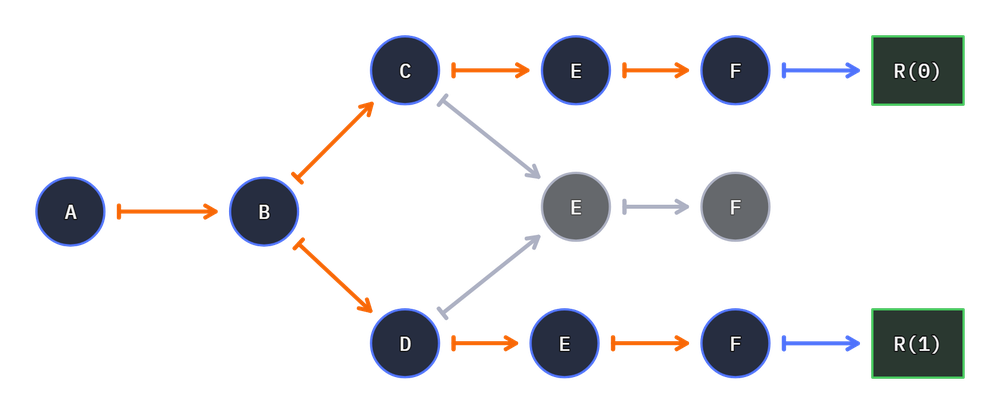
If two nodes call to the same destination node, this causes two calls of the next node:
           +4
i  +2  +3       print
           +5
With this layout, the print function will be called twice by the +4 and +5 node. Two calls occur:
          10
 1  3  6      print
          11

# Two results
print(10) # from path: 1 → +2 → +3 → +4 → 10
print(11) # from path: 1 → +2 → +3 → +5 → 11
This is because there are two connections to the print node, causing two calls.
Result Concatenation (Merge Nodes)
Use merge nodes to action one call to a node, with two results.
- Set
merge_node=Trueon target node - Flag
concat_aware=Trueon the stepper
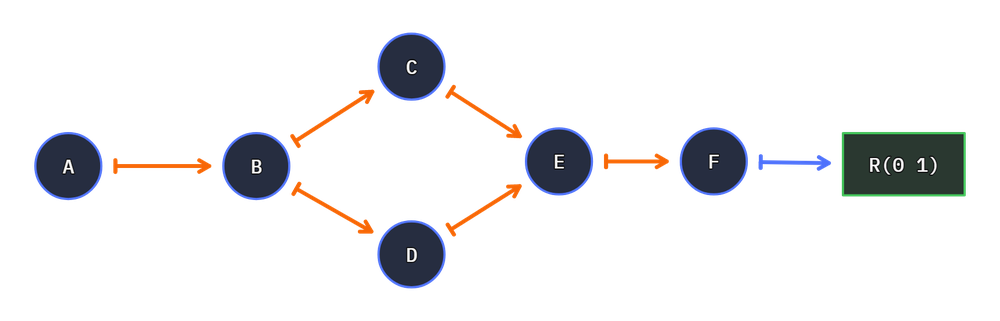
g = Graph()
u = as_unit(print)
u.merge_node = True

s = g.stepper()
s.concat_aware = True

s.step()
...
When processing a print merge-node, one call is executed when events occur through multiple connections during one step:
         10
1  3  6      print
         11

print(10, 11) # resultant
Results Explode!
[!IMPORTANT] Every fork within the graph will yield a new path.
A path defines the flow of a stepper through a single processing chain. A function connected to more than one function will fork the stepper and produce a result per connection.
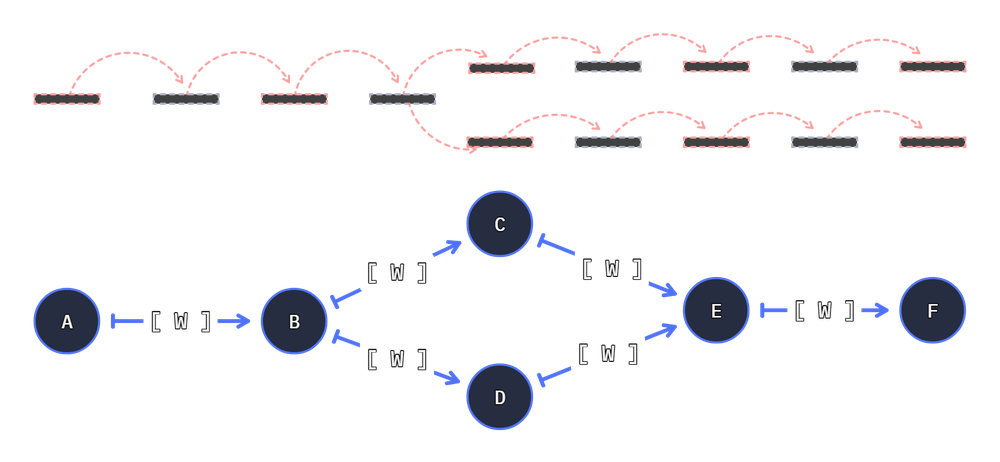
For example a graph with a a split path will yield two results:
from hyperway import Graph, as_units
from hyperway.tools import factory as f

g = Graph()

split, join = as_units(f.add_2, f.add_2)

cs = g.connect(f.add_1, split)
g.connect(split, f.add_3, join)
g.connect(split, f.add_4, join)
g.connect(join, f.add_1)
If graphviz is installed, The graph can be rendered with graph.write():
# Continued from above
g.write('double-split', direction='LR')

Connecting nodes will grow the result count. For example creating in two exits nodes will double the result count
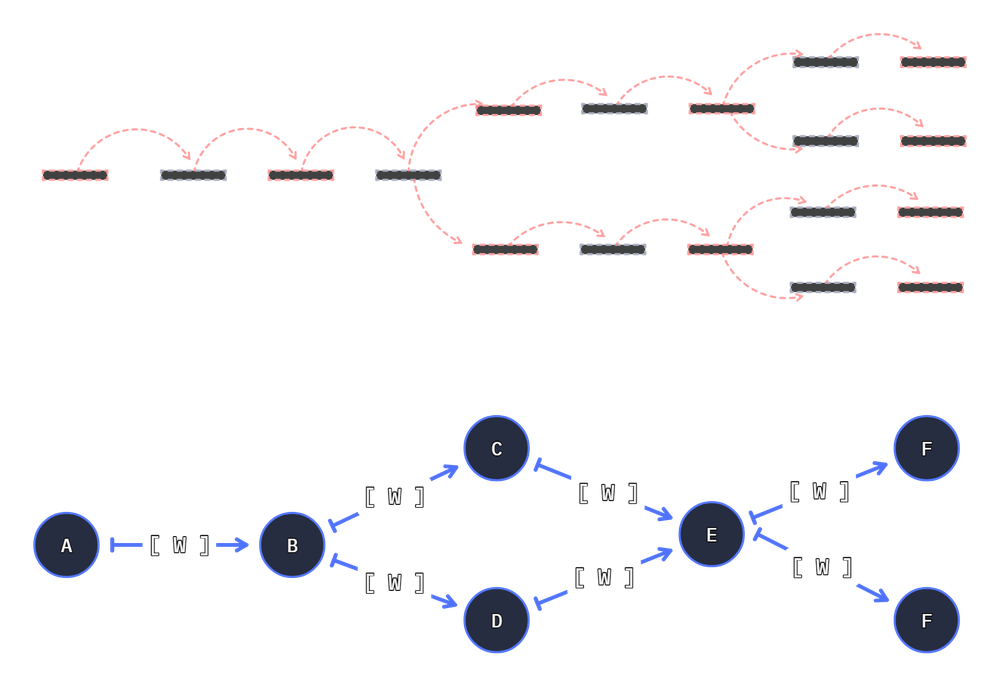
To model this, we can extend the above code with an extra connection: g.connect(join, f.sub_1):
# same as above
from hyperway import Graph, as_units
from hyperway.tools import factory as f

g = Graph()

split, join = as_units(f.add_2, f.add_2)

cs = g.connect(f.add_1, split)
g.connect(split, f.add_3, join)
g.connect(split, f.add_4, join)
g.connect(join, f.add_1)

# connect another function
g.connect(join, f.sub_1)

g.write('double-double-split', direction='LR')

[!NOTE] The count of results is a product of the node count - and may result exponential paths if unmanaged. Hyperway can and will execute this forever.
Wire functions have been removed for clarity
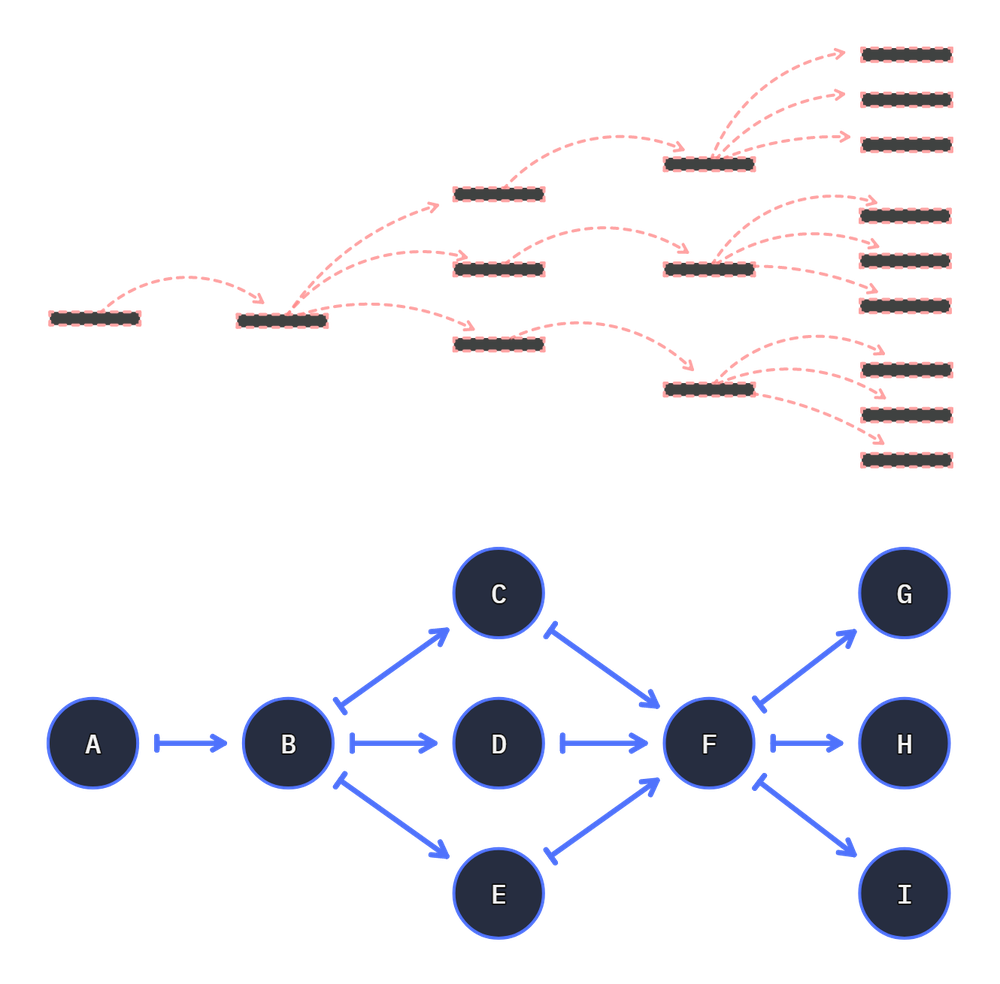
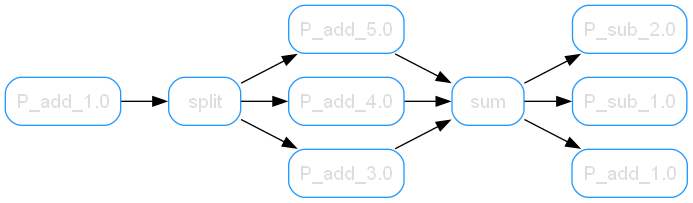
from hyperway import Graph, as_unit

g = Graph()

split = as_unit(f.add_2, name='split')
join_a = as_unit(f.add_2)

# sum([1,2,3]) accepts an array - so we merge the args for the response.
join = as_unit(lambda *x: sum(x), name='sum')

cs = g.connect(f.add_1, split)
g.connect(split, f.add_3, join)
g.connect(split, f.add_4, join)
g.connect(split, f.add_5, join)

g.connect(join, f.add_1)
g.connect(join, f.sub_1)
g.connect(join, f.sub_2)
g.write('triple-split', direction='LR')
Order of Operation
[!IMPORTANT] Hyperway is left-associative, Therefore PEMDAS/BODMAS will not function as expected - graph chains execute linearly.
The order of precedence for operations occurs through sequential evaluation (from left to right) similar to C. Each operation is executed as it is encountered, without regard to the traditional precedence of operators.
| Standard order precedence | Hyperway left-association |
|---|---|
# BODMAS computes * first
 1 + 1 * 2 + 2 == 5
10 + 1 * 2 + 2 == 14
|
# left-to-right computes linearly
( (1 + 1)  * 2) + 2 == 6
( (10 + 1) * 2) + 2 == 24
|
# example sequential evaluation
from hyperway.tools import factory as f
from hyperway.edges import make_edge, wire

c = make_edge(f.add_1, f.add_2, through=wire(f.mul_2))

assert c.pluck(1) == 6   # (1 + 1) * 2 + 2 == 6
assert c.pluck(10) == 24 # (10 + 1) * 2 + 2 == 24
Topology
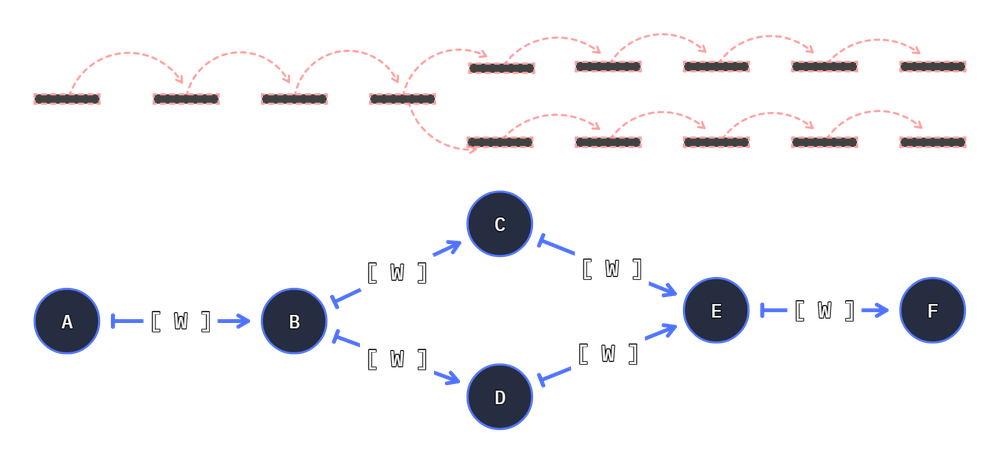
- Graph: The Graph is a thin and dumb dictionary, maintaining a list of connections per node.
- Node: The Node is also very terse, fundamentally acting as a thin wrapper around the user given function, and exposes a few methods for on-graph executions.
- Edges: Edges or Connections are the primary focus of this version, where a single
Connectionis bound to two nodes, and maintains a wire-function. - Stepper: The Stepper performs most of the work for interacting with Nodes on a graph through Edges.
Breakdown
We push Node to Node Connections into the Graph dictionary. The Connection knows A, B, and potentially a Wire function.
When running the graph we use a Stepper to processes each node step during iteration, collecting results of each call, and the next executions to perform.
We walk through the graph using a Stepper. Upon a step we call any rows of waiting callables. This may be the users first input and will yield next callers and the result.
The Stepper should call each next caller with the given result. Each caller will return next callers and a result for the Stepper to call again.
In each iteration the callable resolves one or more connections. If no connections return for a node, The execution chain is considered complete.
Understanding the Graph
The Graph is purposefully terse. Its build to be as minimal as possible for the task. In the raw solution the Graph is a defaultdict(tuple) with a few additional functions for node acquisition.
The graph maintains a list of ID to Connection set.
{
  ID: (
        Connection(to=ID2),
    ),
  ID2: (
        Connection(to=ID),
    )
}
Core Connection Knowledge
A Connection bind two functions and an optional wire function.
A -> [W] -> B
When executing the connection, input starts through A, and returns through B. If the wire function exists it may alter the value before B receives its input values.
Units and Nodes
A Unit represents a thing on the graph, bound to other units through connections.
def callable_func(value):
    return value * 3

as_unit(callable_func)
A unit is one reference
unit = as_unit(callable_func)
unit2 = as_unit(callable_func)

assert unit != unit2
Extras
argspack
The argspack simplifies the movement of arguments and keyword arguments for a function.
we can wrap the result as a pack, always ensuring its unpackable when required.
akw = argspack(100)
akw.a
(100, )

akw = argspack(foo=1)
akw.kw
{ 'foo': 1 }
Project Goal
Although many existing libraries cater to graph theory, they often require a deep understanding of complex terminology and concepts. As an engineer without formal training in graph theory, these libraries are challenging. Hyperway is the result of several years of research aimed at developing a simplified, functional, graph-based execution library with a minimal set of core features.
I'm slowly updating it to include the more advanced future features, such as hyper-edges and connection-decisions, bridging the gap between academic graph theory and practical application, providing developers with a low-level runtime that facilitates functional execution without the need for specialized knowledge.
Areas of Interest
- https://graphclasses.org/
- https://houseofgraphs.org/
- https://en.wikipedia.org/wiki/Cyber%E2%80%93physical_system
- https://en.wikipedia.org/wiki/Signal-flow_graph
- https://resources.wolframcloud.com/FunctionRepository/resources/HypergraphPlot
- https://www.lancaster.ac.uk/stor-i-student-sites/katie-howgate/2021/04/29/hypergraphs-not-just-a-cool-name/
Further Reading
- TensorFlow: Introduction to Graph and
tf.function - Wiki: Extract, transform, load
- https://docs.dgl.ai/en/2.0.x/notebooks/sparse/hgnn.html | https://github.com/iMoonLab/DeepHypergraph/blob/main/README.md
- https://distill.pub/2021/gnn-intro/
- https://renzoangles.net/gdm/
Other Libraries
Links
Project details
Verified details
These details have been verified by PyPIProject links
GitHub Statistics
Maintainers
Release history Release notifications | RSS feed


Download files
Download the file for your platform. If you're not sure which to choose, learn more about installing packages.
Source Distribution
Built Distribution
Filter files by name, interpreter, ABI, and platform.
If you're not sure about the file name format, learn more about wheel file names.
Copy a direct link to the current filters
File details
Details for the file hyperway-1.0.7.tar.gz.
File metadata
- Download URL: hyperway-1.0.7.tar.gz
- Upload date:
- Size: 79.9 kB
- Tags: Source
- Uploaded using Trusted Publishing? Yes
- Uploaded via: twine/6.1.0 CPython/3.13.7
File hashes
| Algorithm | Hash digest | |
|---|---|---|
| SHA256 |
c9d0b716ae2022add617bbc7ffef4f705795118f91d8d93dc9117f2c0d9e2922
|
|
| MD5 |
b23266f6e67fd85050ade187bc3aec14
|
|
| BLAKE2b-256 |
60de4782696c5a81dc6592a348f93e3fad3771f149130e7dc90751f164f5e0a0
|
Provenance
The following attestation bundles were made for hyperway-1.0.7.tar.gz:
Publisher:
python-publish.yml on Strangemother/python-hyperway
-
Statement:
-
Statement type:
https://in-toto.io/Statement/v1 -
Predicate type:
https://docs.pypi.org/attestations/publish/v1 -
Subject name:
hyperway-1.0.7.tar.gz -
Subject digest:
c9d0b716ae2022add617bbc7ffef4f705795118f91d8d93dc9117f2c0d9e2922 - Sigstore transparency entry: 685382463
- Sigstore integration time:
-
Permalink:
Strangemother/python-hyperway@9c4800efc18962f942575ab7ceb3cbc91ebe50c3 -
Branch / Tag:
refs/tags/v1.0.7 - Owner: https://github.com/Strangemother
-
Access:
public
-
Token Issuer:
https://token.actions.githubusercontent.com -
Runner Environment:
github-hosted -
Publication workflow:
python-publish.yml@9c4800efc18962f942575ab7ceb3cbc91ebe50c3 -
Trigger Event:
release
-
Statement type:
File details
Details for the file hyperway-1.0.7-py3-none-any.whl.
File metadata
- Download URL: hyperway-1.0.7-py3-none-any.whl
- Upload date:
- Size: 30.9 kB
- Tags: Python 3
- Uploaded using Trusted Publishing? Yes
- Uploaded via: twine/6.1.0 CPython/3.13.7
File hashes
| Algorithm | Hash digest | |
|---|---|---|
| SHA256 |
d6c4f0b73d0af1cc9e7be304309406bea2f4bc4231b1fcd22b01f09e86f9c4f7
|
|
| MD5 |
055b0f468030b7b93d76db6d7e1c558e
|
|
| BLAKE2b-256 |
f4f0720954d019a35f82bcdff0e21cce7de2affab4b336cd8d72473ce0bd2c06
|
Provenance
The following attestation bundles were made for hyperway-1.0.7-py3-none-any.whl:
Publisher:
python-publish.yml on Strangemother/python-hyperway
-
Statement:
-
Statement type:
https://in-toto.io/Statement/v1 -
Predicate type:
https://docs.pypi.org/attestations/publish/v1 -
Subject name:
hyperway-1.0.7-py3-none-any.whl -
Subject digest:
d6c4f0b73d0af1cc9e7be304309406bea2f4bc4231b1fcd22b01f09e86f9c4f7 - Sigstore transparency entry: 685382464
- Sigstore integration time:
-
Permalink:
Strangemother/python-hyperway@9c4800efc18962f942575ab7ceb3cbc91ebe50c3 -
Branch / Tag:
refs/tags/v1.0.7 - Owner: https://github.com/Strangemother
-
Access:
public
-
Token Issuer:
https://token.actions.githubusercontent.com -
Runner Environment:
github-hosted -
Publication workflow:
python-publish.yml@9c4800efc18962f942575ab7ceb3cbc91ebe50c3 -
Trigger Event:
release
-
Statement type:






