
A tool for doing hypothesis testing

Project description
import sys
import os
sys.path.append(os.path.abspath(os.path.join('..')))
Description
A package to run hypothesis testing for one and two samples.
One Sample Hypothesis Testing
from hypothesis_testing_tool.compute_stats.one_sample_statistics import OneSampleTest
Let's see an example of how you can use the OneSampleTest class.
import random

# Set the seed for reproducibility
seed_value = 42
random.seed(seed_value)

random_sample = [random.gauss(mu = 5, sigma = 1) for _ in range(1000)]
t_test = OneSampleTest(
        data = random_sample,
        null_population_mean = 3.5
        ).t_test_results

print(f"p-value: {t_test.pvalue:.2f}")
print(f"t-statistic: {t_test.statistic:.2f}")
p-value: 0.00
t-statistic: 45.96
The default is with alternative = "two-sided", but that can change to a one tail test.
t_test_less = OneSampleTest(
        data = random_sample,
        null_population_mean = 3.5,
        alternative = "less"
        ).t_test_results

print(f"p-value: {t_test_less.pvalue:.2f}")
print(f"t-statistic: {t_test_less.statistic:.2f}")
p-value: 1.00
t-statistic: 45.96
t_test_greater = OneSampleTest(
        data = random_sample,
        null_population_mean = 3.5,
        alternative = "greater"
        ).t_test_results

print(f"p-value: {t_test_greater.pvalue:.2f}")
print(f"t-statistic: {t_test_greater.statistic:.2f}")
p-value: 0.00
t-statistic: 45.96
You can also compute the confidence interval (default = 95%) for the mean, using the calculate_ci method.
The calculate_ci method takes an optional argument alpha to adjust to 99% CI (alpha = 0.01) or any other.
confidence_interval = OneSampleTest(
        data = random_sample,
        null_population_mean = 3.5
        ).calculate_ci()
confidence_interval
{'lower_bound': 4.918459428969473,
 'point_estimate': 4.9817306915192265,
 'upper_bound': 5.04500195406898,
 'null_population_mean': 3.5}
Finally, you can create a plot with the CI and save it to a local path.
from hypothesis_testing_tool.presentation.create_plots import create_one_sample_hypothesis_plot
create_one_sample_hypothesis_plot(
    path_to_save_plot = "artifacts/one_sample_plot.png",
    ci_dict = confidence_interval,
    width = 10,
    height = 5
)
(<Figure size 1000x500 with 1 Axes>,
 <Axes: title={'center': '95% Confidence Interval (CI) for the Mean of One Sample'}, xlabel='Values'>)
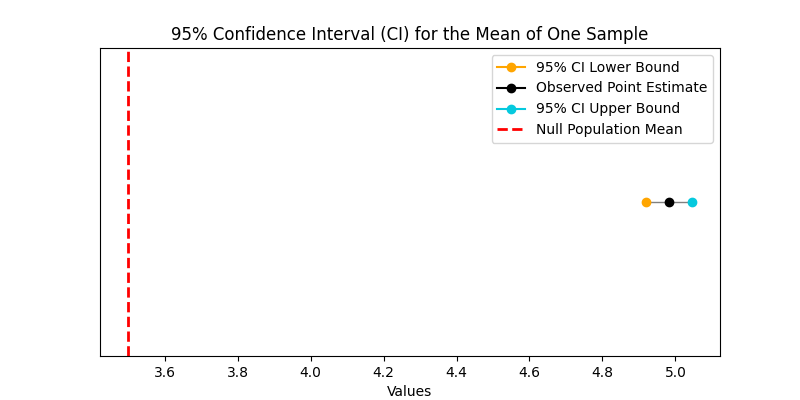
In the plot above the 95% confidence interval includes 3.5, so we do not reject the null hypothesis.
Release history Release notifications | RSS feed


Download files
Download the file for your platform. If you're not sure which to choose, learn more about installing packages.
Source Distribution
Built Distribution
Filter files by name, interpreter, ABI, and platform.
If you're not sure about the file name format, learn more about wheel file names.
Copy a direct link to the current filters
File details
Details for the file hypothesis_testing_tool-0.1.2.tar.gz.
File metadata
- Download URL: hypothesis_testing_tool-0.1.2.tar.gz
- Upload date:
- Size: 3.3 kB
- Tags: Source
- Uploaded using Trusted Publishing? No
- Uploaded via: poetry/1.8.3 CPython/3.11.9 Windows/10
File hashes
| Algorithm | Hash digest | |
|---|---|---|
| SHA256 |
6c6df308a2e2480203b6fcd4682b1885fa6c9c4b8b3225e5a6014eca479ed1d4
|
|
| MD5 |
0adb38b346ca8ca1ae30969f4a0ea188
|
|
| BLAKE2b-256 |
ae5d0d75de26dcd3da78cd014bbfd41c994e08ffb4c780941ea402d536541cfb
|
File details
Details for the file hypothesis_testing_tool-0.1.2-py3-none-any.whl.
File metadata
- Download URL: hypothesis_testing_tool-0.1.2-py3-none-any.whl
- Upload date:
- Size: 4.6 kB
- Tags: Python 3
- Uploaded using Trusted Publishing? No
- Uploaded via: poetry/1.8.3 CPython/3.11.9 Windows/10
File hashes
| Algorithm | Hash digest | |
|---|---|---|
| SHA256 |
db911e407dea2f985e9ece1eccd7010e2b10cfd1192c0fff7647b528774ae6fa
|
|
| MD5 |
0d2f4d5d33a6a4f83caf7fc958bf3278
|
|
| BLAKE2b-256 |
be99b1f5b3763889add9100294e60f22b1b5f1e636971591faea200dc28beb23
|






