





Contents
About i18n-check
[!IMPORTANT] Before you contribute, read the contributing guide.
i18n-check is a Python package that automates the validation of keys and values for your internationalization and localization processes.
Developed by the activist community, this package helps keep development and i18n/L10n teams in sync when using JSON-based localization processes.
Installation
Users
You can install i18n-check using uv (recommended) or pip.
uv
(Recommended - fast, Rust-based installer)
uv pip install i18n-check
pip
pip install i18n-check
Development Build
You can install the latest development build using uv, pip, or by cloning the repository.
Clone the Repository (Development Build)
git clone https://github.com/activist-org/i18n-check.git  # or ideally your fork
cd i18n-check
uv (Development Build)
uv sync --all-groups  # install all dependencies
source .venv/bin/activate  # activate venv (macOS/Linux)
# .venv\Scripts\activate  # activate venv (Windows)
pip (Development Build)
python -m venv .venv  # create virtual environment
source .venv/bin/activate  # activate venv (macOS/Linux)
# .venv\Scripts\activate  # activate venv (Windows)
pip install -e .
Key Conventions
i18n-check enforces these conventions for all keys:
- All keys must begin with
i18n.. - The base path must be the file path where the key is used.
- If a key is used in more than one file, the base path must be the lowest common directory and end with
_global. - Base paths must be followed by a minimally descriptive content reference (
i18n-checkonly checks content references for formatting). - Separate base paths with periods (
.). - Separate directory / file name components and content references with underscores (
_). - Repeated words in the file path, including the file name, must not be repeated in the key.
[!NOTE] Example of a valid file / key pair:
File:
components/component/ComponentName.extKey:
"i18n.components.component_name.content_reference"
How It Works
Commands
These are some example commands:
View Help
i18n-check -h
Generate a Configuration File
i18n-check -gcf
Generate Test Frontends
# i18n-check includes test frontends for testing the functionalities.
i18n-check -gtf
Run All Checks
i18n-check -a
Run a Specific Check
i18n-check -CHECK_ID
Interactive Mode - Add Missing Keys
i18n-check -mk -f -l ENTER_ISO_2_CODE
Delete Unused Keys
i18n-check -uk -d
Delete Non-Source Keys
i18n-check -nsk -d
[!NOTE] We use
--delete(-d) instead of--fix(-f) for unused and non-source keys so they're not deleted duringi18n-check --all --fix. Delete must be passed explicitly.
Checks
When i18n-check finds errors, it provides directions for resolving them. You can also disable checks in the workflow by modifying the configuration YAML file.
You can run these checks across your codebase:
| Check | Command | Resolution | Fix Command |
|---|---|---|---|
| Does the source file contain keys that don't follow the required formatting rules? | key-formatting (kf) |
Format the keys in the source file to match the conventions. | --fix (-f) to fix all formatting issues automatically. |
| Are key names consistent with how and where they are used in the codebase? | key-naming (kn) |
Rename them so i18n key usage is consistent and their scope is communicated in their name. | --fix (-f) to fix all naming issues automatically. |
| Does the codebase include i18n keys that are not within the source file? | nonexistent-keys (nk) |
Check their validity and resolve if they should be added to the i18n files or replaced. | --fix (-f) to interactively add nonexistent keys. |
| Does the source file have keys that are not used in the codebase? | unused-keys (uk) |
Remove them so the localization team isn't working on strings that aren't used. | --delete (-d) to delete unused keys from all JSON files automatically. |
| Do the target locale files have keys that are not in the source file? | non-source-keys (nsk) |
Remove them as they won't be used in the application. | --delete (-d) to delete non-source keys from target JSON files automatically. |
| Do any of localization files have repeat keys? | repeat-keys (rk) |
Separate them so that the values are not mixed when they're in production. Note: The existence of repeat keys prevents keys from being sorted by the sorted-keys check. |
n/a |
| Does the source file have repeat values that can be combined into a single key? | repeat-values (rv) |
Combine them so the localization team only needs to localize one of them. | n/a |
| Are the i18n source and target locale files sorted alphabetically? | sorted-keys (sk) |
Sort them alphabetically to reduce merge conflicts from the files changing. Sorting is done such that periods come before underscores (some JSON extensions do otherwise). | --fix (-f) to sort the i18n files automatically. Note: The --fix option for other checks will sort the keys if this check is active. |
| Do the i18n files contain nested JSON structures? | nested-files (nf) |
Flatten them to make replacing invalid keys easier with find-and-replace all. | --fix (-f) to flatten JSON files |
| Are any keys from the source file missing in the locale files? | missing-keys (mk) |
Add the missing keys to ensure all translations are complete. Keys with empty string values are considered missing. |
--fix --locale ENTER_ISO_2_CODE (-f -l ENTER_ISO_2_CODE) to interactively add missing keys. |
For both LTR and RTL languages, do keys that end in _aria_label end in punctuation? |
aria-labels (al) |
Remove the punctuation, as it negatively affects screen reader experience. | --fix (-f) to remove punctuation automatically. |
For both LTR and RTL languages, are keys that end in _alt_text missing proper punctuation? |
alt-texts (at) |
Add periods to the end to comply with alt text guidelines. | --fix (-f) to add periods automatically. |
Example Responses
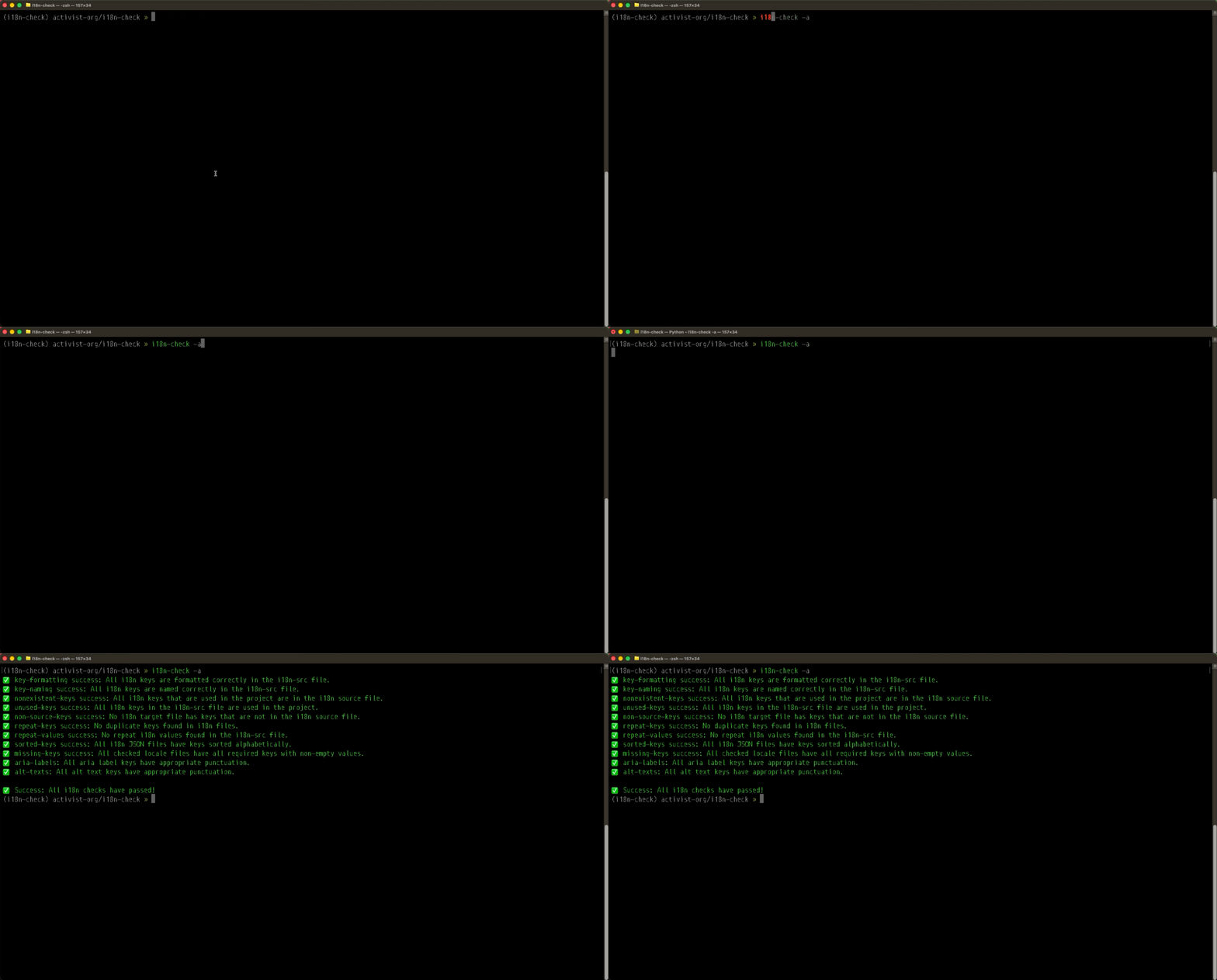
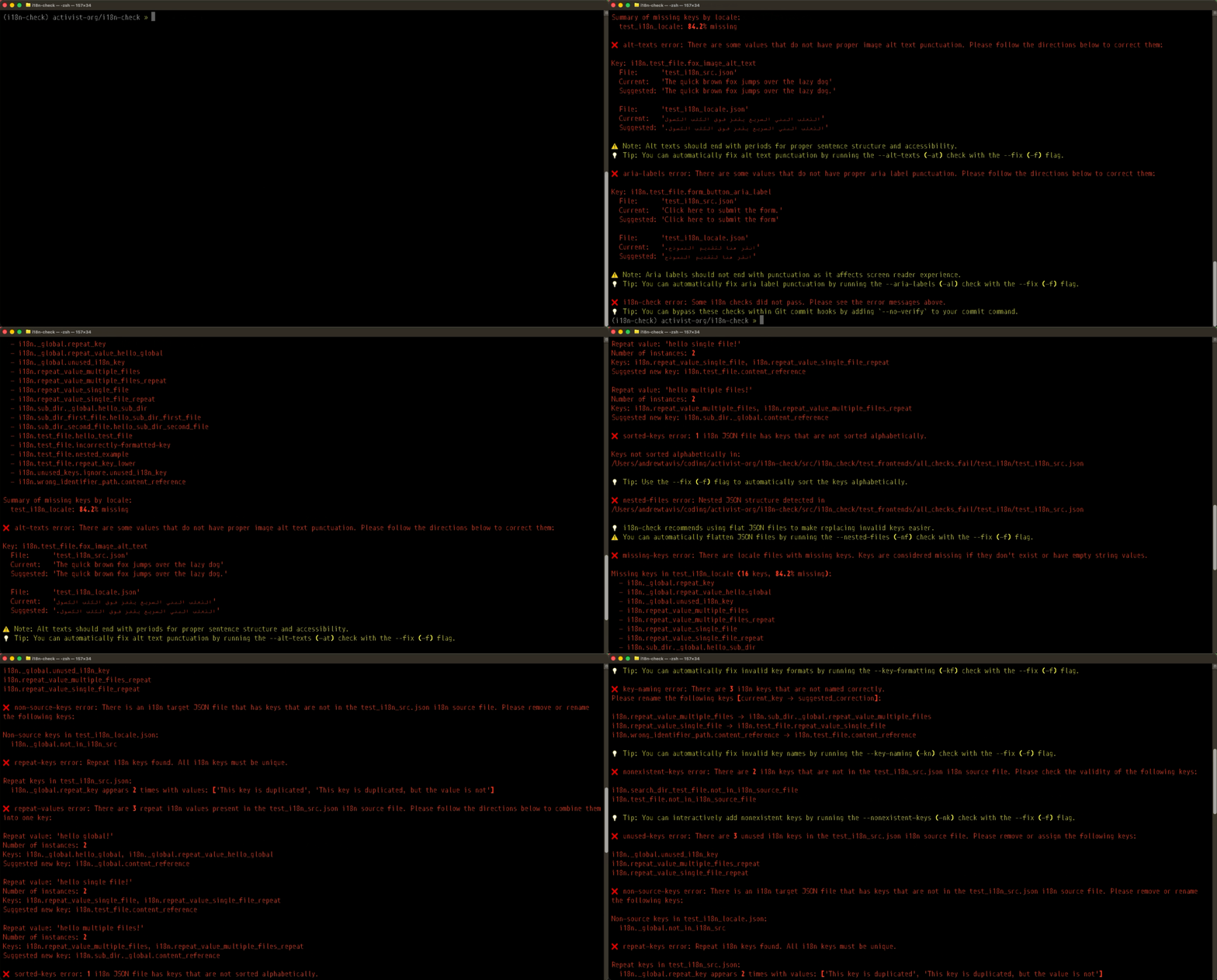
These GIFs show the response to the command i18n-check -a when all checks pass or fail.
All Checks Pass
All Checks Fail
Configuration
YAML File
You can configure i18n-check using the .i18n-check.yaml (or .yml) configuration file.
For an example, see the configuration file for this repository that we use in testing.
The following details the potential contents of this file:
[!NOTE] When
global.activeis set totrue, all checks are enabled by default. You can then disable specific checks by setting theiractivevalue tofalse. This allows for more concise configuration files. Example:checks: global: active: true missing-keys: active: false # disabled even though global is active
src-dirs: [frontend]
i18n-dir: frontend/i18n
i18n-src: frontend/i18n/en.json
file-types-to-check: [.ts, .js]

checks:
  # Global configurations are applied to all checks.
  global:
    active: true # enables all checks by default
    directories-to-skip: [frontend/node_modules]
    files-to-skip: []
  key-formatting:
    active: true # can be used to override individual checks
    keys-to-ignore: [] # regexes for ignoring keys
  key-naming:
    active: true
    directories-to-skip: []
    files-to-skip: []
    keys-to-ignore: []
  nonexistent-keys:
    active: true
    directories-to-skip: []
    files-to-skip: []
    search-dirs: [] # additional directories to search for key usage (e.g., test directories)
  unused-keys:
    active: true
    directories-to-skip: []
    files-to-skip: []
    keys-to-ignore: []
  non-source-keys:
    active: true
  repeat-keys:
    active: true
  repeat-values:
    active: true
  sorted-keys:
    active: true
  nested-files:
    active: true
  missing-keys:
    active: true
    locales-to-check: [] # iso codes, or leave empty to check all
  aria-labels:
    active: true
  alt-texts:
    active: true
Arguments
In the .i18n-check.yaml or .i18n-check.yml configuration file, provide these arguments:
src-dirs: The directory paths to your source code.i18n-dir: The directory path to your i18n files.i18n-src: The name of your i18n source file.file-types-to-check: The file types to include in the check.
Additional Arguments
You can find common additional arguments for using specific web frameworks here:
Vue.js
file_types_to_check: [.vue]

checks:
  global:
    directories_to_skip: [frontend/.nuxt, frontend/.output, frontend/dist]
pre-commit
This is an example of a prek or pre-commit hook:
- repo: local
  hooks:
    - id: run-i18n-check
      name: run i18n-check key-value checks
      files: ^src-dirs/
      entry: uv run i18n-check -a
      language: python
      pass_filenames: false
GitHub Action
This is an example YAML file for a GitHub Action to check your i18n-files on PRs and commits:
name: ci_i18n_check
on:
  workflow_dispatch:
  pull_request:
    branches:
      - main
    types:
      - opened
      - reopened
      - synchronize
  push:
    branches:
      - main

jobs:
  i18n_check:
    runs-on: ubuntu-latest
    steps:
      - name: Checkout Project
        uses: actions/checkout@v6

      - name: Setup Python
        uses: actions/setup-python@v6
        with:
          python-version: "3.12"

      - name: Install uv
        uses: astral-sh/setup-uv@v7

      - name: Install Dependencies
        run: uv sync --frozen --all-groups

      - name: Execute All i18n-check Key-Value Checks
        run: |
          uv run i18n-check -a
Contributing
See the contribution guidelines before contributing. You can help by:
- 🐞 Reporting bugs.
- ✨ Working with us on new features.
- 📝 Improving the documentation.
We track work that is in progress or may be implemented in the issues and projects.
Contact the Team

activist uses Matrix for team communication. Join us in our public chat rooms to share ideas, ask questions, or just say hi to the team.
We recommend using the Element client and Element X for a mobile app.
Contributors
Thanks to all our amazing contributors! ❤️

1 maintainer

Download files
Download the file for your platform. If you're not sure which to choose, learn more about installing packages.
Source Distribution
Built Distribution
Filter files by name, interpreter, ABI, and platform.
If you're not sure about the file name format, learn more about wheel file names.
Copy a direct link to the current filters
File details
Details for the file i18n_check-1.21.0.tar.gz.
File metadata
- Download URL: i18n_check-1.21.0.tar.gz
- Upload date:
- Size: 154.1 kB
- Tags: Source
- Uploaded using Trusted Publishing? No
- Uploaded via:
uv/0.12.2 {"installer":{"name":"uv","version":"0.12.2","subcommand":["publish"]},"python":null,"implementation":{"name":null,"version":null},"distro":{"name":"macOS","version":null,"id":null,"libc":null},"system":{"name":null,"release":null},"cpu":null,"openssl_version":null,"setuptools_version":null,"rustc_version":null,"ci":null}
File hashes
| Algorithm | Hash digest | |
|---|---|---|
| SHA256 |
f9b8da7cb1e1906ffa13dd85c81c8a7c06cecafd97758585a573622f0bd5e69d
|
|
| MD5 |
e7416aecf771849f981023a6e153e849
|
|
| BLAKE2b-256 |
3bb9d5fd86fc92ded4691d795f08d386fcbeabebcf9bf588b020e4fb490def56
|
File details
Details for the file i18n_check-1.21.0-py3-none-any.whl.
File metadata
- Download URL: i18n_check-1.21.0-py3-none-any.whl
- Upload date:
- Size: 77.6 kB
- Tags: Python 3
- Uploaded using Trusted Publishing? No
- Uploaded via:
uv/0.12.2 {"installer":{"name":"uv","version":"0.12.2","subcommand":["publish"]},"python":null,"implementation":{"name":null,"version":null},"distro":{"name":"macOS","version":null,"id":null,"libc":null},"system":{"name":null,"release":null},"cpu":null,"openssl_version":null,"setuptools_version":null,"rustc_version":null,"ci":null}
File hashes
| Algorithm | Hash digest | |
|---|---|---|
| SHA256 |
fba49cbea23060ffad404295ed051d19cda0af98b50372ca81a28adb019b4648
|
|
| MD5 |
6b4cf1ac85de5a9e35741a9a4e747a68
|
|
| BLAKE2b-256 |
5c0afbccaa25254b44f45c0747cfc55a798e2653ce4e5f43105c2e6d7f645007
|














