
i3-instant-layout
Automatic 'list based' layouts for the i3 window manager
Animated summary
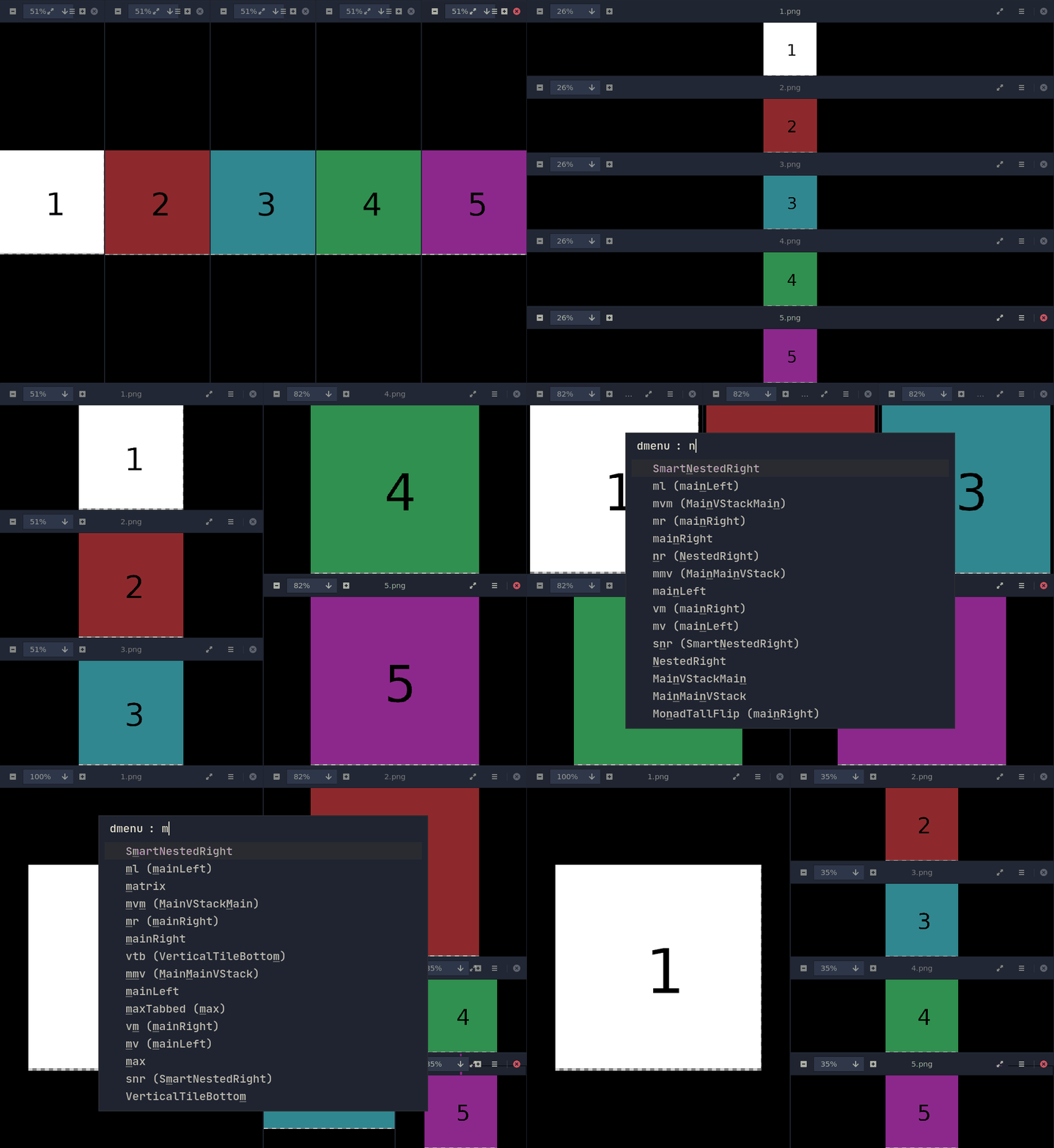
Description
This python program drags i3 into the 'managed layouts tiling window manager world' kicking and screaming.
What it does is apply a window layout to your current workspace, like this one:
-------------
|     |  2  |
|     |-----|
|  1  |  3  |
|     |-----|
|     |  4  |
-------------
The big advantage here is that it needs no 'swallow' definitions whatsoever, it's 'instant' - just add milk, eh, press the button.
Get started
i3-instant-layout depends xdotool which can be installed by your package manager (e.g. sudo apt-get install xdotool on Debian or Ubuntu)
To get started, install with pip install i3-instant-layout, or if you prefer, pipx
and add this to your i3 config:
bindsym $mod+Escape exec "i3-instant-layout --list | rofi -dmenu -i | i3-instant-layout - (or use the interactive menu of your choice).
Further information
Call i3-instant-layout --help for full details, or
i3-instant-layout --desc for the full list of supported layouts (or see below).
Helpful tips
How to sort windows
Your current active window is what the tiler will consider the 'main window'.
To get the other windows in the right order for your layout of choice, first enable the vStack or hStack layout, sort them, and the proceed to your layout of choice.
Border styles
i3-instant-layout must unmap/map the windows (ie. hide them temporarily) for i3 to place them at the right location. Unfortunatly that appears to consume the border style. Work around this with a line like this in your i3 config:
for_window [class="^.*"] border pixel 1
Available layouts
Layout: vStack
Aliases: ['1col', '1c']
One column / a vertical stack.
---------
|   1   |
---------
|   2   |
---------
|   3   |
---------
Layout: hStack
Aliases: ['1row', '1r']
One row / a horizontal stack
-------------
|   |   |   |
| 1 | 2 | 3 |
|   |   |   |
-------------
Layout: v2Stack
Aliases: ['2col', '2c', '2v']
Two columns of stacks
-------------
|  1  |  4  |
-------------
|  2  |  5  |
-------------
|  3  |  6  |
-------------
Layout: h2Stack
Aliases: ['2row', '2r', '2h']
Two rows of stacks
-------------------
|  1  |  2  |  3  |
-------------------
|  4  |  5  |  6  |
-------------------
Layout: v3Stack
Aliases: ['3col', '3c', '3v']
Three columns of stacks
-------------------
|  1  |  3  |  5  |
-------------------
|  2  |  4  |  6  |
-------------------
Layout: h3Stack
Aliases: ['3row', '3r', '3h']
Three rows of stacks
-------------------
|  1  |  2  |  3  |
-------------------
|  4  |  5  |  6  |
-------------------
|  7  |  8  |  9  |
-------------------
Layout: max
Aliases: ['maxTabbed']
One large container, in tabbed mode.
---------------
|             |
|   1,2,3,4,  |
|             |
---------------
Layout: mainLeft
Aliases: ['ml', 'mv', 'MonadTall']
One large window to the left at 50%, all others stacked to the right vertically.
-------------
|     |  2  |
|     |-----|
|  1  |  3  |
|     |-----|
|     |  4  |
-------------
Layout: mainRight
Aliases: ['mr', 'vm', 'MonadTallFlip']
One large window to the right at 50%, all others stacked to the right vertically.
-------------
|  2  |     |
|-----|     |
|  3  |  1  |
|-----|     |
|  4  |     |
-------------
Layout: MainMainVStack
Aliases: ['mmv']
Two large windows to the left at 30%, all others stacked to the right vertically.
-------------------
|     |     |  3  |
|     |     |-----|
|  1  |  2  |  4  |
|     |     |-----|
|     |     |  5  |
-------------------
Layout: MainVStackMain
Aliases: ['mvm']
Two large windows at 30% to the left and right, a vstack in the center
-------------------
|     |  3  |     |
|     |-----|     |
|  1  |  4  |  2  |
|     |-----|     |
|     |  5  |     |
-------------------
Layout: matrix
Aliases: []
Place windows in a n * n matrix.
The matrix will place swallow-markers if you have less than n*n windows.
N is math.ceil(math.sqrt(window_count))
Layout: VerticalTileTop
Aliases: ['vtt']
Large master area (66%) on top, horizontal stacking below
Layout: VerticalTileBottom
Aliases: ['vtb']
Large master area (66%) on bottom, horizontal stacking above
Layout: NestedRight
Aliases: ['nr']
Nested layout, starting with a full left half.
-------------------------
|           |           |
|           |     2     |
|           |           |
|     1     |-----------|
|           |     |  4  |
|           |  3  |-----|
|           |     |5 | 6|
-------------------------
Layout: SmartNestedRight
Aliases: ['snr']
Nested layout, starting with a full left half, but never going below 1/16th of the size.
2 windows
-------------------------
|           |           |
|           |           |
|           |           |
|     1     |     2     |
|           |           |
|           |           |
|           |           |
-------------------------

5 windows
-------------------------
|           |           |
|           |     2     |
|           |           |
|     1     |-----------|
|           |     |  4  |
|           |  3  |-----|
|           |     |  5  |
-------------------------

6 windows
-------------------------
|           |           |
|           |     2     |
|           |           |
|     1     |-----------|
|           |  3  |  4  |
|           |-----|-----|
|           |  5  |  6  |
-------------------------

7 windows
-------------------------
|           |     |     |
|           |  2  |  3  |
|           |     |     |
|     1     |-----------|
|           |  4  |  5  |
|           |-----|-----|
|           |  6  |  7  |
-------------------------


15 windows
-------------------------
|     |  2  |  4  |  6  |
|  1  |-----|-----|-----|
|     |  3  |  5  |  7  |
|-----------|-----------|
|  8  |  A  |  C  |  E  |
|-----|-----|-----|-----|
|  9  |  B  |  D  |  F  |
-------------------------
Falls back to matrix layout above 16 windows.
Layout: mainCenter
Aliases: ['mc', 'vmv'] One large window in the midle at 50%, all others stacked to the left/right vertically.
-------------------
|  2  |     |  5  |
|-----|     |-----|
|  3  |  1  |  6  |
|-----|     |-----|
|  4  |     |  7  |
-------------------
1 maintainer

Metadata
1 maintainer
Release files for i3-instant-layout 0.1.13
For a detailed explanation of source distributions (sdists) and built distributions (wheels), please see the package formats documentation.
Source distribution (sdist)
| File | Size | Uploaded | Provenance | Actions |
|---|---|---|---|---|
| i3_instant_layout-0.1.13.tar.gz | 11.5 kB | Without provenance | Details for i3_instant_layout-0.1.13.tar.gz |
Release files / i3_instant_layout-0.1.13.tar.gz
| Download URL | i3_instant_layout-0.1.13.tar.gz |
|---|---|
| Size | 11.5 kB |
| Tags | Source |
|
SHA-256 checksum How to use checksums |
6816ae82ccebd611f7572ad6889c4fd0bf1f14c213b72dd163c77d95b2ef2a79
|
|
BLAKE2b-256 checksum How to use checksums |
143ade3243f40008701dfa0ad27264f30aa965666e7c7fb864da15cc7656c79d
|
| Upload date | |
|
Uploaded using Trusted Publishing? What is trusted publishing? |
No |
| Uploaded via |
twine/6.0.1 CPython/3.9.21
|
Security for i3-instant-layout 0.1.13
Provenance
Provenance describes where a file came from. On PyPI, provenance is shared via attestations, which provide a verifiable record of the build or publishing details. View details, limitations and caveats.
No provenance found
None of the files in this release were uploaded with provenance metadata.
A note on package security
PyPI is a repository for distributing packages, not a service for auditing them. While third-party security researchers and our staff do their best to detect and remove malicious packages, PyPI cannot guarantee the quality, security or suitability of any given package.
To learn more about protecting yourself from malicious actors, visit our package security documentation.














