
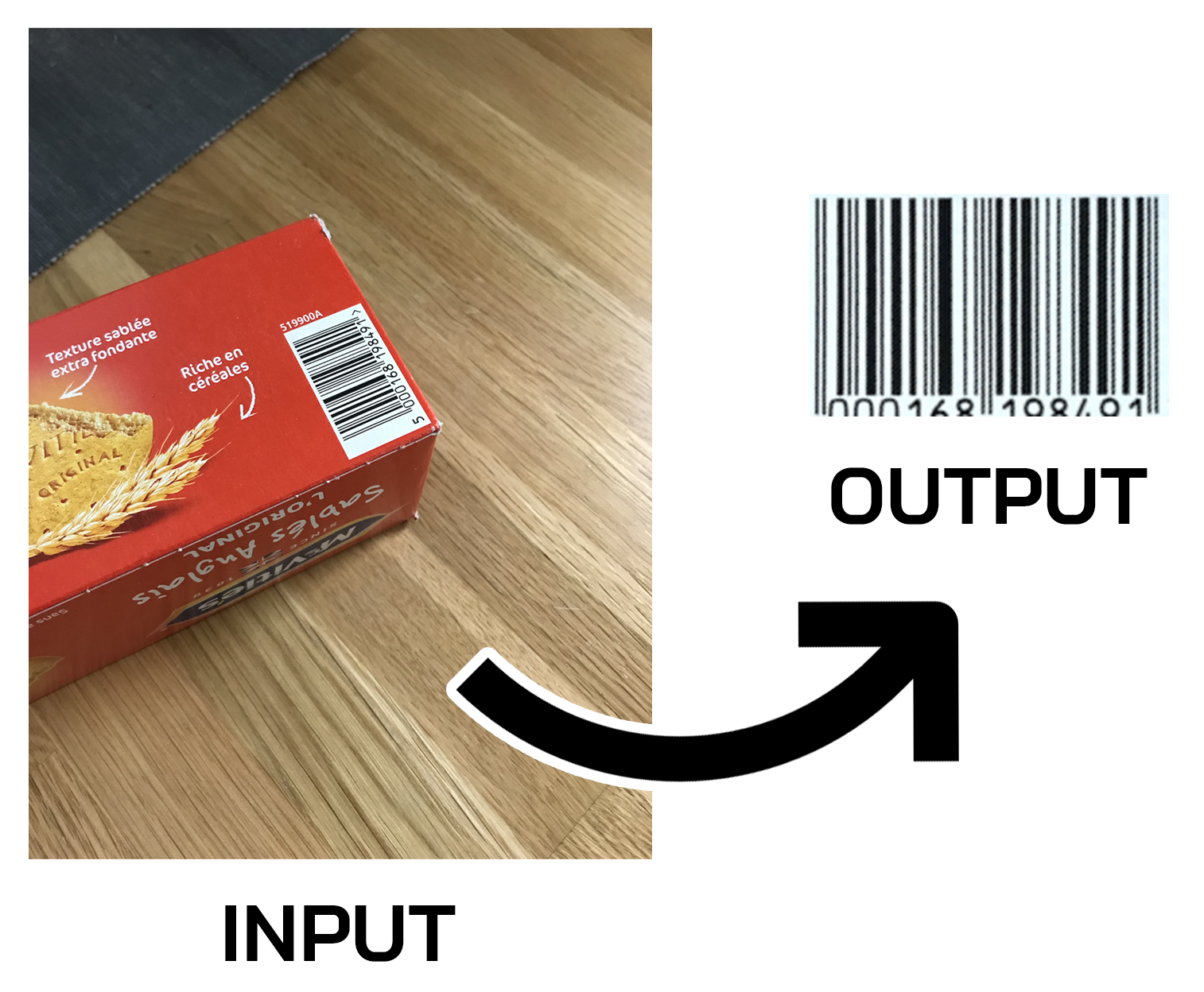
IBEX 1D : Image 1D Barcode EXtractor
Detect 1D Barcode(s) in Photographs, Extract & Straighten them!
A Python 3 command line script to detect & extract barcode(s) in images, using OpenCV and NumPy.
Install
Via PIP
pip3 install ibex-1d
And for update to latest version use:
pip3 install --upgrade ibex-1d
Via Source Code
Download the latest release or clone/download this repository.
Usage
If you installed the package (via pip3) you can either import the package in your project:
import ibex_1d

image_path = "/Users/bensouchet/Desktop/IMG_3212.png"
settings = ibex_1d.Settings()
settings.use_adaptive_threshold = True

barcode_extract = ibex_1d.ImageBarcodeExtract1D(settings)
results = barcode_extract.find_barcodes([image_path])
Or use it as a script directly in you terminal:
ibex_1d -i ~/Desktop/IMG_3212.png
If you download a release or clone the repository, to use it as a script:
python3 ibex_1d.py -i ~/Desktop/IMG_3212.png
Results
If you called IBEX 1D via your terminal (as a script), the barcode images extracted will be saved into a newly created folder inside a folder ./results/, if nothing has been generated please check the log(s) in your terminal.
Otherwise if you called the function find_barcodes you will received a python list of ibex_1d.Result instances, this class store info about the execution (like execution status, message, debug steps) and the barcode(s) image(s) extracted for each image path passed to the function.
Multiple images
You can pass one or more images/photographs to the script like this:
ibex_1d -i ~/Desktop/IMG_3205.png ./object_12.jpg ~/Documents/photo_0345.jpeg
Inside the corresponding result sub-folder, extracted barcodes will be named barcode_001.png, barcode_002.png, barcode_003.png, ...
Incorrect result ?
If the barcode hasn't been extracted (or the resulting barcode image isn't good) this can be due to the OTSU threshold method.
You can try using the script with the argument -a (or --adaptive-threshold):
ibex_1d -i ~/Desktop/IMG_3205.png -a
This threshold method isn't set as default because it's slower than OTSU.
Debug
You can visualize some steps of the sheet detection.
For the script call you need to add the argument -d or --debug to the command:
ibex_1d -i ~/Documents/product_03.jpeg -d
if you imported the package, you need to enable the save_detection_steps in the settings instance like this:
settings = Settings()
settings.save_detection_steps = True

barcode_extract = ImageBarcodeExtract1D(settings)
results = barcode_extract.find_barcodes(images_paths)
This will add debug/steps images into the result sub-folders.
Errors / Warnings
In case of an error you should see a formatted log message in your terminal telling you exactly what is the issue. If the script crash or something don't work you can open an issue here.
Author / Maintainer
IBEX 1D has been created and is currently maintained by Ben Souchet.
Licenses
The code present in this repository is under MIT license.
1 maintainer

Metadata
1 maintainer
Release files for ibex-1d 1.3.2
For a detailed explanation of source distributions (sdists) and built distributions (wheels), please see the package formats documentation.
Source distribution (sdist)
| File | Size | Uploaded | |
|---|---|---|---|
| ibex_1d-1.3.2.tar.gz | 14.4 kB | Details |
Built distribution (wheel)
| File | Interpreter | ABI | Platform | Reset |
|---|---|---|---|---|
| ibex_1d-1.3.2-py3-none-any.whl | Python 3 | none | any | Details |
Total release size: 29.1 kB
Release files / ibex_1d-1.3.2.tar.gz
| Download URL | ibex_1d-1.3.2.tar.gz |
|---|---|
| Size | 14.4 kB |
| Tags | Source |
|
SHA-256 checksum How to use checksums |
e093f1b56a120e1db285be1dacf2dee4eea74ae997928410204f425a7e4046b9
|
|
BLAKE2b-256 checksum How to use checksums |
b15a5201e0acd2a356f1856361c76e20573c88e02ba438ea006196b7c30f0ea3
|
| Upload date | |
|
Uploaded using Trusted Publishing? What is trusted publishing? |
No |
| Uploaded via |
twine/4.0.1 CPython/3.11.1
|
Release files / ibex_1d-1.3.2-py3-none-any.whl
| Download URL | ibex_1d-1.3.2-py3-none-any.whl |
|---|---|
| Size | 14.7 kB |
| Tags | Python 3 |
|
SHA-256 checksum How to use checksums |
892c437b4609db709bc83760f331177efaab732a9412090d2ff16c74a407ce41
|
|
BLAKE2b-256 checksum How to use checksums |
9651186c848a9dd6276c181c82f2dad09f22d7d69a2758d9eb8649dbc8ed2ebe
|
| Upload date | |
|
Uploaded using Trusted Publishing? What is trusted publishing? |
No |
| Uploaded via |
twine/4.0.1 CPython/3.11.1
|














