
ibkr-report-parser





Interactive Brokers (IBKR) Report Parser for MyTax (vero.fi) - not affiliated with either service
Example
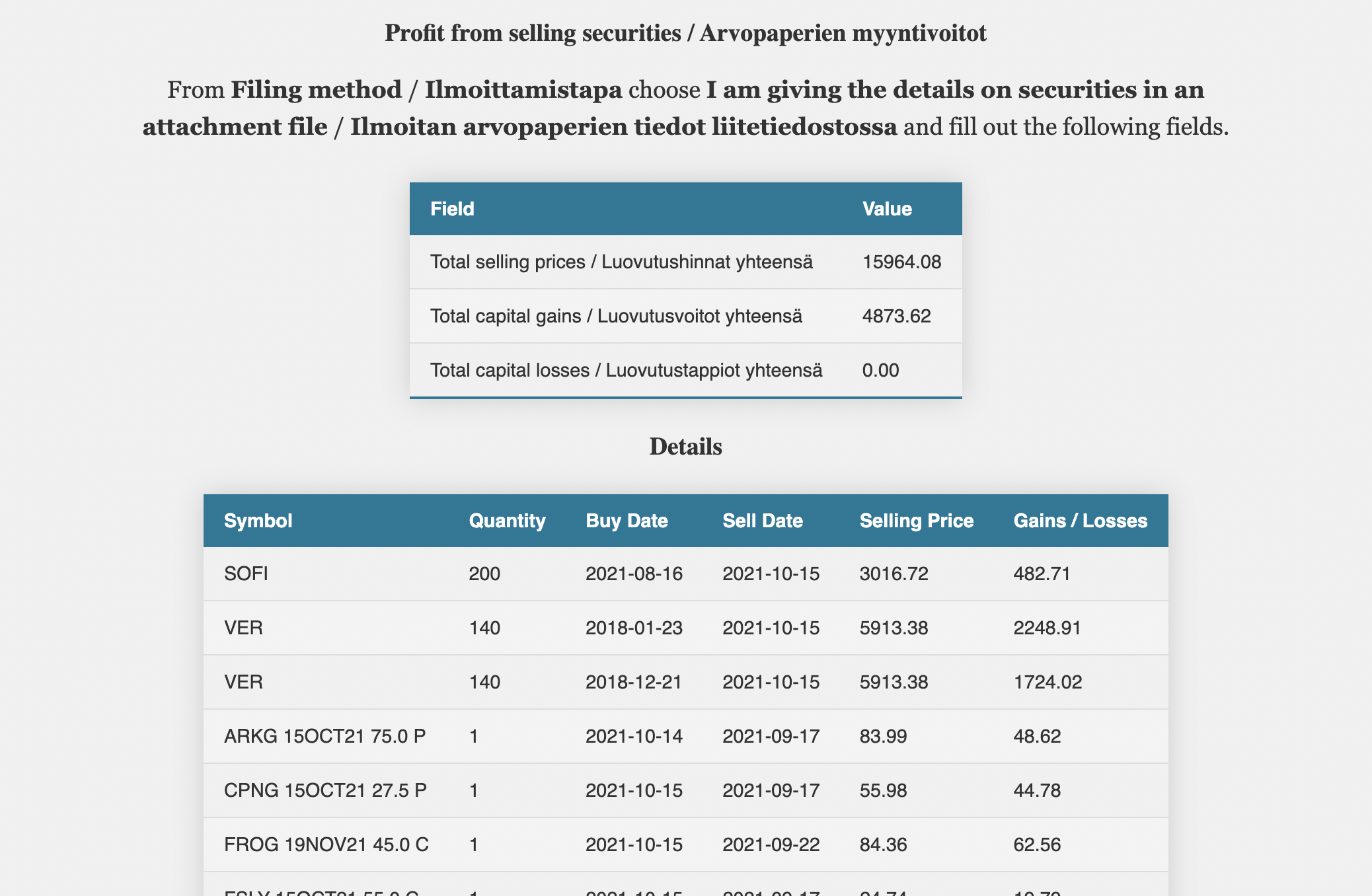
How to run locally
Option 1: pip
pip install ibkr-report-parser
ibkr-report-parser
Option 2: Docker
docker pull ghcr.io/oittaa/ibkr-report-parser
docker run --rm -d -p 8080:8080 --name ibkr-report-parser ghcr.io/oittaa/ibkr-report-parser
Use the app
Browse to http://127.0.0.1:8080/
Environment variables
TITLEThe title of the website. DefaultIBKR Report ParserCURRENCYThe currency used in the report output. DefaultEURUSE_DEEMED_ACQUISITION_COSTWhether to use the deemed acquisition cost, if it benefits you. DefaultTRUESTORAGE_TYPEThe storage to save the fetched daily Euro exchange rates, if set to anything other thanDISABLED. Currently supported types areLOCAL,AWS, andGCP. DefaultDISABLEDSTORAGE_DIRThe directory used whenSTORAGE_TYPEis set toLOCAL. Default.ibkr_storageBUCKET_IDThe storage bucket used whenSTORAGE_TYPEis set toAWSorGCP. Default""
Testing and debugging
DEBUGFlask debug. DefaultFALSELOGGING_LEVELPython logging level. DefaultINFOEXCHANGE_RATES_URLURL for the Euro exchange rates from European Central Bank. Defaulthttps://www.ecb.europa.eu/stats/eurofxref/eurofxref-hist.zip
How to build yourself
Python
git clone https://github.com/oittaa/ibkr-report-parser.git
cd ibkr-report-parser
pip install .
ibkr-report-parser
Docker
git clone https://github.com/oittaa/ibkr-report-parser.git
cd ibkr-report-parser
docker build -t ibkr-report-parser:latest .
docker run --rm -d -p 8080:8080 --name ibkr-report-parser ibkr-report-parser
Python API
from ibkr_report import Report

FILE_1 = "tests/test-data/data_single_account.csv"
FILE_2 = "tests/test-data/data_multi_account.csv"

with open(FILE_1, "rb") as file:
    report = Report(file=file, report_currency="EUR", use_deemed_acquisition_cost=True)

with open(FILE_2, "rb") as file:
    report.add_trades(file=file)

print(f"Total selling prices: {report.prices}")
print(f"Total capital gains: {report.gains}")
print(f"Total capital losses: {report.losses}")

for item in report.details:
    print(
        f"{item.symbol=}, {item.quantity=}, {item.buy_date=}, "
        f"{item.sell_date=}, {item.price=}, {item.realized=}"
    )
from ibkr_report import ExchangeRates, StorageType

rates = ExchangeRates(storage_type=StorageType.LOCAL, storage_dir="/tmp/my_storage")
print(rates.get_rate("EUR", "USD", "2020-06-20"))
print(rates.get_rate("GBP", "SEK", "2015-12-31"))
1 maintainer

Download files
Download the file for your platform. If you're not sure which to choose, learn more about installing packages.
Source Distribution
ibkr_report_parser-2026.7.19.tar.gz
(197.6 kB
view details)
Built Distribution
Filter files by name, interpreter, ABI, and platform.
If you're not sure about the file name format, learn more about wheel file names.
Copy a direct link to the current filters
File details
Details for the file ibkr_report_parser-2026.7.19.tar.gz.
File metadata
- Download URL: ibkr_report_parser-2026.7.19.tar.gz
- Upload date:
- Size: 197.6 kB
- Tags: Source
- Uploaded using Trusted Publishing? No
- Uploaded via:
twine/6.1.0 CPython/3.13.13
File hashes
| Algorithm | Hash digest | |
|---|---|---|
| SHA256 |
e4b7ca0ba3ea10af7bad8bb0526a2b667df5a22b082ab51f76531323628b492c
|
|
| MD5 |
2e13adb9b7ae4a93ab5a9443c2dcd47a
|
|
| BLAKE2b-256 |
436ef649609fd1984d53451d73d5c120383f01d41787241a92f8268bde7bdf89
|
File details
Details for the file ibkr_report_parser-2026.7.19-py3-none-any.whl.
File metadata
- Download URL: ibkr_report_parser-2026.7.19-py3-none-any.whl
- Upload date:
- Size: 201.4 kB
- Tags: Python 3
- Uploaded using Trusted Publishing? No
- Uploaded via:
twine/6.1.0 CPython/3.13.13
File hashes
| Algorithm | Hash digest | |
|---|---|---|
| SHA256 |
8f11bf1bcb1c1ed7813349e6058506069e80bf9d29177e13c3939bbf70747a57
|
|
| MD5 |
a332a4da7568c8db37cc436aeaf3646b
|
|
| BLAKE2b-256 |
0017de065b20fc1b3b756650e3669a0bf0077c775e702a1ca8b4ce09e1326d73
|







