
IBR-FaultScreen





Fault-scenario screening for grids with inverter-based resources (solar, wind, battery storage).
IBR-FaultScreen simulates many three-phase fault scenarios, labels each one RISKY or OK by failure mode (rotor-angle instability, slow voltage recovery, IBR ride-through exposure under NERC PRC-029-1, frequency), and trains a classifier that ranks new scenarios so engineers know which contingencies to study in detail first. Every RISKY result shown to a user is verified by simulation.
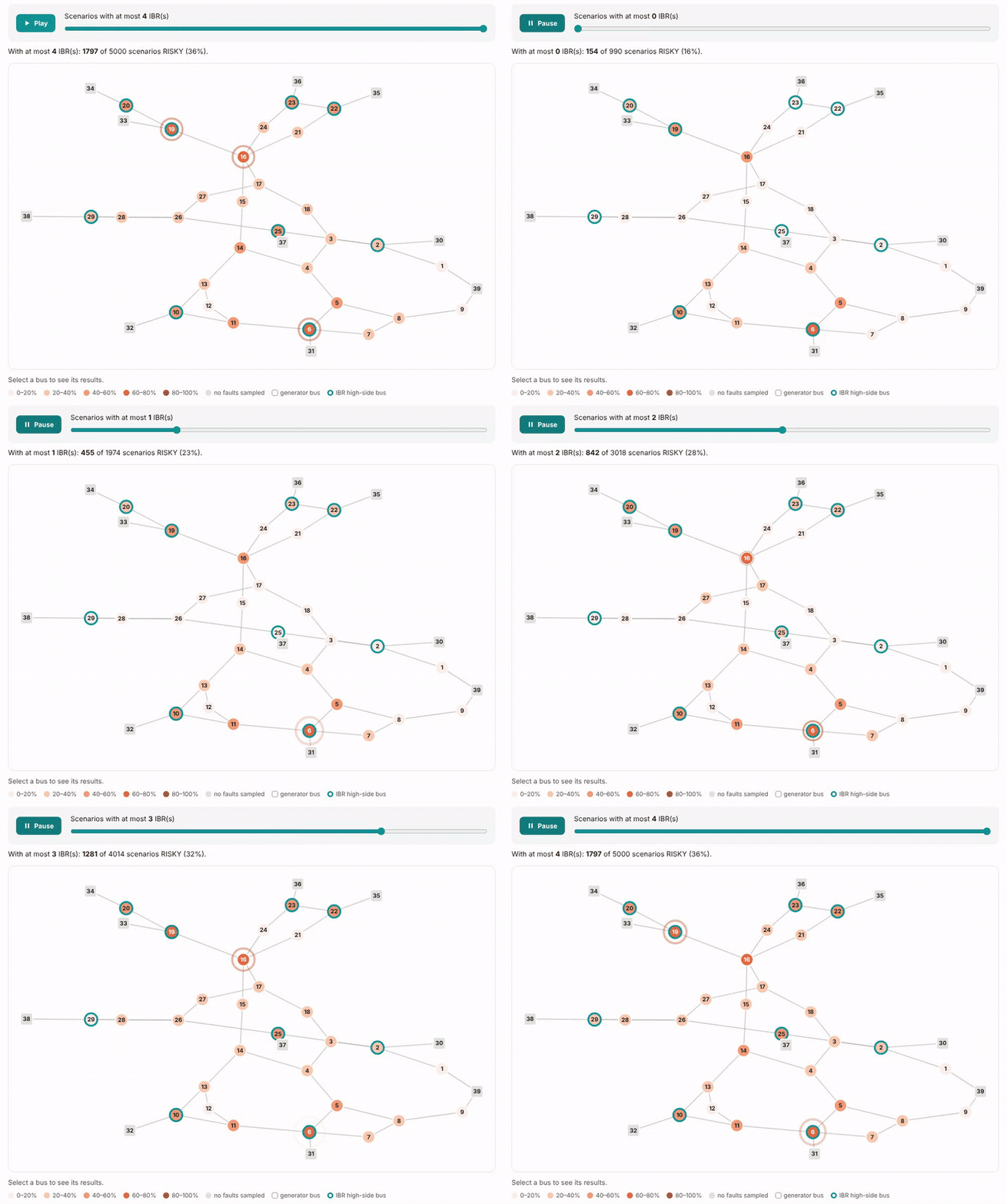
5,000 simulated faults on the IEEE 39-bus system: press Play and the share of RISKY faults grows from 16% with no IBRs to 52% with four. Open the interactive demo.
Screening only. It prioritizes detailed studies; it does not replace an interconnection study. RMS positive-sequence simulation (ANDES), generic WECC IBR models, balanced faults.
Version 0.1.0. Author: Shaibu Ibrahim, P.E. License: GPL-3.0-or-later.
Try it
- Interactive demo report, in your browser, nothing to install: the IEEE 39-bus dataset (5,000 scenarios) with the animated network map, the ranked table, the model card, and trajectories you can replay and read point by point.
- On your computer:
pip install ibr-faultscreen, thenibr-faultscreen example. It runs five scenarios in about a minute and opens the same kind of report.
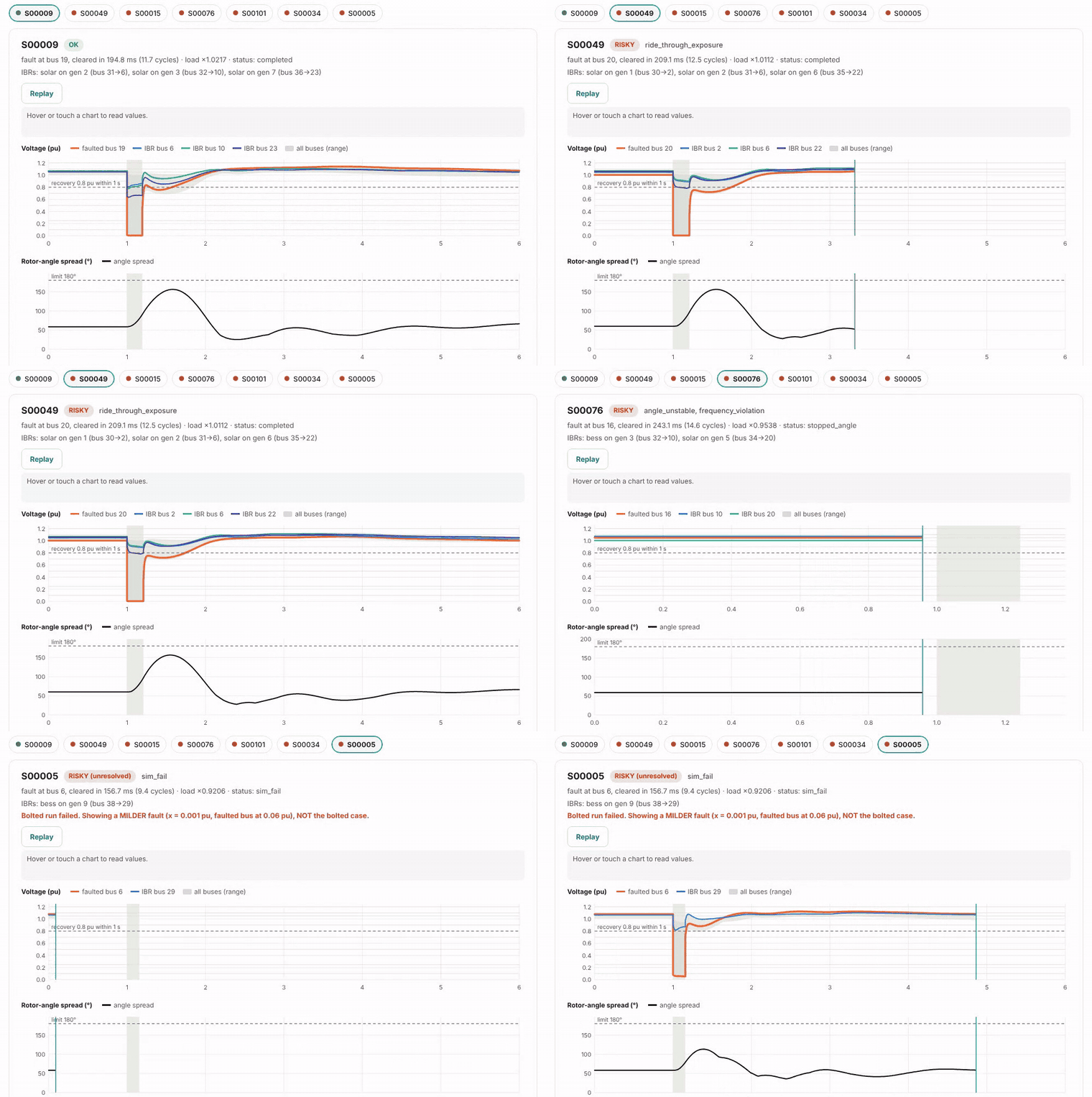
Each scenario plays out when selected: here post-fault overvoltage at IBR buses, rotor-angle instability, and a bolted fault the solver could not settle (shown honestly).
What it found on the IEEE 39-bus test system
From the 5,000-scenario demo dataset (generic IBR parameters, illustrative limits; the data card and model card are in the demo):
- Risk grows with IBR share. 16% of faults were RISKY with no IBRs, 31% with one, 52% with four.
- Ride-through exposure came from overvoltage, not undervoltage. Of 693 scenarios with PRC-029-1 exposure, almost all had the IBR high-side voltage above 1.1 pu after the fault cleared (sustained above 1.1 pu, or briefly above 1.2 pu); only 6 involved undervoltage. This depends strongly on the generic IBR parameters.
- The learned model ranks better than a simple rule (clearing time and lowest SCR), tested only on fault buses it never saw: AUC 0.87 vs. 0.78, average precision 0.69 vs. 0.53.
| Share of RISKY scenarios caught (recall) | Gradient boosting sends to simulation | Simple rule sends to simulation |
|---|---|---|
| 90% | 53% | 57% |
| 95% | 62% | 63% |
| 99% | 76% | 83% |
The gain over the rule is largest when almost nothing may be missed. screen also always
simulates fault buses where the solver often fails; with that, it caught 96% of RISKY and 95% of
unsolvable scenarios while simulating 69% of all scenarios. These numbers are for one test system with
generic models: retrain on your own network before relying on them.
How it works
flowchart LR
    A[Case: IEEE 39-bus<br/>or PSS/E .raw + .dyr] --> B[Scenarios<br/>IBRs, load, fault, clearing time]
    B --> C[ANDES simulation]
    C --> D[Labels<br/>angle, voltage recovery,<br/>PRC-029 ride-through, frequency]
    B --> E[Pre-fault features<br/>SCR, distance, inertia]
    D --> F[(Labeled dataset)]
    E --> F
    F --> G[Classifier<br/>evaluated on unseen fault locations]
    G --> H[Screen new scenarios]
    H --> I[Re-simulate predicted RISKY<br/>and borderline]
    I --> J[HTML report]
Install
Python 3.11 or newer.
pip install ibr-faultscreen
From source:
git clone https://github.com/ishaibu/ibr-faultscreen
cd ibr-faultscreen
python -m venv .venv
.venv\Scripts\activate             # Windows (macOS/Linux: source .venv/bin/activate)
pip install -e ".[dev]"
Quick start
ibr-faultscreen example
Runs five scenarios on the IEEE 39-bus case (about a minute; the very first run takes
longer while ANDES prepares its models) and opens an HTML report. Results go to
example_output/. Every output folder ignores itself in Git.
Commands
| Command | What it does |
|---|---|
ibr-faultscreen check CASE |
Is a case ready? Lists unsupported PSS/E dynamic models, generators that can become IBRs, power flow status |
ibr-faultscreen simulate SCENARIOS.yaml |
Runs your scenarios; writes results, figures and a report |
ibr-faultscreen cct --bus 16 |
Critical clearing time at one or more buses |
ibr-faultscreen dataset --n 5000 |
Generates a labeled dataset in parallel (resumable, with a data card) |
ibr-faultscreen train dataset.csv |
Evaluates rule, logistic and gradient-boosting models on unseen fault locations; trains one |
ibr-faultscreen screen --model model.joblib |
Ranks new scenarios and verifies the risky ones by simulation |
ibr-faultscreen report results.csv |
Builds the HTML report from any results file |
Add --help to any command for its options. A scenario file looks like this:
- scenario_id: my_case_1
  load_scale: 1.0
  ibrs: [{gen: 2, kind: solar}, {gen: 6, kind: bess}]
  fault: {bus: 16, clear_time: 0.10}     # seconds; bolted by default
From Python:
from ibr_faultscreen.criteria import default_criteria
from ibr_faultscreen.label import label
from ibr_faultscreen.scenario import FaultSpec, IBRSpec, Scenario
from ibr_faultscreen.simulate import simulate

scenario = Scenario("my_case", ibrs=(IBRSpec(2), IBRSpec(6, kind="bess")),
                    fault=FaultSpec(16, clear_time=0.10))
result = simulate(scenario)                  # ANDES time-domain run
verdict = label(result, default_criteria())  # PRC-029-1 ride-through and other checks
print(result.status, "RISKY" if verdict.risky else "OK", verdict.reasons)
Your own model: ibr-faultscreen check mycase.raw (the .dyr file with the same name is
picked up automatically, or pass --dyr), then use case: mycase.raw in the scenario file.
Criteria
Screening limits live in a YAML file. The built-in file
(src/ibr_faultscreen/data/criteria_prc029.yaml) holds the NERC PRC-029-1 voltage and
frequency ride-through tables (Table 2, "All Other IBR", which covers PV and BESS; and
Table 3), transcribed from the NERC PDF and checked row by row. Its angle, voltage-recovery and frequency limits are illustrative: replace them with
your transmission provider's criteria (--criteria myfile.yaml). See
examples/criteria_example.yaml for the format.
IBR models
Each IBR uses the WECC generic models REGCA1 + REECA1 + REPCA1 in ANDES. Parameter
profiles live in src/ibr_faultscreen/data/ibr_profiles.yaml:
andes_example (ANDES's example case) and wecc_mvwg_2019 (the illustrative values
in the WECC MVWG Solar PV Plant Modeling and Validation Guideline, 2019). Neither
represents a specific plant. Choose one per IBR in a scenario file
({gen: 2, profile: wecc_mvwg_2019}) or for a whole dataset (--ibr-profile).
Honest handling of solver failures
ANDES cannot solve some bolted faults close to large units, and sometimes "solves" them with
buses stuck at 0 V after clearing (non-physical). IBR-FaultScreen detects both, reruns the case
at milder faults, and labels it RISKY (confirmed) when the milder fault is already RISKY or
RISKY (unresolved) when it is not, so it never reports a guess as a result. Unresolved
scenarios are left out of model training, and screen always simulates scenarios at fault
buses where the solver often fails. See "Unsolvable bolted faults" in docs/design-spec.md.
Validation
The validation tests in docs/design-spec.md §14 run on every push (GitHub Actions),
including a single-machine critical clearing time checked against the equal-area criterion,
determinism of the dataset, evaluation on unseen fault locations, and "no RISKY verdict from a
prediction alone". Hand checks are recorded in docs/verification.md. Abbreviations are
explained in docs/glossary.md.
Documents
docs/design-spec.md: scope, decisions, methods, tests, limitationsdocs/review-guide.md: how to review scenario figuresdocs/verification.md: independent hand checksdocs/owners-guide.md: how it works, FAQ, supporting usersdocs/glossary.md: abbreviations and termsCHANGELOG.md: what changed in each versionexamples/walkthrough.ipynb: step-by-step notebooktools/build_demo.py: rebuilds the interactive demo from a dataset
Contributing
Questions, bug reports and ideas are welcome: open an
issue (templates help you include what is
needed). Please never attach confidential network models; an anonymized description or the
IEEE 39-bus case is enough. See CONTRIBUTING.md.
Citation
See CITATION.cff. A DOI is added after the first release is archived on Zenodo.
1 maintainer

Metadata
1 maintainer
Release files for ibr-faultscreen 0.1.0
For a detailed explanation of source distributions (sdists) and built distributions (wheels), please see the package formats documentation.
Source distribution (sdist)
| File | Size | Uploaded | |
|---|---|---|---|
| ibr_faultscreen-0.1.0.tar.gz | 108.7 kB | Details |
Built distribution (wheel)
| File | Interpreter | ABI | Platform | Reset |
|---|---|---|---|---|
| ibr_faultscreen-0.1.0-py3-none-any.whl | Python 3 | none | any | Details |
Total release size: 205.2 kB
Release files / ibr_faultscreen-0.1.0.tar.gz
| Download URL | ibr_faultscreen-0.1.0.tar.gz |
|---|---|
| Size | 108.7 kB |
| Tags | Source |
|
SHA-256 checksum How to use checksums |
40e6f1bb21d32a613d5e8b1adae0680f09726f7bfd5ffcecd054a1172e35fdde
|
|
BLAKE2b-256 checksum How to use checksums |
0e28a3fcca587604f19b0b7bf5fb05f2ed52d92abb6822b8b5331cb63444a343
|
| Upload date | |
|
Uploaded using Trusted Publishing? What is trusted publishing? |
Yes |
| Uploaded via |
twine/7.0.0 CPython/3.13.14
|
Provenance
Provenance describes where a file came from. On PyPI, provenance is shared via attestations, which provide a verifiable record of the build or publishing details. View details, limitations and caveats.


PyPI Publish Attestation
PyPI verified that this artifact, at this checksum, originated from the publisher listed below.
Signed by GitHub Actions, verified by PyPI on Oct 11, 2026.
Transparency logRelease files / ibr_faultscreen-0.1.0-py3-none-any.whl
| Download URL | ibr_faultscreen-0.1.0-py3-none-any.whl |
|---|---|
| Size | 96.5 kB |
| Tags | Python 3 |
|
SHA-256 checksum How to use checksums |
7ab5e37718903fe04c8e2d0c580c9656fa12fc2ec8b00cb225ccf8b0e775d5d1
|
|
BLAKE2b-256 checksum How to use checksums |
4613bc6f1203b55edd6421253ae6ea08da2440f673ece4251deddbcf68e1edcd
|
| Upload date | |
|
Uploaded using Trusted Publishing? What is trusted publishing? |
Yes |
| Uploaded via |
twine/7.0.0 CPython/3.13.14
|
Provenance
Provenance describes where a file came from. On PyPI, provenance is shared via attestations, which provide a verifiable record of the build or publishing details. View details, limitations and caveats.
PyPI Publish Attestation
PyPI verified that this artifact, at this checksum, originated from the publisher listed below.
Signed by GitHub Actions, verified by PyPI on Oct 11, 2026.
Transparency log












