
icalcli
An iCalendar Command Line Interface
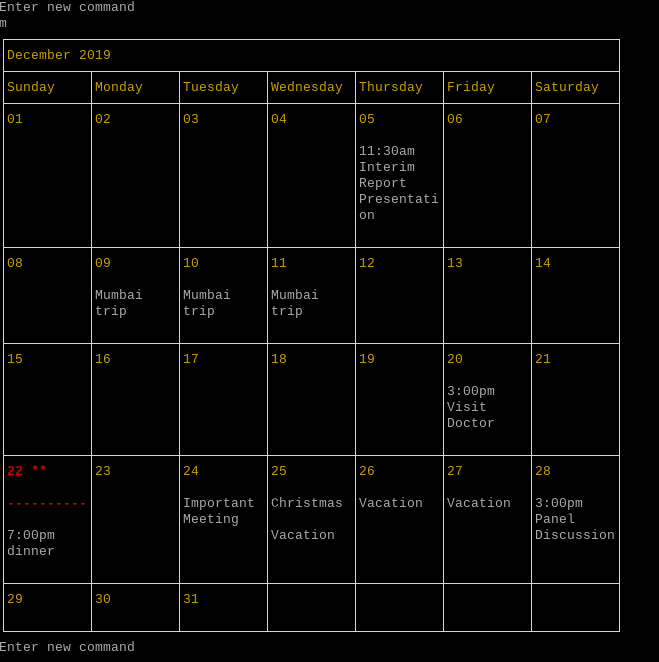
icalcli - a modification of gcalcli - is a Python command line front-end to your Calendar. It allows you to get your agenda, view weekly and monthly calendars (ascii text graphical calendar), search for events, add new events, delete events, and edit events.
Unlike gcalcli which is tied to Google Calendar, icalcli is agnostic to (abstracts away from) the actual backend calendar service. It relies on a backend interface which interacts with the backend calendar to perform all the CRUD (Create, Retrieve, Update and Delete) operations on the actual calendar. The package includes two backends:
-
The
etesync_backendsubpackage provides a backend interface to the EteSync calendar (versions 1.0 and 2.0). In fact,icalcliwas created primarily to provide a command line interface to my self hostedEteSynccalendar. -
The
file_backendsubpackage provides a backend interface to a calendar contained in a localicsfile. This is useful as a viewer/editor oficsfiles. It is also useful to try outicalciwithout having any other backend configured.
The two included backends would also be useful to those who wish to write their own backend interfaces. icalcli requires the calendar to be presented to it as a list of icalendar events (VEVENT). It is the responsibility of the backend interface to read the actual calendar and create this list of events. It must also perform all the CRUD (Create, Retrieve, Update and Delete) operations on the actual calendar.
Requirements
- Python (3+)
- dateutil
- parsedatetime
- icalendar
- A love for the command line!
Optional packages
- pyetesync the python client library for
EteSyncif you want to use theEteSyncbackend.
Installation
Install from PyPI
pip install icalcli
or via pipx:
pipx install icalcli
Install from source
git clone https://github.com/jrvarma/icalcli.git
cd icalcli
python -m pip install .
or via pipx:
pipx install . --editable
Usage
Command line arguments
icalcli provides a series of subcommands with the following functionality:
edit (e)               edit calendar events
agenda (g)             get an agenda for a time period
calw (w)               get a week-based agenda in calendar format
cal5w (5w)             get this week / 2 past / 2 future weeks agenda in calendar format
calm (m)               get a month agenda in calendar format
add (a)                add a detailed event to the calendar
search (s)             (regex) search for events
sync (y)               sync the backend calendar
quit (q)               quit icalcli
By default, icalcli runs interactively as an REPL (Read Evaluate Print Loop). Run icalcli --help for more details. icalcli <subcommand> --help gives help on each subcommand.
Configuration Script
In the beginning, icalcli executes a configuration script which is expected to create the object backend_interface representing the backend interface initialized with the right authentication credentials to access the backend calendar. The configuration script is located, by default, at ~/.icalcli.py, but this can be changed with the -c option.
Example configuration for file_backend
from icalcli import ICSInterface

backend_interface = ICSInterface("/path/to/ics-file")
Example configuration for multiple readonly file_backend
from icalcli import ICSInterface

backend_interface = ICSInterface(["/path/to/ics-file-1", "/path/to/ics-file-2"])
Example configuration for etesync_backend (etesync 1.0)
This configuration assumes that all the credentials are stored in a plain text (json) file. In practice, you would use a more secure storage (perhaps, the Gnome keyring) or just read it from the terminal.
from icalcli import EtesyncInterface
import base64
import json

conf_file = '/path/to/json-file'
with open(conf_file, 'r') as fp:
    c = json.load(fp)
backend_interface = EtesyncInterface(
    c['email'], c['userPassword'], c['remoteUrl'],
    c['uid'], c['authToken'],
    base64.decodebytes(c['cipher_key'].encode('ascii')))
See the Example code for getting the uid and authToken for the etesync calendar.
Example configuration for etebase_backend (etesync 2.0)
This configuration assumes that all the credentials are stored in a plain text (json) file. In practice, you would use a more secure storage (perhaps, the Gnome keyring) or just read it from the terminal.
from icalcli import EtebaseInterface
import json

conf_file = '/path/to/json-file'
with open(conf_file, 'r') as fp:
    c = json.load(fp)

backend_interface = EtebaseInterface(c['user'], c['server_url'], c['password'],
                                     c['calendar_uid'], silent=False)
The calendar_uid can be obtained using the following code. This code assumes that the dict c has been populated with the credentials from the json file as above.
from etebase import Client, Account, FetchOptions

client = Client(c['user'], c['server_url'])
etebase = Account.login(client, c['user'], c['password'])
col_mgr = etebase.get_collection_manager()
print({col.uid: col.meta
      for col in col_mgr.list("etebase.vevent").data})
Recurring events and default search period
icalcli understands the RRULE, RDATE, EXRULE, EXDATE elements of the icalendar specification. These elements can be added while creating or editing events using --rrule, --rdate, --exrule and --exdate options.
In most views, the instances of the recurring event are displayed. Since a recurring event can have an unlimited number of instances, searches with no start or end date can produce an unending series of events. By default therefore searches with no start or end date are limited to the previous five years and following five years. These defaults can be changed using the options --default_past_years and --default_future_years
Raw ICS
The icalendar specification is quite large and complex, and icalcli implements only the most common parts of this specification. It is possible to use the --raw_ics option to create/edit event using raw ICS text.
Screenshots
Some screenshots are available at Github:
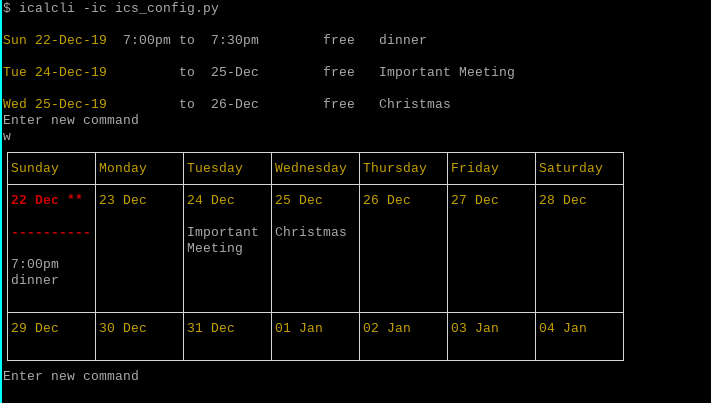
Agenda and Week Views
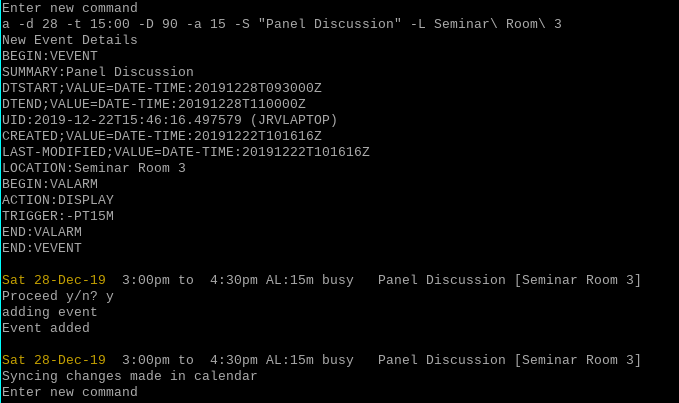
Adding an event
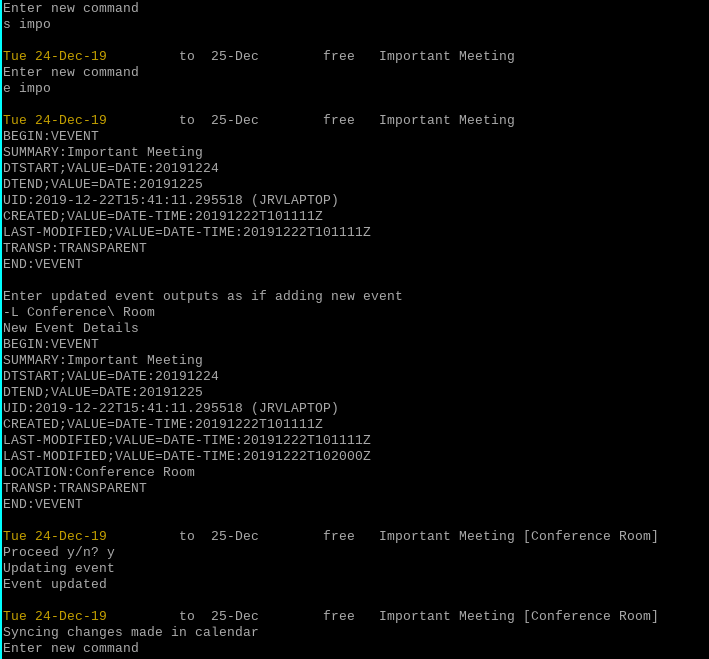
Searching and editing events
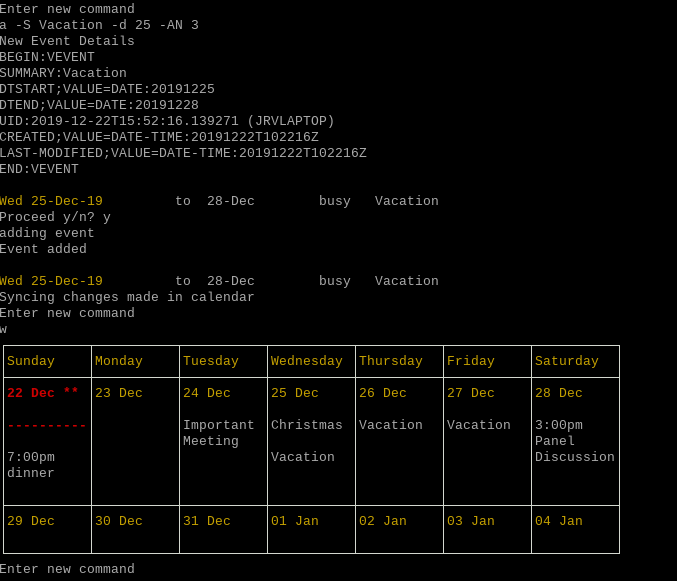
Multi-day events
Month View
1 maintainer

Download files
Download the file for your platform. If you're not sure which to choose, learn more about installing packages.
Source Distribution
Built Distribution
Filter files by name, interpreter, ABI, and platform.
If you're not sure about the file name format, learn more about wheel file names.
Copy a direct link to the current filters
File details
Details for the file icalcli-1.1.5.tar.gz.
File metadata
- Download URL: icalcli-1.1.5.tar.gz
- Upload date:
- Size: 32.8 kB
- Tags: Source
- Uploaded using Trusted Publishing? No
- Uploaded via:
twine/6.2.0 CPython/3.14.6
File hashes
| Algorithm | Hash digest | |
|---|---|---|
| SHA256 |
c032813b21b61cf0908d24f0ae38f5a4b598eed95281eea443ef56707c9a9732
|
|
| MD5 |
6f8fe2b76cca850c164b73e0ffd32fb9
|
|
| BLAKE2b-256 |
e998e54ddcf2c37d961735a3e6e7bf704653d316e77f2bce7fe3f159affd13fc
|
File details
Details for the file icalcli-1.1.5-py3-none-any.whl.
File metadata
- Download URL: icalcli-1.1.5-py3-none-any.whl
- Upload date:
- Size: 35.5 kB
- Tags: Python 3
- Uploaded using Trusted Publishing? No
- Uploaded via:
twine/6.2.0 CPython/3.14.6
File hashes
| Algorithm | Hash digest | |
|---|---|---|
| SHA256 |
83caef8df9232346cfe4e715bf940bc2a01ff135ce1293cda6df9fc8c4fb9225
|
|
| MD5 |
fbaf3e3cde5e579f1b40e3291ca7fa4a
|
|
| BLAKE2b-256 |
e3e52f1efb96076687c348c3ebef5aab4afa426323352027ff6cf18d2b96d935
|














