
Monitoring software for the Icarus Pressure Jump apparatus

Project description

Table of Contents
About The Project
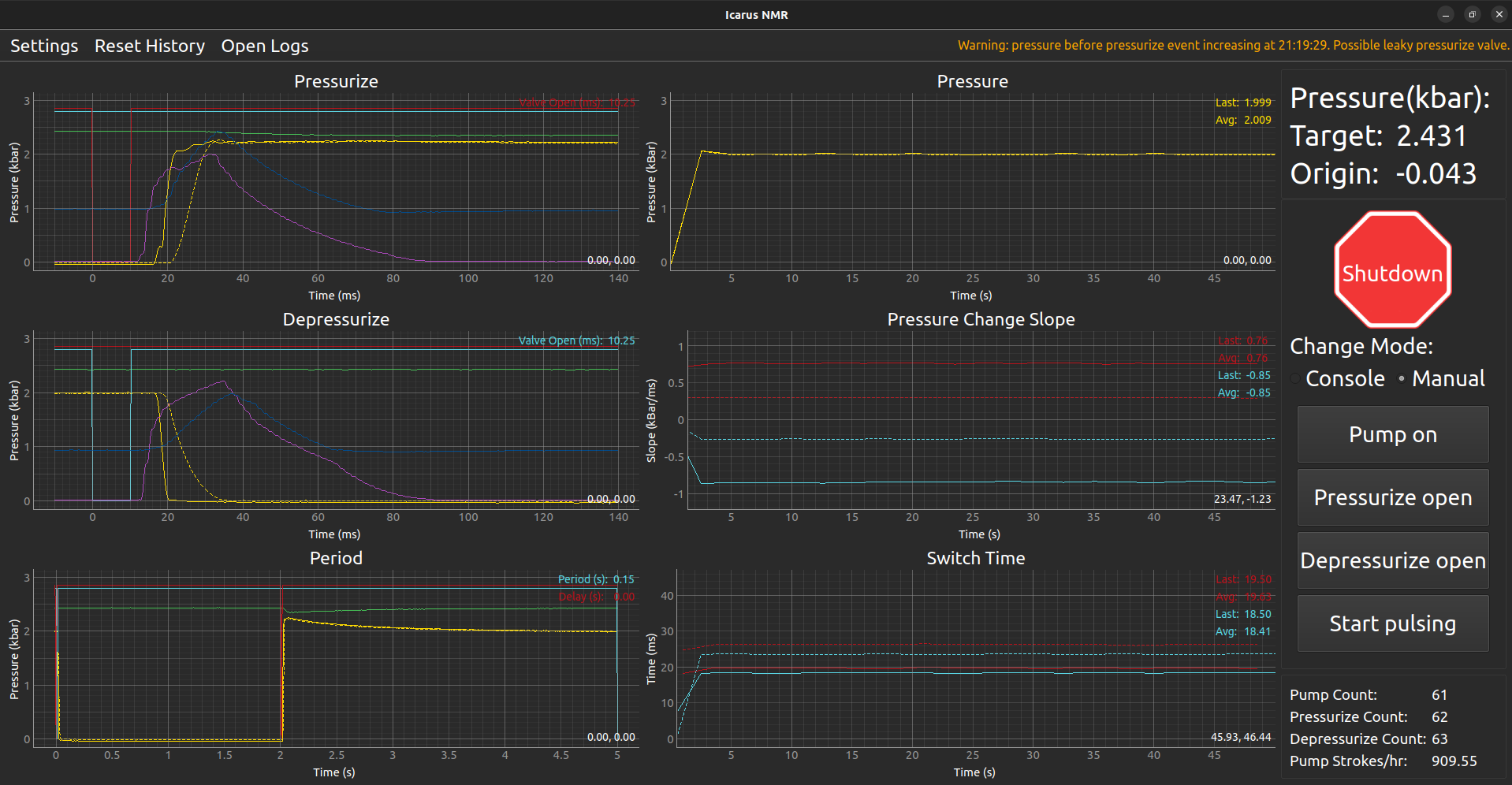
The Icarus NMR Pressure Jump Apparatus is a novel device used to rapidly switch the pressure within an NMR sample cell. This enables study of the unfolded protein under native conditions and, vice versa, study of the native protein under denaturing conditions. This project is the second version of a monitoring software for the pressure sensors and digital controls. It is responsible for displaying device readings, controlling and testing hardware, and detecting faults.
Once a DATAQ DI-4108 USB device (check out its protocol here) is detected by the monitoring software, it establishes a connection and begins reading data from the USB device at 4000Hz. The analog and digital channels monitored are as follows:
- Analog:
CH0: target pressure sensor
CH1: depressurization valve lower sensor
CH2: depressurization valve upper sensor
CH3: pressurization valve lower sensor
CH4: pressurization valve upper sensor
CH5: high pressure sensor at the origin
CH6: high pressure sensor at the sample - Digital:
CH0: high pressure pump control
CH1: depressurize valve control
CH2: pressurize valve control
CH4: log control
The data is stored in a circular buffer with a default length of 2 minutes. The data is read by many event handlers which each detect certain features in the readings. They then signal events containing their respective data which may be read by the GUI. The event handlers are as follows:
- Depressurize: detects high to low state transitions in digital CH0
- Pressurize: detects high to low state transitions in digital CH1
- Period: detects consecutive high to low state transitions in digital CH1
- Pressure: detects current pressure of analog CH5
- Pump: detects drops in analog CH0, signifying the pump stroking
- Log: detects state changes in digital CH4
The digital channels may be controlled by the software by sending commands to the DATAQ DI-4108. This is used for the following:
- Toggling the high pressure pump
- Hardware tests under manual device operation
- Shutdowns, either manual or when a fatal error is detected by the Sentry
All events are transmitted to the GUI and are rendered in dedicated event plots, history plots, and status indicators. They are also transmitted to a Sentry module which analyzes them to detect leaks and abnormal behavior. In the event of a serious leak, the device will automatically shut down. Pressurize, depressurize, and period events are also transmitted to a logger, which generates LZMA compressed log files. These files may be opened by the GUI for later viewing.
Built With
-
Python >=3.10, <=3.12
-
PySide6
-
PyQtDarkTheme
Development tools
- Poetry
Getting Started
Prerequisites
System Requirements
- Ubuntu 22.04 LTS or later (primary supported OS)
- Other Linux distributions with Python 3.10-3.12 support may work but are not officially supported
- macOS 11 (Big Sur) or later may work but is not officially supported
- Windows 10 or later may work but is not officially supported
Installing Python
Ensure you have Python 3.10-3.12 installed on your system by running the following command.
python3 --version
If Python is not installed, or you need a different version, follow the installation instructions for your operating system from the official Python documentation: https://www.python.org/downloads/.
Installation
The recommended method for installation is to install the application globally using pipx. If pipx is not installed on your system, follow the official installation instructions here: https://pypa.github.io/pipx/installation/
Now, you can install the icarus_v2 package:
pipx install icarus_v2
Updating
To update the application to the latest version, use:
pipx upgrade icarus_v2
Usage
To start the application, run the following command from any directory:
icarus
- Note: The first time the application is run with a DATAQ connected, it will attempt to install a udev rule to allow access to the USB device. This requires admin permissions. If the application fails to connect to the device after a few seconds, reboot your computer to ensure the udev rules are fully reloaded.
Roadmap
See the open issues for a full list of proposed features (and known issues).
Contributing
Contributions are what make the open source community such an amazing place to learn, inspire, and create. Any contributions you make are greatly appreciated.
If you have a suggestion that would make this better, please fork the repo and create a pull request. You can also simply open an issue with the tag "enhancement". Don't forget to give the project a star! Thanks again!
- Fork the Project
- Create your Feature Branch (
git checkout -b feature/AmazingFeature) - Commit your Changes (
git commit -m 'Add some AmazingFeature') - Push to the Branch (
git push origin feature/AmazingFeature) - Open a Pull Request
Environment Setup
Installing Poetry
This project uses poetry to manage dependencies. To install it, follow the instructions found in the documentation at https://python-poetry.org/docs.
Cloning the Repository
Before you can start setting up your environment, you'll need to clone the repository containing the project. Open your terminal and execute the following command:
git clone https://github.com/SeanIFitch/icarus_v2
cd icarus_v2
Installing Dependencies
Now you can initialize the poetry package:
poetry install
Run Icarus
To run the main script, you can use the following command from the directory into which you cloned the repository:
poetry run icarus
License
Distributed under the MIT License. See LICENSE.txt for more information.
Contact
Sean Fitch - seanifitch@gmail.com
Project Link: https://github.com/SeanIFitch/icarus_v2
Acknowledgments
- Dr. Philip Anfinrud - Software specification
- icarus-nmr by Valentyn Stadnytskyi
Release history Release notifications | RSS feed


Download files
Download the file for your platform. If you're not sure which to choose, learn more about installing packages.
Source Distribution
Built Distribution
Filter files by name, interpreter, ABI, and platform.
If you're not sure about the file name format, learn more about wheel file names.
Copy a direct link to the current filters
File details
Details for the file icarus_v2-0.3.8.tar.gz.
File metadata
- Download URL: icarus_v2-0.3.8.tar.gz
- Upload date:
- Size: 319.1 kB
- Tags: Source
- Uploaded using Trusted Publishing? No
- Uploaded via: poetry/1.8.2 CPython/3.12.3 Linux/6.8.0-52-generic
File hashes
| Algorithm | Hash digest | |
|---|---|---|
| SHA256 |
f539cf4bdb5510e5376c3c203530f3a5ff8939acaa8f339abbaad7b21fb68bc9
|
|
| MD5 |
e557af62e4313019f4e43e0ad7aab4be
|
|
| BLAKE2b-256 |
266562036bdb96857eed5e88a8879c1ba9a86610a9642d64e3ea2b85b8055068
|
File details
Details for the file icarus_v2-0.3.8-py3-none-any.whl.
File metadata
- Download URL: icarus_v2-0.3.8-py3-none-any.whl
- Upload date:
- Size: 334.5 kB
- Tags: Python 3
- Uploaded using Trusted Publishing? No
- Uploaded via: poetry/1.8.2 CPython/3.12.3 Linux/6.8.0-52-generic
File hashes
| Algorithm | Hash digest | |
|---|---|---|
| SHA256 |
26b0445381118bbcee7fb8b88f9222f5553bd404b96aae34ba9d564e6cf92154
|
|
| MD5 |
46b15d4e21c13f0d5ebbc4c4a9ddfdcb
|
|
| BLAKE2b-256 |
4c5d8b46e6bff80caaf0e5d4da9d12821b5ca8b95a0e4d2c53268096a5c2f0ff
|






