

Interactive Corpus Analysis Tool





The Interactive Corpus Analysis Tool (ICAT) is an interactive machine learning (IML) dashboard for unlabeled text datasets that allows a user to iteratively and visually define features, explore and label instances of their dataset, and train a logistic regression model on the fly as they do so to assist in filtering, searching, and labeling tasks.
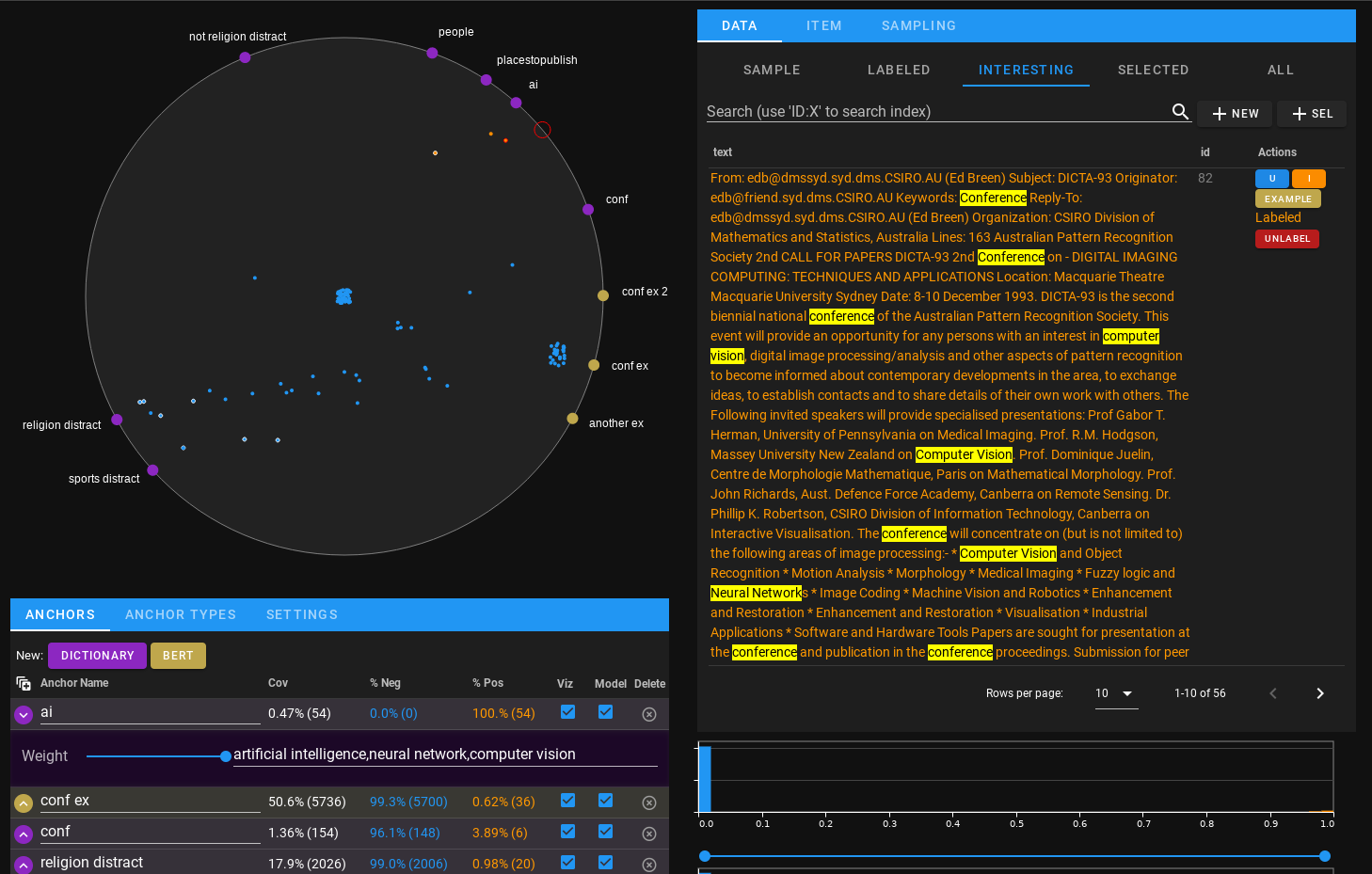
ICAT is implemented using holoviz's panel library, so it can either directly be rendered like a widget in a jupyter lab instance, or incorporated as part of a standalone panel website.
Installation
ICAT can be installed via pip with:
pip install icat-iml
Documentation
The user guide and API documentation can be found at https://ornl.github.io/icat.
Visualization
The primary ring visualization is called AnchorViz, a technique from IML literature. (See Chen, Nan-Chen, et al. "AnchorViz: Facilitating classifier error discovery through interactive semantic data exploration")
We implemented an ipywidget version of AnchorViz and use it in this project, it can be found separately at https://github.com/ORNL/ipyanchorviz
Contributing
Contributions for improving ICAT are welcome! If you run into any problems, find bugs, or think of useful improvements and enhancements, feel free to open an issue.
If you add a feature or fix a bug yourself and want it considered for integration, feel free to open a pull request with the changes. Please provide a detailed description of what the pull request is doing and briefly list any significant changes made. If it's in regards to a specific issue, please include or link the issue number.
Citation
To cite usage of ICAT, please use the following bibtex:
@misc{doecode_105653,
    title = {Interactive Corpus Analysis Tool},
    author = {Martindale, Nathan and Stewart, Scott},
    abstractNote = {The Interactive Corpus Analysis Tool (ICAT) is an interactive machine learning dashboard for unlabeled text/natural language processing datasets that allows a user to iteratively and visually define features, explore and label instances of their dataset, and simultaneously train a logistic regression model. ICAT was created to allow subject matter experts in a specific domain to directly train their own models for unlabeled datasets visually, without needing to be a machine learning expert or needing to know how to code the models themselves. This approach allows users to directly leverage the power of machine learning, but critically, also involves the user in the development of the machine learning model.},
    year = {2023},
    month = {apr}
}
2 maintainers


Download files
Download the file for your platform. If you're not sure which to choose, learn more about installing packages.
Source Distribution
Built Distribution
Filter files by name, interpreter, ABI, and platform.
If you're not sure about the file name format, learn more about wheel file names.
Copy a direct link to the current filters
File details
Details for the file icat_iml-0.8.1.tar.gz.
File metadata
- Download URL: icat_iml-0.8.1.tar.gz
- Upload date:
- Size: 62.2 kB
- Tags: Source
- Uploaded using Trusted Publishing? No
- Uploaded via:
twine/6.1.0 CPython/3.10.15
File hashes
| Algorithm | Hash digest | |
|---|---|---|
| SHA256 |
11dac3acb05334e22c55244e61b17976e23b47002089944071052cc546b1a651
|
|
| MD5 |
0f05eacb3641af516335642ea6f197a8
|
|
| BLAKE2b-256 |
6ca42cd2f7b783506ad5743c0b25e8e484e184d5a407df3b2a92b21dbf848df4
|
File details
Details for the file icat_iml-0.8.1-py3-none-any.whl.
File metadata
- Download URL: icat_iml-0.8.1-py3-none-any.whl
- Upload date:
- Size: 53.7 kB
- Tags: Python 3
- Uploaded using Trusted Publishing? No
- Uploaded via:
twine/6.1.0 CPython/3.10.15
File hashes
| Algorithm | Hash digest | |
|---|---|---|
| SHA256 |
ad64653aa0eae9491f3f878b30fd7ed40f0456123342228ace8e937acaa0c25a
|
|
| MD5 |
2823cca43fa8d4d9f9619684e536fb55
|
|
| BLAKE2b-256 |
8167c16da0878f7ace1364096cba723af4d8ebdf11693ea4f2e3fefa3ef65181
|














