
iceberg-schema-tools
Create and maintain central iceberg schema. Render and validate FHIR data.
Overview
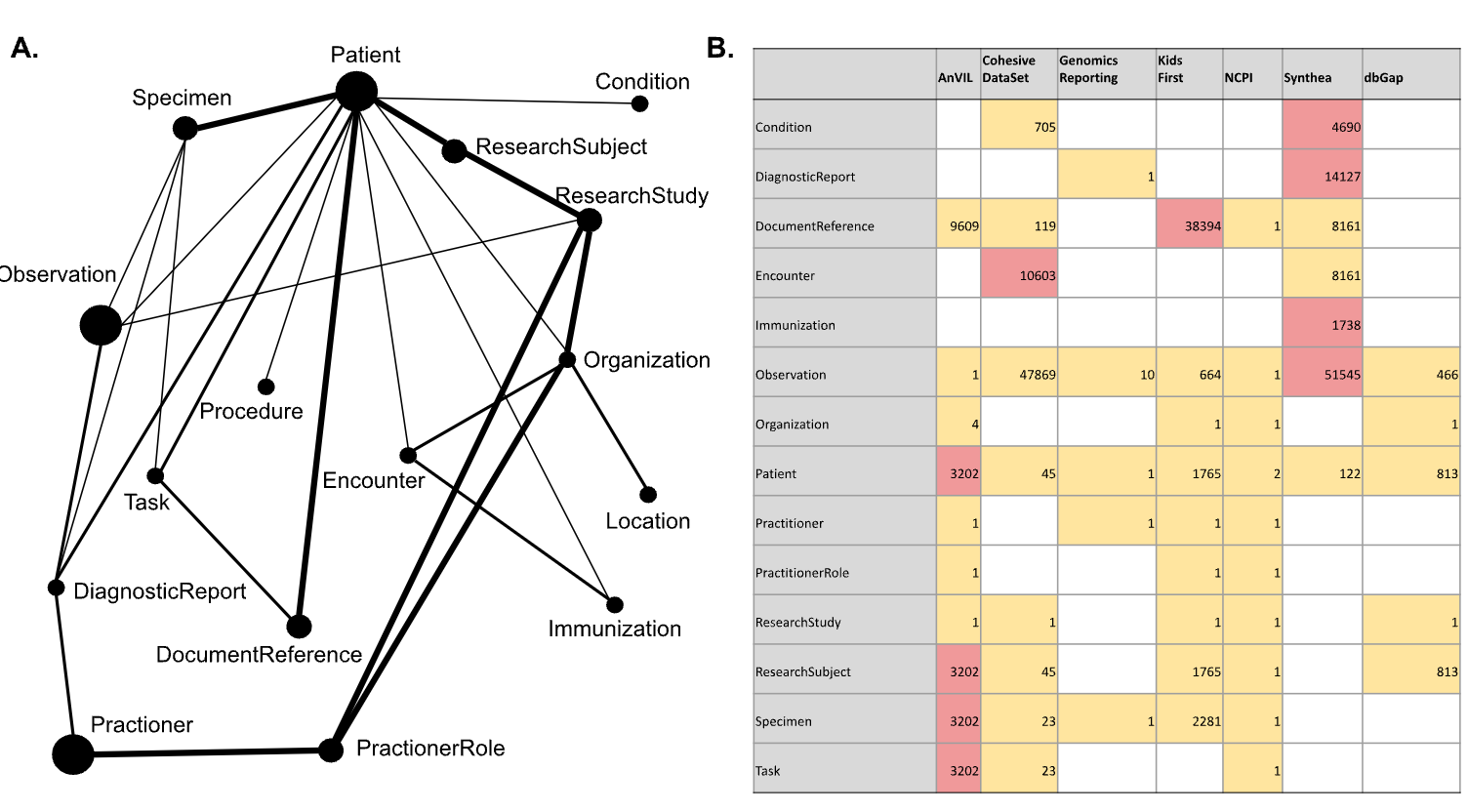
Code that generates the base schema from FHIR goes here. Additional tools are provided to lints, validates and visualize the schema.
Note: The actual schemas are stored in iceberg
Setup
pip install iceberg-tools
Use
$ iceberg schema
Usage: iceberg schema [OPTIONS] COMMAND [ARGS]...

  Manage bmeg or gen3 schemas from FHIR resources.

Options:
  --help  Show this message and exit.

Commands:
  generate  Generate from FHIR resources.
  compile   Create aggregated json file from individual yaml schemas

$ iceberg data

Usage: iceberg data [OPTIONS] COMMAND [ARGS]...

  Project data (ResearchStudy, ResearchSubjects, Patient, etc.).

Options:
  --help  Show this message and exit.

Commands:
  simplify             Renders PFB friendly flattened records.
  validate             Check FHIR data for validity and conventions.
  validate-simplified  Check simplified data for validity and conventions.
  pfb                  Write simplified FHIR files to a PFB.
  migrate              Migrate from FHIR R4B to R5.0.
  report               Aggregate avro pfb files into a cytoscape tsv.
Note:
pfb_fhirandicebergare synonymous in this context.
Examples
The commands:
pfb_fhir schema generate simplified
pfb_fhir data simplify --schema_path  iceberg/schemas/simplified/simplified-fhir.json tests/fixtures/simplify/study/ tmp/simplified
pfb_fhir data pfb tmp/simplified/ tmp/study.pfb
tree tmp
Will generate the following output:
INFO:'Records with relationships': 59413
INFO:'Records': 59460
tmp
├── simplified
│   ├── Condition.ndjson
│   ├── DocumentReference.ndjson
│   ├── Encounter.ndjson
│   ├── MedicationAdministration.ndjson
│   ├── Observation.ndjson
│   ├── Patient.ndjson
│   ├── ResearchStudy.ndjson
│   ├── ResearchSubject.ndjson
│   ├── Specimen.ndjson
│   └── Task.ndjson
└── study.pfb
Contributing
See CONTRIBUTING.md for developer notes.
4 maintainers


Metadata
4 maintainers
Release files for iceberg-tools 0.0.5
For a detailed explanation of source distributions (sdists) and built distributions (wheels), please see the package formats documentation.
Source distribution (sdist)
| File | Size | Uploaded | Provenance | Actions |
|---|---|---|---|---|
| iceberg_tools-0.0.5.tar.gz | 73.5 kB | Without provenance | Details for iceberg_tools-0.0.5.tar.gz |
Built distribution (wheel)
| File | Interpreter | ABI | Platform | Actions Reset |
|---|---|---|---|---|
| iceberg_tools-0.0.5-py3-none-any.whl | Python 3 | none | any | Details for iceberg_tools-0.0.5-py3-none-any.whl |
Total release size: 188.5 kB
Release files / iceberg_tools-0.0.5.tar.gz
| Download URL | iceberg_tools-0.0.5.tar.gz |
|---|---|
| Size | 73.5 kB |
| Tags | Source |
|
SHA-256 checksum How to use checksums |
ef5530054398d025362e9efc154e3c6df4d4f300ab42d632a055dc9ccdda6b96
|
|
BLAKE2b-256 checksum How to use checksums |
b47930c082b59ed59226a96a6404abda352dbf4e82a99e1b2921c08bb06c2afd
|
| Upload date | |
|
Uploaded using Trusted Publishing? What is trusted publishing? |
No |
| Uploaded via |
twine/4.0.2 CPython/3.9.18
|
Release files / iceberg_tools-0.0.5-py3-none-any.whl
| Download URL | iceberg_tools-0.0.5-py3-none-any.whl |
|---|---|
| Size | 115.0 kB |
| Tags | Python 3 |
|
SHA-256 checksum How to use checksums |
eddddeb2c85b866f855458a141fd1db969b3e890ea7bfec38d65ad5eb2a83d22
|
|
BLAKE2b-256 checksum How to use checksums |
c1921199599536fceeaefe6971a4c2bb5753b53379e9966f891178fc89857971
|
| Upload date | |
|
Uploaded using Trusted Publishing? What is trusted publishing? |
No |
| Uploaded via |
twine/4.0.2 CPython/3.9.18
|
Security for iceberg-tools 0.0.5
Provenance
Provenance describes where a file came from. On PyPI, provenance is shared via attestations, which provide a verifiable record of the build or publishing details. View details, limitations and caveats.
No provenance found
None of the files in this release were uploaded with provenance metadata.
A note on package security
PyPI is a repository for distributing packages, not a service for auditing them. While third-party security researchers and our staff do their best to detect and remove malicious packages, PyPI cannot guarantee the quality, security or suitability of any given package.
To learn more about protecting yourself from malicious actors, visit our package security documentation.














