
icon-uv





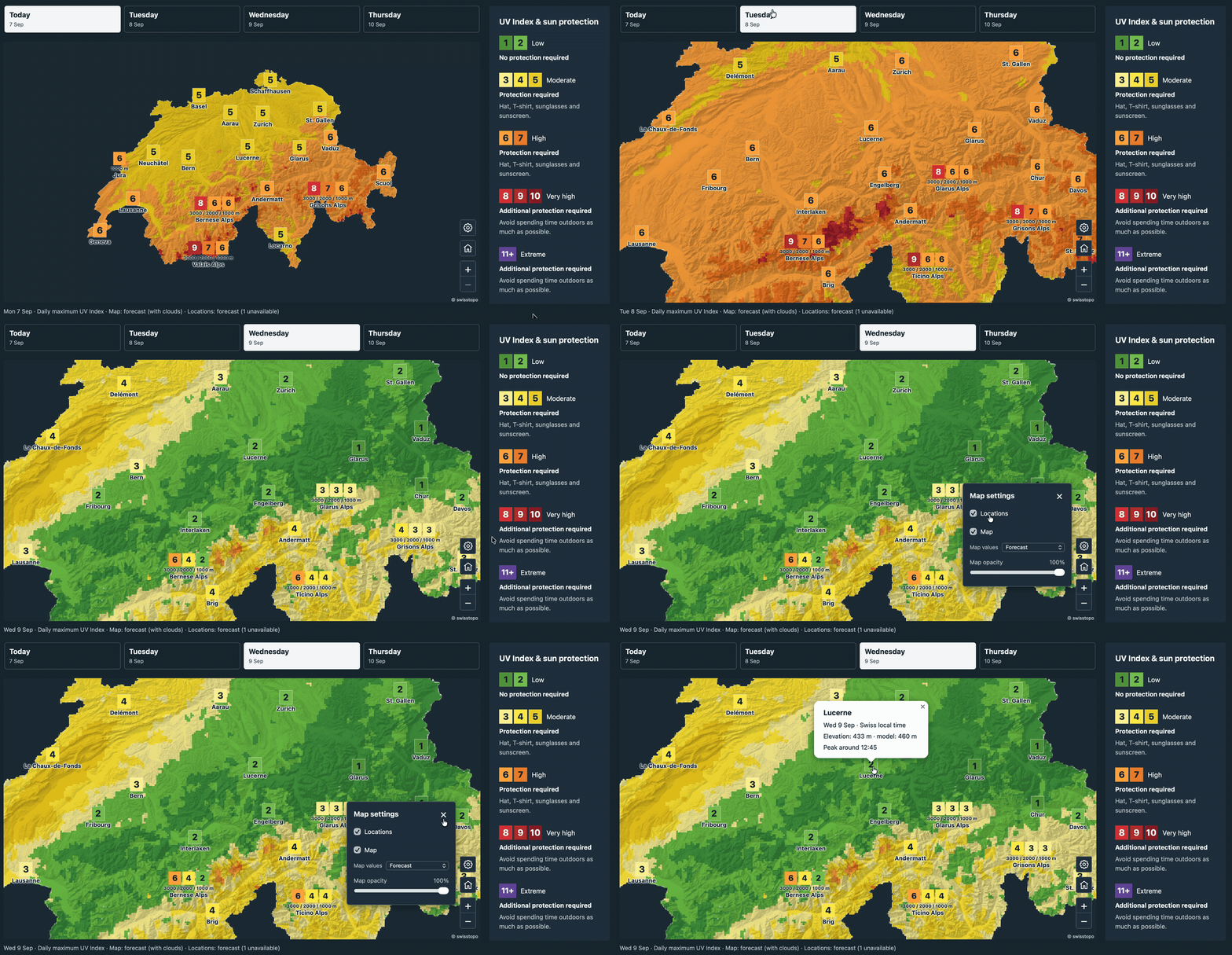
Calculate the UV Index from ICON weather forecasts and CAMS atmospheric composition. icon-uv provides hourly grid and point forecasts and daily JSON for towns and mountain regions, using a bundled radiation lookup table.
Point forecasts need only coordinates and elevation. They use nearby ICON cloud and snow conditions, with optional UV albedo and horizon overrides for a specific site. Hourly and daily products share the same location definitions.
Installation
Install the released package with Python 3.11 or newer:
pip install 'icon-uv[cams]'
icon-uv --help
The API below requires icon-uv 0.2.0 or later. To run the bundled examples, install from the repository with uv:
git clone https://github.com/ofuhrer/icon-uv.git
cd icon-uv
uv sync --locked --extra cams
The cams extra adds the ADS download client. CAMS requires an ADS account and
accepted dataset terms; follow the CAMS API setup.
ICON downloads are public. Omit [cams] when installing for saved inputs only.
Try it without credentials
uv run --no-sync python examples/offline.py --output-dir work/offline
This creates synthetic ICON/CAMS inputs and writes hourly grid/point NetCDF and daily JSON through the real radiation table. After installation it needs no network or credentials. The output illustrates the formats, not a weather forecast.
Calculate UV fields
Choose an available 00 UTC ICON cycle and the preceding day's 12 UTC CAMS cycle. Published ICON files have limited retention. Replace both date placeholders:
ICON_REFERENCE="YYYY-MM-DDT00:00:00Z"
CAMS_REFERENCE="PREVIOUS-YYYY-MM-DDT12:00:00Z"

uv run --no-sync icon-uv fetch-icon \
  --reference "$ICON_REFERENCE" --first-lead 1 --last-lead 48 \
  --output work/icon.nc
uv run --no-sync icon-uv fetch-cams \
  --reference "$CAMS_REFERENCE" --first-lead 12 --last-lead 60 \
  --output work/cams.nc
uv run --no-sync icon-uv run \
  --icon work/icon.nc --cams work/cams.nc --samples 12 --output work/uv.nc
ICON leads are interval boundaries: 1–48 produces 47 hourly intervals, covering
two Swiss daylight dates. --bbox W S E N selects a subset; the default covers
Switzerland and its surroundings. Keep the downloaded NetCDF inputs for offline
recalculation. Downloads use all 21 ICON members; add --control to fetch-icon
for CTRL only. Outputs retain member-specific cloud and surface conditions.
One catalog for hourly and daily forecasts
import xarray as xr
from icon_uv import (
    PointLocation, RegionBand, load_locations,
    compute_points, compute_daily, export_daily_file,
)

locations = load_locations([
    PointLocation("zermatt", 46.017536, 7.746568, 1617, label="Zermatt"),
    RegionBand("valais-3000", (7.0, 45.9, 8.4, 46.4), 3000),
])
with xr.open_dataset("work/uv.nc") as grid:
    hourly = compute_points(grid, locations.points)
    daily = compute_daily(grid, locations, dates=["2026-09-07", "2026-09-08"])

# Publish with the saved grid's hash and issuance freshness checks.
payload = export_daily_file(
    "work/uv.nc", locations, issued_at="2026-09-07T06:00:00Z",
    output="work/daily.json",
)
Use dates matching your saved forecast. Points calculate ambient horizontal UV at the requested coordinates and elevation. UV albedo defaults to the selected ICON cell's snow-derived estimate. Region bands report the spatial P90 of cell daily peaks near their elevation; ensemble products then take the member median. Daily peaks reconstruct a rolling 30-minute mean from the saved atmosphere and cloud state, rather than taking a maximum of hourly means.
The same JSON catalog works with both commands:
uv run --no-sync icon-uv points --grid work/uv.nc \
  --locations examples/shared_locations.json --output work/points.nc
uv run --no-sync icon-uv daily --grid work/uv.nc \
  --locations examples/shared_locations.json --days 2 \
  --issued-at "YYYY-MM-DDT06:00:00Z" --output work/daily.json
See the location API for optional site inputs, native-cell treatment and compatibility. The Davos example shows one supplied terrain horizon and assumed local UV albedo. No horizon preprocessing or HORAYZON installation is required.
Documentation and examples
- Daily products: peak definition, ensemble uncertainty, missing data and JSON schemas.
- Output reference: NetCDF variables, provenance and quality flags.
- Interactive map: 30 towns and six mountain regions, with a dated CTRL snapshot and export scripts.
- Calculation method and validation: physics, evidence and limits.
- Examples, development and releasing.
Scope and limitations
The cloud fit uses ICON's downward shortwave flux without orographic shading
(ASOD_S). Ambient forecasts do not apply a local terrain horizon. A town marker
is an elevation-adjusted reference point; regional elevation bands provide context
for surrounding mountains and cable-car trips. One marker cannot represent every
slope, snow condition or cloud layer in a resort.
Snow-derived UV albedo is an experimental approximation. Cloud state is hourly; subhourly products follow solar geometry and do not resolve rapid cloud changes. Point elevation adjustments retain the source cloud column. Fixed atmospheric profiles, plane-parallel radiation and approximate optional horizon screening also limit accuracy; see the method and validation guides before interpreting results.
Sources and license
- MeteoSwiss ICON OGD
- CAMS atmospheric composition forecasts, produced by ECMWF for Copernicus
- libRadtran, used to generate the radiation table
- swisstopo elevation profiles, used for the supplied Davos horizon
Licensed under BSD 3-Clause. Input datasets and dependencies retain their own licenses and attribution requirements.
1 maintainer

Download files
Download the file for your platform. If you're not sure which to choose, learn more about installing packages.
Source Distribution
Built Distribution
Filter files by name, interpreter, ABI, and platform.
If you're not sure about the file name format, learn more about wheel file names.
Copy a direct link to the current filters
File details
Details for the file icon_uv-0.2.0.tar.gz.
File metadata
- Download URL: icon_uv-0.2.0.tar.gz
- Upload date:
- Size: 10.5 MB
- Tags: Source
- Uploaded using Trusted Publishing? Yes
- Uploaded via:
twine/7.0.0 CPython/3.13.14
File hashes
| Algorithm | Hash digest | |
|---|---|---|
| SHA256 |
18511c7f625963a78e479064a319165e12c158a1fead44d0ae3546a3b5cc2ced
|
|
| MD5 |
34b729c299df7077c563ce975d425bb8
|
|
| BLAKE2b-256 |
222ede5c957f137c7d70917ef491260f0cf22b8aa4c3f326a1ad06a1004b1b51
|
Provenance
The following attestation bundles were made for icon_uv-0.2.0.tar.gz:
Publisher:
publish.yml on ofuhrer/icon-uv
-
Statement:
-
Statement type:
https://in-toto.io/Statement/v1 -
Predicate type:
https://docs.pypi.org/attestations/publish/v1 -
Subject name:
icon_uv-0.2.0.tar.gz -
Subject digest:
18511c7f625963a78e479064a319165e12c158a1fead44d0ae3546a3b5cc2ced - Sigstore transparency entry: 2753001459
- Sigstore integration time:
-
Permalink:
ofuhrer/icon-uv@fba43f5a1d8a390f764717955a4b0aa97f623452 -
Branch / Tag:
refs/tags/v0.2.0 - Owner: https://github.com/ofuhrer
-
Access:
public
-
Token Issuer:
https://token.actions.githubusercontent.com -
Runner Environment:
github-hosted -
Publication workflow:
publish.yml@fba43f5a1d8a390f764717955a4b0aa97f623452 -
Trigger Event:
workflow_dispatch
-
Statement type:
File details
Details for the file icon_uv-0.2.0-py3-none-any.whl.
File metadata
- Download URL: icon_uv-0.2.0-py3-none-any.whl
- Upload date:
- Size: 269.4 kB
- Tags: Python 3
- Uploaded using Trusted Publishing? Yes
- Uploaded via:
twine/7.0.0 CPython/3.13.14
File hashes
| Algorithm | Hash digest | |
|---|---|---|
| SHA256 |
5a6e8cf7a176072d3c3d00aa26a988825b66496b4c08e4fdca4dba4926bfd832
|
|
| MD5 |
2bb1b104672ec275e56e2afe846997bd
|
|
| BLAKE2b-256 |
9e0caaaa04bfaf5927fba70e8a40f31ab5f94590ff730245303a53b8370c6fe2
|
Provenance
The following attestation bundles were made for icon_uv-0.2.0-py3-none-any.whl:
Publisher:
publish.yml on ofuhrer/icon-uv
-
Statement:
-
Statement type:
https://in-toto.io/Statement/v1 -
Predicate type:
https://docs.pypi.org/attestations/publish/v1 -
Subject name:
icon_uv-0.2.0-py3-none-any.whl -
Subject digest:
5a6e8cf7a176072d3c3d00aa26a988825b66496b4c08e4fdca4dba4926bfd832 - Sigstore transparency entry: 2753001468
- Sigstore integration time:
-
Permalink:
ofuhrer/icon-uv@fba43f5a1d8a390f764717955a4b0aa97f623452 -
Branch / Tag:
refs/tags/v0.2.0 - Owner: https://github.com/ofuhrer
-
Access:
public
-
Token Issuer:
https://token.actions.githubusercontent.com -
Runner Environment:
github-hosted -
Publication workflow:
publish.yml@fba43f5a1d8a390f764717955a4b0aa97f623452 -
Trigger Event:
workflow_dispatch
-
Statement type:














