


IconMatch
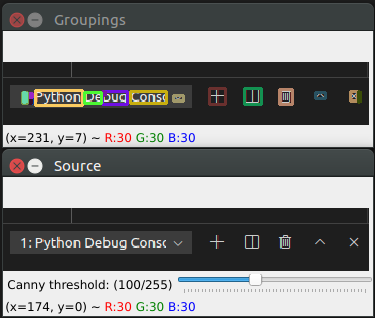
Part of the Hands Free Computing project. This subproject aims to allow a user to easily select icons on the screen in any environment.
Table of Contents
About The Project
Built With
Getting Started
Prerequisites
Refer to the requirements.txt file.
Installation
Clone this repository to your computer.
Install the project using Python 3.8; then install the requirements in the requirements.txt file.
A sample demo of how the engine works so far can be found within the icondetection module.
Key Features
- Detection of areas with a high likelihood of being clickable icons.
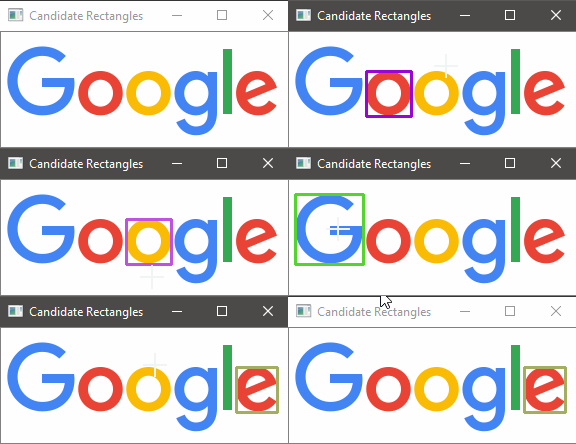
- Detection of closest rectangle to point of interest (be it gaze, or mouse as in the examples)
Usage
You can use the functions as shown in demo.py as a default entry point.
In the below example, the main set of functions is called within a callback function, as this allows the threshold value to be controlled from a GUI in OpenCV.
def threshold_callback(val):
    """
    Takes a value of threshold for the canny edge detector and finds the
    bounding rectangles of appropriate edges within an image.
    """

    # accept an input image and convert it to grayscale, and blur it
    gray_scale_image = grayscale_blur(src)

    # determine the bounding rectangles from canny detection
    _, bound_rect = canny_detection(gray_scale_image, min_threshold=val)

    # group the rectangles from this step
    global grouped_rects
    grouped_rects = group_rects(bound_rect, 0, src.shape[1])

    # (for display purposes) use the provided rectangles to display in your program
    render_rectangles(grouped_rects, src.copy(), "Grouped Rectangles", desired_color=(36, 9, 14))
    render_rectangles(bound_rect, src.copy(), "Original Rectangles", desired_color=(96, 9, 104))
    candidate_rectangle_demo()
Roadmap
✔ denotes an available API, ❌ denotes a WIP API
- ✔ Detect regions of interest with moderate accuracy
- ✔ Detect candidate region based on proximity
- ❌ Detect icon-like objects on the screen
- ❌ Context provision into regions of interest
Contributing
Contributions are what make the open source community such an amazing place to be learn, inspire, and create. Any contributions you make are genuinely appreciated.
- Fork the Project
- Create your Feature Branch (
git checkout -b feature/AmazingFeature) - Commit your Changes (
git commit -m 'Add some AmazingFeature') - Push to the Branch (
git push origin feature/AmazingFeature) - Open a Pull Request
License
Distributed under the MIT License. See LICENSE for more information.
Contact
Luis Zugasti - @luis__zugasti
Project Link: https://github.com/luiszugasti/IconMatch
1 maintainer

Metadata
1 maintainer
Release files for icondetection 0.1.0
For a detailed explanation of source distributions (sdists) and built distributions (wheels), please see the package formats documentation.
Source distribution (sdist)
| File | Size | Uploaded | |
|---|---|---|---|
| icondetection-0.1.0.tar.gz | 39.1 kB | Details |
Built distribution (wheel)
| File | Interpreter | ABI | Platform | Reset |
|---|---|---|---|---|
| icondetection-0.1.0-py3-none-any.whl | Python 3 | none | any | Details |
Total release size: 51.1 kB
Release files / icondetection-0.1.0.tar.gz
| Download URL | icondetection-0.1.0.tar.gz |
|---|---|
| Size | 39.1 kB |
| Tags | Source |
|
SHA-256 checksum How to use checksums |
9ee45a730d988cac494437be25303f269893f1c9fbdd86d6bb11618ba2e97376
|
|
BLAKE2b-256 checksum How to use checksums |
67f2cfa65ed21547a1c3a11ff6a1a747693d2aa4aa15b1eb6382976b68750bf4
|
| Upload date | |
|
Uploaded using Trusted Publishing? What is trusted publishing? |
No |
| Uploaded via |
twine/3.2.0 pkginfo/1.6.1 requests/2.25.0 setuptools/50.3.2 requests-toolbelt/0.9.1 tqdm/4.53.0 CPython/3.8.6
|
Release files / icondetection-0.1.0-py3-none-any.whl
| Download URL | icondetection-0.1.0-py3-none-any.whl |
|---|---|
| Size | 12.0 kB |
| Tags | Python 3 |
|
SHA-256 checksum How to use checksums |
bc8393d1d345768d45ba7687c785cc202e74e0d5a31b2094082a3ce81cca863f
|
|
BLAKE2b-256 checksum How to use checksums |
a9c40b166313e0a397bb72c66f5a0ad56db41b45ab41d8cfa2271a46a43891aa
|
| Upload date | |
|
Uploaded using Trusted Publishing? What is trusted publishing? |
No |
| Uploaded via |
twine/3.2.0 pkginfo/1.6.1 requests/2.25.0 setuptools/50.3.2 requests-toolbelt/0.9.1 tqdm/4.53.0 CPython/3.8.6
|














