
IdaiKuri (Generic Simple Template Engine)
- A Generic Simple Template Engine which maps Function Calls and Variables in templates(based on regex pattern) with code to create Files as variants of the Template Choosen.
- Check out the example code in repo ( https://github.com/Palani-SN/IdaiKuri ) for reference
Filler
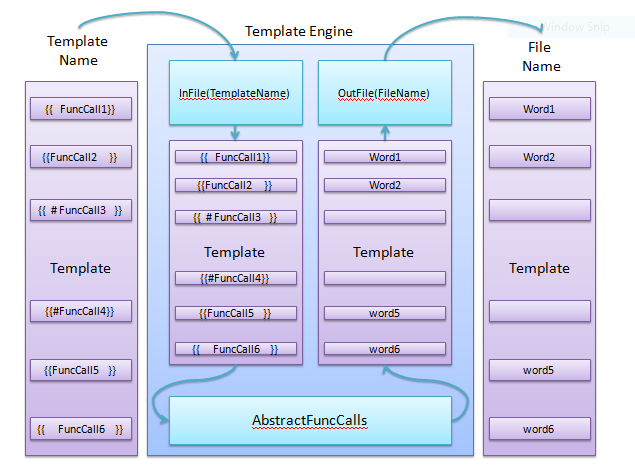
- To be used to fill a template from code using
- variables and function definitions in code and
- function calls in template
- Sample usage of the file is as given below (Refer TemplateFiles for template examples)
from IdaiKuri.Filler import FillerTemplateEngine as TemplateEngine
from IdaiKuri.Filler import Interface

TE = TemplateEngine();
TE.InFile("TemplateFiles/Template_DefaultCase1.html", True);
temp_vars = TE.VARS();

temp_vars.Portrait = "images/GuidoVanRossum.png";
temp_vars.Logo = "images/PythonLogo.png";
temp_vars.FullName = "Guido Van Rossum";
temp_vars.Position = "Python's Benevolent Dictator for life";
temp_vars.Quote = "In Python, every symbol you type is essential.";
temp_vars.Author = "Guido van Rossum";
result_dict = TE.OutFile(temp_vars, "GeneratedFiles/GuidoVanRossum_DefaultCase1.html");
CodeFlow
Interface (Decorator)
- Interface is the decorator to be used to define methods in child class extended from Filler.py/TemplateEngine class
- Sample code for using Interface decorator is shown below (Refer Examples for more understanding)
from IdaiKuri.Filler import FillerTemplateEngine as TemplateEngine
from IdaiKuri.Filler import Interface

class AdvancedTemplate(TemplateEngine):
    @Interface
    def get_portrait(self, name):
        return "images/"+name.replace(" ","")+".png";
    @Interface
    def get_logo(self, contrib):
        return "images/"+contrib+"Logo.png"
TemplateEngine (class from Filler.py)
- Initialising class helps to configure the RegexEdges and it also validates the pattern based on the second parameter FuncCallTemplate
- Arguments
- Arg1 - RegexEdges (a tuple with start and end delimiters)
- Arg2 - FuncCallTemplate is the sample string with "self.FUNC_CALL()" keyword to validate the RegexEdges
- Sample regex configurations in TemplateEngine Initialisation is shown below.
## Default RegexEdges=("{{", "}}"),
## FuncCallTemplate="{{self.FUNC_CALL()}}"
TE1 = TemplateEngine();

## RegexEdges=("_StArT_", "_eNd_"),
## FuncCallTemplate="_StArT_self.FUNC_CALL()_eNd_"
TE2 = TemplateEngine(("_StArT_", "_eNd_"), "_StArT_self.FUNC_CALL()_eNd_");

## RegexEdges=("<<", ">>"),
## FuncCallTemplate="<<self.FUNC_CALL()>>"
TE3 = TemplateEngine(("<<", ">>"), "<<self.FUNC_CALL()>>");

## RegexEdges=("\\[\\[", "\\]\\]"),
## FuncCallTemplate="[[self.FUNC_CALL()]]"
TE4 = TemplateEngine(("\\[\\[", "\\]\\]"), "[[self.FUNC_CALL()]]");

## RegexEdges=("{\\[<{\\[", "}\\]>}\\]"),
## FuncCallTemplate="{[<{[self.FUNC_CALL()}]>}]"
TE5 = TemplateEngine(("{\\[<{\\[", "}\\]>}\\]"), "{[<{[self.FUNC_CALL()}]>}]");
InFile()
- Gets the Template Name/Path of the template function calls that is going to be used.
- Will initialize the MapDict for updating the function calls in the template.
## Definition
def InFile(self, TemplateName, DebugTokens=False):
- Arguments
- Arg1 - TemplateName (a String that contains the Path/Name of the template)
- Arg2 - DebugTokens (If True prints the function calls of template, If false doesnt print)
VARS()
- Returns an Instance of the an empty class, for argument variables storage.
OutFile()
- Defines the file Name/Path that needs to be generated with the filled content from the template.
- It edits the template based on the dependencies/arguments of the template function calls.
## Definition
def OutFile(self, FuncArgVars, UniqueName):
- Arguments
- Arg 1 - FuncArgVars (an instance of class with appropriate members filled)
- Arg 2 - UniqueName (filename to be generated with the edited template content)
- Returns
- MapDict - the result as a dictionary ( keys : func_calls and values : Return_values)
Parser
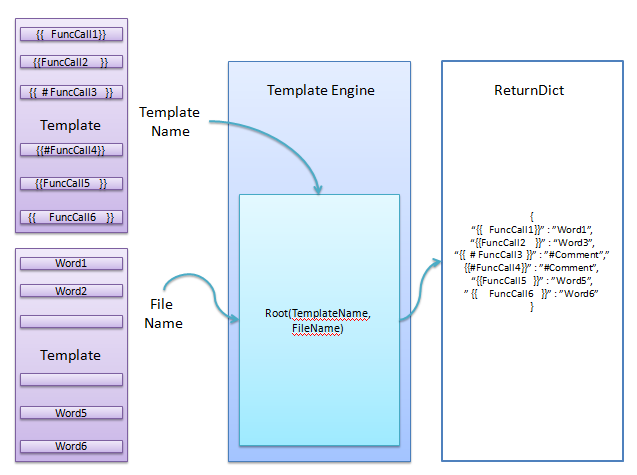
- To be used to parse a file by comparing
- function calls in a template and
- file that is generated using the template
- Sample usage of the file is as given below (Refer TemplateFiles for template examples)
from IdaiKuri.Parser import ParserTemplateEngine as TemplateEngine

PE = TemplateEngine();
print("\n", "Template_DefaultCase1.html", "GuidoVanRossum_DefaultCase1.html", "\n");
diffdict = PE.Root("TemplateFiles/Template_DefaultCase1.html", "GeneratedFiles/GuidoVanRossum_DefaultCase1.html");
for key in diffdict.keys():
    print("   ", key, "->", diffdict[key]);
CodeFlow
TemplateEngine (class from Parser.py)
- Initialising class helps to configure the RegexEdges and it also validates the pattern based on the second parameter FuncCallTemplate
- Arguments
- Arg1 - RegexEdges (a tuple with start and end delimiters)
- Arg2 - FuncCallTemplate is the sample string with "self.FUNC_CALL()" keyword to validate the RegexEdges
- Sample regex configurations in TemplateEngine Initialisation is shown below
## Default RegexEdges=("{{", "}}"),
## FuncCallTemplate="{{self.FUNC_CALL()}}"
TE1 = TemplateEngine();

## RegexEdges=("_StArT_", "_eNd_"),
## FuncCallTemplate="_StArT_self.FUNC_CALL()_eNd_"
TE2 = TemplateEngine(("_StArT_", "_eNd_"), "_StArT_self.FUNC_CALL()_eNd_");

## RegexEdges=("<<", ">>"),
## FuncCallTemplate="<<self.FUNC_CALL()>>"
TE3 = TemplateEngine(("<<", ">>"), "<<self.FUNC_CALL()>>");

## RegexEdges=("\\[\\[", "\\]\\]"),
## FuncCallTemplate="[[self.FUNC_CALL()]]"
TE4 = TemplateEngine(("\\[\\[", "\\]\\]"), "[[self.FUNC_CALL()]]");

## RegexEdges=("{\\[<{\\[", "}\\]>}\\]"),
## FuncCallTemplate="{[<{[self.FUNC_CALL()}]>}]"
TE5 = TemplateEngine(("{\\[<{\\[", "}\\]>}\\]"), "{[<{[self.FUNC_CALL()}]>}]");
Root()
- Parses the template Name/Path and file Name/Path.
- Returns the differences between them as a dict.
## Definition
def Root(self, TemplateName, FileName):
- Arguments
- Arg 1 - TemplateName (Name of the template to be edited)
- Arg 2 - FileName (filename to be generated with the edited template content)
- Returns
- RootDict - the result as a dictionary (keys : func_calls and values : Return_values)
1 maintainer

Metadata
1 maintainer
Release files for IdaiKuri 1.0.0
For a detailed explanation of source distributions (sdists) and built distributions (wheels), please see the package formats documentation.
Source distribution (sdist)
| File | Size | Uploaded | |
|---|---|---|---|
| IdaiKuri-1.0.0.tar.gz | 93.7 kB | Details |
Built distribution (wheel)
| File | Interpreter | ABI | Platform | Reset |
|---|---|---|---|---|
| IdaiKuri-1.0.0-py3-none-any.whl | Python 3 | none | any | Details |
Total release size: 113.2 kB
Release files / IdaiKuri-1.0.0.tar.gz
| Download URL | IdaiKuri-1.0.0.tar.gz |
|---|---|
| Size | 93.7 kB |
| Tags | Source |
|
SHA-256 checksum How to use checksums |
ac466749742ff4f5625d7289c4f40e63d36342ca60ddbcad5165875302621ad9
|
|
BLAKE2b-256 checksum How to use checksums |
95b03275c7bf8105c42d2a6325bab1aee7a7b4f875de38f21ce3aa1dbb98daaa
|
| Upload date | |
|
Uploaded using Trusted Publishing? What is trusted publishing? |
No |
| Uploaded via |
twine/3.4.2 importlib_metadata/4.8.1 pkginfo/1.7.1 requests/2.26.0 requests-toolbelt/0.9.1 tqdm/4.62.2 CPython/3.7.6
|
Release files / IdaiKuri-1.0.0-py3-none-any.whl
| Download URL | IdaiKuri-1.0.0-py3-none-any.whl |
|---|---|
| Size | 19.4 kB |
| Tags | Python 3 |
|
SHA-256 checksum How to use checksums |
a990547d5be8dbb3a08c500b2be5a74e8fb7fac8c0e0f30b70a934536b0c0bde
|
|
BLAKE2b-256 checksum How to use checksums |
ccab9b0d7bf8c29bf7306528f6f449bec9b6b9f567449ac159979ab31816631e
|
| Upload date | |
|
Uploaded using Trusted Publishing? What is trusted publishing? |
No |
| Uploaded via |
twine/3.4.2 importlib_metadata/4.8.1 pkginfo/1.7.1 requests/2.26.0 requests-toolbelt/0.9.1 tqdm/4.62.2 CPython/3.7.6
|














