
Cross-IDE persistent memory layer for AI coding agents via MCP

Project description
IDE Memory MCP
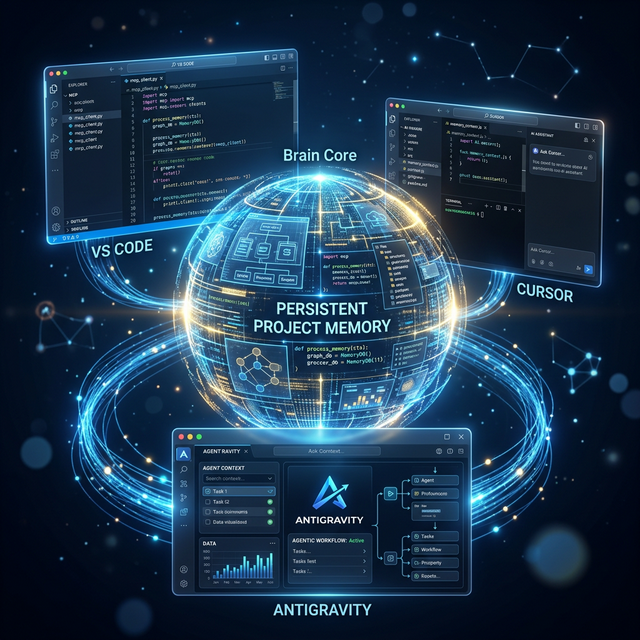
Cross-IDE persistent memory for AI coding agents — your AI remembers every project, across every IDE.


The Problem
Every time you open a project in a new IDE or start a fresh AI conversation, your AI assistant forgets everything:
- What the project does
- Architecture decisions you've made
- What you're currently working on
- Your progress and milestones
You end up repeating yourself. Every. Single. Time.
The Solution
IDE Memory MCP gives AI coding agents a persistent memory layer that works across any IDE supporting the Model Context Protocol. Write project context once — the AI remembers it everywhere.
Cursor ←──→ IDE Memory MCP ←──→ VS Code
   ↑              ↓                 ↑
   └── same project memory ────────┘
Key Features
- Cross-IDE Memory — Project context persists across Cursor, VS Code, Windsurf, Claude Desktop, and any MCP-compatible IDE
- Context-Optimized — Default reads return a compact summary table, not a context-window-destroying content dump. The AI loads only what it needs.
- Smart Warnings — Automatically detects stale sections (>7 days), oversized content (>10k chars), and suggests pruning when memory gets old (>30 days)
- Agent Prompts — Built-in MCP prompts guide the AI on how to start sessions, bootstrap memory for new projects, and update memory after changes
- Smart Project Matching — Recognizes projects by path or git remote URL. Move folders, switch machines — your memory follows.
- Section-Based Storage — Organized into
overview,decisions,active_context,progress+ custom sections - Append Mode — Add incremental updates without rewriting entire sections
- Version History — Previous content auto-saved before each overwrite (last 5 snapshots)
- Zero Config — Works out of the box. No database, no cloud, just local markdown files.
Quick Start
1. Install
# Using uv (recommended)
uv pip install ide-memory-mcp

# Using pip
pip install ide-memory-mcp
2. Auto-Configure Your IDE
Run the setup command to automatically detect and configure installed IDEs (Cursor, VS Code, Windsurf, Claude Desktop):
ide-memory-mcp setup
💡 Restart your IDE after running this command to activate the MCP server.
CLI Commands
The ide-memory-mcp package includes practical commands to manage your setup:
ide-memory-mcp setup
Auto-configure MCP for your IDEs.
ide-memory-mcp setup              # auto-detect + configure all
ide-memory-mcp setup --cursor     # configure only Cursor
ide-memory-mcp setup --vscode     # configure only VS Code
ide-memory-mcp setup --windsurf   # configure only Windsurf
ide-memory-mcp setup --claude     # configure only Claude Desktop
ide-memory-mcp setup --all        # configure all supported
ide-memory-mcp doctor
Health check your installation.
ide-memory-mcp doctor
Verifies server import, storage disk usage, projects count, and which IDEs are configured.
ide-memory-mcp status
Quick overview of all projects.
ide-memory-mcp status
Lists registered projects with section counts, total size, and last updated date.
💡 Manual IDE Configuration (If setup fails or for advanced users)
Add the MCP server to your IDE's configuration file:
Cursor — ~/.cursor/mcp.json
{
  "mcpServers": {
    "ide-memory": {
      "command": "ide-memory-mcp"
    }
  }
}
VS Code — .vscode/mcp.json (or global settings)
{
  "mcpServers": {
    "ide-memory": {
      "command": "ide-memory-mcp"
    }
  }
}
Windsurf — ~/.codeium/windsurf/mcp_config.json
{
  "mcpServers": {
    "ide-memory": {
      "command": "ide-memory-mcp"
    }
  }
}
Claude Desktop
- macOS:
~/Library/Application Support/Claude/claude_desktop_config.json - Windows:
%APPDATA%\Claude\claude_desktop_config.json
{
  "mcpServers": {
    "ide-memory": {
      "command": "ide-memory-mcp"
    }
  }
}
Tools
IDE Memory MCP exposes 4 optimized tools to the AI agent:
init_project
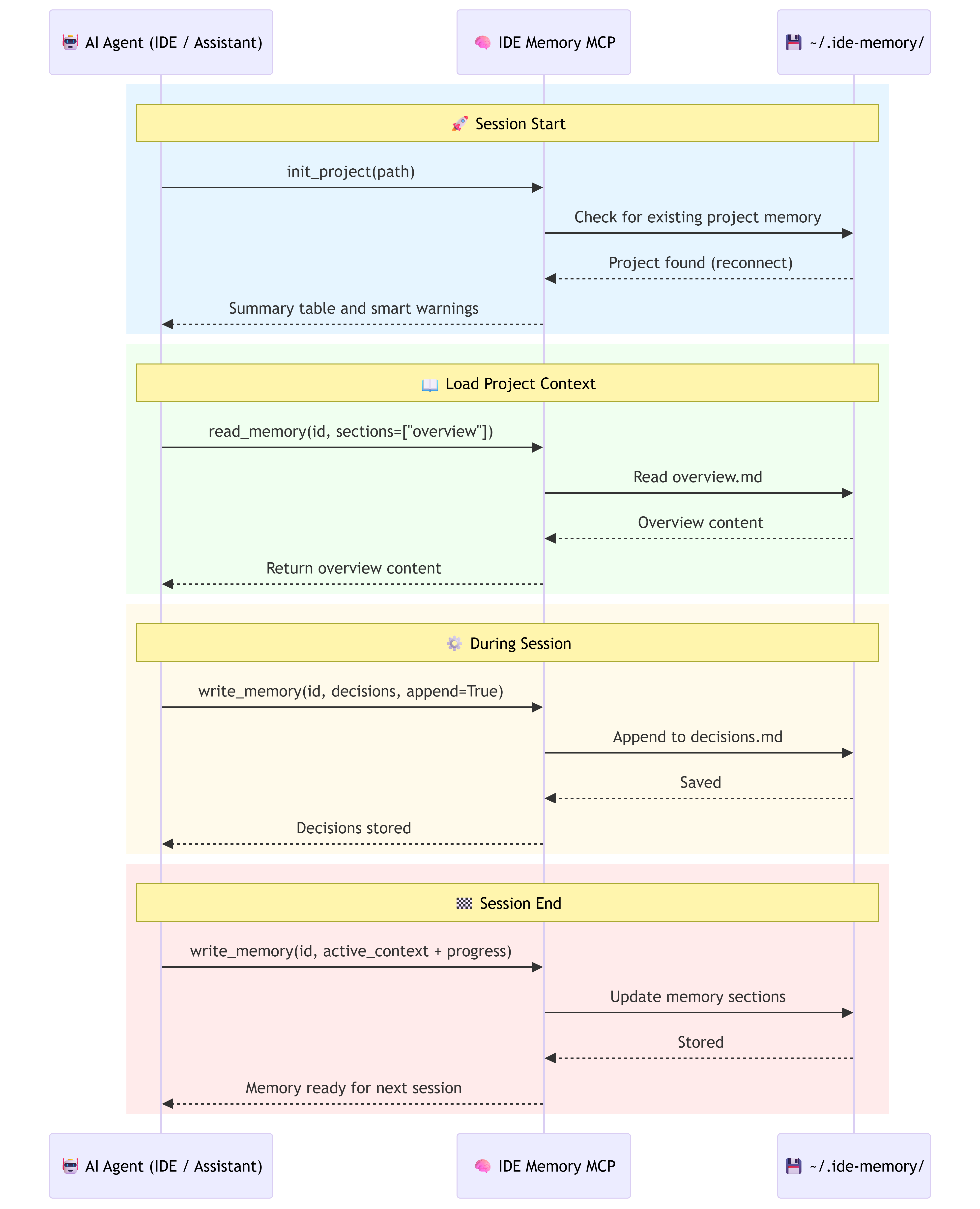
Register or reconnect to a project. Call this first in every conversation.
init_project(projectPath, projectName?, gitRemoteUrl?)
- New project → creates memory storage, suggests next steps, mentions
bootstrap_memoryprompt - Known project → reconnects, returns memory summary with smart warnings:
- ⚠️ Empty sections that need filling
- ⏰ Stale sections (>7 days) that should be updated
- 📦 Large sections (>10k chars) that may need pruning
- 🧹 Old sections (>30 days) suggesting a full prune
read_memory
Context-aware memory loading. Optimized to avoid flooding the AI's context window.
read_memory(projectIdOrPath, sections?, query?, maxChars?, history?, prune?)
| Mode | Trigger | What it does |
|---|---|---|
| Summary (default) | No sections |
Returns a compact table: section names, sizes, staleness, warnings. No content. |
| Selective | sections=["overview"] |
Loads only the listed sections |
| Truncated | maxChars=500 |
Caps each section at N characters |
| Search | query="auth" |
Keyword search across all sections |
| History | history=True |
Shows previous versions of a section |
| Prune | prune=True |
Loads all with actionable cleanup instructions |
💡 Recommended workflow:
read_memory(projectId)→ get the summary table (~10 lines)- Decide which sections are relevant
read_memory(projectId, sections=["overview", "decisions"])→ load only what you need
write_memory
Write to one or more memory sections.
write_memory(projectIdOrPath, sections, append?, heading?)
- Overwrite mode (default): Replace entire section content. Previous content auto-saved to history.
- Append mode (
append=True): Add timestamped entries without rewriting. Great for decisions and progress logs.
Tool description includes behavioral guidance — it tells the AI agent when to call it:
- After significant code changes
- When important decisions are made
- At the end of productive sessions
- When the user asks to "remember" something
manage_projects
List or delete projects.
manage_projects(action, projectIdOrPath?, confirm?)
MCP Prompts
IDE Memory MCP includes 3 built-in prompt templates that guide the AI agent through common workflows. These solve the "agent doesn't know when to use memory" problem.
start_session
When: Beginning of every conversation.
Guides the agent through: initialize project → read summary → load relevant sections → check for stale content → plan memory updates for end of session.
bootstrap_memory
When: First time using IDE Memory on an existing project, or when the user says "learn about this project".
Guides the agent through: analyze README & package files → write comprehensive overview → document architecture decisions → set active context → record progress.
update_memory
When: End of a productive session, after significant changes, or when the user says "save what we did".
Guides the agent through: read current memory → update active_context → append new decisions → update progress → update overview if needed → check if pruning is needed.
Memory Sections
Default sections created for every project:
| Section | Purpose |
|---|---|
overview |
What the project is, tech stack, architecture |
decisions |
Key technical decisions and rationale |
active_context |
What you're currently working on |
progress |
Milestones, completed items, what's next |
Custom sections are fully supported — use any lowercase identifier:
write_memory(projectId, {"api_contracts": "...", "testing_notes": "..."})
Smart Warnings
The memory summary automatically includes actionable warnings:
| Warning | Trigger | Action |
|---|---|---|
| ⚠️ Empty | Section has <50 chars | Fill with write_memory |
| ⏰ Stale | Section not updated in >7 days | Review and update |
| 📦 Large | Section exceeds 10k chars | Consider pruning |
| 🧹 Prune | Any section >30 days old | Run read_memory(prune=True) |
Storage
All memory is stored as simple markdown files in ~/.ide-memory/projects/:
~/.ide-memory/
├── config.json              # Optional configuration
└── projects/
    └── <project_id>/
        ├── meta.json         # Project metadata + timestamps
        ├── overview.md
        ├── decisions.md
        ├── active_context.md
        ├── progress.md
        └── .history/         # Auto-saved snapshots
            ├── overview_20260314_120000.md
            └── decisions_20260314_130000.md
- No database required
- All files are human-readable markdown
- Easy to backup, version, or migrate
- No data ever leaves your machine
Configuration
Optional. Create ~/.ide-memory/config.json:
{
  "default_sections": [
    "overview",
    "decisions",
    "active_context",
    "progress"
  ]
}
Development
Prerequisites
- Python 3.11+
- uv (recommended) or pip
Setup
git clone https://github.com/prasanna-pmpeople/IDE-Memory-MCP.git
cd IDE-Memory-MCP
uv sync
Run the server
uv run ide-memory-mcp
Run tests
uv run pytest tests/ -v
Test with MCP Inspector
npx -y @modelcontextprotocol/inspector uv run ide-memory-mcp
See TESTING.md for the complete testing guide, including MCP Inspector walkthrough and cross-IDE battle testing.
Build the package
uv build
Install from built package
pip install dist/ide_memory_mcp-0.2.1-py3-none-any.whl
How It Works


Download files
Download the file for your platform. If you're not sure which to choose, learn more about installing packages.
Source Distribution
Built Distribution
Filter files by name, interpreter, ABI, and platform.
If you're not sure about the file name format, learn more about wheel file names.
Copy a direct link to the current filters
File details
Details for the file ide_memory_mcp-0.2.2.tar.gz.
File metadata
- Download URL: ide_memory_mcp-0.2.2.tar.gz
- Upload date:
- Size: 1.3 MB
- Tags: Source
- Uploaded using Trusted Publishing? No
- Uploaded via: twine/6.1.0 CPython/3.13.2
File hashes
| Algorithm | Hash digest | |
|---|---|---|
| SHA256 |
50489b85f41899e97f8e7c2dd0720ba4b845e18e73ca974f87b2483c4b734fcf
|
|
| MD5 |
07f280639ff6a912341b9cc70283781a
|
|
| BLAKE2b-256 |
bfdb1bb4e3207e4d1936ebcf38eaa546212dd4bbd24c329db401b0dcea537caa
|
File details
Details for the file ide_memory_mcp-0.2.2-py3-none-any.whl.
File metadata
- Download URL: ide_memory_mcp-0.2.2-py3-none-any.whl
- Upload date:
- Size: 24.2 kB
- Tags: Python 3
- Uploaded using Trusted Publishing? No
- Uploaded via: twine/6.1.0 CPython/3.13.2
File hashes
| Algorithm | Hash digest | |
|---|---|---|
| SHA256 |
78fdc6e299d4bd1c1deec1a2f65291193d5b421b6a50c22e4994e91c2355df5e
|
|
| MD5 |
0fc5fa3d2a4b8ed10a27fca4d959ed54
|
|
| BLAKE2b-256 |
82ea1755b54663c4664e39e266011b4fb1b8f8ca014d1938929a38f3f9e2118e
|






