
idm
Downloader with Internet Download Manager (Windows)
Installing
Install and update using pip:
pip install idm
Requires Python 3.7+ on Windows with Internet Download Manager installed.
Example
What does it look like? Here is an example of a simple pyidm program:
from idm import IDMan

downloader = IDMan()
url = "http://test.com/test.exe"

downloader.download(url, r"c:\DOWNLOADS", "test_output.exe")
and "Internet Download Manager (IDM)" will open then immediately download the URL
add link without start downloading
from idm import IDMan

downloader = IDMan()
url = "http://test.com/test.exe"

downloader.download(url, r"c:\DOWNLOADS", "test_output.exe", add_only=True)
download() returns True when IDM accepted the link, False otherwise (the reason is in downloader.last_error).
or run on terminal/cmd
> idm "http://test.com/test.exe" -p C:\DOWNLOADS -o test_output.exe -c -ua "Mozilla/5.0 (Windows NT 10.0; Win64; x64) AppleWebKit/537.36 (KHTML, like Gecko) Chrome/67.0.3396.99 Safari/537.36" -r "http://test.com/test.exe" -U admin -P admin123 -D "Authorization=Bearer KN9WW7k5gKgCnQLpnmWWM7LytAuSUwb9\nCookie=accountToken=KN9WW7k5gKgCnQLpnmWWM7LytAuSUwb9" -C "accountToken=KN9WW7k5gKgCnQLpnmWWM7LytAuSUwb9;"
# or pyidm
Example use with headers as postData, cookies and other parameters:
from idm import IDMan

downloader = IDMan()
url = "http://test.com/test.exe"

headers = {
    'Authorization': "Bearer KN9WW7k5gKgCnQLpnmWWM7LytAuSUwb9",
    'Cookie': 'accountToken=KN9WW7k5gKgCnQLpnmWWM7LytAuSUwb9',
}
cookies = {
    'accountToken': 'KN9WW7k5gKgCnQLpnmWWM7LytAuSUwb9'
}

username = "admin"
password = "admin123"
confirm = True
user_agent = "Mozilla/5.0 (Windows NT 10.0; Win64; x64) AppleWebKit/537.36 (KHTML, like Gecko) Chrome/67.0.3396.99 Safari/537.36"

downloader.download(url, r"c:\DOWNLOADS", "test_output.exe", "http://test.com/test.exe", cookies, headers, username, password, confirm, user_agent)
Command line usage
you can use idm or pyidm
Usage: idm/pyidm [-h] [-p PATH] [-o OUTPUT] [-c] [-a] [-r REFERRER] [-C COOKIE] [-D POST_DATA] [-U USERNAME] [-P PASSWORD] [-ua USER_AGENT] [-s] [--host HOST] [--port PORT] [--token TOKEN] [-A AGENT] [--agent-token AGENT_TOKEN]
           [--local] [-v] [--config CONFIG]
           [URLS ...]

Command line downloader with/Via Internet Download Manager(IDM)

Positional Arguments:
  URLS                  url to download, or "c" to get url from clipboard or a text file containing one link per line

Options:
  -h, --help            show this help message and exit
  -p, --path PATH       Path to save (default: current dir; on agent server: its configured path)
  -o, --output OUTPUT   Save with different name
  -c, --confirm         Confirm before download
  -a, --add             Add link to IDM without start downloading
  -r, --referrer REFERRER
                        Url referrer
  -C, --cookie COOKIE   Cookie string or dict
  -D, --post-data POST_DATA
                        Post Data string or dict
  -U, --username USERNAME
                        Username if require
  -P, --password PASSWORD
                        Password if require
  -ua, --user-agent USER_AGENT
                        Send with custom User-Agent string
  -s, --server          Run agent server: receive links over HTTP and forward them to IDM (COM)
  --host HOST           Agent server bind host (default: 127.0.0.1)
  --port PORT           Agent server port (default: 8899)
  --token TOKEN         Agent server token (or env PYIDM_TOKEN), required if host is not loopback
  -A, --agent AGENT     Send links to an agent server instead of local IDM, e.g. http://192.168.1.10:8899
  --agent-token AGENT_TOKEN
                        Token for the agent server (or env PYIDM_TOKEN)
  --local               Ignore configured agent url, send to local IDM
  -v, --verbose         Verbose agent server log
  --config CONFIG       set config, format section:option:value, for list valid section/option type "doc"
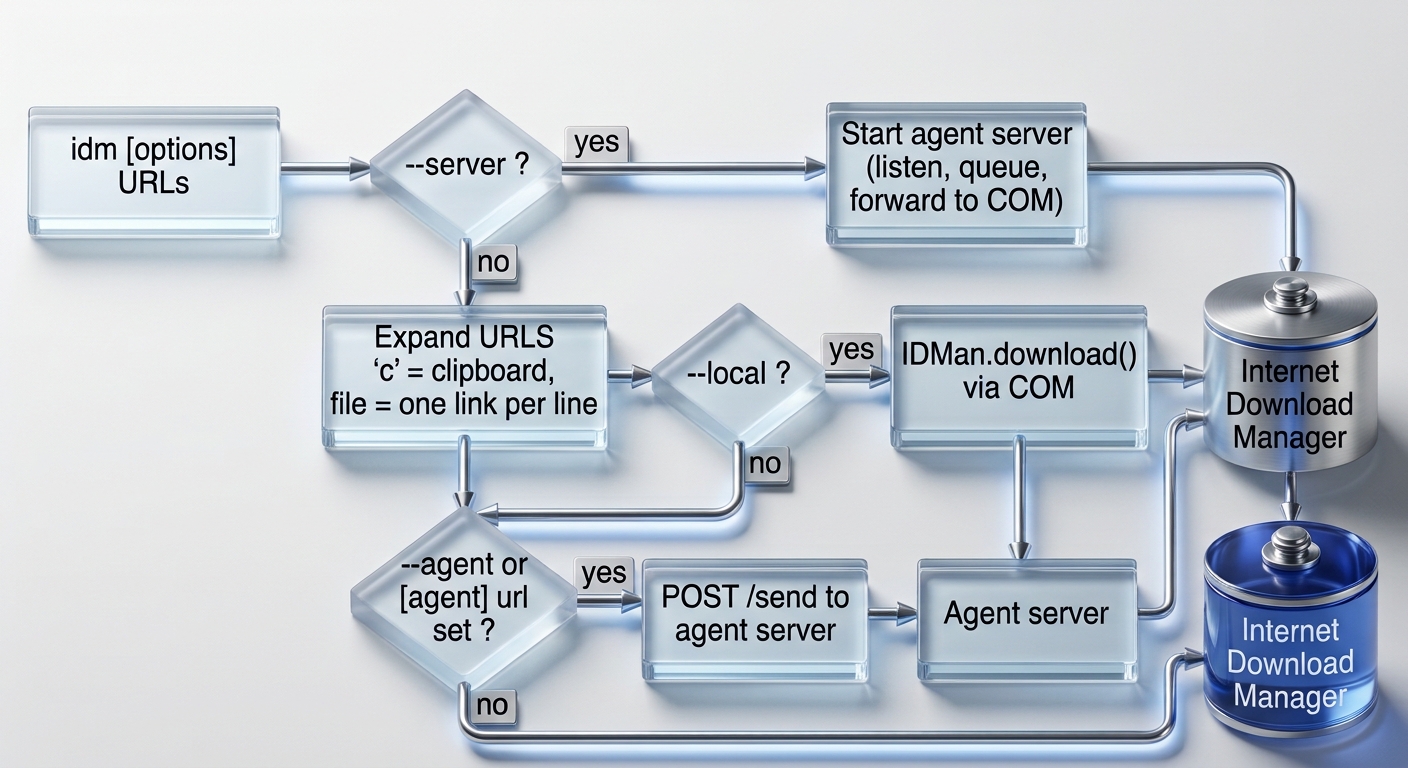
How the CLI decides where a link goes:
flowchart TD
    A["idm [options] URLS"] --> B{"--server ?"}
    B -- yes --> S["Start agent server<br/>(listen, queue, forward to COM)"]
    B -- no --> C["Expand URLS<br/>'c' = clipboard, file = one link per line"]
    C --> D{"--local ?"}
    D -- yes --> L["IDMan.download() via COM"]
    D -- no --> E{"--agent or<br/>[agent] url set ?"}
    E -- yes --> G["POST /send to agent server"]
    E -- no --> L
    L --> IDM[("Internet Download Manager")]
    G --> R["Agent server"] --> IDM
    S --> IDM
Agent server mode
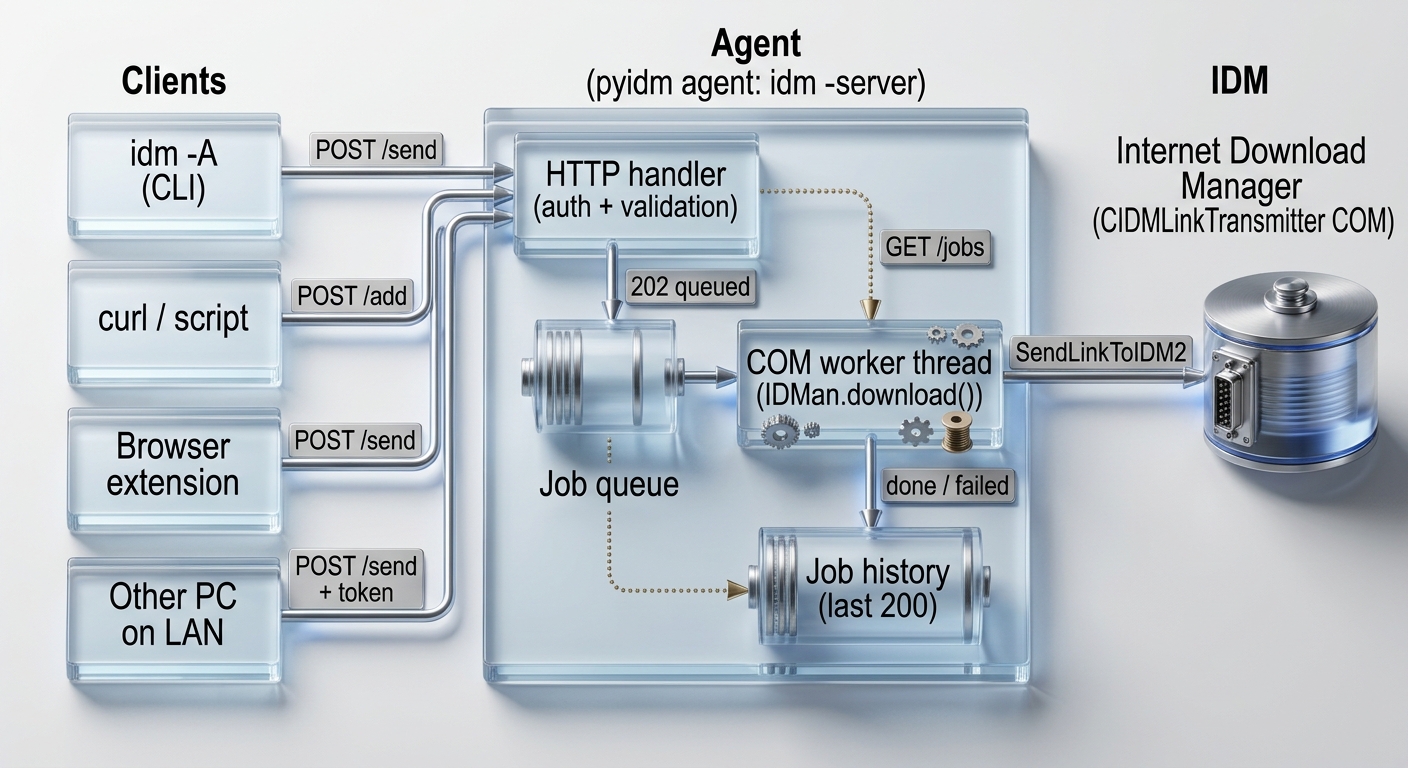
Run idm as a small HTTP agent. Any client (another PC, a script, curl, a browser extension) sends links to it,
and the agent forwards them to IDM through COM. Requests are queued and executed one by one on a single COM worker thread.
No extra dependency is needed (Python standard library only).
Architecture
flowchart LR
    subgraph Clients
        C1["idm -A (CLI)"]
        C2["curl / script"]
        C3["Browser extension"]
        C4["Other PC on LAN"]
    end

    subgraph Agent["pyidm agent  (idm --server)"]
        H["HTTP handler<br/>auth + validation"]
        Q[("Job queue")]
        W["COM worker thread<br/>IDMan.download()"]
        J[("Job history<br/>last 200")]
        H -->|"202 queued"| Q
        Q --> W
        W -->|"done / failed"| J
        H -. "GET /jobs" .-> J
    end

    IDM[("Internet Download Manager<br/>CIDMLinkTransmitter COM")]

    C1 -->|"POST /send"| H
    C2 -->|"POST /add"| H
    C3 -->|"POST /send"| H
    C4 -->|"POST /send + token"| H
    W -->|"SendLinkToIDM2"| IDM
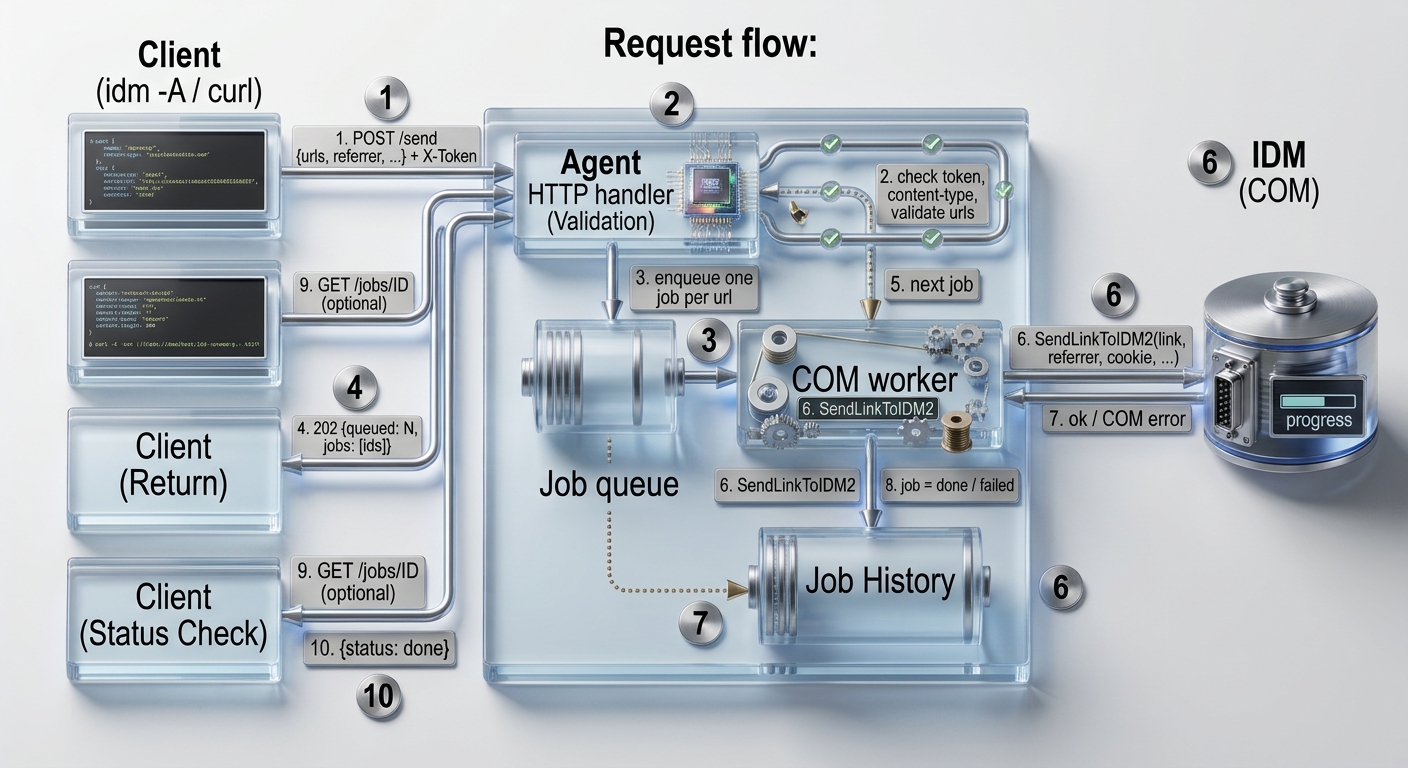
Request flow:
sequenceDiagram
    autonumber
    participant Client as Client (idm -A / curl)
    participant HTTP as Agent HTTP handler
    participant Queue as Job queue
    participant Worker as COM worker
    participant IDM as IDM (COM)

    Client->>HTTP: POST /send {urls, referrer, ...} + X-Token
    HTTP->>HTTP: check token, content-type, validate urls
    HTTP->>Queue: enqueue one job per url
    HTTP-->>Client: 202 {queued: N, jobs: [ids]}
    Queue->>Worker: next job
    Worker->>IDM: SendLinkToIDM2(link, referrer, cookie, ...)
    IDM-->>Worker: ok / COM error
    Worker->>Worker: job = done / failed
    Client->>HTTP: GET /jobs/ID (optional)
    HTTP-->>Client: {status: done}
Quick start
Start the agent (on the Windows machine where IDM is installed):
> idm --server                                              # 127.0.0.1:8899, no token (loopback only)
> idm --server --host 0.0.0.0 --port 8899 --token SECRET    # token is REQUIRED for non-loopback host
> idm --server -v                                           # log every request and job
Send links to the agent from the command line:
> idm -A http://192.168.1.10:8899 --agent-token SECRET "http://test.com/test.exe" -r "http://test.com" -a
> idm -A 127.0.0.1:8899 links.txt          # text file, one link per line ('#' = comment)
> idm -A 127.0.0.1:8899 c                  # link(s) from clipboard
Or with HTTP/JSON (Content-Type: application/json is required, token via X-Token or Authorization: Bearer):
curl -X POST http://127.0.0.1:8899/send -H "Content-Type: application/json" -H "X-Token: SECRET" \
     -d "{\"urls\": [\"http://test.com/test.exe\"], \"referrer\": \"http://test.com\"}"
HTTP API
| Endpoint | Auth | Description |
|---|---|---|
POST /send |
yes | send link(s) to IDM (start download unless add_only: true) |
POST /add |
yes | add link(s) to IDM queue without starting (forces add_only) |
GET /jobs |
yes | list recent jobs, newest first |
GET /jobs/<id> |
yes | status of one job |
GET /health |
no | liveness check: {"status":"ok","version":"...","pending":0} |
Request body (JSON object):
| Field | Type | Description |
|---|---|---|
url / urls |
string / list | link(s), only http, https, ftp (max 500 per request) |
path |
string | save directory on the agent machine (default: [download] path of the agent) |
output |
string | save with different name |
referrer |
string | url referrer |
cookie |
string / object | cookie string or {name: value} |
post_data |
string / object | post data / extra headers |
username, password |
string | credentials if required |
confirm |
bool | confirm dialog in IDM before download |
user_agent |
string | custom User-Agent |
add_only |
bool | add to IDM queue without starting |
Responses:
{"queued": 2, "jobs": ["a1a8d016346c", "3701fe02acc4"]}
{"jobs": [{"id": "3701fe02acc4", "url": "http://test.com/y", "status": "failed", "error": "...", "time": 1792912521.6}]}
| Status | Meaning |
|---|---|
202 |
accepted and queued |
400 |
invalid JSON, invalid url/field |
401 |
missing/wrong token (or browser/foreign Host request without token) |
404 |
unknown endpoint or job id |
411 / 413 |
no Content-Length / body larger than 1 MB |
415 |
Content-Type is not application/json |
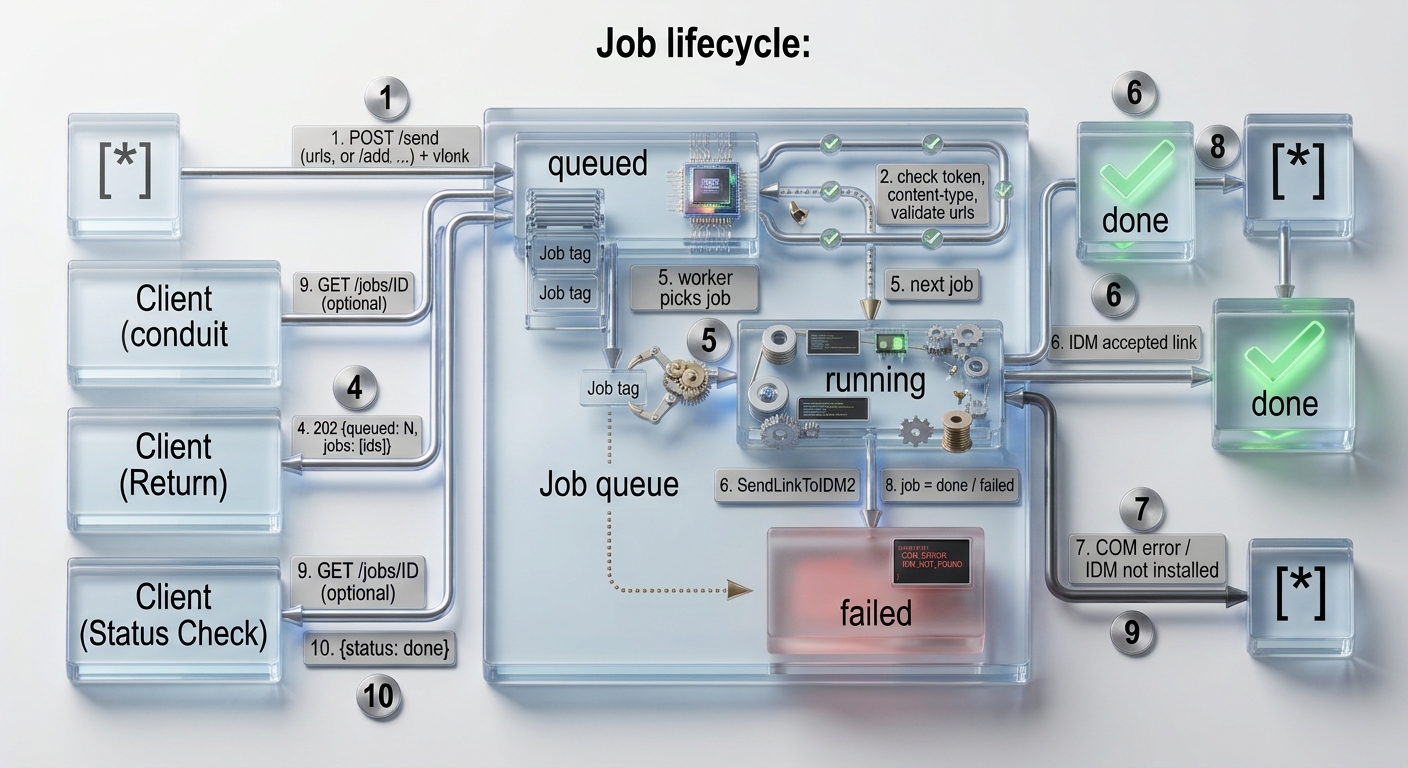
Job lifecycle
stateDiagram-v2
    [*] --> queued: POST /send or /add
    queued --> running: worker picks job
    running --> done: IDM accepted link
    running --> failed: COM error / IDM not installed
    done --> [*]
    failed --> [*]
Only the last 200 jobs are kept in memory; history is cleared when the agent stops.
Python API
from idm import IDMan, AgentServer, agent_send

# client
res = agent_send("192.168.1.10:8899",
                 ["http://test.com/a.exe", "http://test.com/b.exe"],
                 {"referrer": "http://test.com", "add_only": True},
                 token="SECRET")
print(res)   # {'queued': 2, 'jobs': [...]}

# embed the agent in your own program (blocks until Ctrl+C)
AgentServer(IDMan(), host="127.0.0.1", port=8899, token=None,
            defaults={"path": r"C:\DOWNLOADS"}).serve()
agent_send raises idm.AgentError when the agent is unreachable or replies with an error.
Configuration
Config file is idm.ini inside the package (change with idm --config section:option:value).
| Section | Option | Description |
|---|---|---|
[download] |
path |
default save path (also used by the agent server when the request has no path) |
[download] |
confirm |
confirm before download |
[data] |
user_agent |
default User-Agent |
[debug] |
verbose |
print "Link sent to IDM successfully." |
[server] |
host, port, token |
defaults for idm --server (127.0.0.1, 8899, none) |
[agent] |
url, token |
when url is set the CLI always sends to the agent; use --local to force local IDM |
Precedence: command line option, then environment PYIDM_TOKEN (token only), then idm.ini, then built-in default.
Example:
> idm --config server:port:9000
> idm --config agent:url:http://192.168.1.10:9000
> idm --config agent:token:SECRET
Security
- The agent listens on
127.0.0.1by default. Binding to any other host is refused unless a token is set. - Without a token (loopback only) requests that carry an
Originheader or a non-loopbackHostheader are rejected, so a web page cannot trigger downloads (CSRF / DNS rebinding).Content-Type: application/jsonis mandatory and no CORS headers are sent. - With a token every endpoint except
/healthrequires it (constant-time comparison). Browser extensions with host permission can call the agent; normal web pages cannot (no CORS). - Traffic is plain HTTP. For access outside a trusted LAN put it behind a VPN or a TLS reverse proxy.
pathis a path on the agent machine; anyone holding the token can make the agent save files anywhere IDM can write.- Credentials sent in
username/password/cookietravel in the request body, protect the transport accordingly.
Run at Windows startup
schtasks /Create /SC ONLOGON /TN "pyidm-agent" /TR "idm --server --host 0.0.0.0 --token SECRET" /RL LIMITED
Remove with schtasks /Delete /TN "pyidm-agent" /F. The agent must run in the same logged-in user session as IDM.
Troubleshooting
| Problem | Fix |
|---|---|
Cannot reach agent server |
agent not running, wrong host/port, or firewall (allow the port in Windows Firewall) |
HTTP 401: unauthorized |
token mismatch; pass --agent-token/PYIDM_TOKEN, or you are calling from a browser page |
Refusing to listen on ... without a token |
add --token when using a non-loopback --host |
HTTP 415 |
add Content-Type: application/json |
job failed with COM error |
IDM not installed/running in the same session, check idm --server -v output |
Address already in use |
another process uses the port, choose --port |
Support
- Python 3.7+
- Windows (only), for Linux you can use
pywget(pip install pywget) or wgetpanel - The agent client (
idm -A,agent_send) only needs HTTP access to the agent, but theidmpackage itself currently imports Windows-only modules.
Tips
always provide ‘referrer’, some sites must have referrer in header
Links
- License: GPL
- Code: https://github.com/cumulus13/pyidm
- Issue tracker: https://github.com/cumulus13/pyidm/issues
Author


1 maintainer

Metadata
1 maintainer
Release files for idm 0.58.3
For a detailed explanation of source distributions (sdists) and built distributions (wheels), please see the package formats documentation.
Source distribution (sdist)
| File | Size | Uploaded | Provenance | Actions |
|---|---|---|---|---|
| idm-0.58.3.tar.gz | 22.1 kB | With provenance | Details for idm-0.58.3.tar.gz |
Built distribution (wheel)
| File | Interpreter | ABI | Platform | Actions Reset |
|---|---|---|---|---|
| idm-0.58.3-py2.py3-none-any.whl | Python 2, Python 3 | none | any | Details for idm-0.58.3-py2.py3-none-any.whl |
Total release size: 46.6 kB
Release files / idm-0.58.3.tar.gz
| Download URL | idm-0.58.3.tar.gz |
|---|---|
| Size | 22.1 kB |
| Tags | Source |
|
SHA-256 checksum How to use checksums |
9f2a04c66bd4fcf622bae77d9f8481d0d9d6889dc20299d3c94fa37ad2ba3215
|
|
BLAKE2b-256 checksum How to use checksums |
33487ffb066ff27ea2ebc485024b66ca1f702e93edea338866f5f9aee8cb9c0d
|
| Upload date | |
|
Uploaded using Trusted Publishing? What is trusted publishing? |
Yes |
| Uploaded via |
twine/7.0.0 CPython/3.13.16
|
Provenance
Provenance describes where a file came from. On PyPI, provenance is shared via attestations, which provide a verifiable record of the build or publishing details. View details, limitations and caveats.


PyPI Publish Attestation
PyPI verified that this artifact, at this checksum, originated from the publisher listed below.
Signed by GitHub Actions, verified by PyPI on Oct 26, 2026.
Transparency logRelease files / idm-0.58.3-py2.py3-none-any.whl
| Download URL | idm-0.58.3-py2.py3-none-any.whl |
|---|---|
| Size | 24.5 kB |
| Tags | Python 2 Python 3 |
|
SHA-256 checksum How to use checksums |
95113b964f1446b8baacda46f6f26c06043ac7bc7740b8393b43a331ba6a5dc0
|
|
BLAKE2b-256 checksum How to use checksums |
51ee01c44f26206d414c05033b91248fcc7e67d5f2f80948ffd01d42667a74b8
|
| Upload date | |
|
Uploaded using Trusted Publishing? What is trusted publishing? |
Yes |
| Uploaded via |
twine/7.0.0 CPython/3.13.16
|
Provenance
Provenance describes where a file came from. On PyPI, provenance is shared via attestations, which provide a verifiable record of the build or publishing details. View details, limitations and caveats.
PyPI Publish Attestation
PyPI verified that this artifact, at this checksum, originated from the publisher listed below.
Signed by GitHub Actions, verified by PyPI on Oct 26, 2026.
Transparency logSecurity for idm 0.58.3
Provenance
Provenance describes where a file came from. On PyPI, provenance is shared via attestations, which provide a verifiable record of the build or publishing details. View details, limitations and caveats.
Full provenance
Both files in this release have been uploaded with provenance metadata.
Attestation for idm-0.58.3.tar.gz
PyPI Publish Attestation
PyPI verified that this artifact, at this checksum, originated from the publisher listed below.
Signed by GitHub Actions, verified by PyPI on Oct 26, 2026.
Transparency logA note on package security
PyPI is a repository for distributing packages, not a service for auditing them. While third-party security researchers and our staff do their best to detect and remove malicious packages, PyPI cannot guarantee the quality, security or suitability of any given package.
To learn more about protecting yourself from malicious actors, visit our package security documentation.














