
idol-mlx
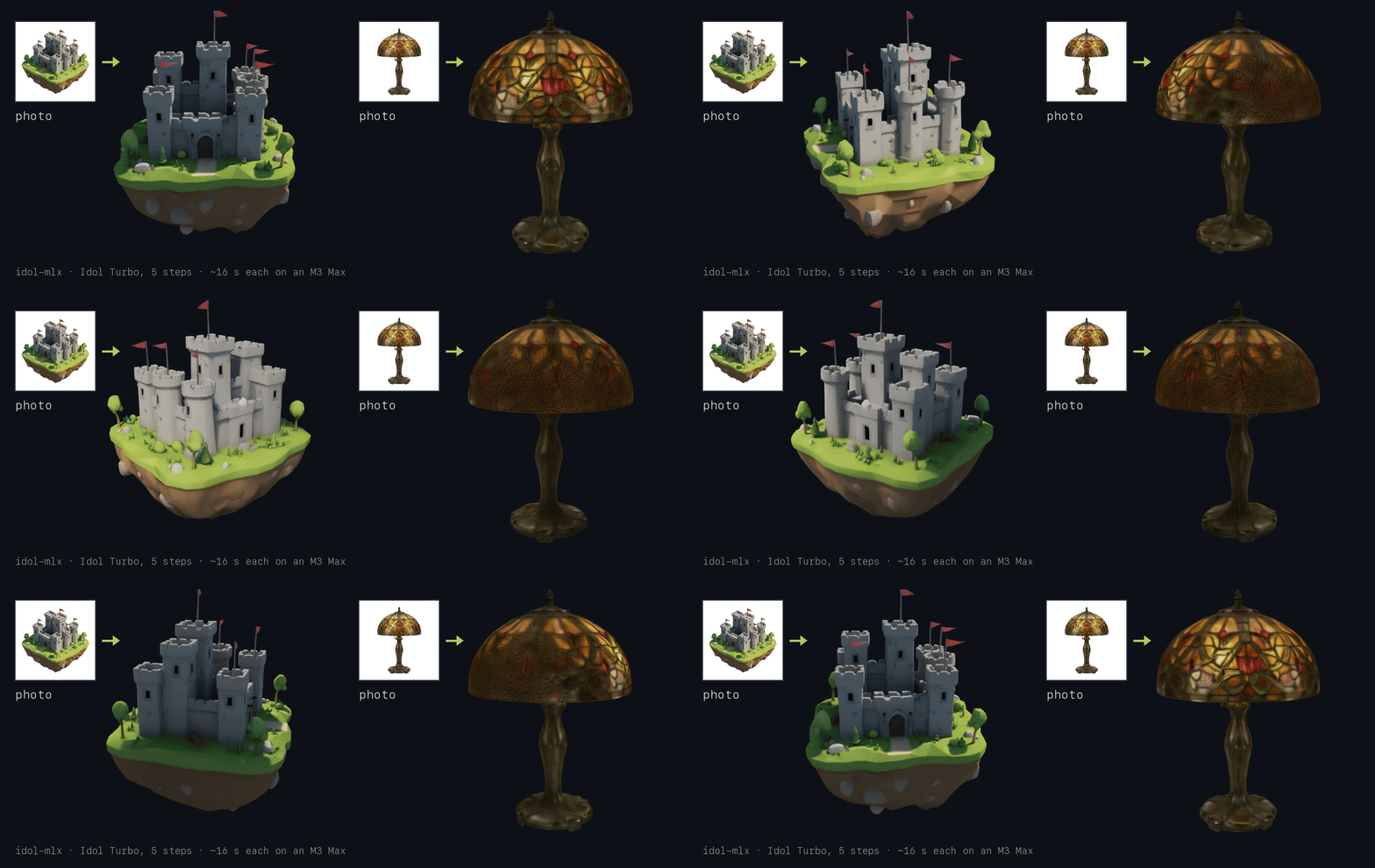
One photo in, a 3D Gaussian splat out, in about 15 seconds on your Mac.
Idol + Idol Turbo, running locally on Apple Silicon.



uvx idol-mlx castle.jpg --view
That's it. You get castle.ply, a standard 3D Gaussian splat with up to a million Gaussians, including the sides the photo never showed. --view opens it in your browser.
Why
Idol by Speri Labs is one of the most popular open image-to-3D models, but at its default 50 steps it takes about 3 minutes per object on a MacBook, even with MLX. Idol Turbo gets close to the same result in 5 steps, but it ships as a PyTorch adapter, and PyTorch on a Mac is slow.
idol-mlx brings Turbo to the Mac:
| Steps | M3 Max | |
|---|---|---|
| Idol (base) | 50 + guidance | 191 s |
| Idol Turbo, idol-mlx | 5 | 15 s |
Everything runs on your machine. There's no account and no upload, and you don't need access to any gated models.
Install
You need an Apple Silicon Mac with macOS 26.2 or later, and uv.
uvx idol-mlx photo.jpg        # run without installing
uv tool install idol-mlx      # or install the `idol-mlx` command
The first run installs mlx-serve through Homebrew if you don't have it (it asks first). It then downloads the model and builds the Turbo pack, which takes about a minute and 4.6 GB of downloads, once. To do all of that up front, run idol-mlx setup.
Usage
idol-mlx photo.jpg                     # → photo.ply
idol-mlx photo.jpg --view              # also open it in the browser
idol-mlx shots/ -o splats/             # every image in a folder
idol-mlx photo.jpg --mode synthetic    # tighter framing for renders and generated images
idol-mlx photo.jpg --format glb        # GLB instead of PLY
idol-mlx photo.jpg --seed 7            # a different take on the same image
idol-mlx photo.jpg --keep-server       # leave the model loaded for the next run
idol-mlx view splats/                  # open .ply files you already have
Turntables
Get a spinning animation of the result, ready to post:
idol-mlx photo.jpg --turntable         # → photo.ply + photo.gif
idol-mlx photo.jpg --turntable mp4     # MP4 instead (needs ffmpeg)
idol-mlx turntable photo.ply           # from a splat you already have
Turntables are rendered in a headless browser, so they need Google Chrome (or Chromium, Brave or Edge). A 72-frame, 640 px GIF takes about 20 s and is 3–5 MB with ffmpeg installed, larger without it.
Presets
| Flag | Steps | Gaussians | M3 Max | Use it for |
|---|---|---|---|---|
--fast |
4 | 65,536 | 12 s | Quick previews |
| (default) | 5 | 262,144 | 16 s | Most things |
--quality high |
8 | 262,144 | 23 s | Closest to the original's detail |
--original |
50 + guidance | 262,144 | 191 s | The base model, as the reference |
Times are per image with the model already loaded. The first image in a run also takes about 3 s to start mlx-serve and load the model.
Input tips
- One object, plainly visible. The background is removed for you.
- The default
--mode realsuits photos. For renders and AI-generated images,--mode syntheticcrops tighter around the object, which is all the mode changes. - Objects cut off at the edge of the frame still work, but the hidden part is a guess.
From Python
from idol_mlx import Idol

with Idol() as idol:                                # starts or reuses the local server
    splat = idol.generate("photo.jpg", steps=5)     # ~16 s
    splat.save("photo.ply")

    for path in ["mug.jpg", "lamp.jpg"]:            # the model stays loaded between calls
        idol.generate(path, seed=7).save(path.replace(".jpg", ".ply"))
generate also takes guidance, gaussians, mode and an on_progress callback that receives each stage.
How it works
flowchart LR
    A["photo.jpg"] --> B["<b>idol-mlx</b><br/>5 steps, guidance 0"]
    B --> C["<b>mlx-serve</b> · your GPU<br/>remove background<br/>encode image<br/>denoise ×5 (Turbo)<br/>decode Gaussians"]
    C -- "GLB" --> D["<b>idol-mlx</b><br/>GLB → 3DGS .ply"]
    D --> E["photo.ply"]
- mlx-serve does the model work. It's a native MLX server that already runs Idol on Apple Silicon.
- idol-mlx adds Turbo. Turbo is a small adapter (a LoRA) that teaches Idol to finish in 5 steps instead of 50. mlx-serve can't load adapters, so the Turbo pack has the adapter merged into Idol's weights ahead of time:
W' = W + 4·B·Afor each of its 112 layers. To mlx-serve it looks like plain Idol. - It also converts the output. mlx-serve returns a GLB using
KHR_gaussian_splatting, and idol-mlx rewrites it as a standard 3DGS.ply, which works in SuperSplat, Spark, gsplat and the Hugging Face file viewer.
Where the 15 seconds go, measured on an M3 Max:
image prep  ▇▇ 1.4 s
denoise ×5  ▇▇▇▇▇▇▇▇▇▇▇▇▇▇▇▇▇▇▇▇▇▇▇▇▇ 12.5 s
octree      ▏ 0.4 s
gaussians   ▇▇▇ 1.6 s
Quality
Turbo trades a little fine detail for a 12× speedup. Outputs are close to the 50-step base model, though a bit softer, and colours can run warm at 4 steps. If a result looks off, try --quality high or a different --seed. --original is always there as the reference.
This build uses Turbo's high-noise ("slow") adapter for every step. The full recipe switches to a second adapter for the last step, which needs adapter support in mlx-serve. Turbo's authors list slow-only as the safe default.
FAQ
Does it work on Intel Macs, Linux or Windows?
Not yet. idol-mlx is built on MLX, which is Apple Silicon only. On NVIDIA GPUs, use Idol's own SDK with Idol Turbo. An NVIDIA GPU is also much faster.
How much memory does it need?
The weights take about 4 GB, but peak unified memory while generating is higher: 7.6 to 11.3 GB on an M3 Max at the default 262,144 Gaussians, measured with footprint. A Mac with 16 GB or more is comfortable. The two model packs take about 3.5 GB of disk.
Why not quantize it further to go faster?
On M1–M4 the GPU, not memory, is the bottleneck, and MLX converts 8-bit weights back to 16-bit before multiplying. Smaller weights save memory but not time. The speedup comes from running fewer steps.
Where do the files go?
Models live in ~/.mlx-serve/models: the base pack in Idol-MLX-Serve-8bit, and the Turbo pack in Idol-Turbo, which links to the base pack's files and adds only the merged denoiser. The full-precision denoiser and the adapter used to build it stay in your Hugging Face cache. mlx-serve's log is ~/.mlx-serve/idol-mlx-server.log.
idol-mlx uninstall removes the Turbo pack, and idol-mlx uninstall --all also removes the base pack.
Development
git clone https://github.com/cfahlgren1/idol-mlx && cd idol-mlx
uv sync
uv run pytest                              # fast tests, on a real 32k-Gaussian fixture
IDOL_MLX_E2E=1 uv run pytest tests/test_e2e.py   # the real model, ~20 s once set up
The end-to-end tests check that idol-mlx's quantizer reproduces the published 8-bit pack exactly, then run a real generation.
Releasing
Releases publish from GitHub Actions through PyPI Trusted Publishing, so there's no API token to manage:
uv version --bump patch            # or minor / major
git commit -am "release v$(uv version --short)"
git tag -a "v$(uv version --short)" -m "v$(uv version --short)" && git push --follow-tags
The release workflow checks the tag matches the version, runs lint and tests, publishes to PyPI and creates the GitHub release.
Credits
idol-mlx is an unofficial community project. It is not affiliated with Speri Labs.
- Idol by Speri Labs, Apache-2.0
- Idol Turbo adapter by AK, distilled with the Glance phase-LoRA method
- mlx-serve and the 8-bit MLX pack by ddalcu
- DINOv3 image encoder by Meta, under the DINOv3 License, which ships with the model files
- The castle and lamp photos at the top are example inputs from Idol's gallery
License
The code is Apache-2.0. The model weights keep their own licenses (see Credits).
1 maintainer

Metadata
1 maintainer
Release files for idol-mlx 0.1.2
For a detailed explanation of source distributions (sdists) and built distributions (wheels), please see the package formats documentation.
Source distribution (sdist)
| File | Size | Uploaded | Provenance | Actions |
|---|---|---|---|---|
| idol_mlx-0.1.2.tar.gz | 1.8 MB | With provenance | Details for idol_mlx-0.1.2.tar.gz |
Built distribution (wheel)
| File | Interpreter | ABI | Platform | Actions Reset |
|---|---|---|---|---|
| idol_mlx-0.1.2-py3-none-any.whl | Python 3 | none | any | Details for idol_mlx-0.1.2-py3-none-any.whl |
Total release size: 1.8 MB
Release files / idol_mlx-0.1.2.tar.gz
| Download URL | idol_mlx-0.1.2.tar.gz |
|---|---|
| Size | 1.8 MB |
| Tags | Source |
|
SHA-256 checksum How to use checksums |
1c90c031fab870a24cbfa8851cc1b8fa8580f4e03c4e2b7d37fdb74972c7f49f
|
|
BLAKE2b-256 checksum How to use checksums |
5e1cf82d4afe783fbf0b6bb1af08ad105c743514ef825523c1caf0f172a80e0e
|
| Upload date | |
|
Uploaded using Trusted Publishing? What is trusted publishing? |
Yes |
| Uploaded via |
twine/7.0.0 CPython/3.13.16
|
Provenance
Provenance describes where a file came from. On PyPI, provenance is shared via attestations, which provide a verifiable record of the build or publishing details. View details, limitations and caveats.


PyPI Publish Attestation
PyPI verified that this artifact, at this checksum, originated from the publisher listed below.
Signed by GitHub Actions, verified by PyPI on Nov 25, 2026.
Transparency logRelease files / idol_mlx-0.1.2-py3-none-any.whl
| Download URL | idol_mlx-0.1.2-py3-none-any.whl |
|---|---|
| Size | 33.1 kB |
| Tags | Python 3 |
|
SHA-256 checksum How to use checksums |
1ac2915e2444a836bd84e4642155b140789cbe8d1dad3187673589fb9db4e5b8
|
|
BLAKE2b-256 checksum How to use checksums |
fe2e4604b9d6caaed4e08a3259e7218cc18948565b298c348fb882f843a379bd
|
| Upload date | |
|
Uploaded using Trusted Publishing? What is trusted publishing? |
Yes |
| Uploaded via |
twine/7.0.0 CPython/3.13.16
|
Provenance
Provenance describes where a file came from. On PyPI, provenance is shared via attestations, which provide a verifiable record of the build or publishing details. View details, limitations and caveats.
PyPI Publish Attestation
PyPI verified that this artifact, at this checksum, originated from the publisher listed below.
Signed by GitHub Actions, verified by PyPI on Nov 25, 2026.
Transparency logSecurity for idol-mlx 0.1.2
Provenance
Provenance describes where a file came from. On PyPI, provenance is shared via attestations, which provide a verifiable record of the build or publishing details. View details, limitations and caveats.
Full provenance
Both files in this release have been uploaded with provenance metadata.
Attestation for idol_mlx-0.1.2.tar.gz
PyPI Publish Attestation
PyPI verified that this artifact, at this checksum, originated from the publisher listed below.
Signed by GitHub Actions, verified by PyPI on Nov 25, 2026.
Transparency logA note on package security
PyPI is a repository for distributing packages, not a service for auditing them. While third-party security researchers and our staff do their best to detect and remove malicious packages, PyPI cannot guarantee the quality, security or suitability of any given package.
To learn more about protecting yourself from malicious actors, visit our package security documentation.














