
Multi-channel AI Assistant powered by iflow CLI

Project description
🤖 iflow-bot
/$$ /$$$$$$$$ /$$                                 /$$$$$$$              /$$
|__/| $$_____/| $$                                | $$__  $$            | $$
 /$$| $$      | $$  /$$$$$$  /$$  /$$  /$$        | $$  \ $$  /$$$$$$  /$$$$$$
| $$| $$$$$   | $$ /$$__  $$| $$ | $$ | $$ /$$$$$$| $$$$$$$  /$$__  $$|_  $$_/
| $$| $$__/   | $$| $$  \ $$| $$ | $$ | $$|______/| $$__  $$| $$  \ $$  | $$
| $$| $$      | $$| $$  | $$| $$ | $$ | $$        | $$  \ $$| $$  \ $$  | $$ /$$
| $$| $$      | $$|  $$$$$$/|  $$$$$/$$$$/        | $$$$$$$/|  $$$$$$/  |  $$$$/
|__/|__/      |__/ \______/  \_____/\___/         |_______/  \______/    \___/
English | 中文
Multi-Channel AI Assistant - A multi-platform messaging bot built on iflow CLI.
Extend the powerful AI capabilities of iflow to multiple communication platforms, making AI assistants accessible everywhere.
✨ Features
- 🔌 Multi-Channel Support - Telegram, Discord, Slack, Feishu, DingTalk, QQ, WhatsApp, Email, Mochat
- 🧠 AI-Powered - Built on iflow CLI, supporting multiple models (GLM-5, Kimi K2.5, MiniMax M2.5, etc.)
- 💾 Session Management - Automatic multi-user session management with conversation context support
- 📁 Workspace - Each bot instance has its own independent workspace and memory system
- 🔐 Access Control - Supports whitelist, mention trigger, and various other policies
- 🔄 Thinking Mode - Optional AI thinking process display
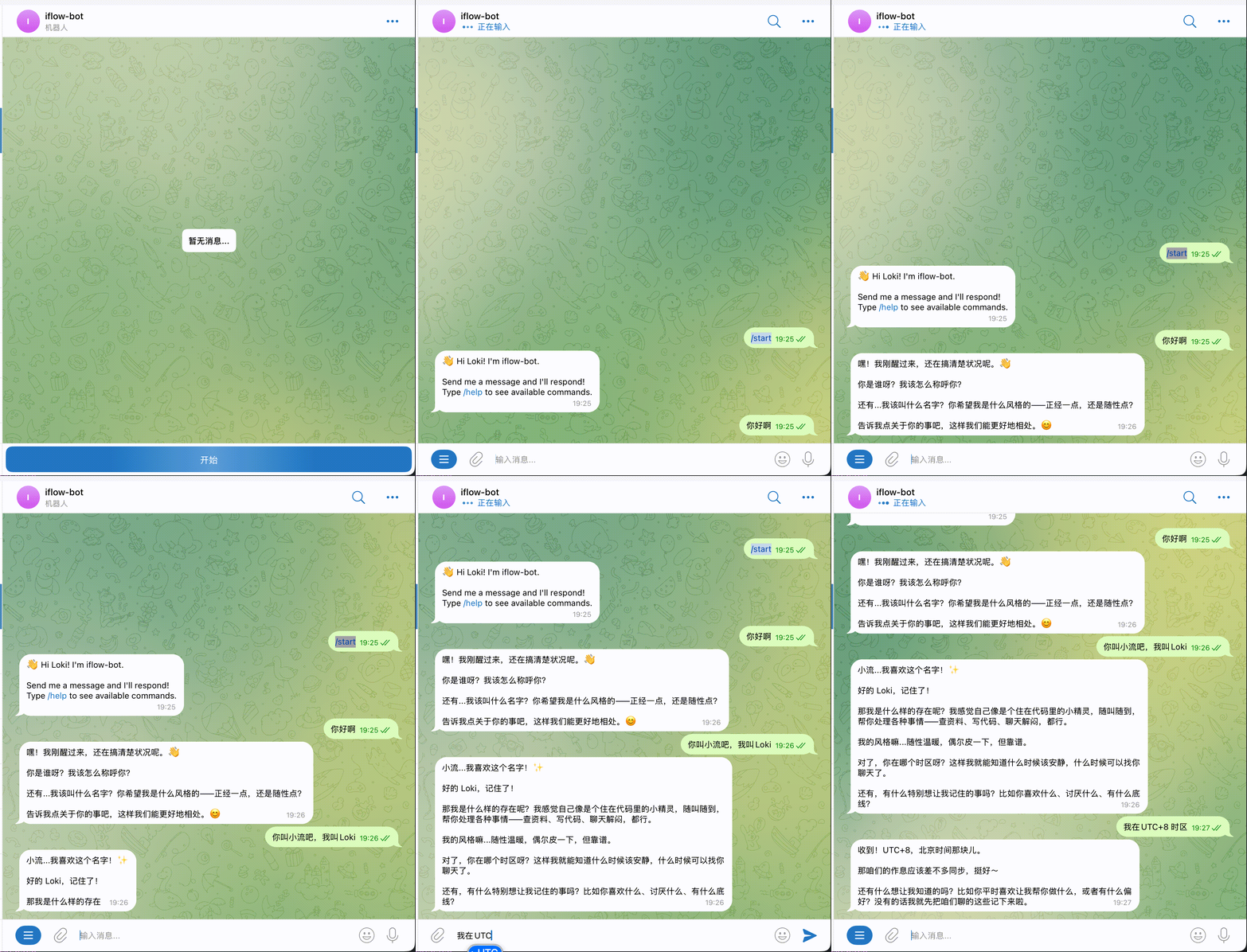
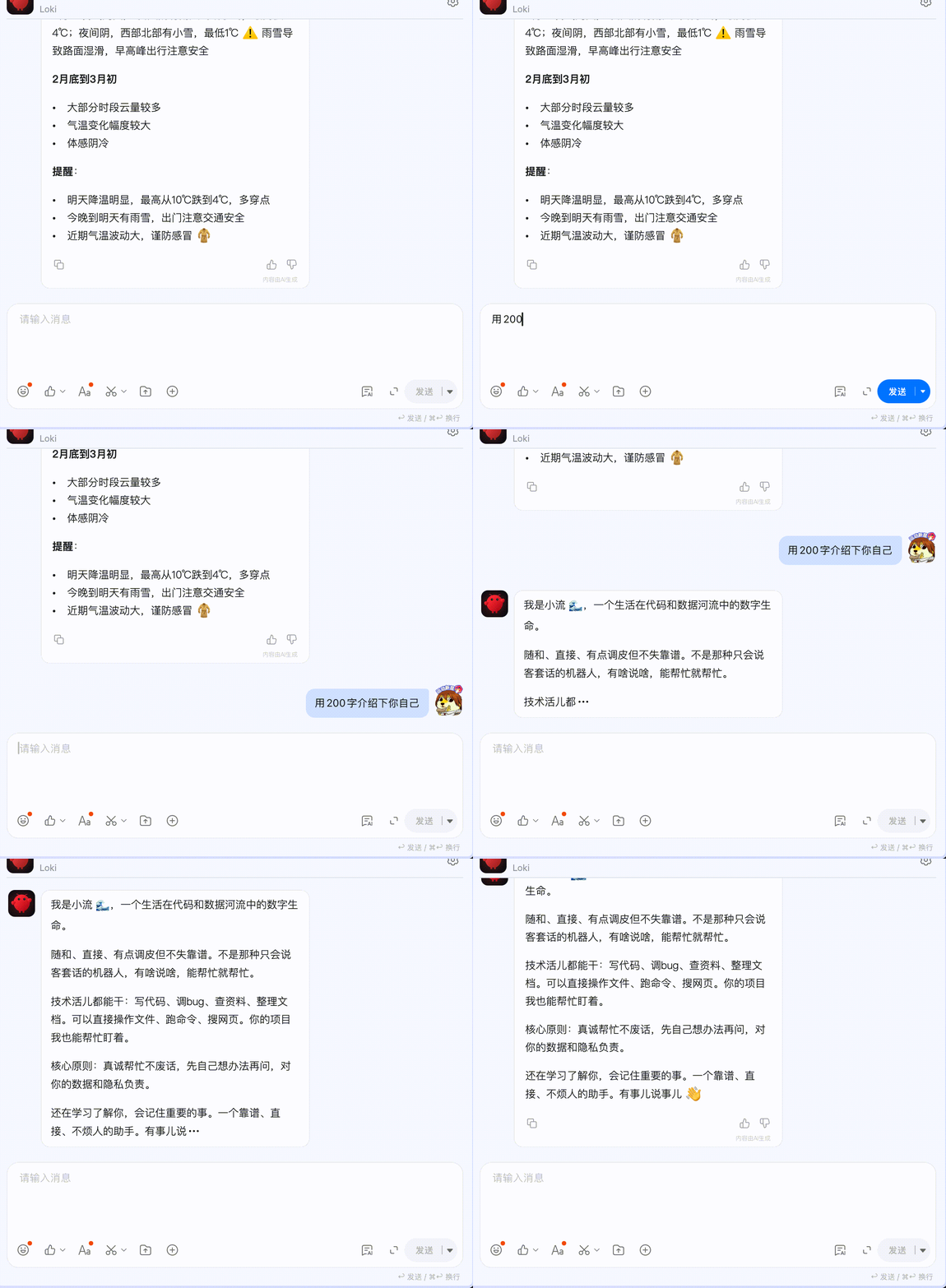
- ⚡ Streaming Output - Real-time streaming output support for Telegram and DingTalk AI Card
- 🚀 Stdio Mode - Direct communication with iflow via stdin/stdout for faster response
🎬 Demo
Telegram Streaming Output
DingTalk AI Card Streaming Output
📋 Prerequisites
1. Install iflow CLI
iflow-bot depends on iflow CLI. Please install it first:
# With Node.js 22+
npm i -g @iflow-ai/iflow-cli@latest

# Or via curl
bash -c "$(curl -fsSL https://gitee.com/iflow-ai/iflow-cli/raw/main/install.sh)"
2. Login to iflow
iflow
- After running iflow, select "Login with iFlow"
- CLI will automatically open browser to iFlow platform
- Complete registration/login and authorize iFlow CLI
- Return to terminal automatically and start using
Follow the prompts to complete the login process.
🚀 Quick Start
Installation
Option 1: pip install (Recommended)
pip install iflow-bot
After installation, you can use it directly:
iflow-bot --help
iflow-bot onboard
iflow-bot gateway start
Option 2: Install from Source
# Clone repository
git clone https://github.com/your-repo/iflow-bot.git
cd iflow-bot

# Install dependencies (using uv)
uv sync
Initialize Configuration
# Create default config file (pip install)
iflow-bot onboard

# Or from source
uv run iflow-bot onboard

# Or manually
mkdir -p ~/.iflow-bot
cp config.example.json ~/.iflow-bot/config.json
Start Service
After pip install:
# Foreground (debug mode)
iflow-bot gateway run

# Background
iflow-bot gateway start

# Check status
iflow-bot status

# Stop service
iflow-bot gateway stop
After source install:
# Foreground (debug mode)
uv run iflow-bot gateway run

# Background
uv run iflow-bot gateway start
🐳 Docker Deployment
# Build image
docker build -t iflow-bot:latest .

# Prepare host config file
mkdir -p ./config
cp config/config.example.json ./config/config.json
Then edit ./config/config.json to enable channels and tokens.
# Start with docker compose
docker compose up -d

# View logs
docker compose logs -f iflow-bot
⚙️ Configuration
Configuration file located at ~/.iflow-bot/config.json
Full Configuration Example
{
  "driver": {
    "mode": "stdio",
    "iflow_path": "iflow",
    "model": "minimax-m2.5",
    "yolo": true,
    "thinking": false,
    "max_turns": 40,
    "timeout": 180,
    "workspace": "~/.iflow-bot/workspace",
    "extra_args": []
  },
  "channels": {
    "telegram": {
      "enabled": true,
      "token": "YOUR_BOT_TOKEN",
      "allow_from": []
    },
    "discord": {
      "enabled": false,
      "token": "YOUR_BOT_TOKEN",
      "allow_from": []
    },
    "slack": {
      "enabled": false,
      "bot_token": "xoxb-xxx",
      "app_token": "xapp-xxx",
      "allow_from": [],
      "group_policy": "mention"
    },
    "feishu": {
      "enabled": false,
      "app_id": "cli_xxx",
      "app_secret": "xxx",
      "encrypt_key": "",
      "verification_token": "",
      "allow_from": []
    },
    "dingtalk": {
      "enabled": false,
      "client_id": "xxx",
      "client_secret": "xxx",
      "robot_code": "xxx",
      "card_template_id": "xxx-xxx-xxx",
      "card_template_key": "content",
      "allow_from": []
    },
    "qq": {
      "enabled": false,
      "app_id": "xxx",
      "secret": "xxx",
      "allow_from": []
    },
    "whatsapp": {
      "enabled": false,
      "bridge_url": "http://localhost:3001",
      "bridge_token": "",
      "allow_from": []
    },
    "email": {
      "enabled": false,
      "consent_granted": false,
      "imap_host": "imap.gmail.com",
      "imap_port": 993,
      "imap_username": "your@email.com",
      "imap_password": "app_password",
      "smtp_host": "smtp.gmail.com",
      "smtp_port": 587,
      "smtp_username": "your@email.com",
      "smtp_password": "app_password",
      "from_address": "your@email.com",
      "allow_from": [],
      "auto_reply_enabled": true
    },
    "mochat": {
      "enabled": false,
      "base_url": "https://mochat.io",
      "socket_url": "https://mochat.io",
      "socket_path": "/socket.io",
      "claw_token": "xxx",
      "agent_user_id": "",
      "sessions": ["*"],
      "panels": ["*"]
    }
  },
  "log_level": "INFO",
  "log_file": ""
}
Driver Configuration
| Parameter | Type | Default | Description |
|---|---|---|---|
mode |
string | "stdio" |
Communication mode: stdio (recommended), acp (WebSocket), cli (subprocess) |
iflow_path |
string | "iflow" |
iflow CLI path [keep default] |
model |
string | "minimax-m2.5" |
Default model (glm-5, kimi-k2.5, minimax-m2.5, etc.) |
yolo |
bool | true |
Auto-confirm mode |
thinking |
bool | false |
Show AI thinking process |
max_turns |
int | 40 |
Maximum conversation turns per session |
timeout |
int | 180 |
Timeout in seconds |
workspace |
string | ~/.iflow-bot/workspace |
Workspace path |
extra_args |
list | [] |
Additional iflow arguments |
acp_port |
int | 8090 |
Port for ACP mode |
acp_host |
string | "localhost" |
Host for ACP mode |
Communication Modes
Stdio Mode (⭐ Recommended):
- Direct communication with iflow via stdin/stdout
- No need to start WebSocket service, faster startup
- Real-time streaming output, typewriter effect
- Lower response latency, close to native experience
- Gateway automatically executes
iflow --experimental-acp --streamon startup
ACP Mode (WebSocket):
- Communication with iflow via WebSocket
- Requires starting WebSocket server [auto-started]
- Real-time streaming output support
- Suitable for scenarios requiring remote connection
CLI Mode:
- Call iflow CLI via subprocess
- Each conversation starts independent process
- Suitable for simple scenarios or debugging
Recommended Configuration
{
  "driver": {
    "mode": "stdio",
    "model": "minimax-m2.5",
    "thinking": false,
    "yolo": true
  }
}
Channel Configuration
Telegram
{
  "telegram": {
    "enabled": true,
    "token": "YOUR_BOT_TOKEN",
    "allow_from": ["user_id_1", "user_id_2"]
  }
}
- Create bot at @BotFather to get Token
- Empty
allow_fromallows all users
Discord
{
  "discord": {
    "enabled": true,
    "token": "YOUR_BOT_TOKEN",
    "allow_from": ["user_id_1"]
  }
}
- Create application at Discord Developer Portal
- Create Bot user and get Token
- Enable Message Content Intent
Slack
{
  "slack": {
    "enabled": true,
    "bot_token": "xoxb-xxx",
    "app_token": "xapp-xxx",
    "allow_from": [],
    "group_policy": "mention"
  }
}
- Create application at Slack API
- Create Bot and get Bot Token (
xoxb-xxx) - Enable Socket Mode to get App Token (
xapp-xxx) group_policycontrols channel message response strategy:mention: Only respond to @mentionsopen: Respond to all messagesallowlist: Only respond to whitelisted channels
Feishu/Lark
{
  "feishu": {
    "enabled": true,
    "app_id": "cli_xxx",
    "app_secret": "xxx",
    "encrypt_key": "",
    "verification_token": "",
    "allow_from": []
  }
}
- Create enterprise self-built app at Feishu Open Platform
- Enable bot capability
- Configure event subscription (uses WebSocket, no public IP required)
DingTalk
{
  "dingtalk": {
    "enabled": true,
    "client_id": "xxx",
    "client_secret": "xxx",
    "robot_code": "xxx",
    "card_template_id": "xxx-xxx-xxx",
    "card_template_key": "content",
    "allow_from": []
  }
}
- Create bot at DingTalk Open Platform
- Get Client ID and Client Secret
- Enable Stream Mode (no public IP required)
AI Card Streaming Output Configuration (optional, for typewriter effect):
| Parameter | Description |
|---|---|
robot_code |
Robot code, required for group chats |
card_template_id |
AI Card template ID, create in DingTalk developer console |
card_template_key |
Template content field name, default content |
Create AI Card Template:
- Login to DingTalk Developer Console
- Go to "Card Platform" → "Card Templates"
- Create template, add a "Text" type field
- Record template ID and field name, configure in
card_template_idandcard_template_key
Streaming Output Effect:
- Bot immediately replies with a blank card after user sends message
- Card content updates in real-time, typewriter effect
- No need to wait for complete response, smoother experience
{
  "qq": {
    "enabled": true,
    "app_id": "xxx",
    "secret": "xxx",
    "allow_from": []
  }
}
- Create bot at QQ Open Platform
- Get App ID and Secret
{
  "whatsapp": {
    "enabled": true,
    "bridge_url": "http://localhost:3001",
    "bridge_token": "",
    "allow_from": []
  }
}
Requires deploying WhatsApp Bridge (based on baileys)
{
  "email": {
    "enabled": true,
    "consent_granted": true,
    "imap_host": "imap.gmail.com",
    "imap_port": 993,
    "imap_username": "your@email.com",
    "imap_password": "app_password",
    "smtp_host": "smtp.gmail.com",
    "smtp_port": 587,
    "smtp_username": "your@email.com",
    "smtp_password": "app_password",
    "from_address": "your@email.com",
    "allow_from": ["sender@example.com"],
    "auto_reply_enabled": true
  }
}
Important: Using Gmail requires creating an App Password
Mochat
{
  "mochat": {
    "enabled": true,
    "base_url": "https://mochat.io",
    "socket_url": "https://mochat.io",
    "socket_path": "/socket.io",
    "claw_token": "xxx",
    "agent_user_id": "",
    "sessions": ["*"],
    "panels": ["*"]
  }
}
🎮 CLI Commands
Basic Commands
# Show version
iflow-bot version
iflow-bot -v

# Show help
iflow-bot --help

# Check status
iflow-bot status

# Initialize config
iflow-bot onboard [--force]

# Start web console
iflow-bot console --host 127.0.0.1 --port 8787
# Optional access token
iflow-bot console --token your_token
Gateway Service Management
# Start service in background
iflow-bot gateway start

# Run in foreground (debug mode)
iflow-bot gateway run

# Stop service
iflow-bot gateway stop

# Restart service
iflow-bot gateway restart
Configuration Management
# Show config
iflow-bot config --show

# Edit config
iflow-bot config -e

# Switch model
iflow-bot model glm-5
iflow-bot model kimi-k2.5
iflow-bot model minimax-m2.5

# Thinking mode
iflow-bot thinking on
iflow-bot thinking off
Session Management
# List all sessions
iflow-bot sessions

# Filter by channel
iflow-bot sessions --channel telegram

# Filter by chat ID
iflow-bot sessions --chat-id 123456

# Clear session mappings
iflow-bot sessions --clear
Scheduled Tasks (Cron)
# List tasks
iflow-bot cron list [-a]

# Add interval task
iflow-bot cron add -n "Water reminder" -m "Time to drink water!" -e 300 -d --channel telegram --to "123456"

# Add one-time task
iflow-bot cron add -n "Meeting reminder" -m "Meeting time!" -a "2024-12-25T10:00:00" -d --channel telegram --to "123456"

# Add cron expression task
iflow-bot cron add -n "Morning report" -m "Send morning report" -c "0 9 * * *" -d --channel telegram --to "123456"

# Enable/disable task
iflow-bot cron enable <id>
iflow-bot cron disable <id>

# Run task immediately
iflow-bot cron run <id>

# Remove task
iflow-bot cron remove <id>
iflow Command Passthrough
# iflow basic passthrough
iflow-bot iflow --help
iflow-bot iflow -p "hello"

# MCP commands
iflow-bot mcp --help

# Agent commands
iflow-bot agent --help

# Workflow commands
iflow-bot workflow --help

# Skill commands
iflow-bot skill --help

# Commands
iflow-bot commands --help
📁 Directory Structure
~/.iflow-bot/
├── botpy.log                # QQ bot log
├── config.json              # Configuration file
├── gateway.pid              # PID file (background mode)
├── gateway.log              # Gateway log
├── session_mappings.json    # Session mappings
├── workspace/               # iflow workspace
│   ├── AGENTS.md            # Agent behavior guide
│   ├── BOOT.md              # Boot configuration
│   ├── HEARTBEAT.md         # Heartbeat tasks
│   ├── IDENTITY.md          # Identity
│   ├── SOUL.md              # AI personality definition
│   ├── TOOLS.md             # Tool configuration
│   ├── USER.md              # User info
│   └── memory/              # Memory directory
│       └── MEMORY.md        # Long-term memory
└── data/                    # Data directory
    └── cron/                # Scheduled tasks
        └── jobs.json        # Task data
🔧 Development
Streaming Output Support
iflow-bot supports real-time streaming output, allowing users to see AI "typing".
Channels with Streaming Support:
| Channel | Method | Description |
|---|---|---|
| Telegram | Edit message | Real-time message content editing |
| DingTalk | AI Card | Streaming update using DingTalk card template |
| Discord | Edit message | Real-time message content editing (planned) |
| Slack | Edit message | Real-time message content editing (planned) |
Configuration Requirements:
- Use Stdio mode (
driver.mode = "stdio") or ACP mode (driver.mode = "acp") - DingTalk requires additional AI Card template configuration
Streaming Output Buffer Mechanism:
- Push update when content accumulates 10-25 characters (random)
- Avoid overly frequent API calls
- Ensure final message contains all content
Session Management
iflow-bot automatically manages multi-user sessions with cross-channel conversation context support.
Session Mapping Storage:
- Location:
~/.iflow-bot/session_mappings.json - Format:
{channel}:{chat_id} -> {sessionId}
Session Recovery Mechanism:
- Automatically restore sessions after Gateway restart
- Create new session when session expires
- Support session management via CLI
# View all sessions
iflow-bot sessions

# Clear session mappings
iflow-bot sessions --clear
Project Structure
iflow-bot/
├── iflow_bot/
│   ├── __init__.py
│   ├── __main__.py          # Entry point
│   ├── bus/                 # Message bus
│   │   ├── events.py        # Event definitions
│   │   └── queue.py         # Message queue
│   ├── channels/            # Channel implementations
│   │   ├── base.py          # Base class
│   │   ├── telegram.py
│   │   ├── discord.py
│   │   ├── slack.py
│   │   ├── feishu.py
│   │   ├── dingtalk.py
│   │   ├── qq.py
│   │   ├── whatsapp.py
│   │   ├── email.py
│   │   ├── mochat.py
│   │   └── manager.py       # Channel manager
│   ├── cli/                 # CLI commands
│   │   └── commands.py
│   ├── config/              # Configuration management
│   │   ├── schema.py        # Configuration model
│   │   └── loader.py
│   ├── cron/                # Scheduled tasks
│   │   ├── service.py
│   │   └── types.py
│   ├── engine/              # Core engine
│   │   ├── adapter.py       # iflow adapter
│   │   ├── acp.py          # ACP mode (WebSocket)
│   │   ├── stdio_acp.py    # Stdio mode
│   │   └── loop.py          # Message loop
│   ├── heartbeat/           # Heartbeat service
│   │   └── service.py
│   ├── session/             # Session management
│   │   └── manager.py
│   ├── templates/           # Template files
│   │   ├── AGENTS.md
│   │   ├── SOUL.md
│   │   └── ...
│   └── utils/               # Utility functions
│       └── helpers.py
├── tests/
├── pyproject.toml
└── README.md
📝 Workspace Templates
Workspace contains AI's "personality" and memory:
- SOUL.md - Defines AI's core personality and behavior guidelines
- USER.md - User information and preferences
- AGENTS.md - Workspace behavior guide
- TOOLS.md - Available tools and configuration
- MEMORY.md - Long-term memory (important events, decisions)
- memory/YYYY-MM-DD.md - Daily memory logs
🤝 Contributing
Issues and Pull Requests are welcome!
📄 License
MIT
🙏 Acknowledgments
Release history Release notifications | RSS feed


Download files
Download the file for your platform. If you're not sure which to choose, learn more about installing packages.
Source Distribution
Built Distribution
Filter files by name, interpreter, ABI, and platform.
If you're not sure about the file name format, learn more about wheel file names.
Copy a direct link to the current filters
File details
Details for the file iflow_bot-0.3.4.tar.gz.
File metadata
- Download URL: iflow_bot-0.3.4.tar.gz
- Upload date:
- Size: 7.6 MB
- Tags: Source
- Uploaded using Trusted Publishing? No
- Uploaded via: uv/0.7.6
File hashes
| Algorithm | Hash digest | |
|---|---|---|
| SHA256 |
727fdb47a018e54ae60e3b43907949277f4c63a38521ae7d279fc51e84d53012
|
|
| MD5 |
97ed313a923bb81ca12283b2d58363ff
|
|
| BLAKE2b-256 |
812cd7286cd37f10281566dea766a61af76f0997973b5a2e5fe2e8f1de29c10f
|
File details
Details for the file iflow_bot-0.3.4-py3-none-any.whl.
File metadata
- Download URL: iflow_bot-0.3.4-py3-none-any.whl
- Upload date:
- Size: 194.6 kB
- Tags: Python 3
- Uploaded using Trusted Publishing? No
- Uploaded via: uv/0.7.6
File hashes
| Algorithm | Hash digest | |
|---|---|---|
| SHA256 |
c321d7a956ef380c682371eda10c5cdcefe2d74d4051568fe40dd55628f2629b
|
|
| MD5 |
b6f28ba02f882f10aabaa5fc08b2e04b
|
|
| BLAKE2b-256 |
b0a00db6daf3592f731886d8690817cbf5d7eaf0a3e8c8b81966e7e470a0d0a8
|






