
mcp-netmiko-server
An MCP server that enables LLMs interacting with your network devices via SSH (netmiko).
| Tool | Description |
|---|---|
| get_network_device_list | Return list of network device names and types defined in a TOML file. |
| send_command_and_get_output | Send a command to a device and returns its output. |
| set_config_commands_and_commit_or_save | Send configuration commands to a device and commit or save automatically. |
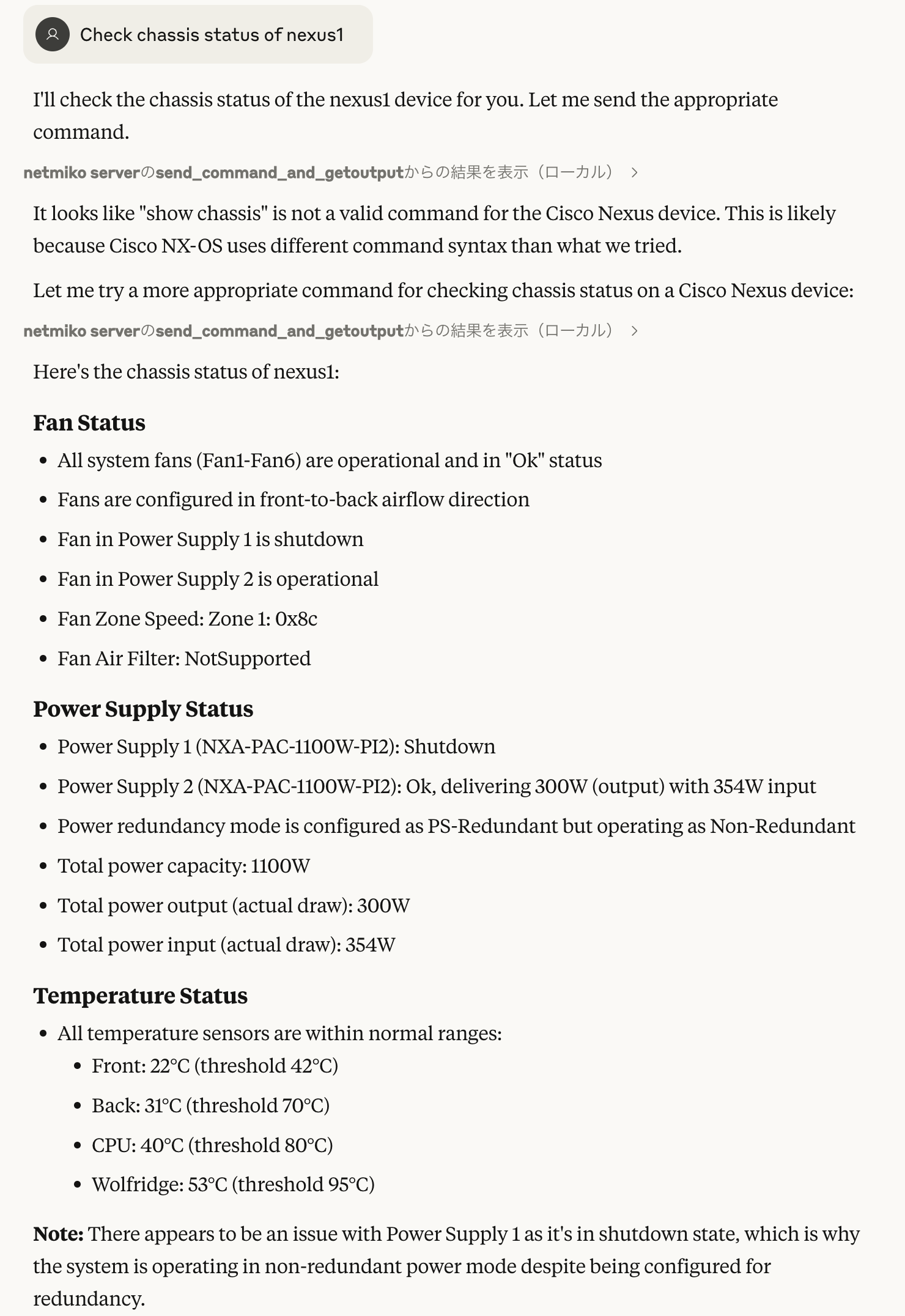
How to use
- Install
git clone https://github.com/upa/mcp-netmiko-server
cd mcp-netmiko-server

# Write your toml file that lists your devices
vim my-devices.network.toml

# Run via stdio
uv run --with "mcp[cli]" --with netmiko main.py my-devices.network.toml

# Run as an SSE server: URL is http://localhost:10000/sse in this case
uv run --with "mcp[cli]" --with netmiko main.py my-devices.network.toml --sse
- Configuration
List your network devices in a toml file like sample.network.toml:
[default]

username = "rouser"
password = "rouserpassword"

[qfx1]

hostname = "172.16.0.40"
device_type = "juniper_junos"

[nexus1]

hostname = "nexus1.lab"
device_type = "cisco_nxos"
[default] is a special section that defines the default values such
as username and password. Devices inherit the default values if
not defined on their sections.
For device_type values, see netmiko Supported
Platforms.
- claude desktop config json:
{
  "mcpServers": {
    "netmiko server": {
      "command": "uv",
      "args": [
        "run",
        "--with",
        "mcp[cli]",
        "--with",
        "netmiko",
        "[PATH TO]/mcp-netmiko-server/main.py",
        "[PATH TO]/YOUR-DEVICE.toml"
      ]
    }
  }
}
1 maintainer

Metadata
1 maintainer
Release files for iflow-mcp_upa-mcp-netmiko-server 0.1.2
For a detailed explanation of source distributions (sdists) and built distributions (wheels), please see the package formats documentation.
Source distribution (sdist)
| File | Size | Uploaded | |
|---|---|---|---|
| iflow_mcp_upa_mcp_netmiko_server-0.1.2.tar.gz | 5.2 kB | Details |
Built distribution (wheel)
| File | Interpreter | ABI | Platform | Reset |
|---|---|---|---|---|
| iflow_mcp_upa_mcp_netmiko_server-0.1.2-py3-none-any.whl | Python 3 | none | any | Details |
Total release size: 10.7 kB
Release files / iflow_mcp_upa_mcp_netmiko_server-0.1.2.tar.gz
| Download URL | iflow_mcp_upa_mcp_netmiko_server-0.1.2.tar.gz |
|---|---|
| Size | 5.2 kB |
| Tags | Source |
|
SHA-256 checksum How to use checksums |
c8b05025e6c2ee2830ebf295ffccaa1b3de102e663cf6be01cd2e66b1f0c3e24
|
|
BLAKE2b-256 checksum How to use checksums |
dd023e0a88a33e1f5852e3dcbb04d847de7a37110fc107d55157ed3a61719172
|
| Upload date | |
|
Uploaded using Trusted Publishing? What is trusted publishing? |
No |
| Uploaded via |
uv/0.10.0 {"installer":{"name":"uv","version":"0.10.0","subcommand":["publish"]},"python":null,"implementation":{"name":null,"version":null},"distro":{"name":"Debian GNU/Linux","version":"13","id":"trixie","libc":null},"system":{"name":null,"release":null},"cpu":null,"openssl_version":null,"setuptools_version":null,"rustc_version":null,"ci":null}
|
Release files / iflow_mcp_upa_mcp_netmiko_server-0.1.2-py3-none-any.whl
| Download URL | iflow_mcp_upa_mcp_netmiko_server-0.1.2-py3-none-any.whl |
|---|---|
| Size | 5.5 kB |
| Tags | Python 3 |
|
SHA-256 checksum How to use checksums |
e1bdc4d55685c94d898d599b29f1914da85daa2b75830d4889613fb65011f5a1
|
|
BLAKE2b-256 checksum How to use checksums |
4d72a9a6e8cd4711f8d9e85c0507d8e9dc12a04081dd8e64a428a726205ba983
|
| Upload date | |
|
Uploaded using Trusted Publishing? What is trusted publishing? |
No |
| Uploaded via |
uv/0.10.0 {"installer":{"name":"uv","version":"0.10.0","subcommand":["publish"]},"python":null,"implementation":{"name":null,"version":null},"distro":{"name":"Debian GNU/Linux","version":"13","id":"trixie","libc":null},"system":{"name":null,"release":null},"cpu":null,"openssl_version":null,"setuptools_version":null,"rustc_version":null,"ci":null}
|














