
MCP netmiko server for LLMs interacting with Network Devices

Project description
mcp-netmiko-server
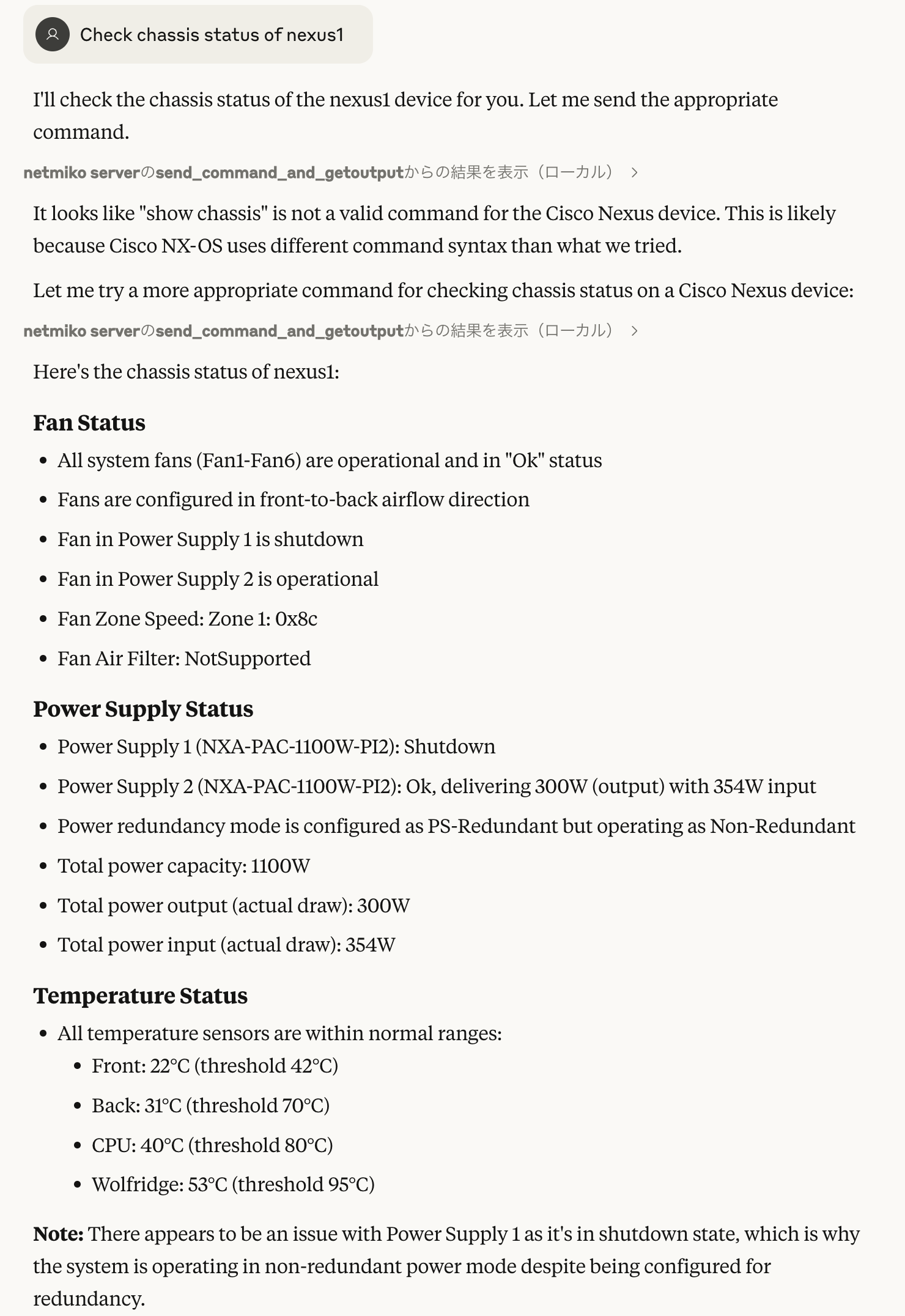
An MCP server that enables LLMs interacting with your network devices via SSH (netmiko).
| Tool | Description |
|---|---|
| get_network_device_list | Return list of network device names and types defined in a TOML file. |
| send_command_and_get_output | Send a command to a device and returns its output. |
| set_config_commands_and_commit_or_save | Send configuration commands to a device and commit or save automatically. |
How to use
- Install
git clone https://github.com/upa/mcp-netmiko-server
cd mcp-netmiko-server

# Write your toml file that lists your devices
vim my-devices.network.toml

# Run via stdio
uv run --with "mcp[cli]" --with netmiko main.py my-devices.network.toml

# Run as an SSE server: URL is http://localhost:10000/sse in this case
uv run --with "mcp[cli]" --with netmiko main.py my-devices.network.toml --sse
- Configuration
List your network devices in a toml file like sample.network.toml:
[default]

username = "rouser"
password = "rouserpassword"

[qfx1]

hostname = "172.16.0.40"
device_type = "juniper_junos"

[nexus1]

hostname = "nexus1.lab"
device_type = "cisco_nxos"
[default] is a special section that defines the default values such
as username and password. Devices inherit the default values if
not defined on their sections.
For device_type values, see netmiko Supported
Platforms.
- claude desktop config json:
{
  "mcpServers": {
    "netmiko server": {
      "command": "uv",
      "args": [
        "run",
        "--with",
        "mcp[cli]",
        "--with",
        "netmiko",
        "[PATH TO]/mcp-netmiko-server/main.py",
        "[PATH TO]/YOUR-DEVICE.toml"
      ]
    }
  }
}
Release history Release notifications | RSS feed


Download files
Download the file for your platform. If you're not sure which to choose, learn more about installing packages.
Source Distribution
Built Distribution
Filter files by name, interpreter, ABI, and platform.
If you're not sure about the file name format, learn more about wheel file names.
Copy a direct link to the current filters
File details
Details for the file iflow_mcp_upa_mcp_netmiko_server-0.1.0.tar.gz.
File metadata
- Download URL: iflow_mcp_upa_mcp_netmiko_server-0.1.0.tar.gz
- Upload date:
- Size: 5.0 kB
- Tags: Source
- Uploaded using Trusted Publishing? No
- Uploaded via: uv/0.10.0 {"installer":{"name":"uv","version":"0.10.0","subcommand":["publish"]},"python":null,"implementation":{"name":null,"version":null},"distro":{"name":"Debian GNU/Linux","version":"13","id":"trixie","libc":null},"system":{"name":null,"release":null},"cpu":null,"openssl_version":null,"setuptools_version":null,"rustc_version":null,"ci":null}
File hashes
| Algorithm | Hash digest | |
|---|---|---|
| SHA256 |
5e7551628e999ffd816ee14498221041c1e12c6304fed696664545019a598b1f
|
|
| MD5 |
7c863640c01187c0f83f21d2718ef656
|
|
| BLAKE2b-256 |
cf25f0fb8e3c3d835e696397bf6626c8a307036c134b9893b0f431941998a8e0
|
File details
Details for the file iflow_mcp_upa_mcp_netmiko_server-0.1.0-py3-none-any.whl.
File metadata
- Download URL: iflow_mcp_upa_mcp_netmiko_server-0.1.0-py3-none-any.whl
- Upload date:
- Size: 5.3 kB
- Tags: Python 3
- Uploaded using Trusted Publishing? No
- Uploaded via: uv/0.10.0 {"installer":{"name":"uv","version":"0.10.0","subcommand":["publish"]},"python":null,"implementation":{"name":null,"version":null},"distro":{"name":"Debian GNU/Linux","version":"13","id":"trixie","libc":null},"system":{"name":null,"release":null},"cpu":null,"openssl_version":null,"setuptools_version":null,"rustc_version":null,"ci":null}
File hashes
| Algorithm | Hash digest | |
|---|---|---|
| SHA256 |
ef490960358d02333cc55c52481bcea15b66e83879b29e28cba745649f88a9f9
|
|
| MD5 |
d0ec3eafe2bb8bc7015ffc22b4422f05
|
|
| BLAKE2b-256 |
57fc464b74a5821e2bfbe8fe00daabfee5190d28670f178cb9c2b2203462a3eb
|






