

AutoCAD MCP 服务器 / AutoCAD MCP Server
⚠️ 本项目目前维护精力有限,欢迎有兴趣的开发者参与协作!
⚠️ Currently this project is not actively maintained due to time constraints. I would be very happy to collaborate with anyone interested in co-maintaining or extending it.
基于 Model Context Protocol (MCP) 的 AutoCAD 集成服务器,允许通过 Claude 等大型语言模型 (LLM) 与 AutoCAD 进行自然语言交互。
An AutoCAD integration server based on Model Context Protocol (MCP), enabling natural language interaction with AutoCAD via large language models like Claude.
🔗 项目在 MseeP.ai 展示 / Referenced on MseeP.ai:
https://mseep.ai/app/zh19980811-easy-mcp-autocad
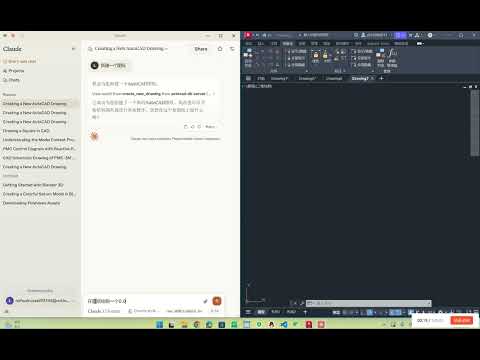
🎬 演示视频 / Demo Video:
✨ 功能特点 / Features
- 🗣️ 自然语言控制 AutoCAD 图纸 / Natural language control of AutoCAD drawings
- ✏️ 基础绘图功能(线条、圆)/ Basic drawing tools (line, circle)
- 📚 图层管理 / Layer management
- 🧠 自动生成 PMC 控制图 / Auto-generate PMC control diagrams
- 🔍 图纸元素分析 / Drawing element analysis
- 🔦 文本高亮匹配 / Highlight specific text patterns
- 💾 内嵌 SQLite 数据库存储 CAD 元素 / Integrated SQLite storage for CAD elements
🖥️ 系统要求 / System Requirements
- Python 3.10+
- AutoCAD 2018+ (需支持 COM 接口 / with COM interface support)
- Windows 操作系统 / Windows OS
⚙️ 安装步骤 / Installation
1. 克隆仓库 / Clone the repository
git clone https://github.com/yourusername/autocad-mcp-server.git
cd autocad-mcp-server

| `export_to_database` | 将 CAD 元素信息存入 SQLite |

## 2. 创建虚拟环境 / Create virtual environment

**Windows:**

```bash
python -m venv .venv
.venv\Scripts\activate
macOS / Linux:
python -m venv .venv
source .venv/bin/activate
3. 安装依赖 / Install dependencies
pip install -r requirements.txt
4. (可选)构建可执行文件 / (Optional) Build as executable
pyinstaller --onefile server.py
🚀 使用方法 / How to Use
独立运行服务器 / Run server independently
python server.py
集成 Claude Desktop / Integrate with Claude Desktop
编辑配置文件:
Windows 路径 / Config path on Windows:
%APPDATA%\Claude\claude_desktop_config.json
示例配置 / Example config:
{
  "mcpServers": {
    "autocad-mcp-server": {
      "command": "path/to/autocad_mcp_server.exe",
      "args": []
    }
  }
}
🧰 工具 API / Available API Tools
| 功能 / Function | 描述 / Description |
|---|---|
create_new_drawing |
创建新的图纸 / Create a new drawing |
draw_line |
画直线 / Draw a line |
draw_circle |
画圆 / Draw a circle |
set_layer |
设置当前图层 / Set current drawing layer |
highlight_text |
高亮显示匹配文本 / Highlight matching text |
scan_elements |
扫描并解析图纸元素 / Scan and parse drawing elements |
export_to_database |
导出 CAD 元素到数据库 / Export CAD data to SQLite |
🙋♂️ 维护状态 / Maintenance Notice
⚠️ 当前我正忙于其他项目,维护精力有限。欢迎 Fork 项目或提交 PR,一起完善 AutoCAD 智能交互生态!
⚠️ I'm currently busy and not able to actively maintain this repo. PRs and collaborators are welcome!
📬 联系我 / Contact: 1062723732@qq.com
Made with ❤️ for open-source learning.
1 maintainer

Metadata
1 maintainer
Release files for iflow-mcp_zh19980811_autocad-mcp-server 0.1.0
For a detailed explanation of source distributions (sdists) and built distributions (wheels), please see the package formats documentation.
Source distribution (sdist)
| File | Size | Uploaded | |
|---|---|---|---|
| iflow_mcp_zh19980811_autocad_mcp_server-0.1.0.tar.gz | 5.4 MB | Details |
Built distribution (wheel)
| File | Interpreter | ABI | Platform | Reset |
|---|---|---|---|---|
| iflow_mcp_zh19980811_autocad_mcp_server-0.1.0-py3-none-any.whl | Python 3 | none | any | Details |
Total release size: 10.8 MB
Release files / iflow_mcp_zh19980811_autocad_mcp_server-0.1.0.tar.gz
| Download URL | iflow_mcp_zh19980811_autocad_mcp_server-0.1.0.tar.gz |
|---|---|
| Size | 5.4 MB |
| Tags | Source |
|
SHA-256 checksum How to use checksums |
4992dda782c053aad61b3ec9b6a11e14bb894b0ff0a88d40cd7392d311d11de8
|
|
BLAKE2b-256 checksum How to use checksums |
a4f8e30440b02f143c0b81c54e012872a35c8ab35b5cef1705f7b2c5a8db70e0
|
| Upload date | |
|
Uploaded using Trusted Publishing? What is trusted publishing? |
No |
| Uploaded via |
uv/0.9.25 {"installer":{"name":"uv","version":"0.9.25","subcommand":["publish"]},"python":null,"implementation":{"name":null,"version":null},"distro":{"name":"Debian GNU/Linux","version":"13","id":"trixie","libc":null},"system":{"name":null,"release":null},"cpu":null,"openssl_version":null,"setuptools_version":null,"rustc_version":null,"ci":null}
|
Release files / iflow_mcp_zh19980811_autocad_mcp_server-0.1.0-py3-none-any.whl
| Download URL | iflow_mcp_zh19980811_autocad_mcp_server-0.1.0-py3-none-any.whl |
|---|---|
| Size | 5.4 MB |
| Tags | Python 3 |
|
SHA-256 checksum How to use checksums |
b14f373e5e1c1d89228fd9cab60f0764d73f192281af19b12b9f9e044198b928
|
|
BLAKE2b-256 checksum How to use checksums |
224d3f190b47ab385c0c8f155bfa0d5a9b3ded06c93e7f4ee05632363b7a776b
|
| Upload date | |
|
Uploaded using Trusted Publishing? What is trusted publishing? |
No |
| Uploaded via |
uv/0.9.25 {"installer":{"name":"uv","version":"0.9.25","subcommand":["publish"]},"python":null,"implementation":{"name":null,"version":null},"distro":{"name":"Debian GNU/Linux","version":"13","id":"trixie","libc":null},"system":{"name":null,"release":null},"cpu":null,"openssl_version":null,"setuptools_version":null,"rustc_version":null,"ci":null}
|













