
Principles
- In development, most if not all webservers containing agent(s), or adk-web, or adk web-server, will start numbering from port 8080, for ease of local debuggability
- From docker-compose, we might expose it on a different port externally. Check
docker-compose.ymlfor the latest updated value here
- From docker-compose, we might expose it on a different port externally. Check
Run Everything!
Run docker-compose up to run everything!
Here's a list of all of the available servers
| Name | Type | Test URL (localhost) | Bash command |
|---|---|---|---|
| ADK Web Chat Tester | Dev tool | localhost:8080 | make bash-adk-web |
| ADK Server API (mocking remote deployment) | Dev tool | localhost:8081 | make bash-adk-apiserver |
| (Under construction) API Docs for agent API endpoints (Swagger) | Dev tool | localhost:8082 | - |
| A2A master agent delegator (That also supports A2A itself!) | Agent | localhost:8083 | make bash-agent-a2a-agent-master |
| Hello world greeter (agent that greets people, simple use case) | Agent | localhost:8084 | make bash-agent-hello-world-greeter |
| Google Search powered agent | Agent | localhost:8085 | make bash-agent-google-search |
| Financial planner agent (Currently only currency functions - Currency conversion, Trend data retrieval etc) |
Agent | localhost:8086 | make bash-agent-financial-planner |
| Chart maker agent | Agent | localhost:8087 | make bash-agent-chart-maker |
| MCP Server - Exchange rate API Wrapper | MCP Server | localhost:9000 | make bash-mcp-server-exchange-rate |
| MCP Server - Quickchart image maker | MCP Server | localhost:9001 | make bash-mcp-server-quickchart |
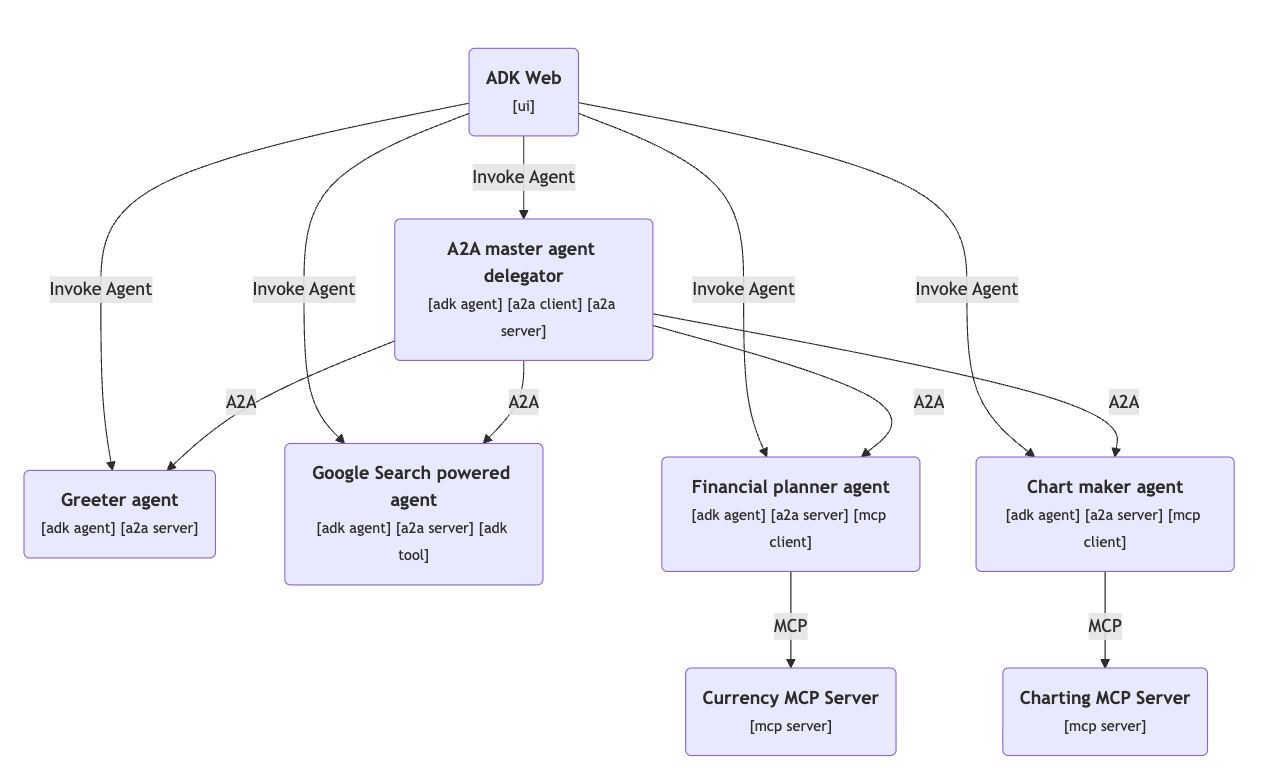
Use ADK Web to test the above agents (already integrated) easily. Here's how they are plugged together at the moment:
Here's how it looks like together:
Development utilities
make util-create-agent name="YOUR_AGENT_NAME"
Disclaimer
Google Cloud credits are provided for this project. #AISprint 🤖 🥳
1 maintainer

Metadata
1 maintainer
Release files for iflow-mcp_Weiyuan-Lane-mcp_exchange_rate_server 0.1.0
For a detailed explanation of source distributions (sdists) and built distributions (wheels), please see the package formats documentation.
Source distribution (sdist)
| File | Size | Uploaded | |
|---|---|---|---|
| iflow_mcp_weiyuan_lane_mcp_exchange_rate_server-0.1.0.tar.gz | 3.2 kB | Details |
Built distribution (wheel)
| File | Interpreter | ABI | Platform | Reset |
|---|---|---|---|---|
| iflow_mcp_weiyuan_lane_mcp_exchange_rate_server-0.1.0-py3-none-any.whl | Python 3 | none | any | Details |
Total release size: 7.4 kB
Release files / iflow_mcp_weiyuan_lane_mcp_exchange_rate_server-0.1.0.tar.gz
| Download URL | iflow_mcp_weiyuan_lane_mcp_exchange_rate_server-0.1.0.tar.gz |
|---|---|
| Size | 3.2 kB |
| Tags | Source |
|
SHA-256 checksum How to use checksums |
22a839064a1616076c48470f7819936234a7f710fe0cfc58fc2d64892ee98cd6
|
|
BLAKE2b-256 checksum How to use checksums |
c8fd08728529155c712b8760a1090b6839ea1a7bda244ea34db641c781c0e40d
|
| Upload date | |
|
Uploaded using Trusted Publishing? What is trusted publishing? |
No |
| Uploaded via |
uv/0.10.0 {"installer":{"name":"uv","version":"0.10.0","subcommand":["publish"]},"python":null,"implementation":{"name":null,"version":null},"distro":{"name":"Debian GNU/Linux","version":"13","id":"trixie","libc":null},"system":{"name":null,"release":null},"cpu":null,"openssl_version":null,"setuptools_version":null,"rustc_version":null,"ci":null}
|
Release files / iflow_mcp_weiyuan_lane_mcp_exchange_rate_server-0.1.0-py3-none-any.whl
| Download URL | iflow_mcp_weiyuan_lane_mcp_exchange_rate_server-0.1.0-py3-none-any.whl |
|---|---|
| Size | 4.2 kB |
| Tags | Python 3 |
|
SHA-256 checksum How to use checksums |
39201e8dfeb82e5fcd0cd2bb4dd81f73d9d9ef3acdd407508ef1b1e26a0dc9f9
|
|
BLAKE2b-256 checksum How to use checksums |
7a5c69eda4d445cd07320a9986fa2f3e436e9bd8dbad9083fd494c2a2bd2eb48
|
| Upload date | |
|
Uploaded using Trusted Publishing? What is trusted publishing? |
No |
| Uploaded via |
uv/0.10.0 {"installer":{"name":"uv","version":"0.10.0","subcommand":["publish"]},"python":null,"implementation":{"name":null,"version":null},"distro":{"name":"Debian GNU/Linux","version":"13","id":"trixie","libc":null},"system":{"name":null,"release":null},"cpu":null,"openssl_version":null,"setuptools_version":null,"rustc_version":null,"ci":null}
|













