
Lemon Squeezy Server

A Model Context Protocol (MCP) server implementation that integrates with Lemon Squeezy for handling subscriptions, checkouts, products, and more. This server provides a structured interface to programmatically manage your Lemon Squeezy store with audit logging and tool-based control.
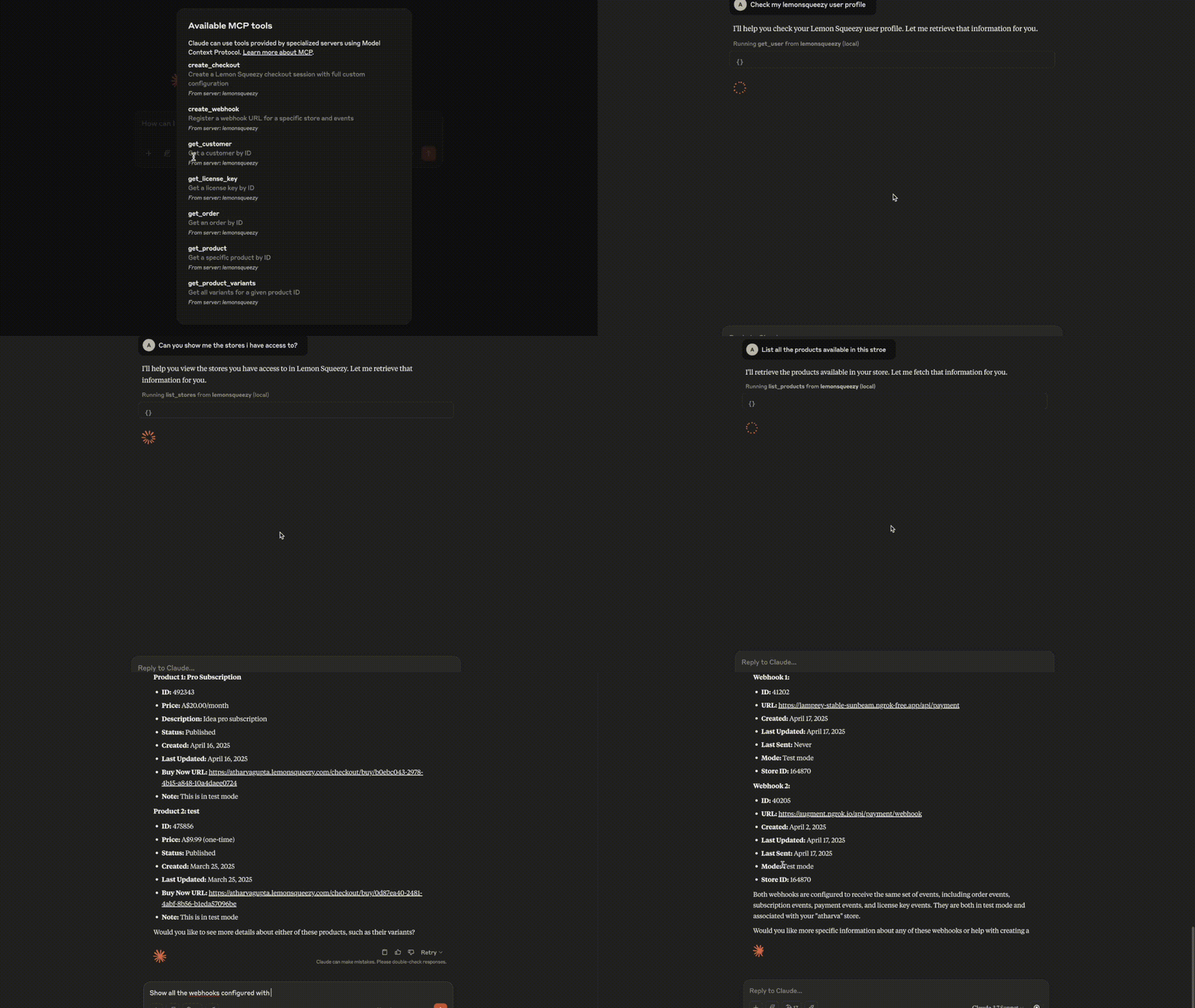
Demo
Requirements
- Python 3.8+
- MCP SDK 0.1.0+
- aiohttp
- python-dotenv
Components
Resources
The server provides an MCP-compatible resource for operation auditing:
- Stores logs of all tool-based Lemon Squeezy operations
- Exposes audit log via
read_resourceendpoint - Helpful for debugging and audit traceability
Tools
Implements a full set of Lemon Squeezy operations via MCP tools:
🔍 Store & Product Tools
get_user: Get current Lemon Squeezy user infolist_stores: List all storesget_store: Fetch a specific storelist_products: List productsget_product: Get product detailsget_product_variants: List variants for a product
📦 Order & Customer Tools
list_orders: List all ordersget_order: Get details of an orderlist_customers: List all customersget_customer: Fetch customer details
💳 Subscription & License Tools
list_subscriptions: List subscriptionsget_subscription: Get a subscriptionlist_license_keys: List license keysget_license_key: Fetch license key info
🛒 Checkout & Webhook Tools
create_checkout: Create a fully customized checkout sessioncreate_webhook: Register a new webhooklist_webhooks: List all webhooks (filterable by store)
Features
- Subscription & Checkout Management
- Webhook Creation & Listing
- Audit Logging of All Actions
- MCP-Compatible Tool & Resource Integration
- Error Feedback and Logging
Installation
Installing via Smithery
To install LemonSqueezy Server for Claude Desktop automatically via Smithery:
npx -y @smithery/cli install @atharvagupta2003/mcp-lemonsqueezy --client claude
Install dependencies
python -m venv venv
source venv/bin/activate  # On macOS/Linux
venv\Scripts\activate    # On Windows
pip install -e .
Configuration
Set up the environment variables in a .env file:
LEMON_SQUEEZY_API_KEY=your_lemonsqueezy_api_key
Claude Desktop
Add the server configuration to your Claude Desktop config:
Windows: C:\Users<username>\AppData\Roaming\Claude\claude_desktop_config.json
MacOS: ~/Library/Application Support/Claude/claude_desktop_config.json
{
  "mcpServers": {
    "lemonsqueezy": {
      "command": "/Users/hp/.local/bin/uv",
      "description": "Operations with lemonsqueezy payment platform",
      "args": [
        "--directory",
        "/ABSOLUTE/PATH/TO/PARENT/FOLDER/src/mcp_lemonsqueezy",
        "run",
        "--with",
        "fastmcp",
        "server.py"
      ],
      "env": {
         "LEMONSQUEEZY_API_KEY": "<YOUR-API-KEY>"
       }
    }
  }
}
Usage
Start the server
uv run src/mcp_lemonsqueezy/server.py
Example MCP Commands
Get Current User
{
  "tool": "get_user",
  "arguments": {}
}
List All Stores
{
  "tool": "list_stores",
  "arguments": {}
}
Get a Store by ID
{
  "tool": "get_store",
  "arguments": {
    "store_id": "164870"
  }
}
Error Handling
The server provides clear error messages for common scenarios:
- 401 Unauthorized: Missing or invalid API key
- 422 Unprocessable Entity: Invalid fields like missing variant/store ID
- 400 Bad Request: Invalid JSON API structure
Development
Testing
Run the MCP Inspector for interactive testing:
npx @modelcontextprotocol/inspector uv run --with fastmcp /ABSOLUTE/PATH/TO/PARENT/FOLDER/src/mcp_lemonsqueezy/server.py
Building
- Update dependencies:
uv compile pyproject.toml
- Build package:
uv build
Contributing
We welcome contributions! Please see our Contributing Guidelines for details.
License
This project is licensed under the MIT License - see the LICENSE file for details.
1 maintainer

Metadata
1 maintainer
Release files for iflow-mcp_atharvagupta2003-mcp-lemonsqueezy 0.1.0
For a detailed explanation of source distributions (sdists) and built distributions (wheels), please see the package formats documentation.
Source distribution (sdist)
| File | Size | Uploaded | |
|---|---|---|---|
| iflow_mcp_atharvagupta2003_mcp_lemonsqueezy-0.1.0.tar.gz | 7.1 kB | Details |
Built distribution (wheel)
| File | Interpreter | ABI | Platform | Reset |
|---|---|---|---|---|
| iflow_mcp_atharvagupta2003_mcp_lemonsqueezy-0.1.0-py3-none-any.whl | Python 3 | none | any | Details |
Total release size: 15.7 kB
Release files / iflow_mcp_atharvagupta2003_mcp_lemonsqueezy-0.1.0.tar.gz
| Download URL | iflow_mcp_atharvagupta2003_mcp_lemonsqueezy-0.1.0.tar.gz |
|---|---|
| Size | 7.1 kB |
| Tags | Source |
|
SHA-256 checksum How to use checksums |
fb39af9dc26df24f46987ce0f8d26d18077f3d633ecd8e3da745eafed643febf
|
|
BLAKE2b-256 checksum How to use checksums |
7e41bac8708bd11b46a98f969a7b941fd9175247302f25f6985e279a5dac83dc
|
| Upload date | |
|
Uploaded using Trusted Publishing? What is trusted publishing? |
No |
| Uploaded via |
uv/0.10.0 {"installer":{"name":"uv","version":"0.10.0","subcommand":["publish"]},"python":null,"implementation":{"name":null,"version":null},"distro":{"name":"Debian GNU/Linux","version":"13","id":"trixie","libc":null},"system":{"name":null,"release":null},"cpu":null,"openssl_version":null,"setuptools_version":null,"rustc_version":null,"ci":null}
|
Release files / iflow_mcp_atharvagupta2003_mcp_lemonsqueezy-0.1.0-py3-none-any.whl
| Download URL | iflow_mcp_atharvagupta2003_mcp_lemonsqueezy-0.1.0-py3-none-any.whl |
|---|---|
| Size | 8.6 kB |
| Tags | Python 3 |
|
SHA-256 checksum How to use checksums |
f0ca9b844748e42fe3da93ce235e88b43ad0313288b4dcac0cf3238b64825194
|
|
BLAKE2b-256 checksum How to use checksums |
9719630cf8a331583a686ea3e886a7b9bd1f23c39c84833887725d66897bd810
|
| Upload date | |
|
Uploaded using Trusted Publishing? What is trusted publishing? |
No |
| Uploaded via |
uv/0.10.0 {"installer":{"name":"uv","version":"0.10.0","subcommand":["publish"]},"python":null,"implementation":{"name":null,"version":null},"distro":{"name":"Debian GNU/Linux","version":"13","id":"trixie","libc":null},"system":{"name":null,"release":null},"cpu":null,"openssl_version":null,"setuptools_version":null,"rustc_version":null,"ci":null}
|













