
YFinance MCP Server
A comprehensive Model Context Protocol (MCP) server that provides financial data through Yahoo Finance API integration. This server enables AI agents to access real-time stock market data, historical prices, financial statements, and market analysis.
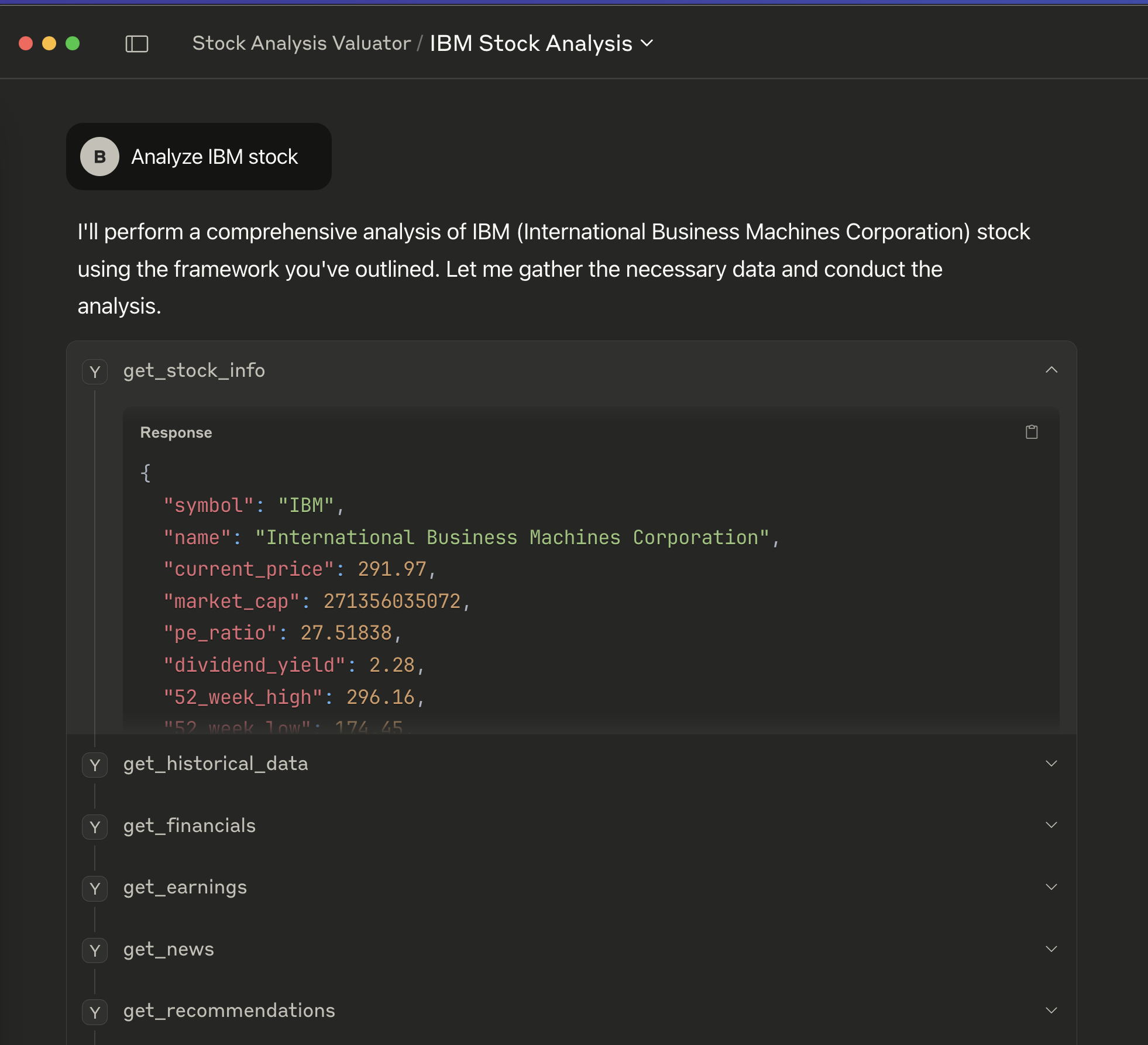
Features
- 10 Comprehensive Financial Tools for complete market data access
- Real-time Stock Information including prices, market cap, and key metrics
- Historical Data Analysis with flexible time periods and intervals
- Financial Statements (income statement, balance sheet, cash flow)
- Earnings Data (annual and quarterly)
- Dividend and Split History
- News and Analyst Recommendations
- Stock Search and Multi-quote Support
- Robust Error Handling with structured JSON responses
- FastMCP Framework with async support for high performance
Quick Start
Prerequisites
- Python 3.11+
- uv (Python package manager)
Installation
# Clone the repository
git clone https://github.com/barvhaim/yfinance-mcp-server.git
cd yfinance-mcp-server

# Install dependencies
uv sync
Running the Server
# Start the MCP server
uv run main.py

# The server will start and be ready to accept MCP client connections
Available Tools
1. get_stock_info
Get comprehensive stock information including current price, market cap, and financial metrics.
Parameters:
symbol(str): Stock ticker symbol (e.g., 'AAPL', 'GOOGL')
Returns: Stock information including price, market cap, P/E ratio, dividend yield, 52-week range, volume, beta, and company details.
2. get_historical_data
Retrieve historical stock price data with flexible time periods and intervals.
Parameters:
symbol(str): Stock ticker symbolperiod(str): Time period (1d, 5d, 1mo, 3mo, 6mo, 1y, 2y, 5y, 10y, ytd, max)interval(str): Data interval (1m, 2m, 5m, 15m, 30m, 60m, 90m, 1h, 1d, 5d, 1wk, 1mo, 3mo)
Returns: Historical OHLCV data with dates and volume information.
3. get_dividends
Get dividend payment history for a stock.
Parameters:
symbol(str): Stock ticker symbol
Returns: List of dividend payments with dates and amounts.
4. get_splits
Retrieve stock split history.
Parameters:
symbol(str): Stock ticker symbol
Returns: List of stock splits with dates and split ratios.
5. get_financials
Get comprehensive financial statements.
Parameters:
symbol(str): Stock ticker symbolquarterly(bool): Get quarterly data if True, annual if False
Returns: Income statement, balance sheet, and cash flow statement data.
6. get_earnings
Retrieve earnings data for analysis.
Parameters:
symbol(str): Stock ticker symbol
Returns: Annual and quarterly earnings data.
7. get_news
Get recent news articles related to a stock.
Parameters:
symbol(str): Stock ticker symbolcount(int): Number of articles to return (default: 10)
Returns: List of news articles with titles, links, publishers, and timestamps.
8. get_recommendations
Get analyst recommendations and ratings.
Parameters:
symbol(str): Stock ticker symbol
Returns: List of analyst recommendations with firms, ratings, and actions.
9. search_stocks
Search for stocks by company name or ticker symbol.
Parameters:
query(str): Search query (company name or ticker)limit(int): Maximum results to return (default: 10)
Returns: List of matching stocks with symbols, names, and exchange information.
10. get_multiple_quotes
Get current quotes for multiple stocks simultaneously.
Parameters:
symbols(List[str]): List of stock ticker symbols
Returns: Dictionary of stock quotes with current prices, changes, and basic metrics.
Usage Examples
Basic Stock Information
# Get Apple stock information
result = await get_stock_info("AAPL")
print(f"Current Price: ${result['current_price']}")
print(f"Market Cap: ${result['market_cap']:,}")
Historical Data Analysis
# Get 1-year daily data for Google
result = await get_historical_data("GOOGL", period="1y", interval="1d")
print(f"Retrieved {result['count']} data points")
Multiple Stock Quotes
# Get quotes for tech stocks
result = await get_multiple_quotes(["AAPL", "GOOGL", "MSFT", "AMZN"])
for symbol, quote in result['quotes'].items():
    print(f"{symbol}: ${quote['current_price']}")
MCP Client Integration
Claude Desktop Integration
To connect this server with Claude Desktop:
-
Start the server in one terminal:
uv run main.py
-
Configure Claude Desktop by editing your MCP settings file:
macOS:
~/Library/Application Support/Claude/claude_desktop_config.jsonWindows:
%APPDATA%\Claude\claude_desktop_config.json -
Add the server configuration:
{
   "yfinance": {
     "command": "uv",
     "args": [
       "--directory",
       "/path/to/yfinance-mcp-server",
       "run",
       "main.py"
     ]
   }
 }
-
Update the cwd path to your actual project directory
-
Restart Claude Desktop to load the new server
-
Verify connection by asking Claude: "What financial data tools do you have available?"
Alternative: Direct Connection
For other MCP clients:
- Start the server:
uv run main.py - Configure your MCP client to connect to the server endpoint
- Tools will be automatically discovered by your AI agent
- Use standard stock symbols (AAPL, GOOGL, MSFT, etc.) with the tools
Development
Code Formatting
# Format code with black
uv run black .

# Check formatting
uv run black --check .

# Show formatting differences
uv run black --diff .
Adding New Tools
- Create a new async function in
main.py - Decorate with
@mcp.tool() - Add proper type hints and docstrings
- Include error handling
- Test the implementation
Environment Variables
Copy .env.sample to .env for any configuration needed:
cp .env.sample .env
Error Handling
All tools include comprehensive error handling:
- Invalid symbols return structured error messages
- Network issues are caught and reported
- Data unavailability is handled gracefully
- Rate limiting is respected automatically by yfinance
Performance Considerations
- Async operations for optimal performance
- Efficient data serialization with structured JSON
- Minimal data processing to reduce latency
- Built-in caching by yfinance for frequently accessed data
Dependencies
- fastmcp - FastMCP framework for MCP server implementation
- yfinance - Yahoo Finance API for financial data
- python-dotenv - Environment variable management
- black - Code formatting
- pydantic - Data validation and serialization
License
This project is available under the MIT License.
Contributing
- Fork the repository
- Create a feature branch
- Make your changes
- Add tests if applicable
- Format code with black
- Submit a pull request
Support
For issues and questions:
- Check the Issues section
- Review the
CLAUDE.mdfile for development guidance - Ensure all dependencies are properly installed with
uv sync
Changelog
v0.1.0
- Initial implementation with 10 financial data tools
- FastMCP server framework integration
- Comprehensive error handling
- Full yfinance API coverage
- MCP client integration support
1 maintainer

Metadata
1 maintainer
Release files for iflow-mcp_barvhaim-yfinance-mcp-server 0.1.0
For a detailed explanation of source distributions (sdists) and built distributions (wheels), please see the package formats documentation.
Source distribution (sdist)
| File | Size | Uploaded | |
|---|---|---|---|
| iflow_mcp_barvhaim_yfinance_mcp_server-0.1.0.tar.gz | 9.3 kB | Details |
Built distribution (wheel)
| File | Interpreter | ABI | Platform | Reset |
|---|---|---|---|---|
| iflow_mcp_barvhaim_yfinance_mcp_server-0.1.0-py3-none-any.whl | Python 3 | none | any | Details |
Total release size: 19.1 kB
Release files / iflow_mcp_barvhaim_yfinance_mcp_server-0.1.0.tar.gz
| Download URL | iflow_mcp_barvhaim_yfinance_mcp_server-0.1.0.tar.gz |
|---|---|
| Size | 9.3 kB |
| Tags | Source |
|
SHA-256 checksum How to use checksums |
81b6a9e6b067a9a3f09d6f70142ba418ecd11a72d5deaabddfa331a7ba75552f
|
|
BLAKE2b-256 checksum How to use checksums |
72979882fd2964c591a05d8933c000bcfeaca724e6401bb4ba2cef7f8b0546e6
|
| Upload date | |
|
Uploaded using Trusted Publishing? What is trusted publishing? |
No |
| Uploaded via |
uv/0.10.2 {"installer":{"name":"uv","version":"0.10.2","subcommand":["publish"]},"python":null,"implementation":{"name":null,"version":null},"distro":{"name":"Debian GNU/Linux","version":"13","id":"trixie","libc":null},"system":{"name":null,"release":null},"cpu":null,"openssl_version":null,"setuptools_version":null,"rustc_version":null,"ci":null}
|
Release files / iflow_mcp_barvhaim_yfinance_mcp_server-0.1.0-py3-none-any.whl
| Download URL | iflow_mcp_barvhaim_yfinance_mcp_server-0.1.0-py3-none-any.whl |
|---|---|
| Size | 9.8 kB |
| Tags | Python 3 |
|
SHA-256 checksum How to use checksums |
f3ec25d04e4f2ddd9ee863c36a107ddd61ac0feb2d5f532b8ab5a2a8baca8325
|
|
BLAKE2b-256 checksum How to use checksums |
155841de68fb07029b3a8796786c0b06ea65843bb3a3402031ebfd60908b87eb
|
| Upload date | |
|
Uploaded using Trusted Publishing? What is trusted publishing? |
No |
| Uploaded via |
uv/0.10.2 {"installer":{"name":"uv","version":"0.10.2","subcommand":["publish"]},"python":null,"implementation":{"name":null,"version":null},"distro":{"name":"Debian GNU/Linux","version":"13","id":"trixie","libc":null},"system":{"name":null,"release":null},"cpu":null,"openssl_version":null,"setuptools_version":null,"rustc_version":null,"ci":null}
|













