
No project description provided

Project description


🪐 ✨ Earthdata MCP Server


Earthdata MCP Server is a Model Context Protocol (MCP) server implementation that provides tools to interact with NASA Earth Data. It enables efficient dataset discovery, retrieval and analysis for Geospatial analysis.
🚀 NEW: This server now includes all Jupyter MCP Server tools through composition, providing a unified interface for both Earth data discovery and analysis in Jupyter Notebooks.
🚀 Key Features
- Efficient Data Retrieval: Search and download Earthdata datasets
- Unified Interface: Combines Earthdata research and Jupyter notebook manipulation tools for analysis
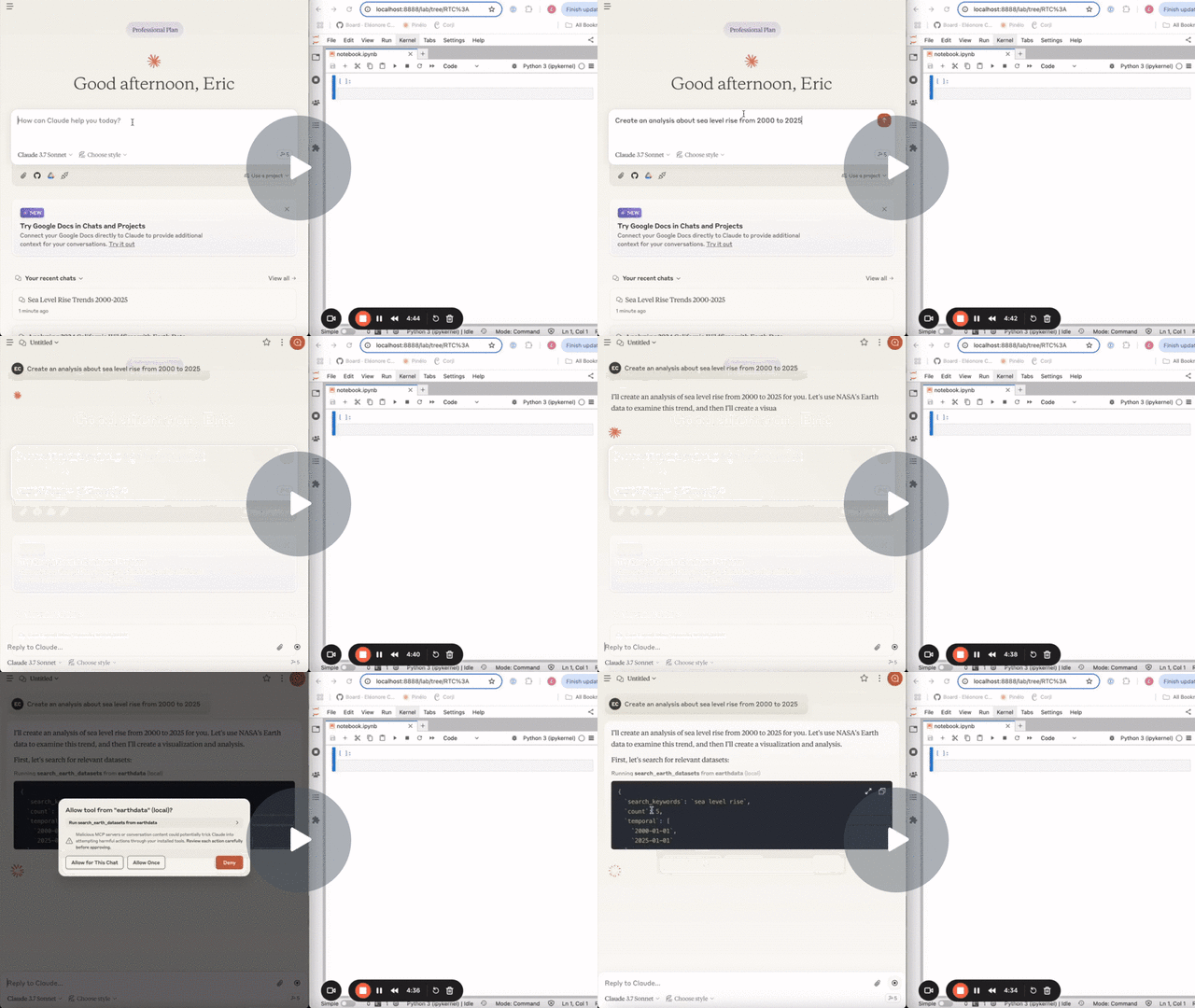
The following demo uses this MCP server to search for datasets and data granules on NASA Earthdata, download the data in Jupyter and run further analysis.
🏁 Getting Started
For comprehensive setup instructions—including Streamable HTTP transport and advanced configuration—check out the Jupyter MCP Server documentation. Or, get started quickly with JupyterLab and stdio transport here below.
1. Set Up Your Environment
pip install jupyterlab==4.4.1 jupyter-collaboration==4.0.2 ipykernel
pip uninstall -y pycrdt datalayer_pycrdt
pip install datalayer_pycrdt==0.12.17
2. Start JupyterLab
# make jupyterlab
jupyter lab --port 8888 --IdentityProvider.token MY_TOKEN --ip 0.0.0.0
3. Configure Your Preferred MCP Client
[!NOTE]
Ensure the
portof theDOCUMENT_URLandRUNTIME_URLmatch those used in thejupyter labcommand.The
DOCUMENT_IDwhich is the path to the notebook you want to connect to, should be relative to the directory where JupyterLab was started.In a basic setup,
DOCUMENT_URLandRUNTIME_URLare the same.DOCUMENT_TOKEN, andRUNTIME_TOKENare also the same and is actually the Jupyter Token.
[!NOTE]
The
EARTHDATA_USERNAMEandEARTHDATA_PASSWORDenvironment variables are used for NASA Earthdata authentication to download datasets via theearthaccesslibrary. See NASA Earthdata Authentication for more details.
MacOS and Windows
{
  "mcpServers": {
    "earthdata": {
      "command": "docker",
      "args": [
        "run",
        "-i",
        "--rm",
        "-e",
        "DOCUMENT_URL",
        "-e",
        "DOCUMENT_TOKEN",
        "-e",
        "DOCUMENT_ID",
        "-e",
        "RUNTIME_URL",
        "-e",
        "RUNTIME_TOKEN",
        "datalayer/earthdata-mcp-server:latest"
      ],
      "env": {
        "DOCUMENT_URL": "http://host.docker.internal:8888",
        "DOCUMENT_TOKEN": "MY_TOKEN",
        "DOCUMENT_ID": "notebook.ipynb",
        "RUNTIME_URL": "http://host.docker.internal:8888",
        "RUNTIME_TOKEN": "MY_TOKEN",
        "EARTHDATA_USERNAME": "your_username",
        "EARTHDATA_PASSWORD": "your_password"
      }
    }
  }
}
Linux
{
  "mcpServers": {
    "earthdata": {
      "command": "docker",
      "args": [
        "run",
        "-i",
        "--rm",
        "-e",
        "DOCUMENT_URL",
        "-e",
        "DOCUMENT_TOKEN",
        "-e",
        "DOCUMENT_ID",
        "-e",
        "RUNTIME_URL",
        "-e",
        "RUNTIME_TOKEN",
        "--network=host",
        "datalayer/earthdata-mcp-server:latest"
      ],
      "env": {
        "DOCUMENT_URL": "http://localhost:8888",
        "DOCUMENT_TOKEN": "MY_TOKEN",
        "DOCUMENT_ID": "notebook.ipynb",
        "RUNTIME_URL": "http://localhost:8888",
        "RUNTIME_TOKEN": "MY_TOKEN",
        "EARTHDATA_USERNAME": "your_username",
        "EARTHDATA_PASSWORD": "your_password"
      }
    }
  }
}
Tools
The server offers 15 tools total: 3 Earthdata-specific tools plus 12 Jupyter notebook manipulation tools.
Earthdata Tools
search_earth_datasets
- Search for datasets on NASA Earthdata.
- Input:
- search_keywords (str): Keywords to search for in the dataset titles.
- count (int): Number of datasets to return.
- temporal (tuple): (Optional) Temporal range in the format (date_from, date_to).
- bounding_box (tuple): (Optional) Bounding box in the format (lower_left_lon, lower_left_lat, upper_right_lon, upper_right_lat).
- Returns: List of dataset abstracts.
search_earth_datagranules
- Search for data granules on NASA Earthdata.
- Input:
- short_name (str): Short name of the dataset.
- count (int): Number of data granules to return.
- temporal (tuple): (Optional) Temporal range in the format (date_from, date_to).
- bounding_box (tuple): (Optional) Bounding box in the format (lower_left_lon, lower_left_lat, upper_right_lon, upper_right_lat).
- Returns: List of data granules.
download_earth_data_granules
- Download Earth data granules from NASA Earth Data and integrate with Jupyter notebooks.
- This tool combines earthdata search capabilities with jupyter notebook manipulation to create a seamless download workflow.
- Authentication: Requires NASA Earthdata Login credentials (see Authentication section)
- Input:
- folder_name (str): Local folder name to save the data.
- short_name (str): Short name of the Earth dataset to download.
- count (int): Number of data granules to download.
- temporal (tuple): (Optional) Temporal range in the format (date_from, date_to).
- bounding_box (tuple): (Optional) Bounding box in the format (lower_left_lon, lower_left_lat, upper_right_lon, upper_right_lat).
- Returns: Success message with download code preparation details.
Jupyter Tools (Composed)
The following Jupyter notebook manipulation tools are available:
append_markdown_cell: Add markdown cells to notebooksinsert_markdown_cell: Insert markdown cells at specific positionsoverwrite_cell_source: Modify existing cell contentappend_execute_code_cell: Add and execute code cellsinsert_execute_code_cell: Insert and execute code cells at specific positionsexecute_cell_with_progress: Execute cells with progress monitoringexecute_cell_simple_timeout: Execute cells with timeoutexecute_cell_streaming: Execute cells with streaming outputread_all_cells: Read all notebook cellsread_cell: Read specific notebook cellsget_notebook_info: Get notebook metadatadelete_cell: Delete notebook cells
For detailed documentation of the Jupyter tools, see the Jupyter MCP Server documentation.
Prompts
-
download_analyze_global_sea_level🆕- Generate a comprehensive workflow for downloading and analyzing Global Mean Sea Level Trend dataset.
- Uses both earthdata download tools and jupyter analysis capabilities.
- Returns: Detailed prompt for complete sea level analysis workflow.
-
sealevel_rise_dataset- Search for datasets related to sea level rise worldwide.
- Input:
start_year(int): Start year to consider.end_year(int): End year to consider.
- Returns: Prompt correctly formatted.
-
ask_datasets_format- To ask about the format of the datasets.
- Returns: Prompt correctly formatted.
Building
# or run `docker build -t datalayer/earthdata-mcp-server .`
make build-docker
If you prefer, you can pull the prebuilt images.
make pull-docker
Release history Release notifications | RSS feed

Download files
Download the file for your platform. If you're not sure which to choose, learn more about installing packages.
Source Distribution
Built Distribution
Filter files by name, interpreter, ABI, and platform.
If you're not sure about the file name format, learn more about wheel file names.
Copy a direct link to the current filters
File details
Details for the file iflow_mcp_earthdata_mcp_server-0.4.0.tar.gz.
File metadata
- Download URL: iflow_mcp_earthdata_mcp_server-0.4.0.tar.gz
- Upload date:
- Size: 23.0 kB
- Tags: Source
- Uploaded using Trusted Publishing? No
- Uploaded via: uv/0.9.8
File hashes
| Algorithm | Hash digest | |
|---|---|---|
| SHA256 |
bedc288c31288fd8e77833717879d32739318f01a31ed1da8895b6ef0fec7656
|
|
| MD5 |
8139cffc61b83ffd0c73998fd02b7060
|
|
| BLAKE2b-256 |
7ecd5c2c1cedd64a56306be6562f01f48c7ffab771e297102750e7e1d1113929
|
File details
Details for the file iflow_mcp_earthdata_mcp_server-0.4.0-py3-none-any.whl.
File metadata
- Download URL: iflow_mcp_earthdata_mcp_server-0.4.0-py3-none-any.whl
- Upload date:
- Size: 24.6 kB
- Tags: Python 3
- Uploaded using Trusted Publishing? No
- Uploaded via: uv/0.9.8
File hashes
| Algorithm | Hash digest | |
|---|---|---|
| SHA256 |
50251a941457f41323f58bb440fe8915076940e96128dc48721c05b9652d81cd
|
|
| MD5 |
34994153fd7c2c66643e998092a481f4
|
|
| BLAKE2b-256 |
13c7d6245affeebb253916dcd871a64a159060006e5e3679de127d99c54255a7
|






