
MCP Server for Unreal Engine integration

Project description
unreal-mcp-server
unreal-mcp-server is a Python-based server that implements the Model Context Protocol (MCP) for Unreal Engine. It enables smooth communication between MCP clients (e.g., Claude, Cursor, Windsurf) and the Unreal Editor, and is intended to be used together with the Unreal-MCPython Plugin.
- Demo : Build 3D Scenes in Unreal Engine with Claude AI | Unreal-MCPython Demo
- Fab Link : Unreal-MCPython: AI Assistant Plugin for Unreal Editor using Python & MCP
- Github Link : GenOrca/unreal-mcpython
🎯 Why Choose Unreal-MCPython?

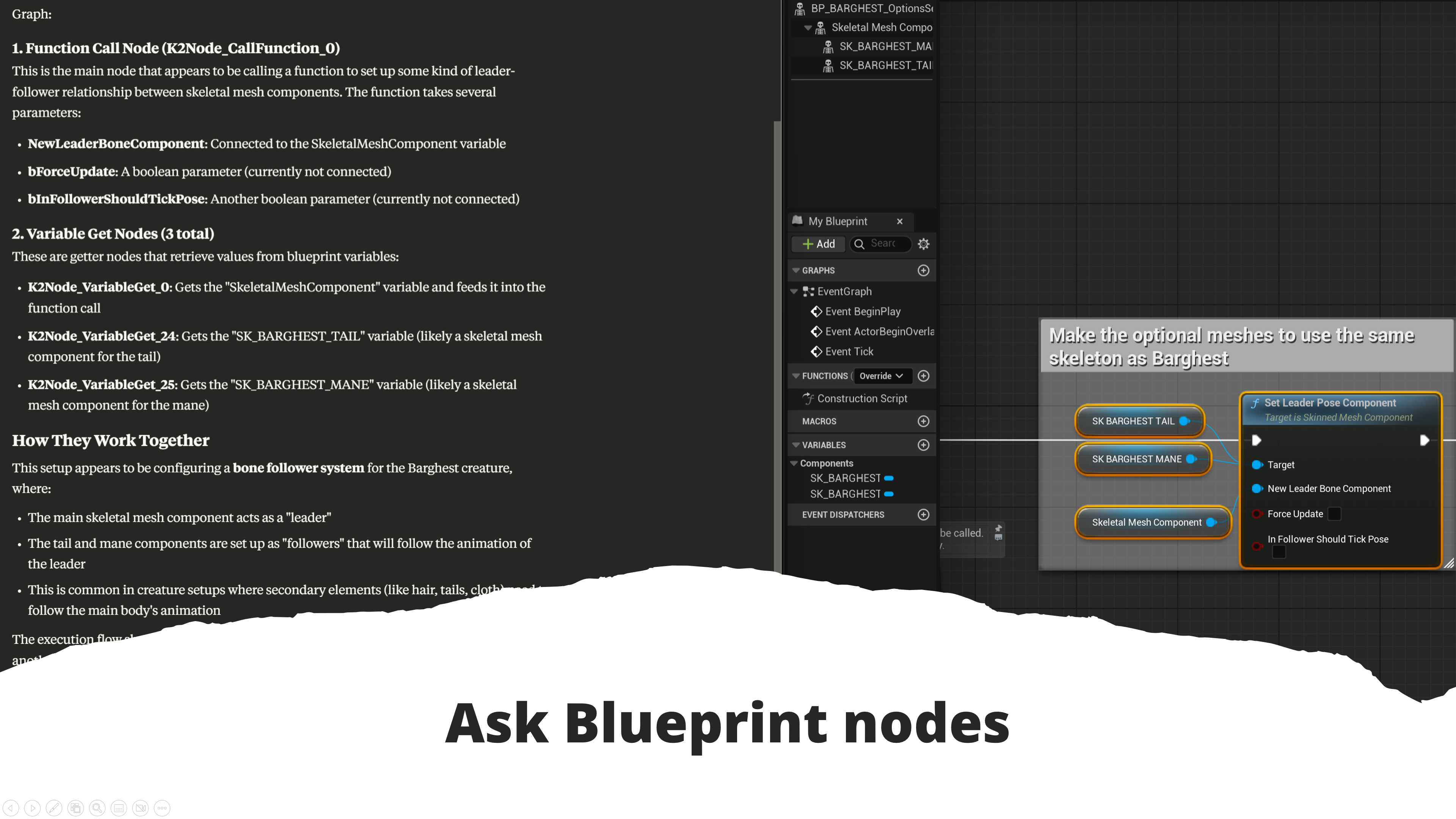


- 🧠 Unreal AI integration - Direct Claude AI assistance in Unreal Engine
- 🔗 Native MCP protocol support - Seamless communication between AI and UE
- 🎮 Intelligent game development - AI-powered asset management and scene manipulation
- ⚡ Smart automation - Context-aware blueprint scripting with AI guidance
- 🎨 Technical artist focused - AI assistance for complex production pipelines
Key Features
- MCP server for communication with Unreal Engine
- Built-in routers for various operations (e.g., Actor, Asset, Editor, etc)
- Supports Python 3.11 and later
Installation
Clone the repository:
git clone https://github.com/your-org/unreal-mcp-server.git
cd unreal-mcp-server
Running the Server
You can start the MCP server with the following command:
uv --directory absolute/path/to/unreal-mcp-server run src/unreal_mcp/main.py
Example Configuration (Using Claude, VSCode, Cursor)
The following is an example configuration for launching the MCP server from Claude, VSCode, or Cursor:
{
    "mcpServers": {
        "unreal-mcpython": {
            "command": "uv",
            "args": [
                "--directory",
                "/absolute/path/to/unreal-mcp-server",  // e.g., D:/GitHub/unreal-mcp-server
                "run",
                "src/unreal_mcp/main.py"
            ]
        }
    }
}
This configuration approach works similarly across editors like VSCode and Cursor.
License
This project is licensed under the Apache-2.0 License. See the LICENSE file for details.
Release history Release notifications | RSS feed


Download files
Download the file for your platform. If you're not sure which to choose, learn more about installing packages.
Source Distributions
Built Distribution
Filter files by name, interpreter, ABI, and platform.
If you're not sure about the file name format, learn more about wheel file names.
Copy a direct link to the current filters
File details
Details for the file iflow_mcp_genorca_unrealmcp-1.0.1-py3-none-any.whl.
File metadata
- Download URL: iflow_mcp_genorca_unrealmcp-1.0.1-py3-none-any.whl
- Upload date:
- Size: 22.0 kB
- Tags: Python 3
- Uploaded using Trusted Publishing? No
- Uploaded via: uv/0.10.0 {"installer":{"name":"uv","version":"0.10.0","subcommand":["publish"]},"python":null,"implementation":{"name":null,"version":null},"distro":{"name":"Debian GNU/Linux","version":"13","id":"trixie","libc":null},"system":{"name":null,"release":null},"cpu":null,"openssl_version":null,"setuptools_version":null,"rustc_version":null,"ci":null}
File hashes
| Algorithm | Hash digest | |
|---|---|---|
| SHA256 |
d59c200e5a6841991066912adde625f02003fa0da5d8f58d774111e332418e83
|
|
| MD5 |
e9d0d886063b0a11585bbf2a98888a45
|
|
| BLAKE2b-256 |
3d125fd55f092c6b30cd7656e81734fc7c0e52dfe5a2fd6f1c4b85f63f2eb7d6
|






