
A Biomedical research MCP server and a Research Agent using it - implementation without framework and using only local models
Anthropic's Model Context Protocol (MCP) is an open standard designed to facilitate seamless integration between AI models, particularly large language models (LLMs), and external tools or data sources.
I am intrigued by Anthropic's MCP model. I want to understand it better. I decided to implement a proof-of-concept server for some common tasks in biomedical research. I wanted my locally running LLMs (using ollama as inference server) to be able to search pubmed or the web in order to answer medical questions. I also wanted to see whether I can produce a lean system with minimal dependencies outside standard python libraries, without using any larger frameworks, commercial software, or commercial API keys. Most biomedical researchers outside the pharmaceutical industry have rather limited financial means, so zero or near zero cost systems are preferable.
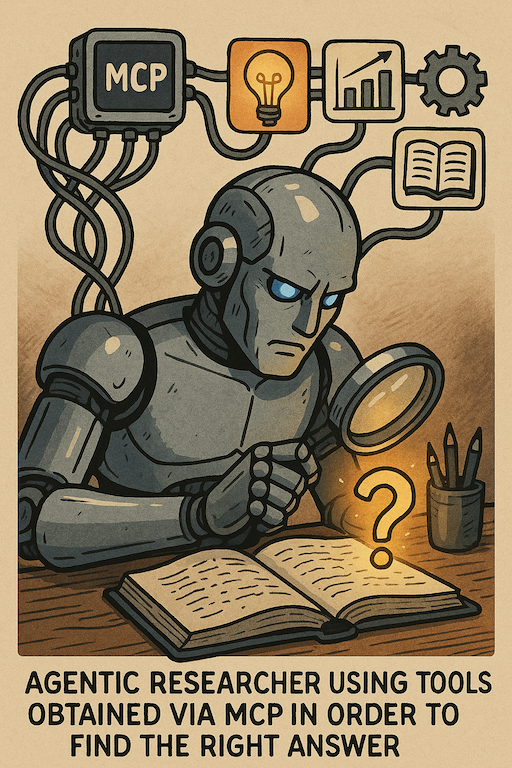
One trustworthy source of medical information is the pubmed database.
*PubMed is a free, searchable database maintained by the National Library of Medicine (NLM) and its division, the National Center for Biotechnology Information (NCBI). It provides access to over 37 million citations and abstracts from biomedical and life sciences literature, primarily through its core component, MEDLINE, which uses Medical Subject Headings (MeSH) for indexing
However, querying it is sort of an art - phrasing the query sub-optimally might either miss too many relevant results, or result in a deluge of irrelevant results. While SOTA models such as Claude Sonnet 3.7 have become quite apt in translating a human language question into a good pubmed query, many smaller models struggle or even fail in that task. When working on a larger (ongoing) project of agentic query optimization , I learned to optimize prompts to instruct smaller models to perform acceptably.
My MCP server needs to both help my LLM to craft a pubmed query based on a natural language medical question, as well as to execute the query and retrieve relevant context to the query results.
The MCP server
So, the first few tools my MCP server should serve include
- providing a prompt that will guide most smaller models towards crafting efficient and valid pubmed queries
- running a pubmed query
- retrieving publications from pubmed or the web as per query results
- formatting the retrieved context suitable for LLM processing (eg Markdown)
The Agent using the server
My proof-of-concept framework-less agent should be able to
- decide whether a question requires context to answer correctly
- use the pubmed and websearch tools provided accordingly
- realize that if a pubmed query is required, it may not know how to craft a valid or efficient query, and use prompting assistance from the MCP server
- answer the question based on the retrieved/provided context
Development environment, tools and libraries
Development environment will be what I am already familiar with
- VS code with Github Copilot using Claude Sonnet 3.7 for coding assistance
- flask for web serving; we will not use stdio based communication since our tools might be hosted on a variety of local servers
- beautifulsoup for web scraping
- ollama as inference server, and the python ollama library
- phi4 as example llm because it is small, fast, and does the job even on modest hardware
Decision process and tool use for our agent
flowchart TD
    Start([User Question]) --> AgentReceives[Agent Receives Question]

    AgentReceives --> GetTools[Agent Requests Tool Inventory]
    GetTools --> MCPClient1[MCP Client]
    MCPClient1 --> MCPServer1[MCP Server: tools/list]
    MCPServer1 --> MCPClient1
    MCPClient1 --> ToolsAvailable[Tool Inventory Available]

    ToolsAvailable --> Decision{Can Answer From\nGeneral Knowledge?}
    Decision -->|Yes| DirectAnswer[Generate Answer Directly\nvia Ollama Phi-4]

    Decision -->|No| ToolSelection{Which Tool\nto Use?}
    ToolSelection -->|General Information| WebSearch[Web Search Tool]
    ToolSelection -->|Medical Literature| PubMedPath[PubMed Search Path]

    PubMedPath --> QueryDecision{Need Help\nCrafting Query?}

    QueryDecision -->|Yes, Request Prompt| GetQueryPrompt[Request Query Crafting Prompt]
    GetQueryPrompt --> MCPClient2[MCP Client]
    MCPClient2 --> MCPServer2[MCP Server:\nget_pubmed_query_crafting_prompt]
    MCPServer2 --> MCPClient2
    MCPClient2 --> PromptReceived[Query Crafting Prompt Received]
    PromptReceived --> CraftQuery[Craft Optimized Query\nvia Ollama Phi-4]

    QueryDecision -->|No, Direct Query| DirectQuery[Create Query Directly]

    CraftQuery --> ExecuteSearch[Execute PubMed Search]
    DirectQuery --> ExecuteSearch

    ExecuteSearch --> MCPClient3[MCP Client]
    MCPClient3 --> MCPServer3[MCP Server:\npubmed_search]
    MCPServer3 --> PMIDs[PubMed Search Results\nwith PMIDs]
    PMIDs --> MCPClient3
    MCPClient3 --> ResultsReceived[Search Results Received]

    ResultsReceived --> ArticleRetrieval[Retrieve Article Details]
    ArticleRetrieval --> MCPClient4[MCP Client]
    MCPClient4 --> MCPServer4[MCP Server:\nget_article]
    MCPServer4 --> FullArticle[Article Abstract/Details]
    FullArticle --> MCPClient4
    MCPClient4 --> ArticleReceived[Article Details Received]

    ArticleReceived --> ContextGeneration[Generate Answer Context]
    WebSearch --> ContextGeneration

    ContextGeneration --> FinalAnswer[Generate Final Answer\nvia Ollama Phi-4]
    DirectAnswer --> Response([Return Answer to User])
    FinalAnswer --> Response

    %% Style definitions
    classDef decision fill:#ffcccc,stroke:#ff6666,stroke-width:1px;
    classDef process fill:#ccffcc,stroke:#66ff66,stroke-width:1px;
    classDef endpoint fill:#f5f5f5,stroke:#333,stroke-width:2px;
    classDef client fill:#ccccff,stroke:#6666ff,stroke-width:1px;
    classDef server fill:#ffffcc,stroke:#ffff66,stroke-width:1px;

    %% Apply styles
    class Decision,QueryDecision,ToolSelection decision;
    class AgentReceives,GetTools,ToolsAvailable,DirectAnswer,CraftQuery,DirectQuery,ExecuteSearch,ResultsReceived,ArticleRetrieval,ArticleReceived,ContextGeneration,FinalAnswer,WebSearch process;
    class Start,Response endpoint;
    class MCPClient1,MCPClient2,MCPClient3,MCPClient4 client;
    class MCPServer1,MCPServer2,MCPServer3,MCPServer4,PMIDs,FullArticle,PromptReceived server;
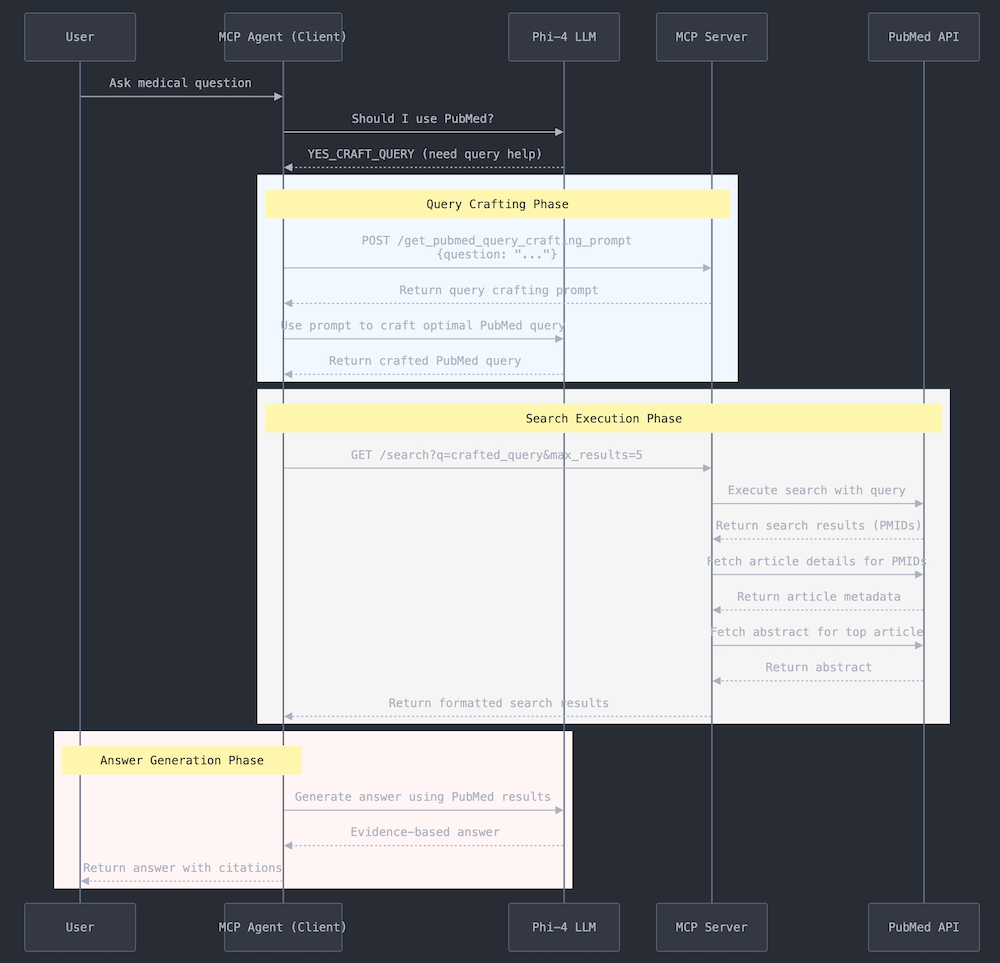
How the information flows between user, agent, LLM, MCP server, and PubMed API
Installation
# Clone the repository
git clone https://github.com/hherb/biomedmcp.git
cd biomedmcp

# Create a virtual environment
python -m venv .venv
source .venv/bin/activate  # On Windows: .venv\Scripts\activate

# Install dependencies
pip install -e .

# Install dev dependencies for testing
pip install -e ".[dev]"
Requirements
- Python 3.12+
- Ollama with a compatible model (default:
phi4:latest) - Optional: NCBI API key for higher PubMed rate limits (set
NCBI_API_KEYenvironment variable)
Usage
Starting the MCP Server
Network Mode (HTTP):
python biomed_mcpserver.py --mode network --port 5152
Local Mode (stdin/stdout):
python biomed_mcpserver.py --mode local
Using the Research Agent
# Interactive mode with default settings
python AutonomicResearchAgent.py

# With custom model
python AutonomicResearchAgent.py --model llama3.2:latest

# With verbose logging
python AutonomicResearchAgent.py --verbose
Using the Research Assistant
# Interactive research assistant
python ResearchAssistant.py

# Force specific approach
python ResearchAssistant.py --force-pubmed  # Always use PubMed
python ResearchAssistant.py --force-web     # Always use web search
Available MCP Tools
| Tool | Description |
|---|---|
pubmed_search |
Search PubMed for articles matching a query |
get_article |
Get detailed information about a specific article by PMID |
get_pubmed_query_crafting_prompt |
Get a prompt to help craft optimized PubMed queries |
web_search |
Search the web using DuckDuckGo |
web_content |
Retrieve and process content from a URL |
Programmatic Usage Example
from MCPClient import MCPClient

# Connect to the MCP server
client = MCPClient(base_url="http://localhost:5152")

# Search PubMed
result = client.execute_tool(
    "pubmed_search",
    {"query": "SGLT2 inhibitors heart failure", "max_results": 5}
)
print(result)

# Get article details
article = client.execute_tool(
    "get_article",
    {"pmid": "12345678"}
)
print(article)
Running Tests
# Run all tests
pytest

# Run with coverage
pytest --cov=. --cov-report=html

# Run specific test file
pytest tests/test_pubmed_tools.py
Project Structure
biomedmcp/
├── biomed_mcpserver.py      # MCP server (HTTP and local modes)
├── MCPClient.py             # HTTP-based MCP client
├── MCPLocalClient.py        # Local/subprocess MCP client
├── AutonomicResearchAgent.py # Autonomous research agent
├── ResearchAssistant.py     # Interactive research assistant
├── PubMedTools.py           # PubMed API integration
├── WebTools.py              # Web search and content tools
├── AgentMemory.py           # Helper utilities
├── example_clients.py       # Usage examples
├── tests/                   # Unit tests
└── pyproject.toml           # Project configuration
1 maintainer

Metadata
1 maintainer
Release files for iflow-mcp_hherb-biomedmcp 0.1.0
For a detailed explanation of source distributions (sdists) and built distributions (wheels), please see the package formats documentation.
Source distribution (sdist)
| File | Size | Uploaded | |
|---|---|---|---|
| iflow_mcp_hherb_biomedmcp-0.1.0.tar.gz | 4.6 MB | Details |
Built distribution (wheel)
| File | Interpreter | ABI | Platform | Reset |
|---|---|---|---|---|
| iflow_mcp_hherb_biomedmcp-0.1.0-py3-none-any.whl | Python 3 | none | any | Details |
Total release size: 9.2 MB
Release files / iflow_mcp_hherb_biomedmcp-0.1.0.tar.gz
| Download URL | iflow_mcp_hherb_biomedmcp-0.1.0.tar.gz |
|---|---|
| Size | 4.6 MB |
| Tags | Source |
|
SHA-256 checksum How to use checksums |
c66d4310d0245bb4ef0db8c255c3ab55b380a660ec80e303b5c82184e07159cd
|
|
BLAKE2b-256 checksum How to use checksums |
df267826c47eee28aed8838c9ebb3eb01504bea36301ed905e5c02d6f7ca377f
|
| Upload date | |
|
Uploaded using Trusted Publishing? What is trusted publishing? |
No |
| Uploaded via |
uv/0.10.2 {"installer":{"name":"uv","version":"0.10.2","subcommand":["publish"]},"python":null,"implementation":{"name":null,"version":null},"distro":{"name":"Debian GNU/Linux","version":"13","id":"trixie","libc":null},"system":{"name":null,"release":null},"cpu":null,"openssl_version":null,"setuptools_version":null,"rustc_version":null,"ci":null}
|
Release files / iflow_mcp_hherb_biomedmcp-0.1.0-py3-none-any.whl
| Download URL | iflow_mcp_hherb_biomedmcp-0.1.0-py3-none-any.whl |
|---|---|
| Size | 4.6 MB |
| Tags | Python 3 |
|
SHA-256 checksum How to use checksums |
ab0accecf4ebfac3ab3a6acd63d92f2fd3a568c79a84a27bc4da1b3531075027
|
|
BLAKE2b-256 checksum How to use checksums |
e922733df17964cf3f688f18bb36b584a98587390d25481873d3f783e16e8f3e
|
| Upload date | |
|
Uploaded using Trusted Publishing? What is trusted publishing? |
No |
| Uploaded via |
uv/0.10.2 {"installer":{"name":"uv","version":"0.10.2","subcommand":["publish"]},"python":null,"implementation":{"name":null,"version":null},"distro":{"name":"Debian GNU/Linux","version":"13","id":"trixie","libc":null},"system":{"name":null,"release":null},"cpu":null,"openssl_version":null,"setuptools_version":null,"rustc_version":null,"ci":null}
|













