
🚀 StarSeeker MCP: GitHub Stars Intelligence Agent
A powerful MCP (Model Context Protocol) server that helps you discover relevant repositories from your own starred list on GitHub. It uses BM25 keyword ranking and Gemini Semantic Search to find the best tools for your next project.
📸 Screenshots
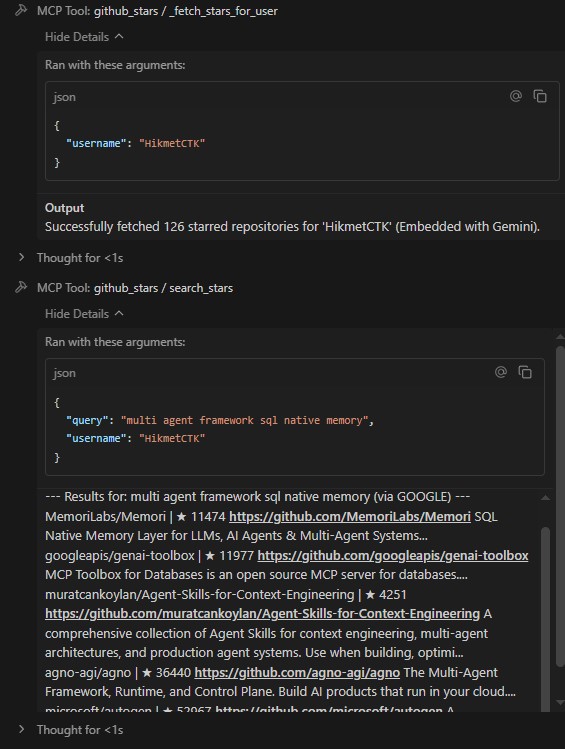
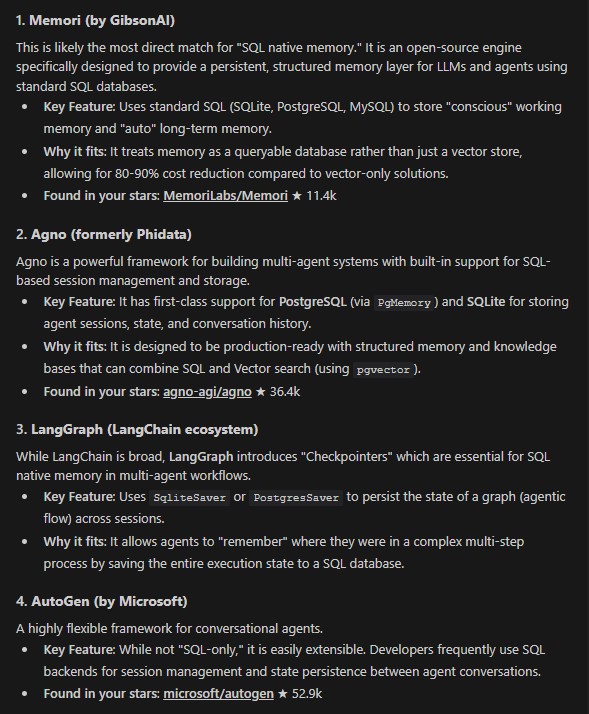
StarSeeker: Fetch and Search part (left) and Result (Right)
🚀 Features
- Semantic Search: Find repositories based on meaning and context, not just keywords, using Google Gemini (text-embedding-004).
- Hybrid Search: Google gemini text embedding + BM25( Fallback to BM25 and popularity-based rank fusion when gemini embedding isn't available.)
- Docker Ready: Easy containerized deployment.
- Fast Performance: Persistent embedding cache and efficient batching.
🛠 File Structure for MCP
mcp_server.py: Main entry point.server.py: Tool definitions and MCP logic.search_engine.py: Core logic for BM25 and Gemini embeddings.github_client.py: GitHub API integration for fetching stars.config.py: Configuration and environment management.
📋 Prerequisites
- Python 3.13+
- uv (recommended)
- GitHub Personal Access Token (for higher rate limits)
- Gemini API Key (for semantic search capabilities)
⚙️ Installation & Setup
-
Clone the repository:
git clone <repository-url>
cd Star_Seeker_mcp
-
Set up Environment: Create a
.envfile in the root directory:GITHUB_TOKEN=your_github_token GEMINI_API_KEY=your_gemini_api_key
Note: You can run without a
GITHUB_TOKEN(GitHub API allows ~60 requests/hr or up to 1000 repos without a token), but aGEMINI_API_KEYis required for the Agent Playground and semantic search. I used free tier of Gemini API. -
Install Dependencies:
uv sync
🎮 Quick Start: Agent Playground
The fastest way to experience StarSeeker is through the integrated Agent Playground. It provides a visual chat interface (Gradio) to interact with your GitHub stars.
1. Launch the Visual UI (Recommended)
uv run agent_playground.py
- Access: Open http://localhost:8080 in your browser.
- Features: Chat with Gemini, ask it to fetch your stars, and then search through them using natural language.
💡 Quick Tip: Once the UI is open, you can simply type:
github name : your_username. Find me some cool React libraries.
The agent will automatically fetch your stars (if not cached) and perform a semantic search.
2. Launch the CLI Version
If you prefer the terminal:
uv run agent_playground.py --cli
🔌 MCP Server (Integration for Antigravity/Cursor/Claude)
If you want to use StarSeeker as a tool inside Cursor, Claude Desktop, or Antigravity, follow these steps.
1. Antigravity (tested with Antigravity)
Antigravity provides the easiest setup experience with a visual interface.
- Open Antigravity
- Click the 3 dots in the top right corner
- Select "MCP Servers" → "Manage Servers" → "View Raw Config"
- Paste this configuration and restart Antigravity :
{
  "mcpServers": {
    "star-seeker-mcp": {
      "command": "uv",
      "args": [
        "--directory",
        "C:\\path\\to\\Star_Seeker_mcp",
        "run",
        "mcp_server.py"
      ],
      "env": {
        "GEMINI_API_KEY": "your_key",
        "GITHUB_TOKEN": "your_token"
      }
    }
  }
}
- Replace
C:\\path\\to\\Star_Seeker_mcpwith your actual installation path - Replace the API keys with your actual keys
- Restart Antigravity
- You can see writing @MCP Server in Antigravity chat
2.VSCODE
- Create mcp.json file in workspace folder or find if it exists.
- Add this configuration to mcp.json file
{
  "mcpServers": {
    "github-stars-seeker": {
      "command": "uv",
      "args": [
        "--directory",
        "c:path\\to\\Star_Seeker_mcp",
        "run",
        "mcp_server.py"
      ],
      "env": {
        "GITHUB_TOKEN": "your_github_token",
        "GEMINI_API_KEY": "your_gemini_api_key"
      }
    }
  }
}
- click start button .
- You can use it
3. Cursor AI
- Settings -> Cursor Settings -> MCP.
- + Add New MCP Server.
- Name:
StarSeeker, Type:command. - Command:
uv --directory "C:\path\to\Star_Seeker_mcp" run mcp_server.py
3. Claude Desktop
Add the following to your claude_desktop_config.json:
{
  "mcpServers": {
    "star-seeker-mcp": {
      "command": "uv",
      "args": [
        "--directory",
        "C:\\path\\to\\Star_Seeker_mcp",
        "run",
        "mcp_server.py"
      ],
      "env": {
        "GITHUB_TOKEN": "your_token",
        "GEMINI_API_KEY": "your_key"
      }
    }
  }
}
🛠 MCP Tools
fetch_stars_tool
Fetches all starred repositories for a given GitHub username and prepares the search index.
- Args:
username(required),token(optional)
search_stars_tool
Search through the fetched repositories using semantic or keyword search.
- Args:
username(required),query(required)
🔌 Integrations
Option A: Running with Docker
The Docker image is optimized to only install the core MCP server dependencies (skipping Gradio).
- Build and Start:
docker-compose up --build -d
- Access: The server runs on stdio/HTTP inside the container, ready for your tools.
Option B: Running Locally
uv run mcp_server.py
📂 Data Storage & Access
The server stores fetched JSON data and search embeddings in a centralized directory to avoid duplicates and ensure persistence.
File Locations
- Local (Windows):
explorer %USERPROFILE%\.star_seeker_mcpto open the directory - Local (Linux/macOS):
~/.star_seeker_mcp - Inside Docker:
/root/.star_seeker_mcp(backed by a Docker volume)
Terminal Commands to Access Data
View Local Data Files (Windows CMD)
dir %USERPROFILE%\.star_seeker_mcp
View Data Files Inside Running Docker Container
docker exec -it star-seeker-mcp ls -lh /root/.star_seeker_mcp
Copy a Data File from Docker to Local Machine
docker cp star-seeker-mcp:/root/.star_seeker_mcp/yourusername_stars.json .
🧠 How it Works
- Data Collection: Fetches repo names, descriptions, and topics via GitHub API.
- Indexing:
- Generates vector embeddings for all descriptions using
text-embedding-004. - Builds a BM25 index for keyword search fallback.
- Generates vector embeddings for all descriptions using
- Retrieval:
- Uses Cosine Similarity for semantic matches.
- For keyword search, it uses a rank fusion of BM25 scores and repository popularity (stars).
📄 License
MIT
1 maintainer

Metadata
1 maintainer
Release files for iflow-mcp_hikmetctk-star_seeker_mcp 0.1.0
For a detailed explanation of source distributions (sdists) and built distributions (wheels), please see the package formats documentation.
Source distribution (sdist)
| File | Size | Uploaded | |
|---|---|---|---|
| iflow_mcp_hikmetctk_star_seeker_mcp-0.1.0.tar.gz | 10.3 kB | Details |
Built distribution (wheel)
| File | Interpreter | ABI | Platform | Reset |
|---|---|---|---|---|
| iflow_mcp_hikmetctk_star_seeker_mcp-0.1.0-py3-none-any.whl | Python 3 | none | any | Details |
Total release size: 23.0 kB
Release files / iflow_mcp_hikmetctk_star_seeker_mcp-0.1.0.tar.gz
| Download URL | iflow_mcp_hikmetctk_star_seeker_mcp-0.1.0.tar.gz |
|---|---|
| Size | 10.3 kB |
| Tags | Source |
|
SHA-256 checksum How to use checksums |
59f96c9d788c7467cdf916214ec3f4a182de5fd895d59fcb276688013f39f9a6
|
|
BLAKE2b-256 checksum How to use checksums |
2d7ff15bc92de63fdc3518d4e1e4c9c955a9273c75022dedc5a956fb1e5a3f64
|
| Upload date | |
|
Uploaded using Trusted Publishing? What is trusted publishing? |
No |
| Uploaded via |
uv/0.10.2 {"installer":{"name":"uv","version":"0.10.2","subcommand":["publish"]},"python":null,"implementation":{"name":null,"version":null},"distro":{"name":"Debian GNU/Linux","version":"13","id":"trixie","libc":null},"system":{"name":null,"release":null},"cpu":null,"openssl_version":null,"setuptools_version":null,"rustc_version":null,"ci":null}
|
Release files / iflow_mcp_hikmetctk_star_seeker_mcp-0.1.0-py3-none-any.whl
| Download URL | iflow_mcp_hikmetctk_star_seeker_mcp-0.1.0-py3-none-any.whl |
|---|---|
| Size | 12.7 kB |
| Tags | Python 3 |
|
SHA-256 checksum How to use checksums |
325c28ac9d9c635a5a80e4a94d0ccf9c305eace144b7821259069abd550e6626
|
|
BLAKE2b-256 checksum How to use checksums |
8390bd6a252d9ab4b4eab1720817f7c8d7fbd0a4b5c6e7f9874650766d5d3915
|
| Upload date | |
|
Uploaded using Trusted Publishing? What is trusted publishing? |
No |
| Uploaded via |
uv/0.10.2 {"installer":{"name":"uv","version":"0.10.2","subcommand":["publish"]},"python":null,"implementation":{"name":null,"version":null},"distro":{"name":"Debian GNU/Linux","version":"13","id":"trixie","libc":null},"system":{"name":null,"release":null},"cpu":null,"openssl_version":null,"setuptools_version":null,"rustc_version":null,"ci":null}
|













