
AWSレベル判定くん MCPサーバー版
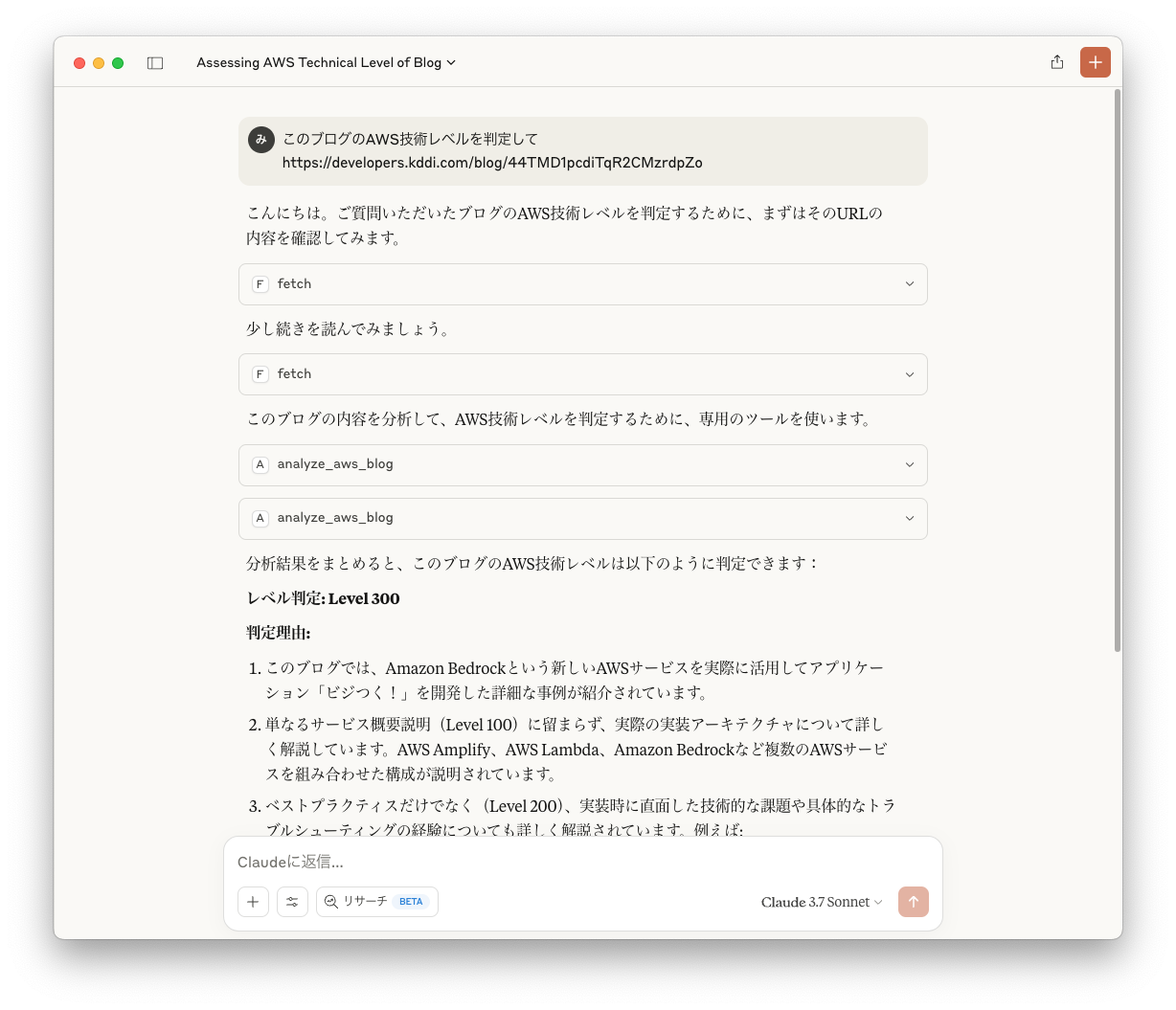
AWS技術ブログの内容を分析し、レベルを判定するMCPサーバーです。
大好評のうちにサービス終了となった #AWSレベル判定くん の魂を継いでいます。
概要
このMCPサーバーは、AWS技術ブログの内容を分析し、以下の4つのレベルのいずれかに判定します:
- Level 100: AWSサービスの概要を解説するレベル
- Level 200: トピックの入門知識を持っていることを前提に、ベストプラクティス、サービス機能を解説するレベル
- Level 300: 対象のトピックの詳細を解説するレベル
- Level 400: 複数のサービス、アーキテクチャによる実装でテクノロジーがどのように機能するかを解説するレベル
インストール
uvxを使用する方法(推奨)
uvを使用する場合、特別なインストールは不要です。uvxを使って直接実行できます:
uvx mcp-aws-level-checker
PyPI経由でインストールする方法
pip を使用してインストールすることもできます:
pip install mcp-aws-level-checker
インストール後は、次のコマンドで実行できます:
python -m mcp_aws_level_checker
設定方法
Claude.app での設定
Claude の設定に以下を追加してください:
uvx を使用する場合
"mcpServers": {
  "aws-level-checker": {
    "command": "uvx",
    "args": ["mcp-aws-level-checker"]
  }
}
pip でインストールした場合
"mcpServers": {
  "aws-level-checker": {
    "command": "python",
    "args": ["-m", "mcp_aws_level_checker"]
  }
}
VS Code での設定
VS Code の設定ファイルに以下を追加してください。Ctrl + Shift + P を押して、Preferences: Open User Settings (JSON) と入力することで設定ファイルを開けます。
あるいは、.vscode/mcp.json ファイルをワークスペースに作成することで、設定を他のユーザーと共有できます。
.vscode/mcp.jsonファイルを使用する場合は、mcpキーが必要です。
uvx を使用する場合
{
  "mcp": {
    "servers": {
      "aws-level-checker": {
        "command": "uvx",
        "args": ["mcp-aws-level-checker"]
      }
    }
  }
}
pip でインストールした場合
{
  "mcp": {
    "servers": {
      "aws-level-checker": {
        "command": "python",
        "args": ["-m", "mcp_aws_level_checker"]
      }
    }
  }
}
MCPサーバー仕様
- ツール名:
analyze_aws_blog - 入力形式:AWSブログ記事のテキスト全文
- 出力形式:以下のとおり
レベル: [判定したレベル (100/200/300/400)]
判定理由: [判定理由の詳細説明]
ヒント
Fetchと組み合わせて使うと便利です。
1 maintainer

Metadata
1 maintainer
Release files for iflow-mcp_minorun365-mcp-aws-level-checker 0.1.1
For a detailed explanation of source distributions (sdists) and built distributions (wheels), please see the package formats documentation.
Source distribution (sdist)
| File | Size | Uploaded | Provenance | Actions |
|---|---|---|---|---|
| iflow_mcp_minorun365_mcp_aws_level_checker-0.1.1.tar.gz | 4.1 kB | Without provenance | Details for iflow_mcp_minorun365_mcp_aws_level_checker-0.1.1.tar.gz |
Built distribution (wheel)
| File | Interpreter | ABI | Platform | Actions Reset |
|---|---|---|---|---|
| iflow_mcp_minorun365_mcp_aws_level_checker-0.1.1-py3-none-any.whl | Python 3 | none | any | Details for iflow_mcp_minorun365_mcp_aws_level_checker-0.1.1-py3-none-any.whl |
Total release size: 10.3 kB
Release files / iflow_mcp_minorun365_mcp_aws_level_checker-0.1.1.tar.gz
| Download URL | iflow_mcp_minorun365_mcp_aws_level_checker-0.1.1.tar.gz |
|---|---|
| Size | 4.1 kB |
| Tags | Source |
|
SHA-256 checksum How to use checksums |
fc7403959012564091a783f0f11d961bdb26f59f042da6f80a3700af14c63827
|
|
BLAKE2b-256 checksum How to use checksums |
91b297133ee6d1615c8731289571039b841783285e3546a1018f63f3a8a8e836
|
| Upload date | |
|
Uploaded using Trusted Publishing? What is trusted publishing? |
No |
| Uploaded via |
uv/0.10.2 {"installer":{"name":"uv","version":"0.10.2","subcommand":["publish"]},"python":null,"implementation":{"name":null,"version":null},"distro":{"name":"Debian GNU/Linux","version":"13","id":"trixie","libc":null},"system":{"name":null,"release":null},"cpu":null,"openssl_version":null,"setuptools_version":null,"rustc_version":null,"ci":null}
|
Release files / iflow_mcp_minorun365_mcp_aws_level_checker-0.1.1-py3-none-any.whl
| Download URL | iflow_mcp_minorun365_mcp_aws_level_checker-0.1.1-py3-none-any.whl |
|---|---|
| Size | 6.2 kB |
| Tags | Python 3 |
|
SHA-256 checksum How to use checksums |
45bf7a54268c91ed6881f7f33c276ee09759925bb9f039952dd766376fb7d79c
|
|
BLAKE2b-256 checksum How to use checksums |
54f19958803083dc866295b615af288ec8a1c58eff06a011d5e7704e64f7185c
|
| Upload date | |
|
Uploaded using Trusted Publishing? What is trusted publishing? |
No |
| Uploaded via |
uv/0.10.2 {"installer":{"name":"uv","version":"0.10.2","subcommand":["publish"]},"python":null,"implementation":{"name":null,"version":null},"distro":{"name":"Debian GNU/Linux","version":"13","id":"trixie","libc":null},"system":{"name":null,"release":null},"cpu":null,"openssl_version":null,"setuptools_version":null,"rustc_version":null,"ci":null}
|
Security for iflow-mcp_minorun365-mcp-aws-level-checker 0.1.1
Provenance
Provenance describes where a file came from. On PyPI, provenance is shared via attestations, which provide a verifiable record of the build or publishing details. View details, limitations and caveats.
No provenance found
None of the files in this release were uploaded with provenance metadata.
A note on package security
PyPI is a repository for distributing packages, not a service for auditing them. While third-party security researchers and our staff do their best to detect and remove malicious packages, PyPI cannot guarantee the quality, security or suitability of any given package.
To learn more about protecting yourself from malicious actors, visit our package security documentation.













