
Rootly MCP Server




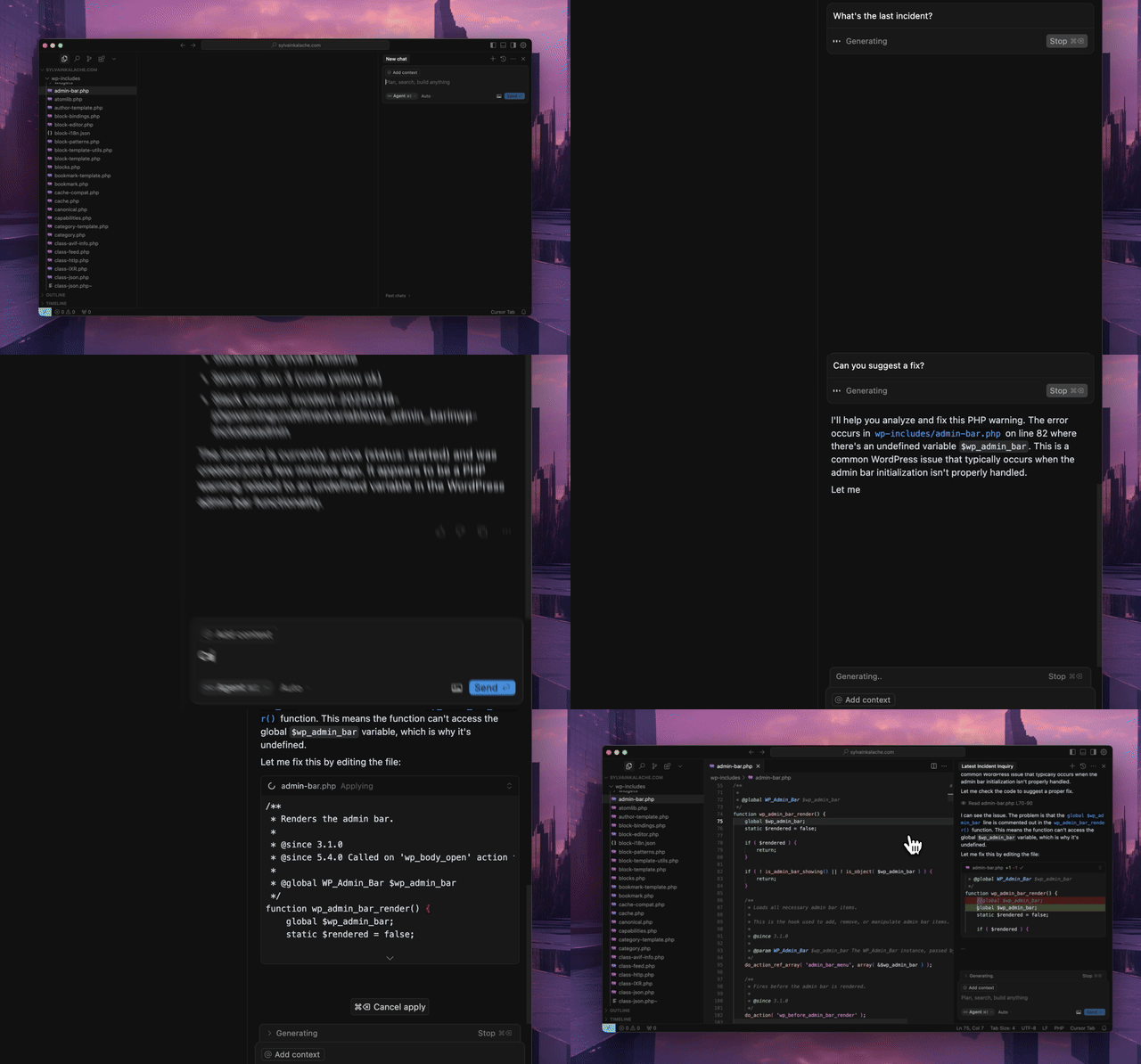
An MCP server for the Rootly API that integrates seamlessly with MCP-compatible editors like Cursor, Windsurf, and Claude. Resolve production incidents in under a minute without leaving your IDE.
Prerequisites
- Python 3.12 or higher
uvpackage managercurl -LsSf https://astral.sh/uv/install.sh | sh
- Rootly API token with appropriate permissions (see below)
API Token Permissions
The MCP server requires a Rootly API token. Choose the appropriate token type based on your needs:
- Global API Key (Recommended): Full access to all entities across your Rootly instance. Required for organization-wide visibility across teams, schedules, and incidents.
- Team API Key: Team Admin permissions with full read/edit access to entities owned by that team. Suitable for team-specific workflows.
- Personal API Key: Inherits the permissions of the user who created it. Works for individual use cases but may have limited visibility.
For full functionality of tools like get_oncall_handoff_summary, get_oncall_shift_metrics, and organization-wide incident search, a Global API Key is recommended.
Installation
Configure your MCP-compatible editor (tested with Cursor) with one of the configurations below. The package will be automatically downloaded and installed when you first open your editor.
With uv
{
  "mcpServers": {
    "rootly": {
      "command": "uv",
      "args": [
        "tool",
        "run",
        "--from",
        "rootly-mcp-server",
        "rootly-mcp-server"
      ],
      "env": {
        "ROOTLY_API_TOKEN": "<YOUR_ROOTLY_API_TOKEN>"
      }
    }
  }
}
With uvx
{
  "mcpServers": {
    "rootly": {
      "command": "uvx",
      "args": [
        "--from",
        "rootly-mcp-server",
        "rootly-mcp-server"
      ],
      "env": {
        "ROOTLY_API_TOKEN": "<YOUR_ROOTLY_API_TOKEN>"
      }
    }
  }
}
Connect to Hosted MCP Server
Alternatively, connect directly to our hosted MCP server:
{
  "mcpServers": {
    "rootly": {
      "command": "npx",
      "args": [
        "-y",
        "mcp-remote",
        "https://mcp.rootly.com/sse",
        "--header",
        "Authorization:${ROOTLY_AUTH_HEADER}"
      ],
      "env": {
        "ROOTLY_AUTH_HEADER": "Bearer <YOUR_ROOTLY_API_TOKEN>"
      }
    }
  }
}
Features
- Dynamic Tool Generation: Automatically creates MCP resources from Rootly's OpenAPI (Swagger) specification
- Smart Pagination: Defaults to 10 items per request for incident endpoints to prevent context window overflow
- API Filtering: Limits exposed API endpoints for security and performance
- Intelligent Incident Analysis: Smart tools that analyze historical incident data
find_related_incidents: Uses TF-IDF similarity analysis to find historically similar incidentssuggest_solutions: Mines past incident resolutions to recommend actionable solutions
- MCP Resources: Exposes incident and team data as structured resources for easy AI reference
- Intelligent Pattern Recognition: Automatically identifies services, error types, and resolution patterns
- On-Call Health Integration: Detects workload health risk in scheduled responders
On-Call Health Integration
Rootly MCP integrates with On-Call Health to detect workload health risk in scheduled responders.
Setup
Set the ONCALLHEALTH_API_KEY environment variable:
{
  "mcpServers": {
    "rootly": {
      "command": "uvx",
      "args": ["rootly-mcp-server"],
      "env": {
        "ROOTLY_API_TOKEN": "your_rootly_token",
        "ONCALLHEALTH_API_KEY": "och_live_your_key"
      }
    }
  }
}
Usage
check_oncall_health_risk(
    start_date="2026-02-09",
    end_date="2026-02-15"
)
Returns at-risk users who are scheduled, recommended safe replacements, and action summaries.
Example Skills
Want to get started quickly? We provide pre-built Claude Code skills that showcase the full power of the Rootly MCP server:
🚨 Rootly Incident Responder
An AI-powered incident response specialist that:
- Analyzes production incidents with full context
- Finds similar historical incidents using ML-based similarity matching
- Suggests solutions based on past successful resolutions
- Coordinates with on-call teams across timezones
- Correlates incidents with recent code changes and deployments
- Creates action items and remediation plans
- Provides confidence scores and time estimates
Quick Start:
# Copy the skill to your project
mkdir -p .claude/skills
cp examples/skills/rootly-incident-responder.md .claude/skills/

# Then in Claude Code, invoke it:
# @rootly-incident-responder analyze incident #12345
This skill demonstrates a complete incident response workflow using Rootly's intelligent tools combined with GitHub integration for code correlation.
On-Call Shift Metrics
Get on-call shift metrics for any time period, grouped by user, team, or schedule. Includes primary/secondary role tracking, shift counts, hours, and days on-call.
get_oncall_shift_metrics(
    start_date="2025-10-01",
    end_date="2025-10-31",
    group_by="user"
)
On-Call Handoff Summary
Complete handoff: current/next on-call + incidents during shifts.
# All on-call (any timezone)
get_oncall_handoff_summary(
    team_ids="team-1,team-2",
    timezone="America/Los_Angeles"
)

# Regional filter - only show APAC on-call during APAC business hours
get_oncall_handoff_summary(
    timezone="Asia/Tokyo",
    filter_by_region=True
)
Regional filtering shows only people on-call during business hours (9am-5pm) in the specified timezone.
Returns: schedules with current_oncall, next_oncall, and shift_incidents
Shift Incidents
Incidents during a time period, with filtering by severity/status/tags.
get_shift_incidents(
    start_time="2025-10-20T09:00:00Z",
    end_time="2025-10-20T17:00:00Z",
    severity="critical",  # optional
    status="resolved",    # optional
    tags="database,api"   # optional
)
Returns: incidents list + summary (counts, avg resolution time, grouping)
Contributing
See CONTRIBUTING.md for developer setup and guidelines.
Play with it on Postman

About Rootly AI Labs
This project was developed by Rootly AI Labs, where we're building the future of system reliability and operational excellence. As an open-source incubator, we share ideas, experiment, and rapidly prototype solutions that benefit the entire community.

1 maintainer

Metadata
1 maintainer
Release files for iflow-mcp_rootly-ai-labs-rootly-mcp-server 2.2.3
For a detailed explanation of source distributions (sdists) and built distributions (wheels), please see the package formats documentation.
Source distribution (sdist)
| File | Size | Uploaded | Provenance | Actions |
|---|---|---|---|---|
| iflow_mcp_rootly_ai_labs_rootly_mcp_server-2.2.3.tar.gz | 6.4 MB | Without provenance | Details for iflow_mcp_rootly_ai_labs_rootly_mcp_server-2.2.3.tar.gz |
Built distribution (wheel)
| File | Interpreter | ABI | Platform | Actions Reset |
|---|---|---|---|---|
| iflow_mcp_rootly_ai_labs_rootly_mcp_server-2.2.3-py3-none-any.whl | Python 3 | none | any | Details for iflow_mcp_rootly_ai_labs_rootly_mcp_server-2.2.3-py3-none-any.whl |
Total release size: 6.5 MB
Release files / iflow_mcp_rootly_ai_labs_rootly_mcp_server-2.2.3.tar.gz
| Download URL | iflow_mcp_rootly_ai_labs_rootly_mcp_server-2.2.3.tar.gz |
|---|---|
| Size | 6.4 MB |
| Tags | Source |
|
SHA-256 checksum How to use checksums |
a9b328cebac79d8703374f5876f65ed4481878022bd5404fc7aa301858423ed6
|
|
BLAKE2b-256 checksum How to use checksums |
bdc79c73e5d394f56e56926920be986a9d1fd594fc56f22405636469da650fba
|
| Upload date | |
|
Uploaded using Trusted Publishing? What is trusted publishing? |
No |
| Uploaded via |
uv/0.10.0 {"installer":{"name":"uv","version":"0.10.0","subcommand":["publish"]},"python":null,"implementation":{"name":null,"version":null},"distro":{"name":"Debian GNU/Linux","version":"13","id":"trixie","libc":null},"system":{"name":null,"release":null},"cpu":null,"openssl_version":null,"setuptools_version":null,"rustc_version":null,"ci":null}
|
Release files / iflow_mcp_rootly_ai_labs_rootly_mcp_server-2.2.3-py3-none-any.whl
| Download URL | iflow_mcp_rootly_ai_labs_rootly_mcp_server-2.2.3-py3-none-any.whl |
|---|---|
| Size | 73.6 kB |
| Tags | Python 3 |
|
SHA-256 checksum How to use checksums |
6b1e0646c801c5ceecbea080b8da93bc1def30152c32ef4738b8750856119aea
|
|
BLAKE2b-256 checksum How to use checksums |
e4d5c159e018c9904e33fe9fd9c54a1fefd307ae61d42f1509c7eb45719cd0bd
|
| Upload date | |
|
Uploaded using Trusted Publishing? What is trusted publishing? |
No |
| Uploaded via |
uv/0.10.0 {"installer":{"name":"uv","version":"0.10.0","subcommand":["publish"]},"python":null,"implementation":{"name":null,"version":null},"distro":{"name":"Debian GNU/Linux","version":"13","id":"trixie","libc":null},"system":{"name":null,"release":null},"cpu":null,"openssl_version":null,"setuptools_version":null,"rustc_version":null,"ci":null}
|
Security for iflow-mcp_rootly-ai-labs-rootly-mcp-server 2.2.3
Provenance
Provenance describes where a file came from. On PyPI, provenance is shared via attestations, which provide a verifiable record of the build or publishing details. View details, limitations and caveats.
No provenance found
None of the files in this release were uploaded with provenance metadata.
A note on package security
PyPI is a repository for distributing packages, not a service for auditing them. While third-party security researchers and our staff do their best to detect and remove malicious packages, PyPI cannot guarantee the quality, security or suitability of any given package.
To learn more about protecting yourself from malicious actors, visit our package security documentation.













