
bitcoin-mcp
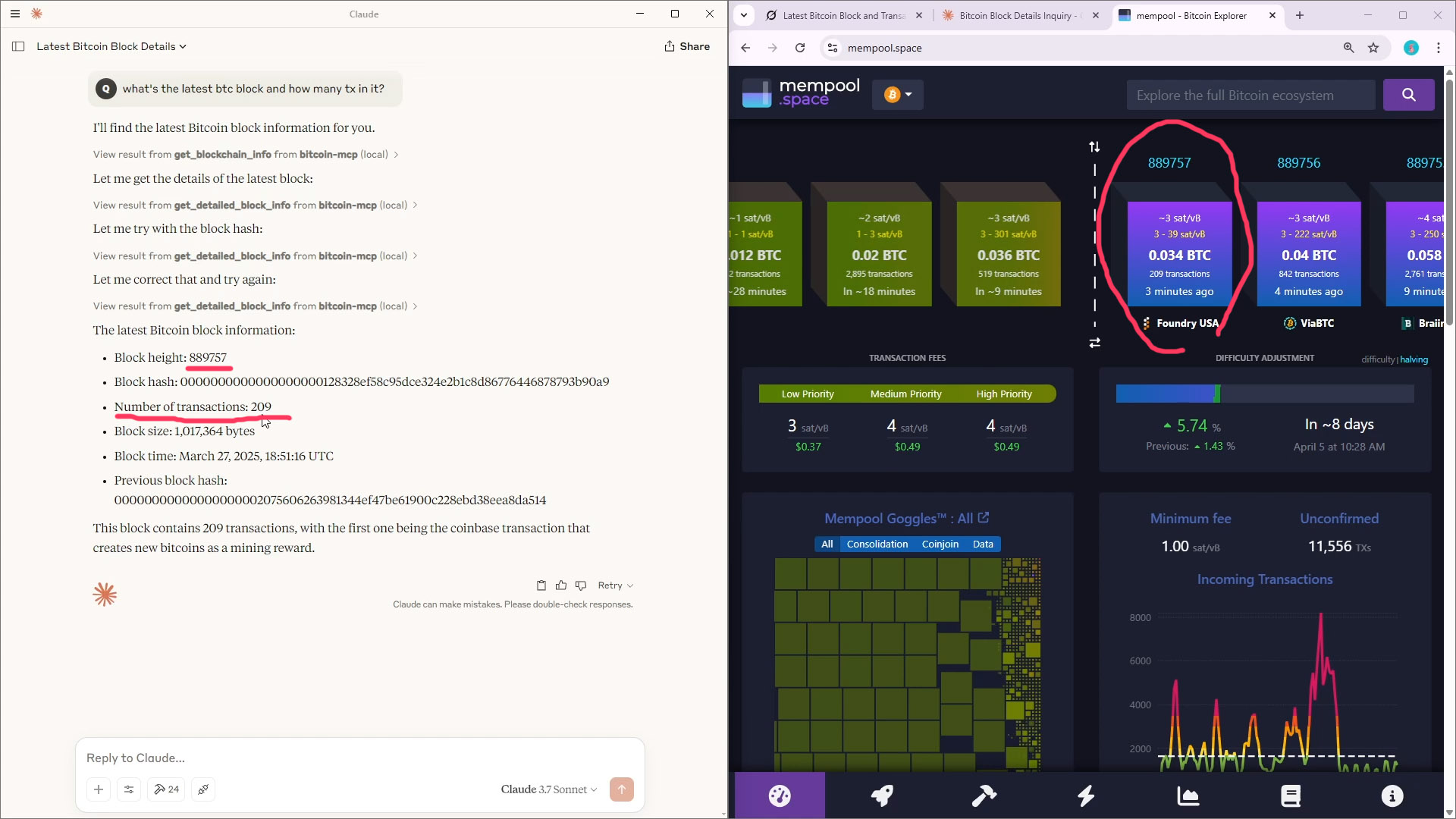
bitcoin-mcp extends AI utilities with accurate Bitcoin blockchain data based on MCP. bitcoin-mcp is a streamlined Model Context Protocol (MCP) server implementation that interfaces with Bitcoin Core (full-node) through bitcoin-cli. This bitcoin-mcp server provides Claude Desktop (or other mcp clients) with READ access to Bitcoin blockchain data WITHOUT wallet functionality.
Features
AI agent meets the most secure data ledger - Bitcoin.
-
Query real-time Bitcoin blockchain information (via
bitcoin-cli, but WITHOUT any wallet calls) -
Access mempool, blocks, and transaction data
-
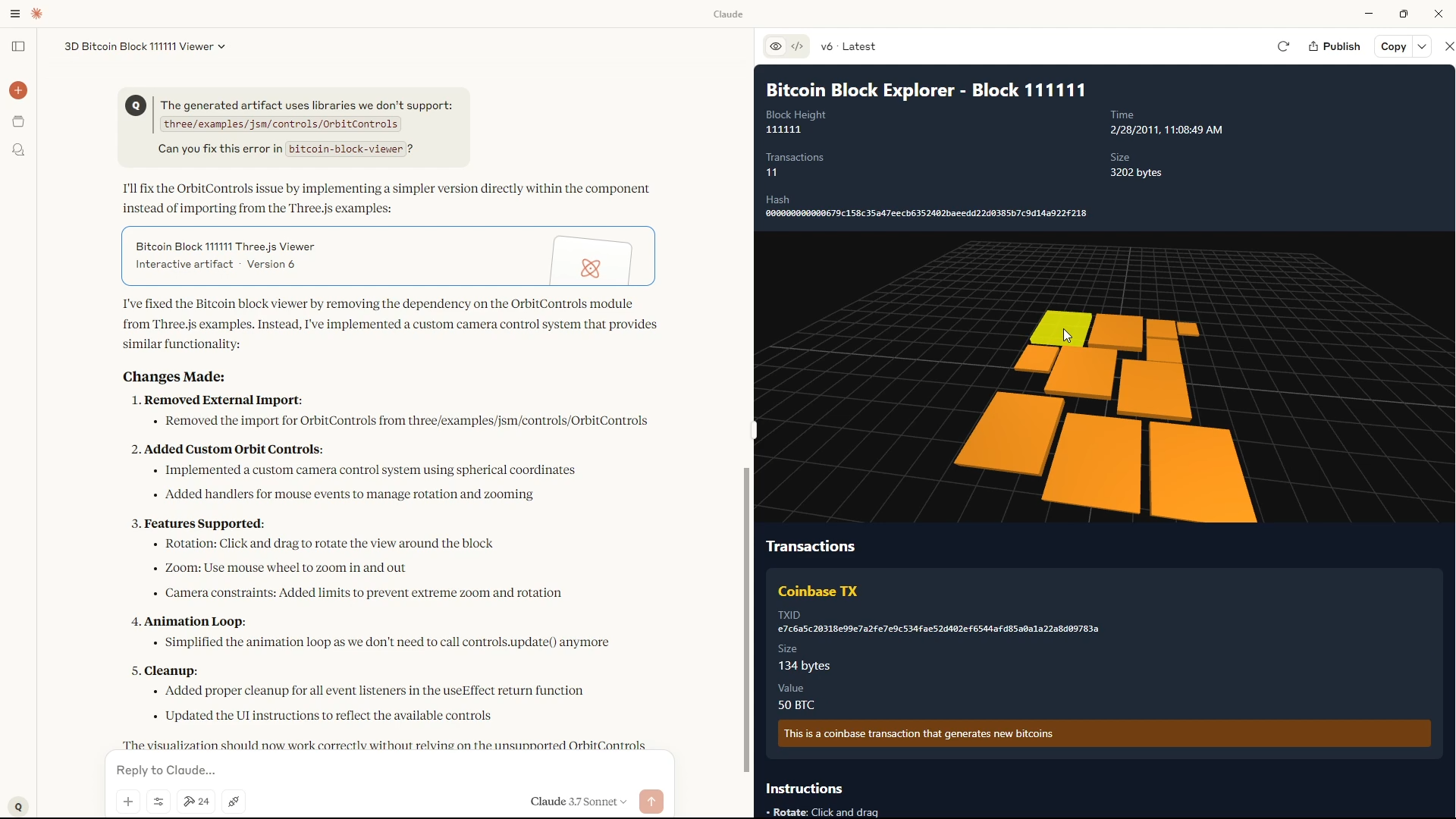
Generate custom 3D visualization of BTC blocks based on TX output values and BitFeed representation (i.e., those beautiful rectangles on mempool.space)
Prerequisites
- Claude Desktop (or other mcp clients)
- Python 3.10+
- Bitcoin full-node (w.
bitcoin-cli) - (Windows)
Installation
-
Clone the repo to your up-to-date btc full node machine (required for bitcoin-mcp to work)
-
Install dependencies:
pip install -r requirements.txt
- Make sure Bitcoin Core is up-to-date and running. Configure
.envand addBITCOIN_CLI_PATHso that MCP server can findbitcoin-cli
- Have this line
BITCOIN_CLI_PATH=C:\\Program Files\\Bitcoin\\daemon\\bitcoin-cliin.env
- Claude Desktop Configuration (standard setup for any mcp servers)
- update
path\\to\\to your localbitcoin-mcpfolder
{
  "mcpServers": {
    "bitcoin-mcp": {
      "command": "python",
      "args": ["path\\to\\bitcoin-mcp\\bitcoin_mcp_server.py"],
      "env": {}
    }
  }
}
Test the server:
You can test the python server to see if it loads your btc full node.
python bitcoin_mcp_server.py
Available Tools
Mainly for mcp clients like Claude Desktop to utilize Bitcoin blockchain info, so NO WALLET FUNCTIONS ARE INCLUDED.
Blockchain Information
| Tool | Description |
|---|---|
get_blockchain_info |
Get current blockchain state |
get_block_hash |
Get block hash for a specific height |
get_block |
Get block data by hash |
get_block_stats |
Get block statistics |
get_chain_tips |
Get information about chain tips |
get_chain_tx_stats |
Get chain transaction statistics |
get_difficulty |
Get current difficulty |
get_network_info |
Get network information |
get_blockchain_status |
Get comprehensive blockchain status |
get_detailed_block_info |
Get detailed block information |
search_blocks |
Search for blocks meeting criteria |
get_bitfeed_3d_representation |
Get 3D representation of a BTC block based on TX data |
Transaction Information
| Tool | Description |
|---|---|
get_mempool_info |
Get mempool information |
get_tx_out |
Get UTXO information |
get_tx_out_set_info |
Get UTXO set statistics |
get_raw_transaction |
Get raw transaction data |
decode_raw_transaction |
Decode raw transaction |
estimate_smart_fee |
Estimate transaction fee |
analyze_transaction |
Analyze transaction details |
Analytics
| Tool | Description |
|---|---|
get_difficulty_history |
Get difficulty adjustment history |
get_fee_history |
Get transaction fee history |
get_hashrate_estimate |
Estimate network hashrate |
get_block_time_distribution |
Analyze block time distribution |
analyze_blockchain |
Comprehensive blockchain analysis |
Configuration
| Tool | Description |
|---|---|
configure_bitcoin_cli |
Configure bitcoin-cli settings |
get_config_info |
Get current server configuration |
update_server_config |
Update server configuration |
Code Structure
bitcoin_mcp_server.py: Main server entry pointbitcoin_connection.py: Bitcoin Core connection utilitiesbitcoin_config.py: Configuration managementbitcoin_transactions.py: Transaction analysis utilitiesbitcoin_utils.py: Blockchain utilitiesbitcoin_analytics.py: Advanced blockchain analyticsbitfeed.py: 3D representations of BTC blocks
Security Notes
- This mcp server does not include wallet functionality in Bitcoin Core (u can add those urself)
- By default, the server only binds to localhost (127.0.0.1)
- Enables read-only access to blockchain data
Example Usage
Get current blockchain information:
Tell me about the current state of the Bitcoin blockchain
Analyze a specific block:
Show me detailed information about block 800000
Get transaction fee history:
What have transaction fees been like over the past 24 hours?
Estimate hashrate:
What is the current estimated hashrate of the Bitcoin network?
Generate 3D representation (note that context length may not fit all TXs, try blocks where TX number < 20 ):
Build a react threejs viewer for btc block 111111
License
MIT License
1 maintainer

Metadata
1 maintainer
Release files for iflow-mcp_runeape-sats-bitcoin-mcp 0.1.2
For a detailed explanation of source distributions (sdists) and built distributions (wheels), please see the package formats documentation.
Source distribution (sdist)
| File | Size | Uploaded | |
|---|---|---|---|
| iflow_mcp_runeape_sats_bitcoin_mcp-0.1.2.tar.gz | 128.9 kB | Details |
Built distribution (wheel)
| File | Interpreter | ABI | Platform | Reset |
|---|---|---|---|---|
| iflow_mcp_runeape_sats_bitcoin_mcp-0.1.2-py3-none-any.whl | Python 3 | none | any | Details |
Total release size: 154.6 kB
Release files / iflow_mcp_runeape_sats_bitcoin_mcp-0.1.2.tar.gz
| Download URL | iflow_mcp_runeape_sats_bitcoin_mcp-0.1.2.tar.gz |
|---|---|
| Size | 128.9 kB |
| Tags | Source |
|
SHA-256 checksum How to use checksums |
bc426ea5de18c78a98228a45fa7fd2f96b68b2a46cca12d51020478d970c7c61
|
|
BLAKE2b-256 checksum How to use checksums |
26f49b40c4d8a358f285b5897fec0a0e9d2be0a5605fda3320e20ece39e91755
|
| Upload date | |
|
Uploaded using Trusted Publishing? What is trusted publishing? |
No |
| Uploaded via |
uv/0.10.0 {"installer":{"name":"uv","version":"0.10.0","subcommand":["publish"]},"python":null,"implementation":{"name":null,"version":null},"distro":{"name":"Debian GNU/Linux","version":"13","id":"trixie","libc":null},"system":{"name":null,"release":null},"cpu":null,"openssl_version":null,"setuptools_version":null,"rustc_version":null,"ci":null}
|
Release files / iflow_mcp_runeape_sats_bitcoin_mcp-0.1.2-py3-none-any.whl
| Download URL | iflow_mcp_runeape_sats_bitcoin_mcp-0.1.2-py3-none-any.whl |
|---|---|
| Size | 25.7 kB |
| Tags | Python 3 |
|
SHA-256 checksum How to use checksums |
5da5b6c685a7cedec78a01a0008a5d365115f79d95d88bd045b178c10bbf49f1
|
|
BLAKE2b-256 checksum How to use checksums |
3339b35f5ca823df8a2281dbe90347874077ee90a1c7c221461e8d4baede1883
|
| Upload date | |
|
Uploaded using Trusted Publishing? What is trusted publishing? |
No |
| Uploaded via |
uv/0.10.0 {"installer":{"name":"uv","version":"0.10.0","subcommand":["publish"]},"python":null,"implementation":{"name":null,"version":null},"distro":{"name":"Debian GNU/Linux","version":"13","id":"trixie","libc":null},"system":{"name":null,"release":null},"cpu":null,"openssl_version":null,"setuptools_version":null,"rustc_version":null,"ci":null}
|














