
Synapse MCP Server

A Model Context Protocol (MCP) server that enables AI agent access to Synapse entities (Datasets, Projects, Folders, Files, Tables, and more).
You (your AI agent) can:
- Retrieve entities by ID
- Get entity annotations
- List entity children
- Search Synapse entities with path and type filters
- Inspect provenance/activity recorded for an entity version
Available Tools
| Tool | Friendly Name | Description |
|---|---|---|
get_entity(entity_id) |
Fetch Entity | Fetch core metadata for a Synapse entity by ID. |
get_entity_annotations(entity_id) |
Fetch Entity Annotations | Return custom annotations associated with an entity. |
get_entity_provenance(entity_id, version=None) |
Fetch Entity Provenance | Retrieve provenance (activity) metadata for an entity, optionally scoped to a specific version. |
get_entity_children(entity_id) |
List Entity Children | List children for container entities such as projects and folders. |
search_synapse(query_term=None, ...) |
Search Synapse | Search Synapse entities by keyword with optional name/type/parent filters. Results are provided by Synapse as data custodian; attribution and licensing follow the source entity metadata. |
Available Resources
Resources provide ready-to-present context that clients can pull without extra parameters. When you need to search or compute derived results, prefer tools instead.
| Resource | Friendly Name | Description |
|---|---|---|
synapse://feeds/blog |
Sage Blog RSS | Live RSS XML for the latest Sage Bionetworks publication posts. |
⚠️ Terms of Service Compliance Notice
Important: When using this MCP server with external AI services (such as Claude, ChatGPT, or other cloud-based models), please be aware that:
- You will use your personal Synapse access token to retrieve data
- Data sent to external AI services may be stored, logged, or used for model training
- The Synapse Terms of Service prohibit redistribution of data, which may include storage or use by third-party AI providers
Recommended Safe Usage:
- ✅ Use with enterprise AI deployments with data residency guarantees
- ✅ Use with local/self-hosted AI models
- ✅ Leverage responsible AI use training if provided
- ❌ Avoid use with consumer AI services that may store or train on your data
You are responsible for ensuring your usage complies with the Synapse Terms of Service.
Usage
This guide provides typical user instructions for connecting to the Synapse MCP server. For contributor setup, please see DEVELOPMENT.md.
Authentication
The Synapse MCP server supports two authentication methods:
-
OAuth2 (Default): This is the primary and recommended authentication method. It provides a secure, browser-based login flow. When your AI agent needs to access protected resources, it will prompt you to log in to Synapse in your browser. This method is used by default for both local and remote servers.
-
Personal Access Token (PAT): This method is available for local development or in environments where a browser-based login is not feasible. It requires you to provide a Synapse Personal Access Token to the server.
MCP Server setup
Remote Server
Use this URL in your client: 🔌 https://mcp.synapse.org/mcp
Claude Desktop Instructions
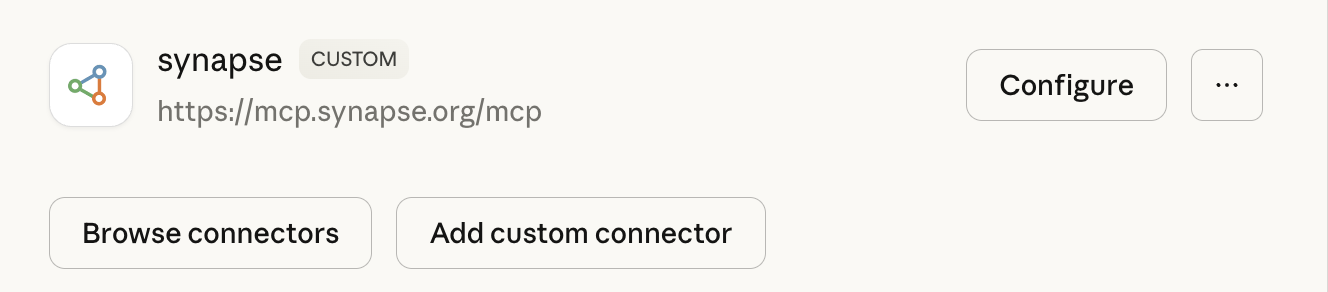
Go to Settings > Connectors > Add custom connector
Claude Code
claude mcp add --transport http synapse -- https://mcp.synapse.org/mcp
Local Server
For running local server, see DEVELOPMENT.md
Example Prompts
See usage examples
Contributing
Contributions are welcome! Please see our Development Guide for instructions on setting up a development environment, running tests, and more.
License
MIT
Contact

For issues, please file an issue. For other contact, see https://sagebionetworks.org/contact.
1 maintainer

Metadata
1 maintainer
Release files for iflow-mcp_susheel_synapse-mcp 0.2.0
For a detailed explanation of source distributions (sdists) and built distributions (wheels), please see the package formats documentation.
Source distribution (sdist)
| File | Size | Uploaded | |
|---|---|---|---|
| iflow_mcp_susheel_synapse_mcp-0.2.0.tar.gz | 76.9 kB | Details |
Built distribution (wheel)
| File | Interpreter | ABI | Platform | Reset |
|---|---|---|---|---|
| iflow_mcp_susheel_synapse_mcp-0.2.0-py3-none-any.whl | Python 3 | none | any | Details |
Total release size: 116.7 kB
Release files / iflow_mcp_susheel_synapse_mcp-0.2.0.tar.gz
| Download URL | iflow_mcp_susheel_synapse_mcp-0.2.0.tar.gz |
|---|---|
| Size | 76.9 kB |
| Tags | Source |
|
SHA-256 checksum How to use checksums |
b1b00dca4fa6005578c532120096ff38a18c1957d95bda1d2c81e54e10681681
|
|
BLAKE2b-256 checksum How to use checksums |
82ba0eabf35ac91ab445c5ca516f29ac4329dc5a4b7d15b4b1c3984a46601b41
|
| Upload date | |
|
Uploaded using Trusted Publishing? What is trusted publishing? |
No |
| Uploaded via |
uv/0.9.28 {"installer":{"name":"uv","version":"0.9.28","subcommand":["publish"]},"python":null,"implementation":{"name":null,"version":null},"distro":{"name":"Debian GNU/Linux","version":"13","id":"trixie","libc":null},"system":{"name":null,"release":null},"cpu":null,"openssl_version":null,"setuptools_version":null,"rustc_version":null,"ci":null}
|
Release files / iflow_mcp_susheel_synapse_mcp-0.2.0-py3-none-any.whl
| Download URL | iflow_mcp_susheel_synapse_mcp-0.2.0-py3-none-any.whl |
|---|---|
| Size | 39.9 kB |
| Tags | Python 3 |
|
SHA-256 checksum How to use checksums |
24d9a1d0e00014144dc106628fdeb96586e0a1a7b908c3f3a6a2b46d2600b36d
|
|
BLAKE2b-256 checksum How to use checksums |
f639edcc8cac89433b0877bf1061a88070f0d0e3eb6d43aba2111039359e1b9e
|
| Upload date | |
|
Uploaded using Trusted Publishing? What is trusted publishing? |
No |
| Uploaded via |
uv/0.9.28 {"installer":{"name":"uv","version":"0.9.28","subcommand":["publish"]},"python":null,"implementation":{"name":null,"version":null},"distro":{"name":"Debian GNU/Linux","version":"13","id":"trixie","libc":null},"system":{"name":null,"release":null},"cpu":null,"openssl_version":null,"setuptools_version":null,"rustc_version":null,"ci":null}
|













