
即梦 MCP 服务器
一个用于即梦AI的模型上下文协议(MCP)服务器 - 通过Claude和其他LLM应用提供强大的图像和视频生成能力。
核心依赖: 本项目基于 jimeng-free-api-all 开源项目构建,该项目提供了即梦AI的逆向接口实现,支持文生图、图生视频等多种AI生成能力。
更新日志
2024-12-14 v0.2.0 - 参数格式同步更新
- 同步上游 v4.7 更新:适配 jimeng-free-api-all 最新 API 参数格式
- 图片接口参数变更:
- 移除
width、height参数 - 新增
ratio参数:支持1:1、4:3、3:4、16:9、9:16、3:2、2:3、21:9 - 新增
resolution参数:支持1k、2k(默认)、4k
- 移除
- 视频接口参数变更:
- 移除
width、height参数 - 新增
ratio参数:支持1:1(默认)、4:3、3:4、16:9、9:16 resolution参数:支持480p、720p(默认)、1080p- 新增
duration参数:视频时长,支持 5 或 10 秒
- 移除
- 默认模型升级:默认图像模型从
jimeng-4.0升级为jimeng-4.5
功能特性
本MCP服务器提供四个主要工具:
1. 文本生成图像 (text_to_image)
使用即梦4.5根据文本描述生成高质量图像。
能力:
- 从详细的文本提示创建图像
- 支持负面提示词(要避免的内容)
- 多种宽高比(1:1, 4:3, 3:4, 16:9, 9:16, 3:2, 2:3, 21:9)
- 多种分辨率(1k, 2k, 4k)
- jimeng-4.5/4.1/4.0 支持智能多图生成
2. 图像合成 (image_composition)
基于文本指令将多张图像融合在一起。
能力:
- 合成1-10张图像
- 风格迁移和图像混合
- 基于文本提示的智能合成
- 生成多个变体结果
3. 文本生成视频 (text_to_video)
使用即梦视频3.0根据文本描述生成短视频片段。
能力:
- 从文本创建动画视频
- 支持多种分辨率(480p, 720p, 1080p)
- 多种宽高比(1:1, 4:3, 3:4, 16:9, 9:16)
- 可选时长(5秒或10秒)
4. 图像生成视频 (image_to_video)
基于文本提示为静态图像添加动画效果。
能力:
- 让图像动起来
- 通过文本描述控制动画效果
- 支持首帧/尾帧图像输入
- 可选时长(5秒或10秒)
技术架构
本 MCP 服务器的核心 API 能力基于 jimeng-free-api-all 项目实现。
为什么选择 jimeng-free-api-all?
- ✅ 完全开源: 遵循 GPL-3.0 开源协议,代码完全透明
- ✅ OpenAI 兼容: 完美兼容 OpenAI API 格式,易于集成
- ✅ 功能完整: 支持文生图、图生视频、图像合成等全套功能
- ✅ 零配置部署: 支持 Docker 一键部署,开箱即用
- ✅ 免费额度: 官方每日赠送 66 积分,可生成 66 次
架构说明
┌─────────────────────────────────────────────────┐
│            Claude Desktop / MCP Client           │
└────────────────────┬────────────────────────────┘
                     │ MCP Protocol
                     ↓
┌─────────────────────────────────────────────────┐
│          jimengmcp (本 MCP 服务器)               │
│    ┌──────────────────────────────────────┐     │
│    │  MCP Protocol Handler (stdio/sse)   │     │
│    └───────────────┬──────────────────────┘     │
│                    ↓                             │
│    ┌──────────────────────────────────────┐     │
│    │     Tool Implementations             │     │
│    │  - text_to_image                     │     │
│    │  - image_composition                 │     │
│    │  - text_to_video                     │     │
│    │  - image_to_video                    │     │
│    └───────────────┬──────────────────────┘     │
└────────────────────┼────────────────────────────┘
                     │ HTTP API Calls
                     ↓
┌─────────────────────────────────────────────────┐
│       jimeng-free-api-all 逆向接口服务            │
│  (https://github.com/wwwzhouhui/                │
│         jimeng-free-api-all)                    │
│    ┌──────────────────────────────────────┐     │
│    │    OpenAI Compatible API Endpoints   │     │
│    │  - POST /v1/images/generations       │     │
│    │  - POST /v1/images/compositions      │     │
│    │  - POST /v1/videos/generations       │     │
│    └───────────────┬──────────────────────┘     │
└────────────────────┼────────────────────────────┘
                     │ 逆向调用
                     ↓
┌─────────────────────────────────────────────────┐
│           即梦 AI 官方服务                        │
│       (https://jimeng.duckcloud.fun)            │
└─────────────────────────────────────────────────┘
安装
前置要求
- Python 3.10或更高版本
- 部署 jimeng-free-api-all 服务 (见下方部署指南)
- 从duckcloud.fun获取即梦API SessionID
设置步骤
第一步: 部署 jimeng-free-api-all 服务
本 MCP 服务器需要先部署底层的 API 服务。请按照以下步骤部署:
方式一: Docker 部署 (推荐)
# 拉取镜像
docker pull wwwzhouhui569/jimeng-free-api-all:latest

# 运行容器
docker run -it -d --init --name jimeng-free-api-all \
  -p 8001:8000 \
  -e TZ=Asia/Shanghai \
  wwwzhouhui569/jimeng-free-api-all:latest
方式二: 源码部署
# 克隆 jimeng-free-api-all 项目
git clone https://github.com/wwwzhouhui/jimeng-free-api-all.git
cd jimeng-free-api-all

# 使用 Docker Compose 启动
docker-compose up -d
部署完成后,API 服务将运行在 http://localhost:8001
获取 SessionID:
- 访问 即梦官网 并登录
- 按
F12打开浏览器开发者工具 - 进入
Application>Cookies - 找到并复制
sessionid的值 - 在后续配置中使用:
Authorization: Bearer [your_sessionid]
验证部署:
# 测试 API 是否正常运行
curl http://localhost:8001/v1/models

# 应该返回可用模型列表
第二步: 安装 jimengmcp MCP 服务器
- 克隆此仓库:
git clone https://github.com/wwwzhouhui/jimeng-mcp-server
cd jimeng-mcp-server
- 根据使用模式安装包:
基础安装 (stdio模式)
pip install -e .
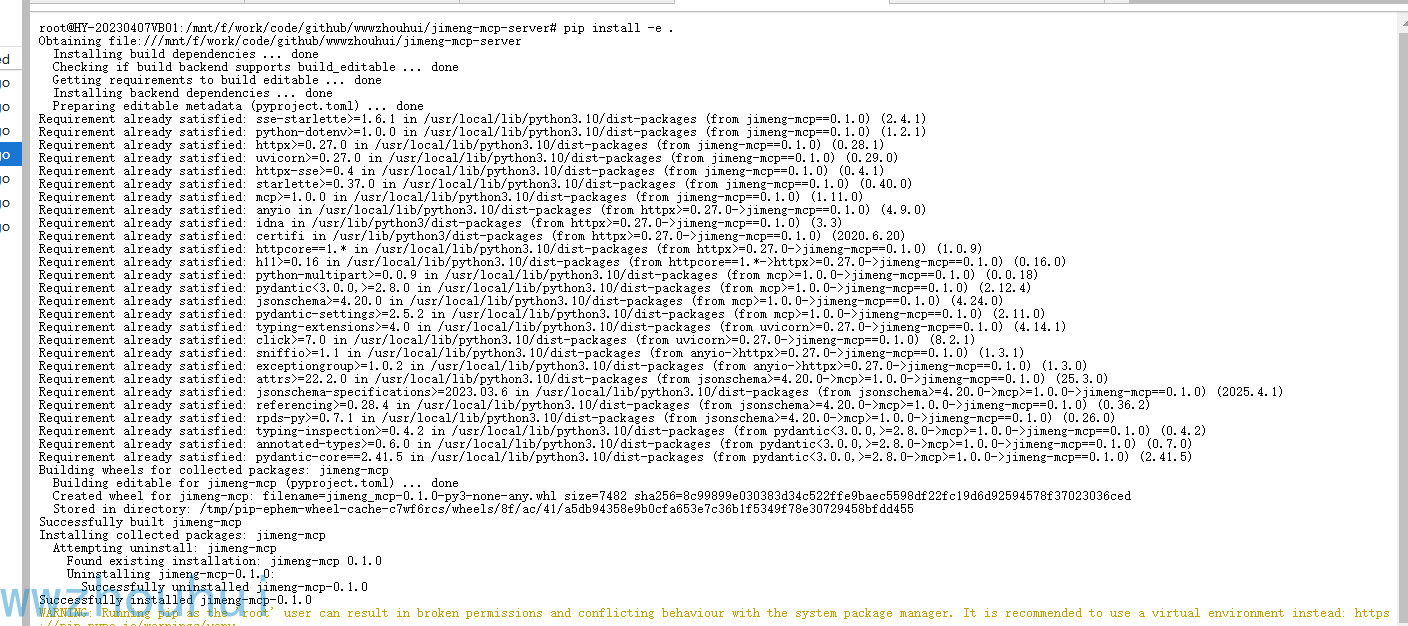
检查安装是否成功 输入下面命令
pip show jimeng-mcp

SSE模式
pip install -e ".[sse]"
HTTP模式
pip install -e ".[http]"
完整安装 (所有模式)
pip install -e ".[all]"
- 从示例创建
.env文件:
cp .env.example .env
- 编辑
.env并配置连接信息:
# 必需: 您的即梦 SessionID (从浏览器 Cookie 中获取)
JIMENG_API_KEY=your_sessionid_here

# 必需: jimeng-free-api-all 服务地址
JIMENG_API_URL=http://localhost:8001

# 可选: 默认使用的模型
JIMENG_MODEL=jimeng-4.5
重要说明:
JIMENG_API_KEY: 填入从即梦官网获取的 sessionidJIMENG_API_URL: 填入第一步部署的 jimeng-free-api-all 服务地址- 如果 jimeng-free-api-all 部署在其他端口或服务器,请相应修改 URL
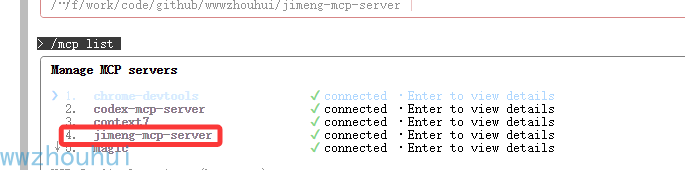
claude code 安装MCP
我们这里使用cc-switch配置
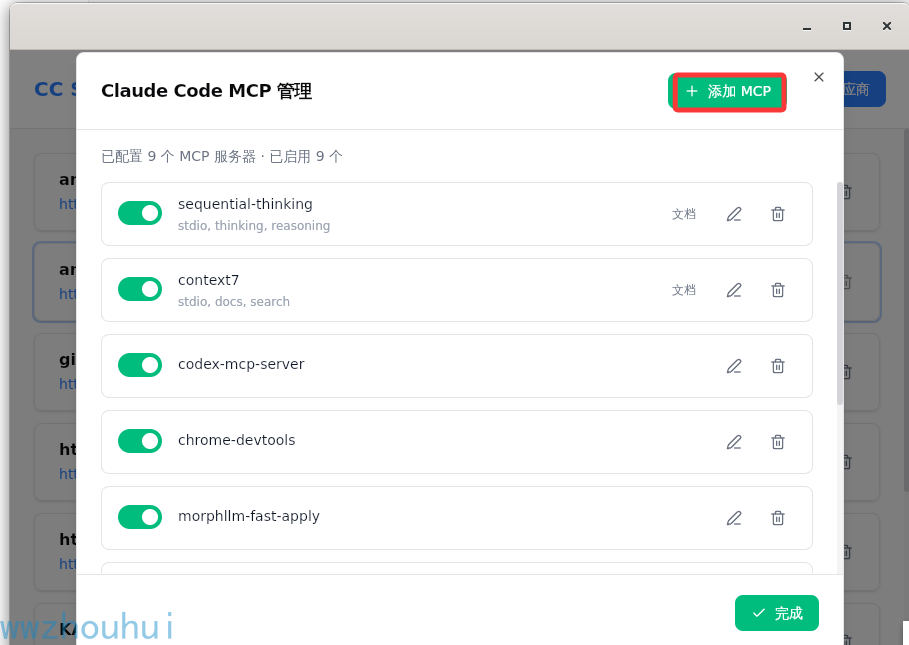
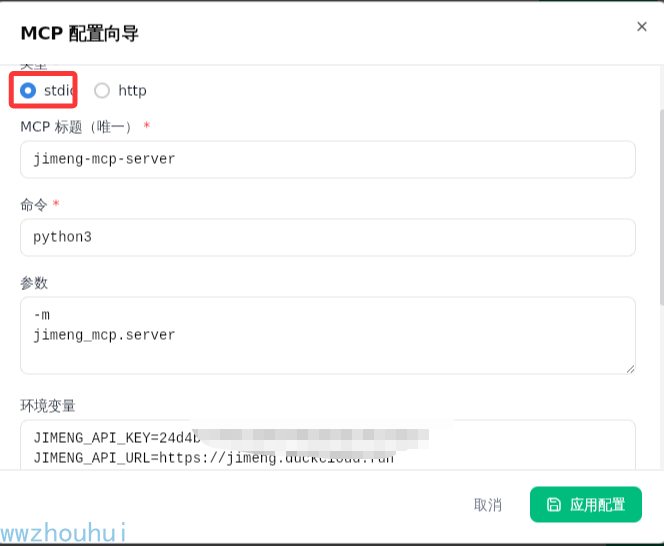
配置完成后,点击保存
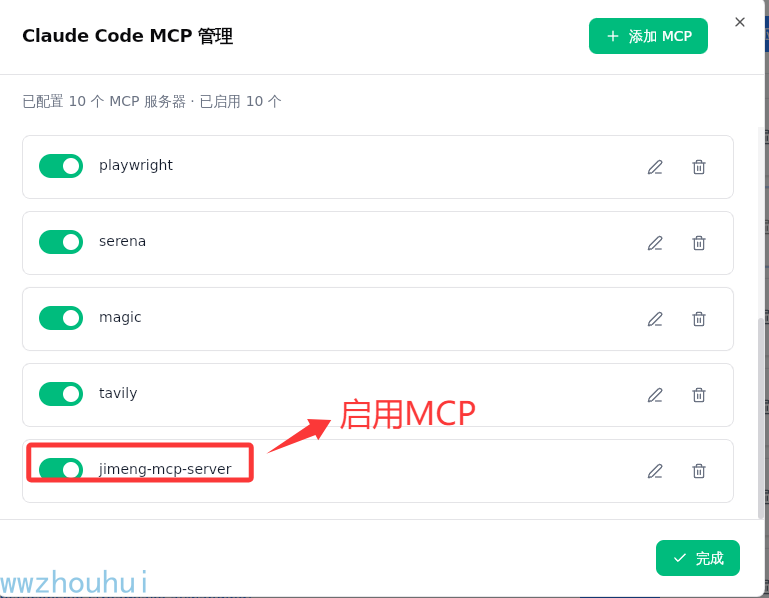
使用claude code mcp list 查看
运行模式
本MCP服务器支持三种通信模式:
1. stdio模式 (默认)
stdio模式通过标准输入/输出通信,适合与Claude Desktop等MCP客户端集成。
启动命令:
python -m jimeng_mcp.server
# 或
python -m jimeng_mcp.server --mode stdio
2. SSE模式 (Server-Sent Events)
SSE模式提供基于HTTP的事件流,适合Web应用集成。
启动命令:
python -m jimeng_mcp.server --mode sse --host 0.0.0.0 --port 8000
连接端点:
http://localhost:8000/sse

3. HTTP REST API模式
HTTP模式提供标准的RESTful API接口,适合各种编程语言调用。
启动命令:
python -m jimeng_mcp.server --mode http --host 0.0.0.0 --port 8000
可用端点:
GET /health- 健康检查GET /tools- 获取可用工具列表POST /text-to-image- 文本生成图像POST /image-composition- 图像合成POST /text-to-video- 文本生成视频POST /image-to-video- 图像生成视频
配置
环境变量
在项目根目录创建.env文件,包含以下变量:
# 必需: 您的即梦API密钥
JIMENG_API_KEY=您的API密钥

# 可选: API基础URL(默认为 https://jimeng.duckcloud.fun)
JIMENG_API_URL=https://jimeng.duckcloud.fun

# 可选: 图像生成的默认模型(默认为 jimeng-4.5)
JIMENG_MODEL=jimeng-4.5
Cherry Studio配置
将此服务器添加到Cherry Studio配置文件:
MacOS: ~/Library/Application Support/Claude/claude_desktop_config.json
Windows: %APPDATA%\Claude\claude_desktop_config.json
{
  "mcpServers": {
    "jimeng": {
      "command": "python",
      "args": ["-m", "jimeng_mcp.server"],
      "env": {
        "JIMENG_API_KEY": "您的API密钥"
      }
    }
  }
}
或者,如果您有.env文件:
{
  "mcpServers": {
    "jimeng": {
      "command": "python",
      "args": ["-m", "jimeng_mcp.server"]
    }
  }
}
sse配置
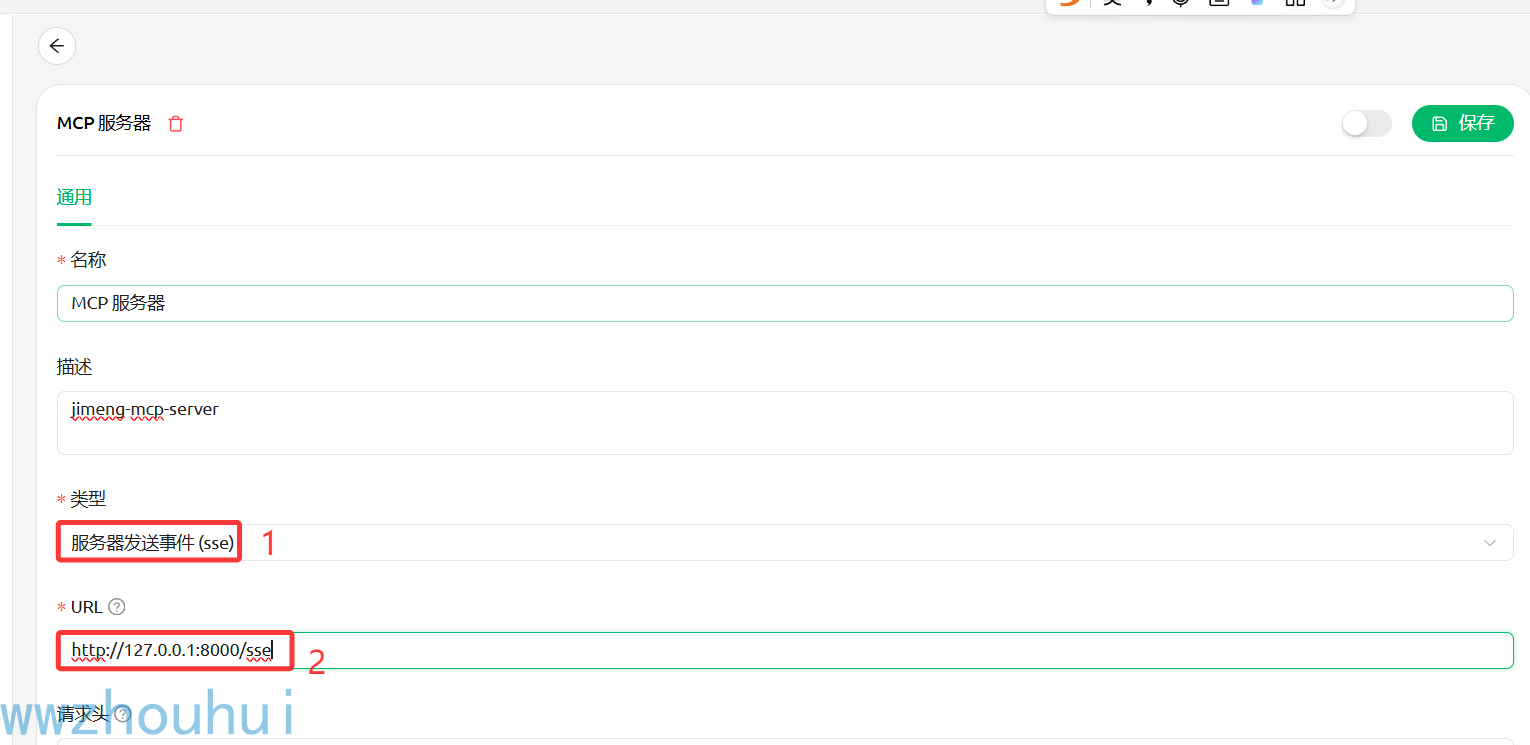
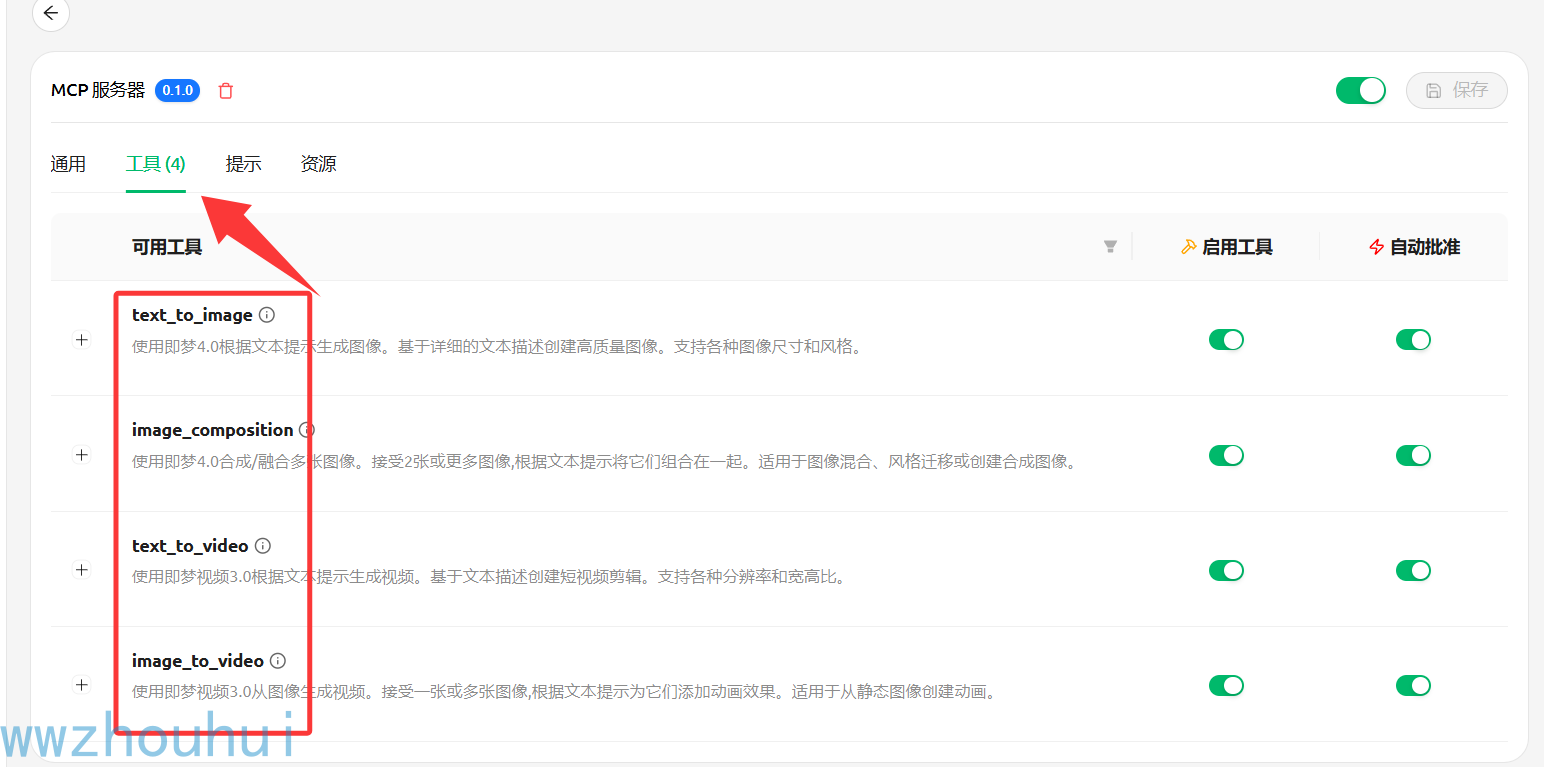
使用方法
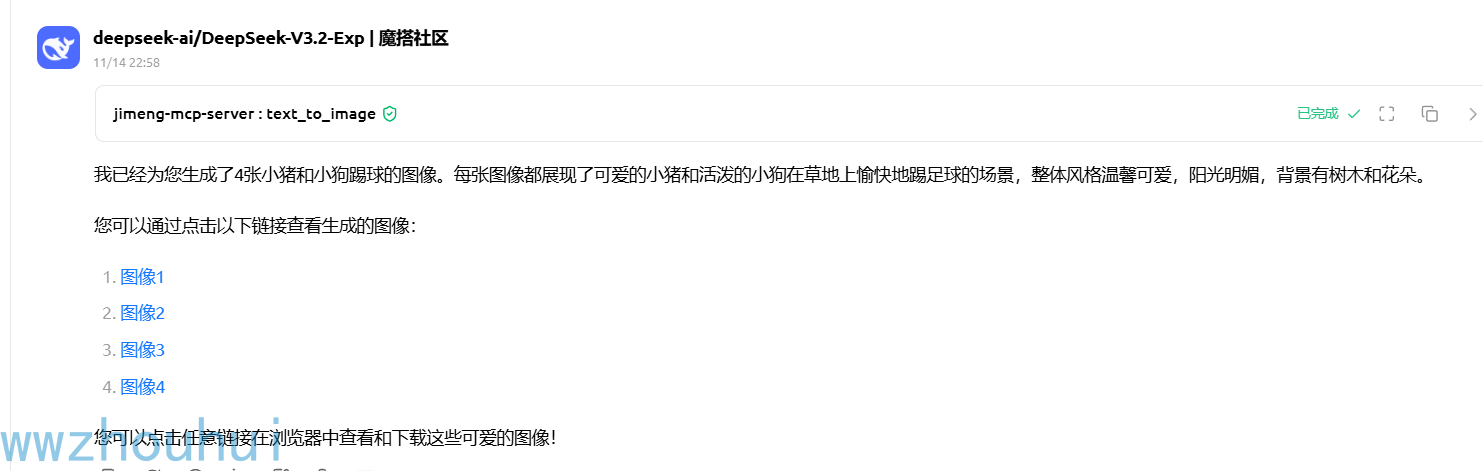
在Cherry Studio中使用 (see模式)
安装和配置完成后,您可以直接在Cherry Studio中使用即梦工具:
文本生成图像示例
生成一张图像:小猪和小狗踢球
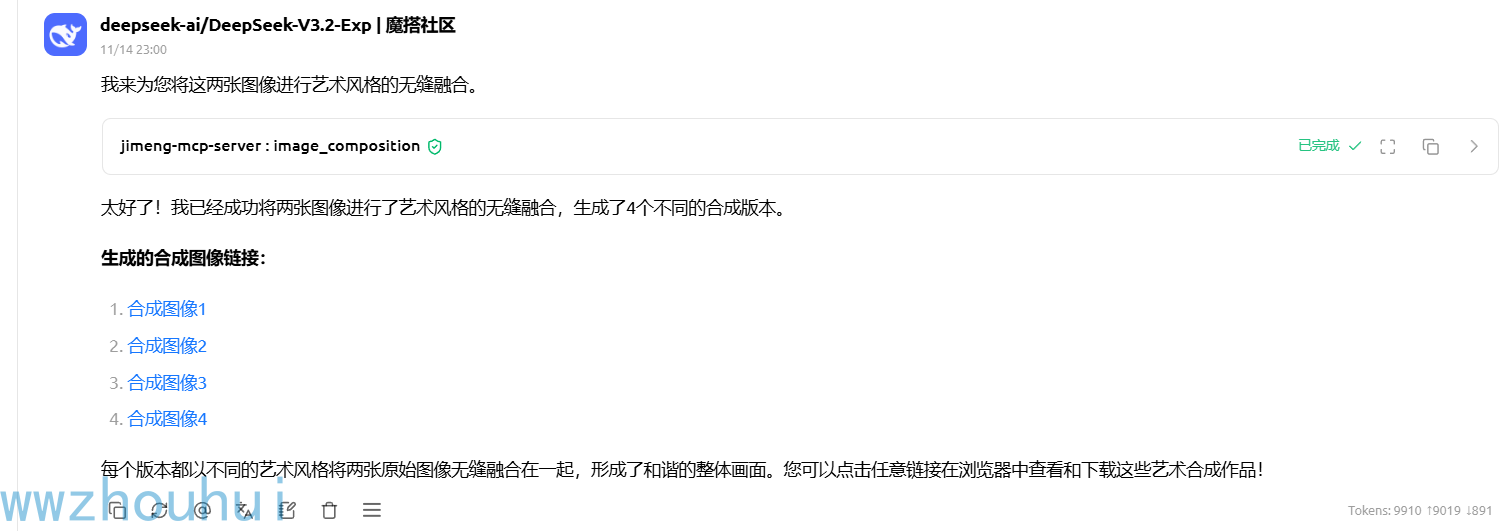
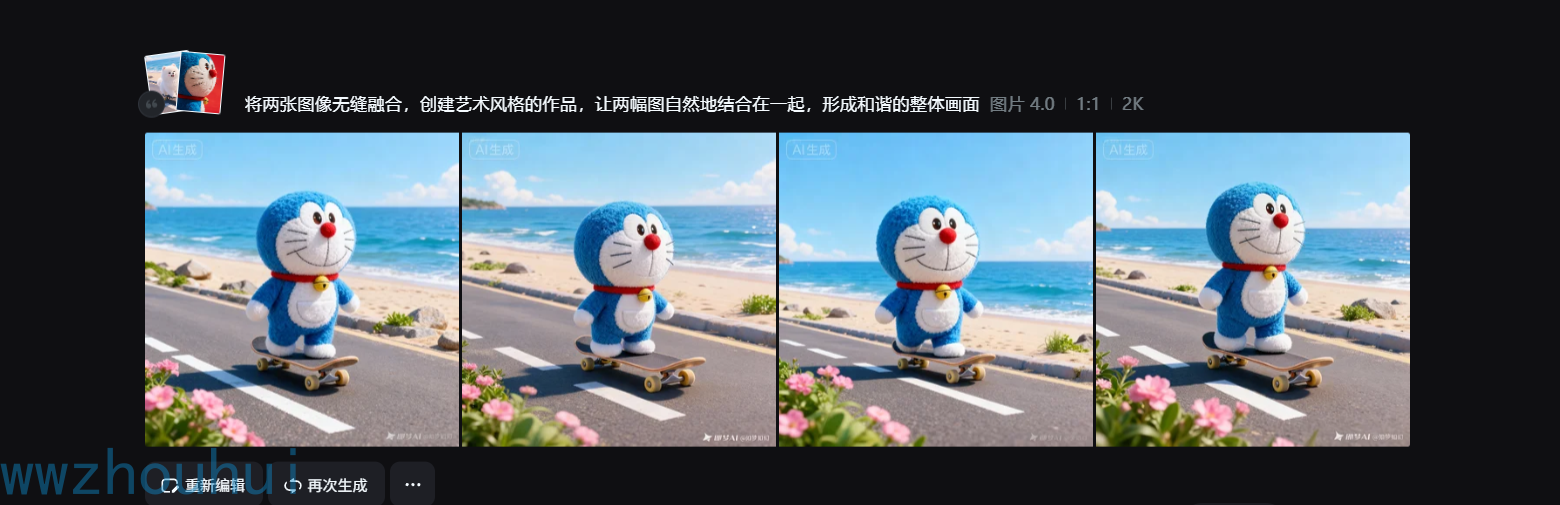
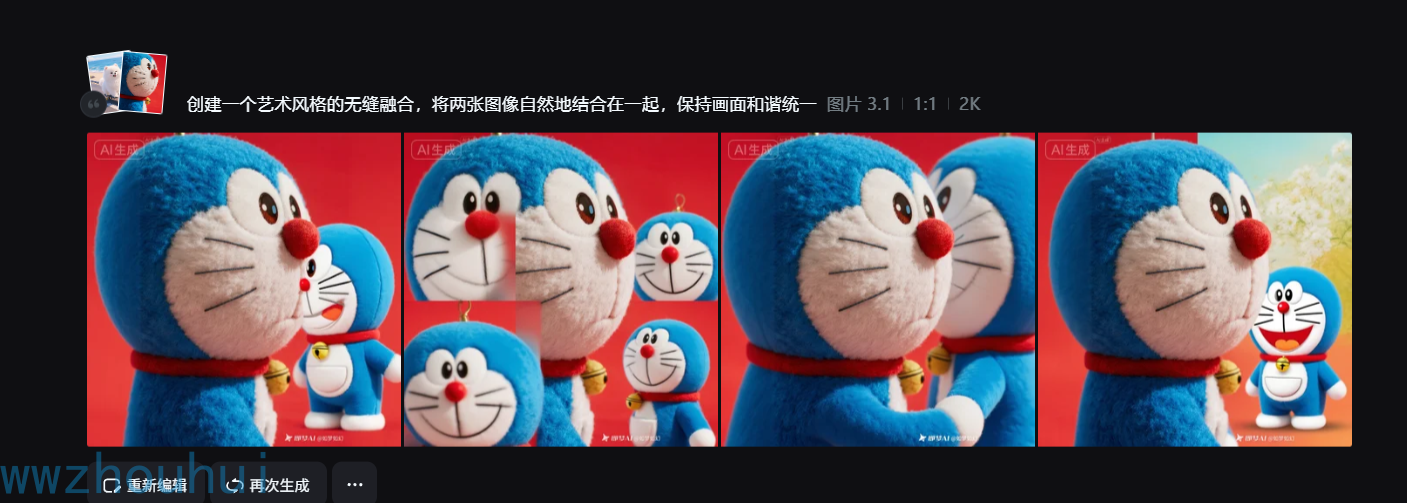
图像合成示例
将这两张图像合成在一起:
- 图像1: https://p3-dreamina-sign.byteimg.com/tos-cn-i-tb4s082cfz/bab623359bd9410da0c1f07897b16fec~tplv-tb4s082cfz-resize:0:0.image?lk3s=8e790bc3&x-expires=1788961069&x-signature=cbtnyeSIcqWpngHdoYWFkCra3cA%3D
- 图像2: https://p3-dreamina-sign.byteimg.com/tos-cn-i-tb4s082cfz/6acf16d07c47413898aea2bdd1ad339e~tplv-tb4s082cfz-resize:0:0.image?lk3s=8e790bc3&x-expires=1788961069&x-signature=30S2i%2FvCH0eRR32CehcEaK8t5ns%3D
创建一个艺术风格的无缝融合
文本生成视频示例
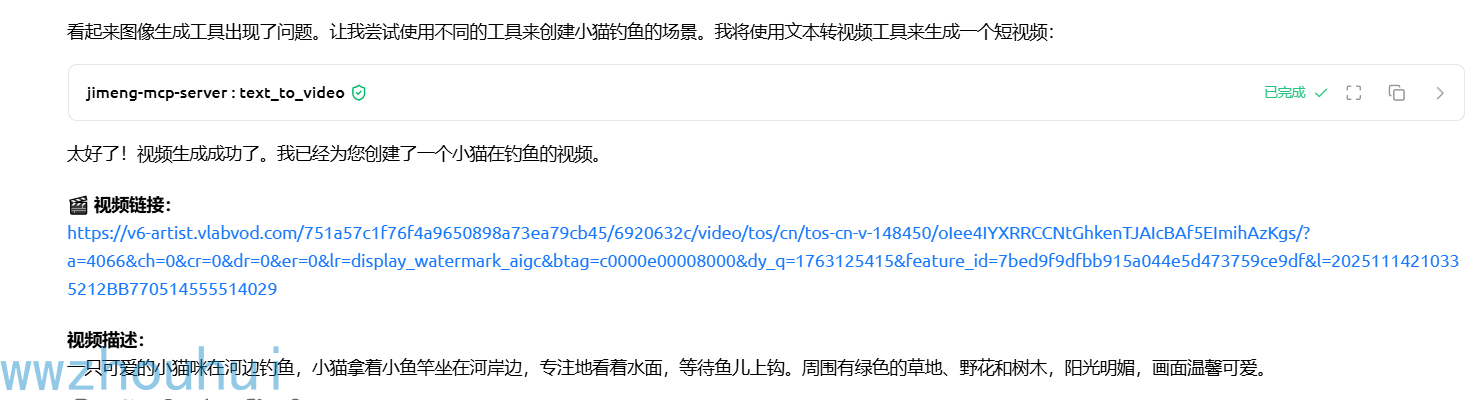
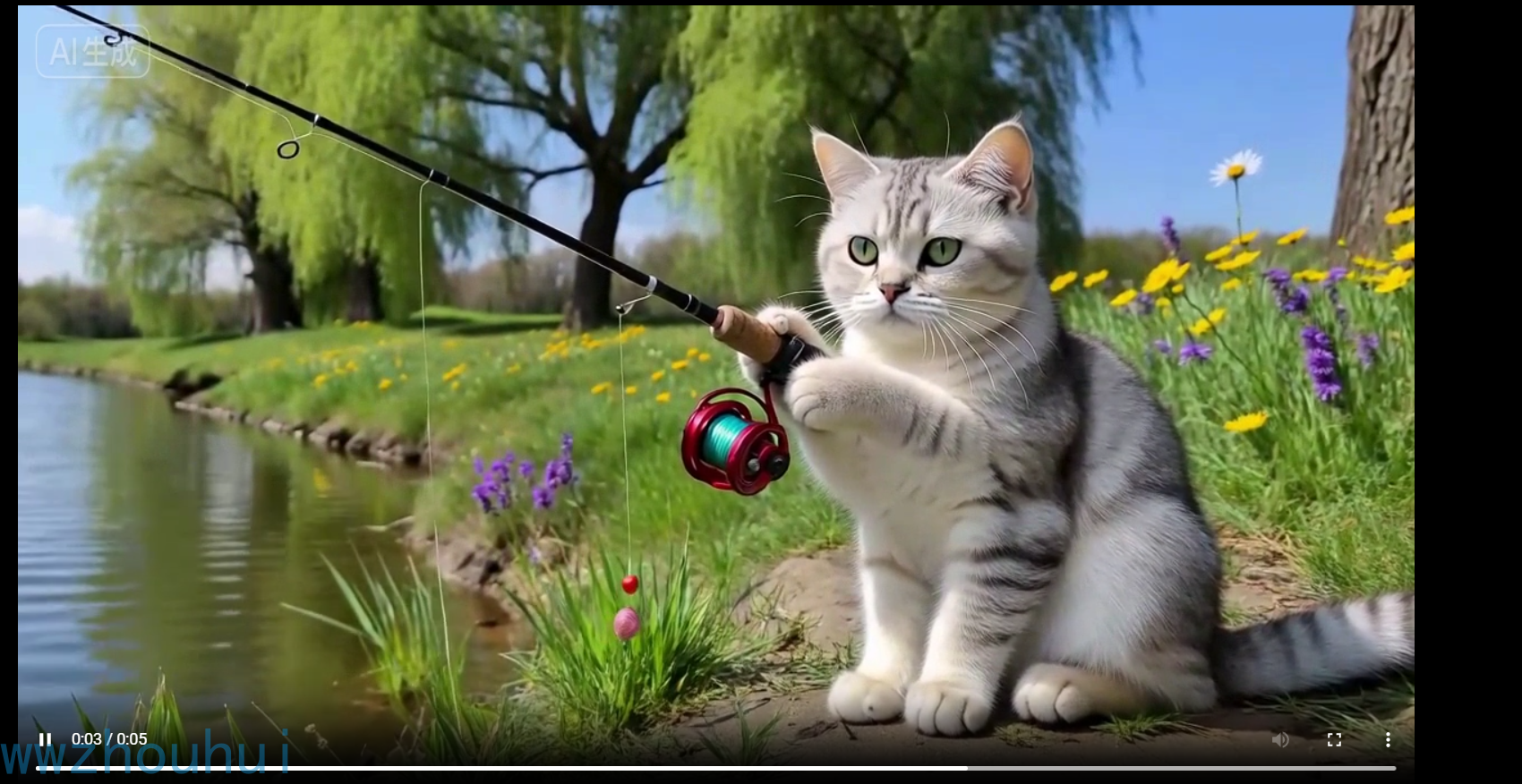
创建一个视频:小猫在钓鱼
图像生成视频示例
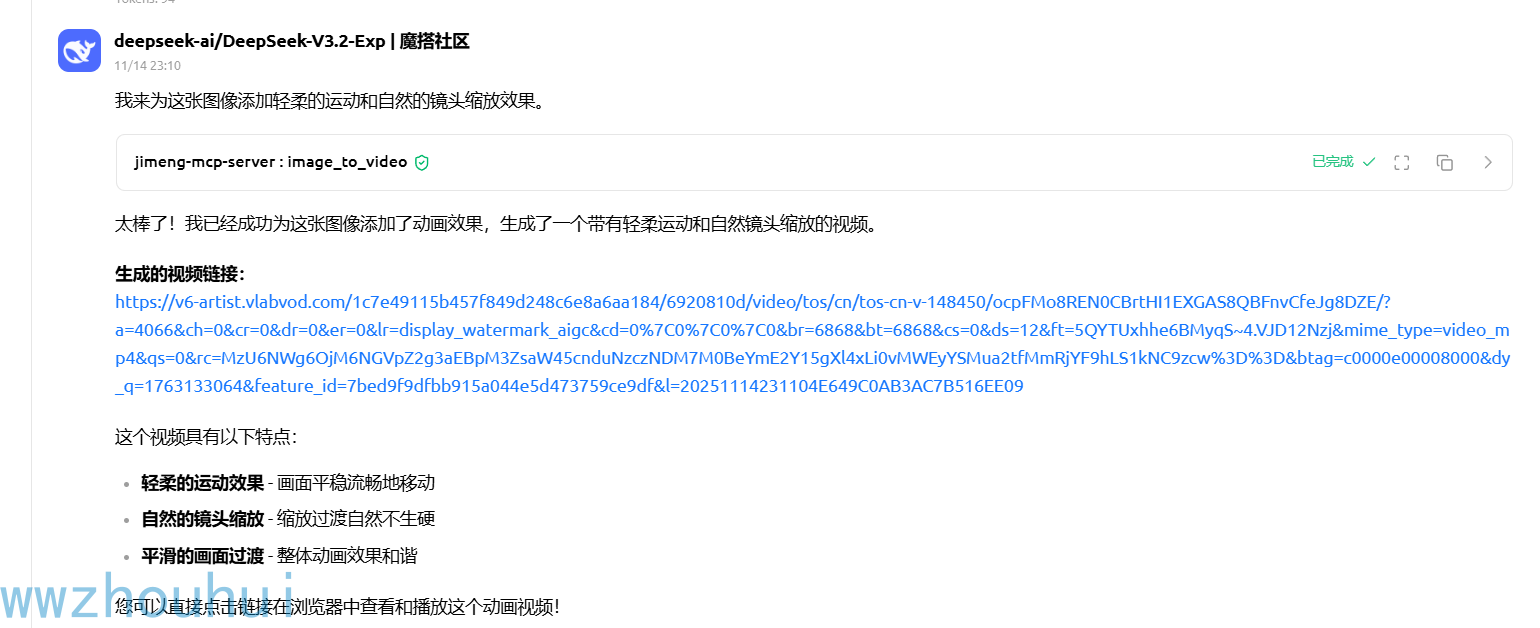
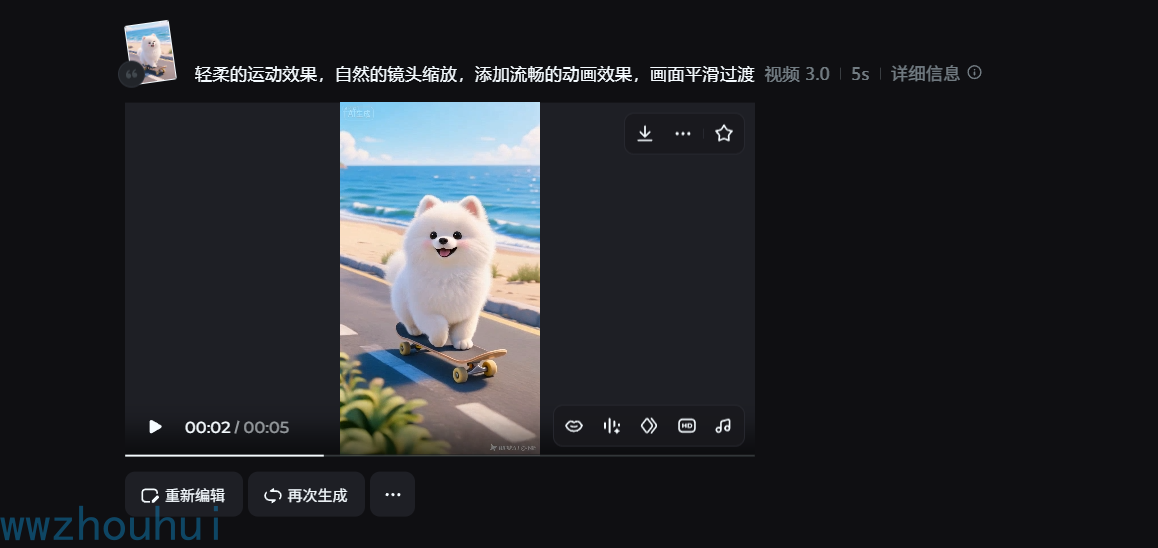
为这张图像添加动画效果:
https://p3-dreamina-sign.byteimg.com/tos-cn-i-tb4s082cfz/bab623359bd9410da0c1f07897b16fec~tplv-tb4s082cfz-resize:0:0.image?lk3s=8e790bc3&x-expires=1788961069&x-signature=cbtnyeSIcqWpngHdoYWFkCra3cA%3D
添加轻柔的运动和自然的镜头缩放
在claude code中使用
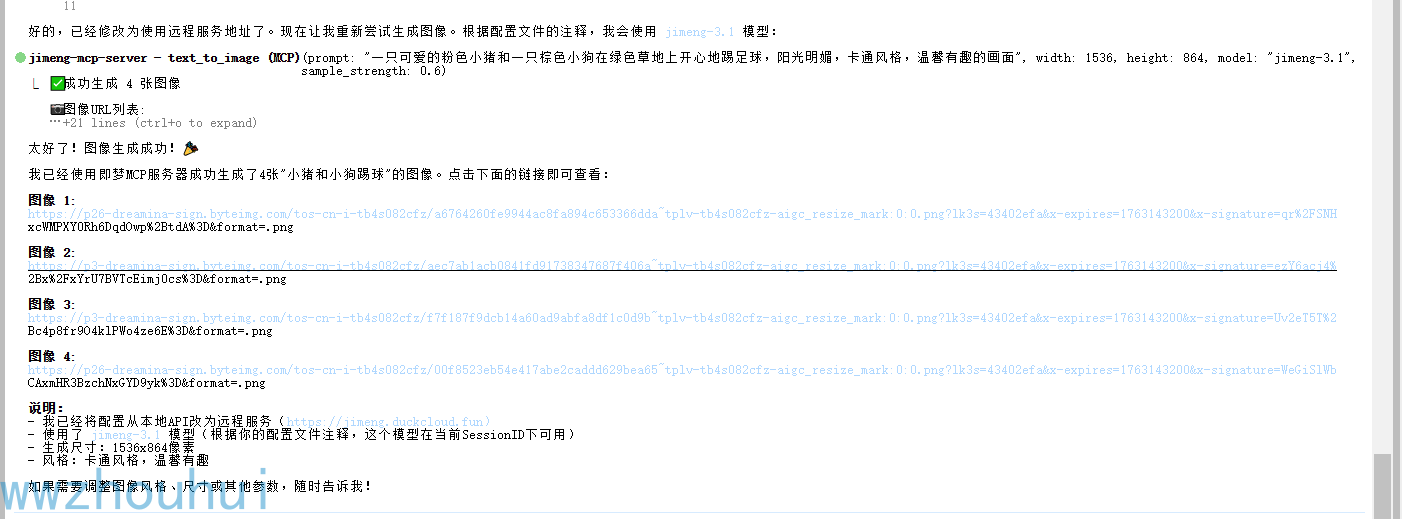
文本生成图像示例
请使用jimeng-mcp-server 生成一张图像:小猪和小狗踢球
图像合成示例
请使用jimeng-mcp-server 将这两张图像合成在一起:
- 图像1: https://p3-dreamina-sign.byteimg.com/tos-cn-i-tb4s082cfz/bab623359bd9410da0c1f07897b16fec~tplv-tb4s082cfz-resize:0:0.image?lk3s=8e790bc3&x-expires=1788961069&x-signature=cbtnyeSIcqWpngHdoYWFkCra3cA%3D
- 图像2: https://p3-dreamina-sign.byteimg.com/tos-cn-i-tb4s082cfz/6acf16d07c47413898aea2bdd1ad339e~tplv-tb4s082cfz-resize:0:0.image?lk3s=8e790bc3&x-expires=1788961069&x-signature=30S2i%2FvCH0eRR32CehcEaK8t5ns%3D
创建一个艺术风格的无缝融合
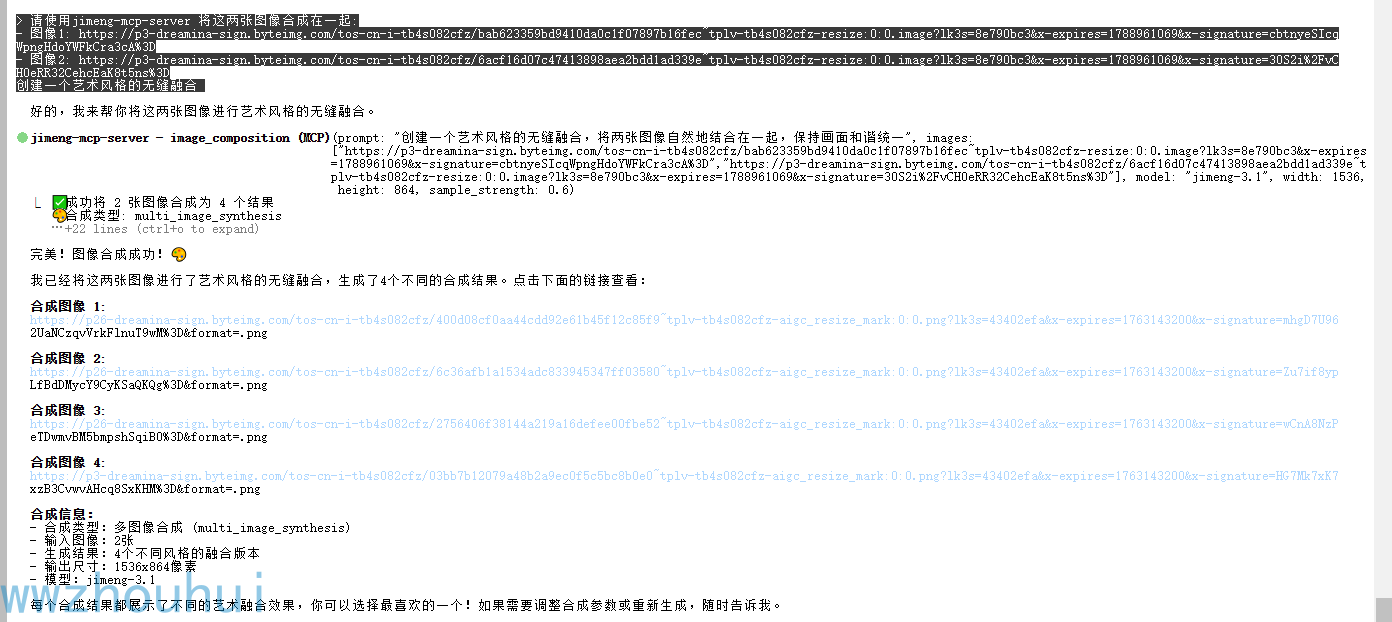
图片生成结果
文本生成视频示例
请使用jimeng-mcp-server 创建一个视频:小马过河
使用HTTP API
当服务器以HTTP模式运行时,您可以通过REST API调用:
健康检查
curl http://localhost:8000/health
响应:
{
  "status": "healthy",
  "server": "jimeng-mcp",
  "version": "0.1.0",
  "mode": "http"
}
获取可用工具
curl http://localhost:8000/tools
文本生成图像
curl -X POST http://localhost:8000/text-to-image \
  -H "Content-Type: application/json" \
  -d '{
    "prompt": "可爱的卡通小斑马在花园里玩耍",
    "ratio": "16:9",
    "resolution": "2k",
    "sample_strength": 0.6
  }'
图像合成
curl -X POST http://localhost:8000/image-composition \
  -H "Content-Type: application/json" \
  -d '{
    "prompt": "将两张图像艺术风格地融合",
    "images": [
      "https://example.com/image1.jpg",
      "https://example.com/image2.jpg"
    ],
    "ratio": "16:9",
    "resolution": "2k"
  }'
文本生成视频
curl -X POST http://localhost:8000/text-to-video \
  -H "Content-Type: application/json" \
  -d '{
    "prompt": "一个人在森林中缓慢向前走",
    "ratio": "16:9",
    "resolution": "720p",
    "duration": 5
  }'
图像生成视频
curl -X POST http://localhost:8000/image-to-video \
  -H "Content-Type: application/json" \
  -d '{
    "prompt": "添加轻柔的运动效果",
    "file_paths": ["https://example.com/image.jpg"],
    "ratio": "16:9",
    "resolution": "720p",
    "duration": 5
  }'
Python示例
import requests

# 文本生成图像
response = requests.post(
    "http://localhost:8000/text-to-image",
    json={
        "prompt": "可爱的卡通小斑马在花园里玩耍",
        "ratio": "16:9",
        "resolution": "2k",
        "sample_strength": 0.6
    }
)

result = response.json()
if result["success"]:
    print(result["result"])
else:
    print(f"Error: {result['error']}")
JavaScript示例
// 文本生成图像
fetch('http://localhost:8000/text-to-image', {
  method: 'POST',
  headers: {
    'Content-Type': 'application/json',
  },
  body: JSON.stringify({
    prompt: '可爱的卡通小斑马在花园里玩耍',
    ratio: '16:9',
    resolution: '2k',
    sample_strength: 0.6
  })
})
.then(response => response.json())
.then(data => {
  if (data.success) {
    console.log(data.result);
  } else {
    console.error('Error:', data.error);
  }
});
API工具参数
text_to_image (文本生成图像)
| 参数 | 类型 | 必需 | 默认值 | 描述 |
|---|---|---|---|---|
| prompt | string | 是 | - | 图像的详细描述,jimeng-4.x支持多图生成 |
| negative_prompt | string | 否 | "" | 要在图像中避免的内容 |
| ratio | string | 否 | 1:1 | 宽高比 (1:1, 4:3, 3:4, 16:9, 9:16, 3:2, 2:3, 21:9) |
| resolution | string | 否 | 2k | 分辨率 (1k, 2k, 4k) |
| sample_strength | float | 否 | 0.5 | 精细度 (0.0-1.0) |
| model | string | 否 | jimeng-4.5 | 使用的模型 |
image_composition (图像合成)
| 参数 | 类型 | 必需 | 默认值 | 描述 |
|---|---|---|---|---|
| prompt | string | 是 | - | 如何合成图像 |
| images | array | 是 | - | 图像URL数组(1-10张) |
| ratio | string | 否 | 1:1 | 输出宽高比 |
| resolution | string | 否 | 2k | 输出分辨率 (1k, 2k, 4k) |
| sample_strength | float | 否 | 0.5 | 精细度 (0.0-1.0) |
| model | string | 否 | jimeng-4.5 | 使用的模型 |
text_to_video (文本生成视频)
| 参数 | 类型 | 必需 | 默认值 | 描述 |
|---|---|---|---|---|
| prompt | string | 是 | - | 视频描述 |
| ratio | string | 否 | 1:1 | 宽高比 (1:1, 4:3, 3:4, 16:9, 9:16) |
| resolution | string | 否 | 720p | 分辨率 (480p, 720p, 1080p) |
| duration | integer | 否 | 5 | 视频时长 (5或10秒) |
| model | string | 否 | jimeng-video-3.0 | 使用的模型 |
image_to_video (图像生成视频)
| 参数 | 类型 | 必需 | 默认值 | 描述 |
|---|---|---|---|---|
| prompt | string | 是 | - | 动画描述 |
| file_paths | array | 是 | - | 首帧/尾帧图像URL数组 |
| ratio | string | 否 | 1:1 | 宽高比 (1:1, 4:3, 3:4, 16:9, 9:16) |
| resolution | string | 否 | 720p | 分辨率 (480p, 720p, 1080p) |
| duration | integer | 否 | 5 | 视频时长 (5或10秒) |
| model | string | 否 | jimeng-video-3.0 | 使用的模型 |
开发
运行测试
pytest
直接运行服务器
python -m jimeng_mcp.server
故障排查
API密钥错误
- 确保
.env文件中的JIMENG_API_KEY设置正确 - 验证您的API密钥是否有效且有足够的额度
连接错误
- 检查您的网络连接
- 验证API基础URL是否可访问
- 检查是否有防火墙限制
超时错误
- 视频生成可能需要几分钟时间
- 服务器已为视频操作自动设置较长超时时间(10分钟)
- 考虑生成更短的视频或更低的分辨率
许可证
MIT许可证 - 详见LICENSE文件
贡献
欢迎贡献!请随时提交Pull Request。
支持
如遇到以下相关问题:
- MCP服务器: 在本仓库开issue
- 即梦API: 联系DuckCloud支持
相关项目
本项目依赖并感谢以下开源项目:
核心依赖
- jimeng-free-api-all - 即梦AI逆向接口实现
- 提供完整的图像和视频生成 API
- OpenAI 兼容的接口设计
- 支持 Docker 一键部署
- 开源协议: GPL-3.0
技术框架
- 模型上下文协议 (MCP) - 统一的 AI 工具协议标准
- Python MCP SDK - MCP 的 Python 实现
- 即梦 AI - 底层的 AI 生成服务
致谢
特别感谢:
- wwwzhouhui - jimeng-free-api-all 项目作者,提供了稳定可靠的即梦 AI 逆向接口
- Anthropic - 开发了强大的 Claude AI 和 MCP 协议
- 即梦 AI 团队 - 提供优秀的图像和视频生成能力
免责声明
本项目仅供学习和研究使用,基于 jimeng-free-api-all 项目构建。
重要提示:
- ⚠️ 本项目使用的是逆向接口,仅限个人学习研究使用
- ⚠️ 禁止将本项目用于商业用途或对外提供服务
- ⚠️ 逆向接口可能随官方更新而失效,请关注项目更新
- ⚠️ 使用时请遵守即梦 AI 官方的服务条款和使用限制
- ⚠️ 建议使用官方 API 进行生产环境部署
如果您需要在生产环境中使用,建议直接购买即梦 AI 官方的 API 服务。
1 maintainer

Metadata
1 maintainer
Release files for iflow-mcp_wwwzhouhui_jimeng-mcp 0.1.0
For a detailed explanation of source distributions (sdists) and built distributions (wheels), please see the package formats documentation.
Source distribution (sdist)
| File | Size | Uploaded | |
|---|---|---|---|
| iflow_mcp_wwwzhouhui_jimeng_mcp-0.1.0.tar.gz | 20.8 kB | Details |
Built distribution (wheel)
| File | Interpreter | ABI | Platform | Reset |
|---|---|---|---|---|
| iflow_mcp_wwwzhouhui_jimeng_mcp-0.1.0-py3-none-any.whl | Python 3 | none | any | Details |
Total release size: 35.0 kB
Release files / iflow_mcp_wwwzhouhui_jimeng_mcp-0.1.0.tar.gz
| Download URL | iflow_mcp_wwwzhouhui_jimeng_mcp-0.1.0.tar.gz |
|---|---|
| Size | 20.8 kB |
| Tags | Source |
|
SHA-256 checksum How to use checksums |
facc540ace41a63ed680684addb242ec8c866f29f1253e83181ab7b54b58ef46
|
|
BLAKE2b-256 checksum How to use checksums |
d26d5034172e93295f9808f0af1014e610587b7413e109b95f098196333b9868
|
| Upload date | |
|
Uploaded using Trusted Publishing? What is trusted publishing? |
No |
| Uploaded via |
uv/0.9.8
|
Release files / iflow_mcp_wwwzhouhui_jimeng_mcp-0.1.0-py3-none-any.whl
| Download URL | iflow_mcp_wwwzhouhui_jimeng_mcp-0.1.0-py3-none-any.whl |
|---|---|
| Size | 14.3 kB |
| Tags | Python 3 |
|
SHA-256 checksum How to use checksums |
6c7853c381cb4dec571ac3a37013cffe972b877cc70ec20711bcd8416882e4d0
|
|
BLAKE2b-256 checksum How to use checksums |
983c6d03e4b39f7e32d265814dfd77a5cfc9e0368d929fd3b7fe5123153f09a4
|
| Upload date | |
|
Uploaded using Trusted Publishing? What is trusted publishing? |
No |
| Uploaded via |
uv/0.9.8
|













