
ifpretty
Prettify and enrich ifconfig output. A terminal tool that turns the raw,
cryptic ifconfig dump into an aligned, colorized, annotated view — and, on
demand, layers on live system data, a 1‑hour bandwidth graph, run‑to‑run
diffing, and an interactive browser map of your whole network. Built on
rich.
ifpretty
Install
pip install ifpretty
Requires Python ≥ 3.9. The only runtime dependency is rich.
Quick start
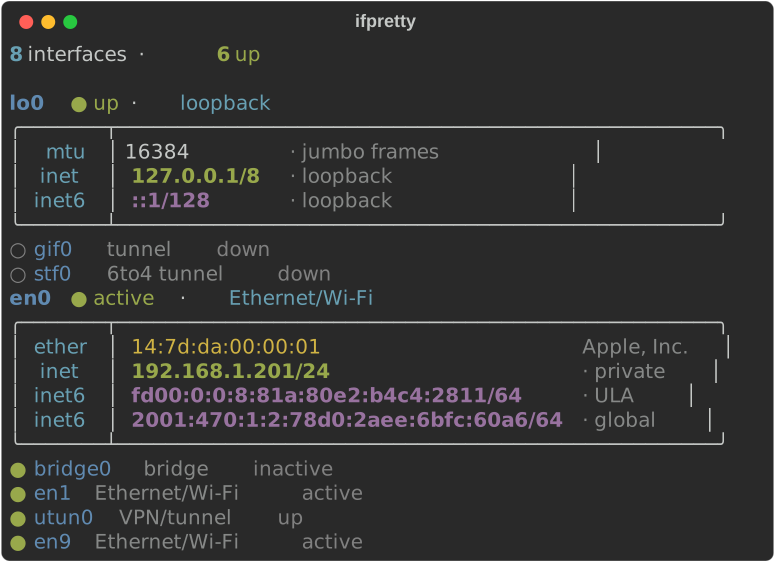
ifpretty— run it bare; it runsifconfigfor you and prints the essentials view.ifpretty -v— the full, verbose view (every field).ifconfig | ifpretty— or pipeifconfigin yourself.ifpretty en0 en6— limit to specific interfaces.
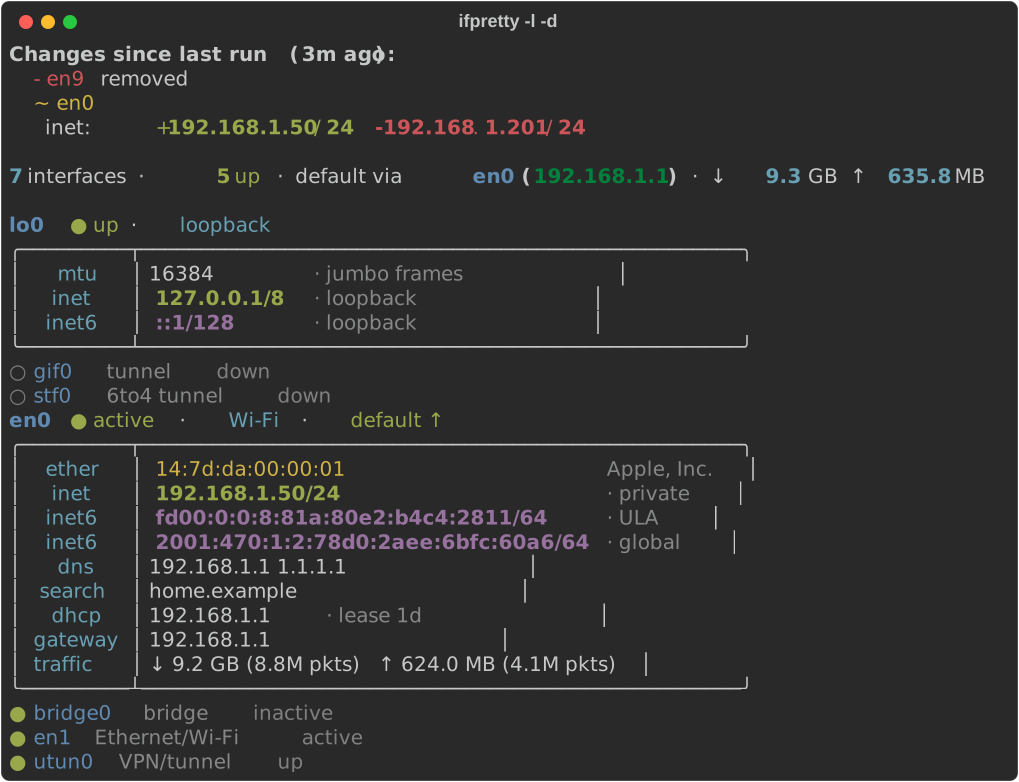
Flags compose, e.g. ifpretty -l -d (live data + diff), ifpretty -t -v (full table).
ifpretty en0 en1 shows only those interfaces:
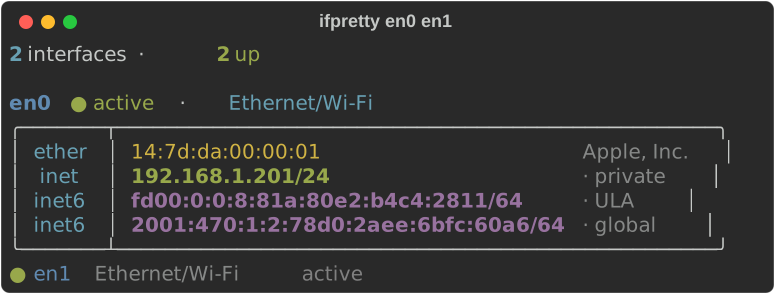
Every picture in this README is a real ifpretty run on made-up data
(see Development).
Output views
The default reads ifconfig from stdin if piped, otherwise runs ifconfig
itself (optionally limited to the interface names you pass).
| View | Flag | Best for |
|---|---|---|
| Essentials (boxed) | (default) | day‑to‑day: identity, routable IPs, gateway, throughput |
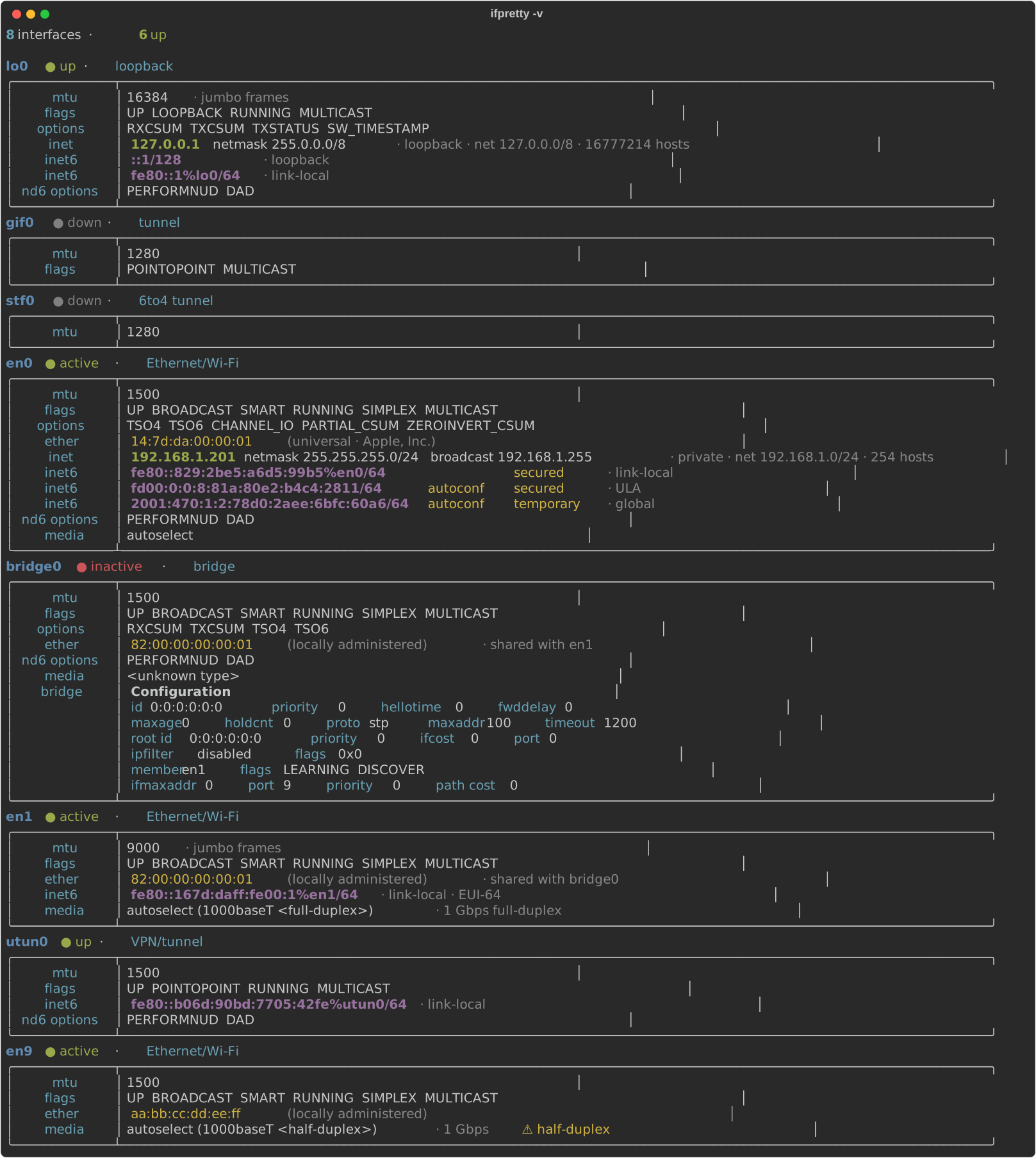
| Verbose | -v / --verbose |
everything: flags, options, nd6, media, link‑local, bridge config |
| Records | -r / --records |
a compact, low‑chrome label/value list |
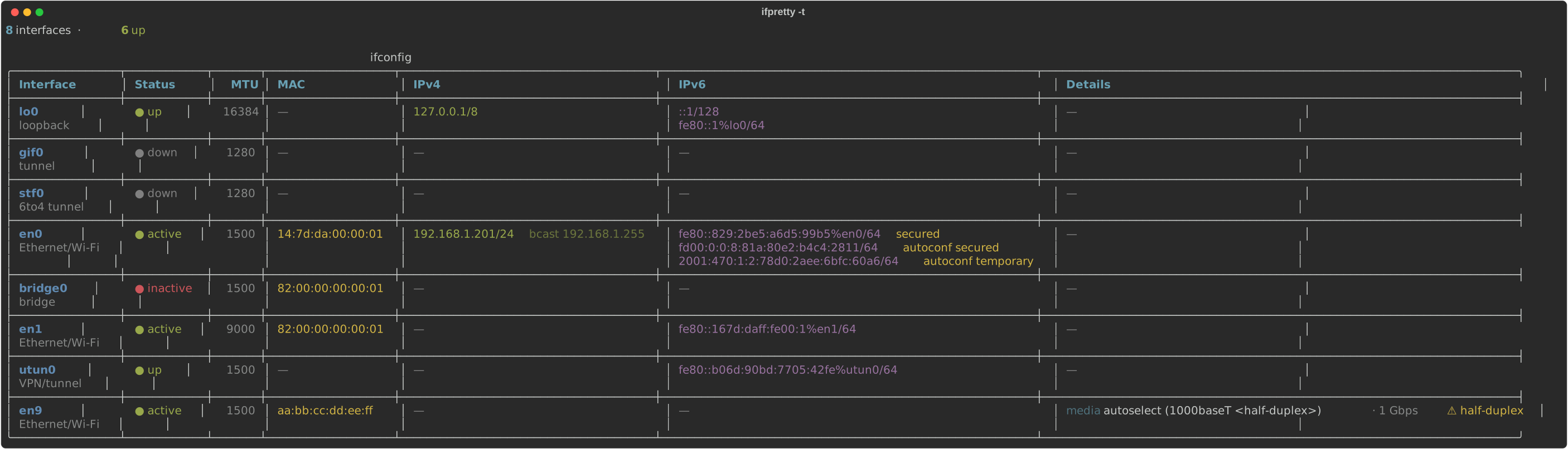
| Table | -t / --table |
one wide table (≤ 240 cols) to scan many interfaces at once |
The essentials view shows each interface's identity, routable addresses (with
scope), gateway and throughput, and collapses down / address‑less interfaces to
a single dim line to cut noise. -v expands them and shows every field.
Verbose (ifpretty -v)
Records (ifpretty -r)
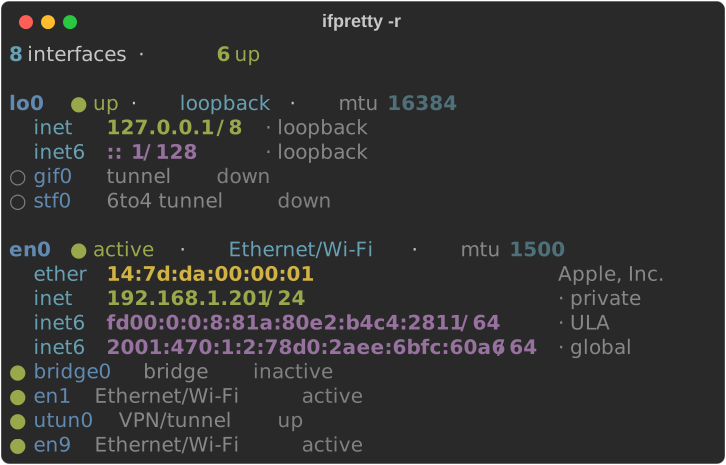
Table (ifpretty -t)
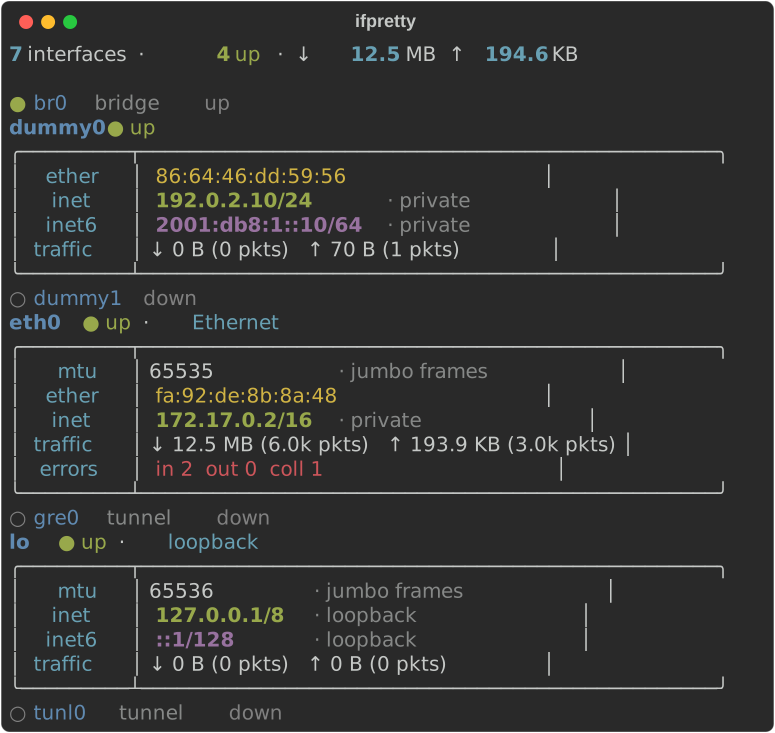
Linux (ifconfig from net-tools; RX/TX counters show without --live)
Always‑on enrichment (offline, no network)
Every view annotates what ifconfig leaves cryptic — all derived locally, no
network calls:
- Interface role — loopback / Ethernet·Wi‑Fi / VPN·tunnel / bridge / AWDL / …
- IP scope for each address —
loopback/link-local/ULA/private/global; IPv4 also shows the network + usable‑host count. - MAC kind (universal vs locally‑administered/random), OUI vendor (from a bundled IEEE registry — no network), shared‑MAC notes (e.g. bridge members sharing an address), and EUI‑64 detection.
- Media speed/duplex, with a ⚠ warning on half‑duplex; jumbo / sub‑1280 MTU notes.
- Decoded flag / option / nd6 bitfields; IPv6 attributes aligned into columns.
- A one‑line overview (interface count, default route, traffic totals).
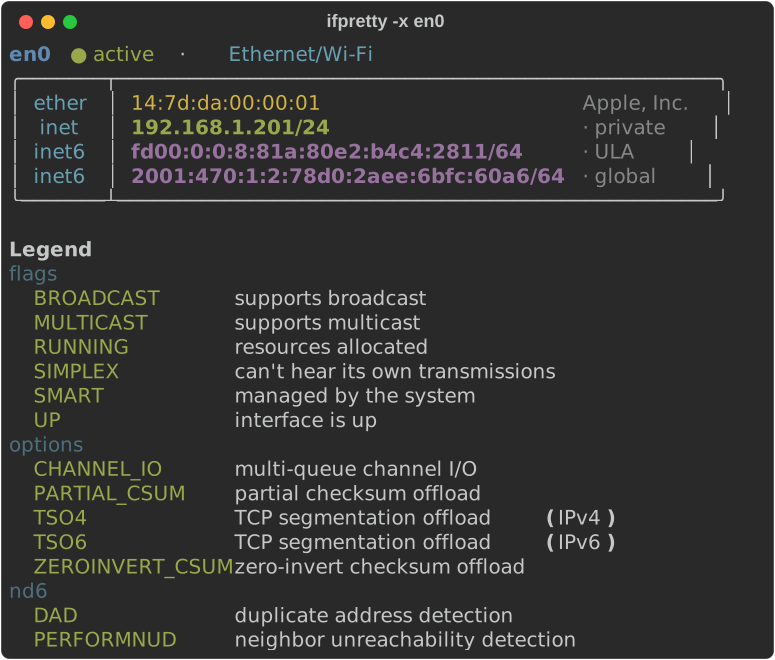
In the pictures above: the OUI vendor next to each MAC (Apple, Inc.), the
scope of each address (private, ULA, global), jumbo frames on a big
MTU and the ⚠ half-duplex warning in the table.
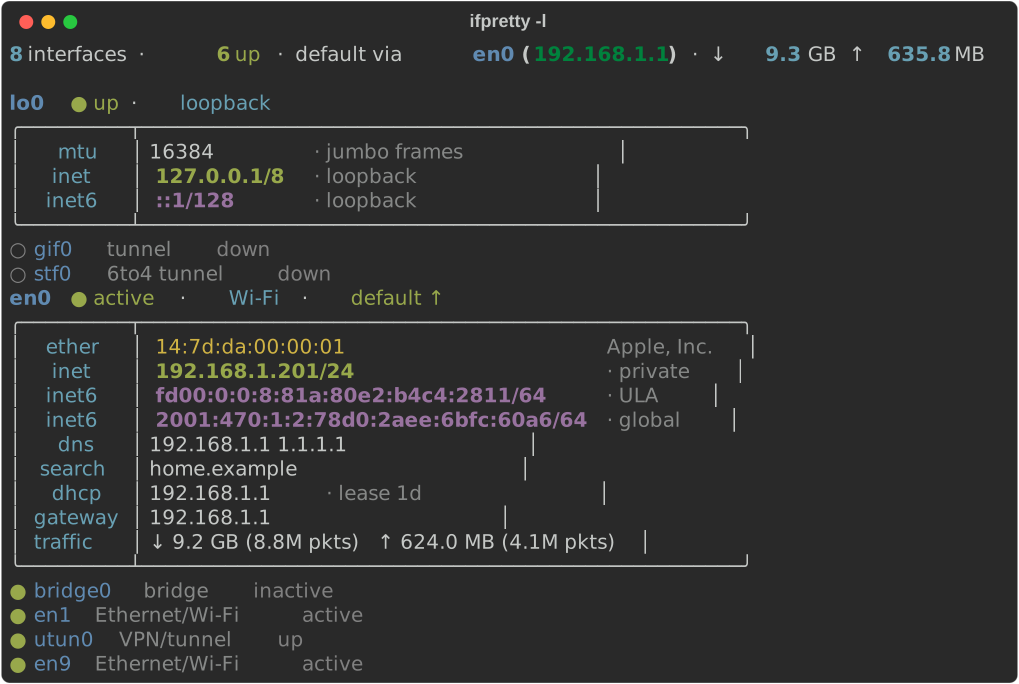
Live system data — -l / --live (macOS, Linux)
Cross‑references the running system and adds, per interface:
- default route + gateway, friendly hardware‑port names (e.g. "Wi‑Fi"),
- DNS servers + search domains, DHCP server + lease,
- traffic counters (bytes and packets) and error / collision counts.
On Linux it reads /proc/net/route, /proc/net/dev and /etc/resolv.conf
(no extra tools, so it works in slim containers): default route, gateway,
counters and DNS. Port names and the DHCP lease are macOS‑only.
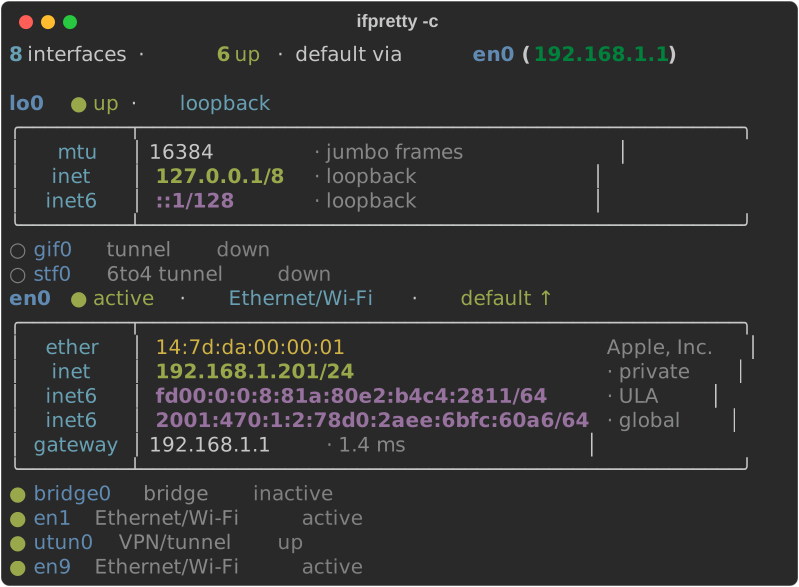
ifpretty -l
Gateway health — -c / --check (macOS)
Pings the default gateway and reports latency (or unreachable).
ifpretty -c
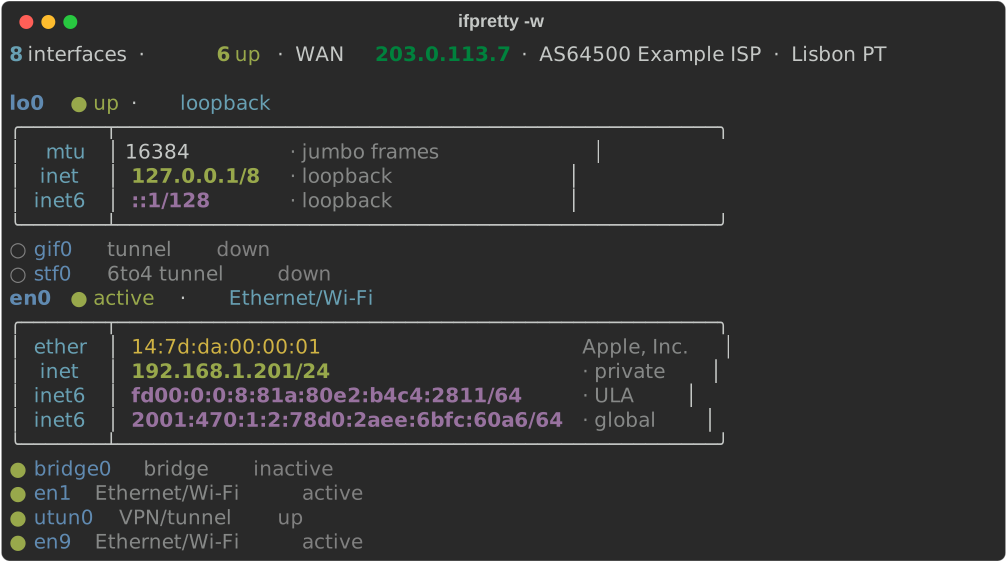
Public IP — -w / --wan (opt‑in, external)
Looks up your public IP + ASN / ISP / geo via ipapi.co and adds it to the
overview line. Strictly opt‑in (it sends your public IP to a third party); the
result is cached ~1 h, times out fast, and degrades silently offline.
ifpretty -w
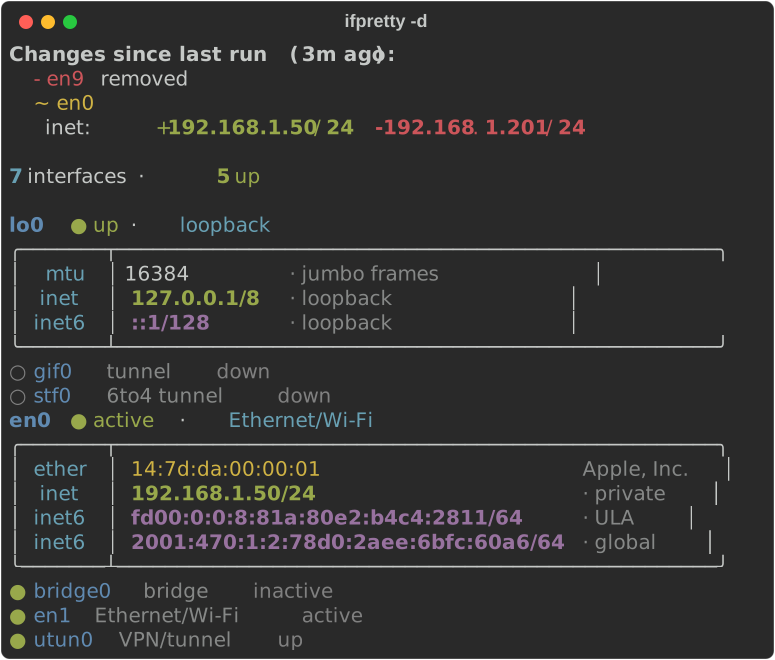
What changed — -d / --diff
Every run records a snapshot of the stable interface state (up/down,
addresses, MAC, mtu, media, gateway — deliberately not volatile counters).
--diff prints what changed since the previous run before the normal view:
ifpretty -d
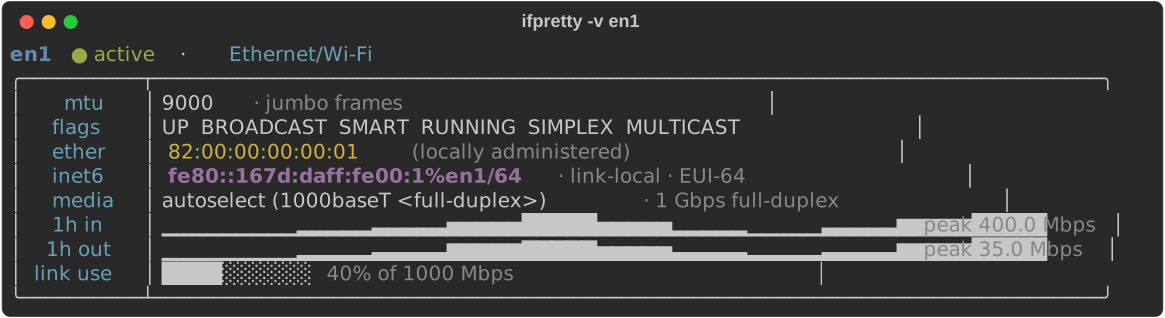
1‑hour bandwidth graph — --record
ifconfig only has cumulative counters, so to graph bandwidth you schedule a
tiny recorder; the per‑interface sparkline + link‑utilization gauge then appear
automatically:
# once, e.g. in `crontab -e` — use the absolute path:
* * * * * $(command -v ifpretty) --record
Network map — --map
Opens an interactive browser graph of your whole network in three zones:
💻 Your computer (interfaces) · 🏠 Local network (gateway + LAN devices/peripherals from the ARP table) · 🌐 Internet (the traceroute path out to the target).
ifpretty --map            # default target 1.1.1.1
ifpretty --map 8.8.8.8    # trace to a specific target
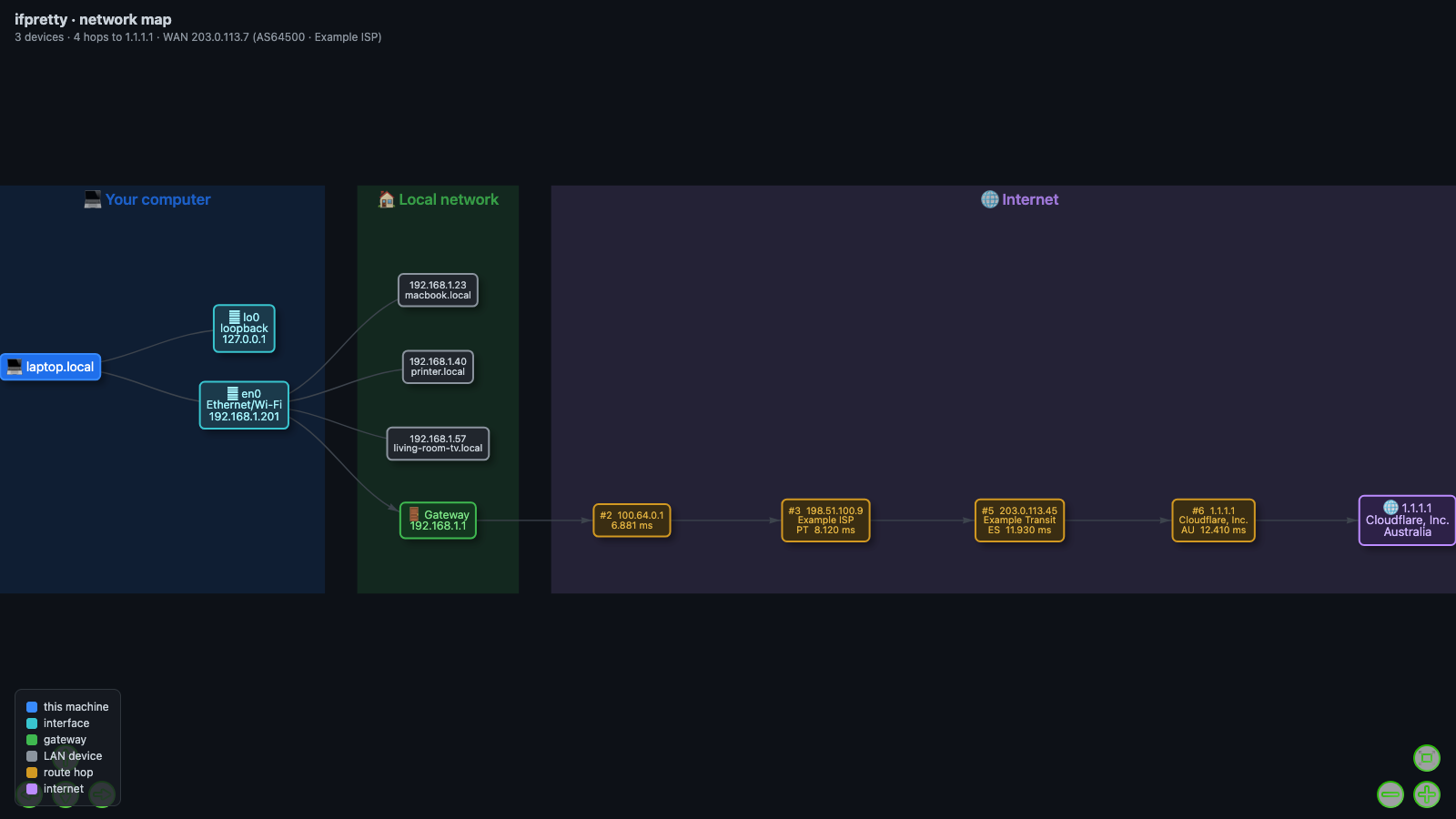
Every IP is enriched with everything useful:
- host — reverse‑DNS name (e.g. a hop's
core.isp.net, a printer'shp.local) - company / org, ISP, ASN (e.g.
AS13335 Cloudflare), country / city - LAN devices also show their OUI vendor (maker) and MAC.
Public IPs (hops + target) are resolved in a single batched whois/geo lookup; LAN IPs get local reverse‑DNS. Hover any node for the full detail; node labels show the company + country inline. Rendered with vis-network (loaded from a CDN) into a self‑contained HTML file that opens automatically.
Legend — -x / --explain
Appends a legend explaining every flag / option / nd6 bit seen in the output.
Refresh vendor DB — --update-oui
Downloads the latest IEEE OUI registry into the cache (overrides the bundled
copy used for MAC → vendor lookups). If Python cannot verify the TLS
certificate (older macOS /etc/ssl/cert.pem lacks a root the Keychain trusts),
it retries with curl, which uses the Keychain.
All flags
| Flag | Does |
|---|---|
| (none) | essentials view; runs ifconfig if nothing is piped |
-v, --verbose |
show every field; expand collapsed interfaces |
-r, --records |
compact label/value layout |
-t, --table |
single wide table (≤ 240 cols) |
-l, --live |
route, traffic, DNS (macOS, Linux); names, DHCP (macOS) |
-c, --check |
ping the default gateway (macOS) |
-w, --wan |
public IP / ASN / geo (opt‑in, external) |
-d, --diff |
show changes since the previous run |
-x, --explain |
append a flag/option legend |
--map [TARGET] |
interactive browser network map (default target 1.1.1.1) |
--record |
sample byte counters and exit (for the 1h graph) |
--update-oui |
refresh the IEEE vendor database and exit |
interfaces… |
limit to these interface names |
Environment
NO_COLOR=1disables color;CLICOLOR_FORCE=1forces it when piped.IFPRETTY_HISTORY— bandwidth‑samples file (default~/.cache/ifpretty/samples.csv).IFPRETTY_CACHE— cache dir for the WAN lookup, refreshed OUI DB, and the diff snapshot (default~/.cache/ifpretty/).
The parsing, formatting and offline enrichment read both macOS ifconfig
and Linux net‑tools ifconfig (Debian/Ubuntu/Fedora net-tools 2.x; on
Linux the RX/TX counters show without --live). --live works on macOS and
Linux; --check / --record rely on macOS tools (route, netstat, ping)
and no‑op elsewhere. --wan and --map's IP lookup need internet and fail
gracefully without it.
Architecture
One responsibility per module:
| Module | Responsibility |
|---|---|
model |
dataclasses Inet / Inet6 / Interface |
parse |
raw ifconfig text → interface model |
enrich |
derivations, OUI, system (--live/--check), history, --wan, snapshot/diff |
formatting |
model values → styled (rich‑markup) strings; layout field rows |
render |
render strategies (boxed / records / table) + overview / legend / diff |
topology |
--map: traceroute + ARP + per‑IP whois/rDNS → vis‑network graph |
cli |
acquire input → parse → enrich → render |
Dependency direction: model ← parse, enrich ← formatting ← render ← cli (no cycles).
Development
python3 -m unittest discover -s tests   # 70 tests (snapshot + unit)
ruff check src tests && mypy src
Layout snapshots are pinned to golden files; regenerate intentionally with
REGEN=1 python3 tests/test_ifpretty.py.
The README pictures come from docs/make_images.py (macOS): it runs the real
CLI with a fake ifconfig, fake route/netstat/scutil/ipconfig/ping
and a seeded cache, so no address of your machine ends up in an image. CI
regenerates the SVGs and fails when they are out of date.
uv run python docs/make_images.py             # SVGs + the --map PNG (needs Chrome)
uv run python docs/make_images.py --svg-only  # SVGs only, what CI checks
License
MIT
1 maintainer

Metadata
1 maintainer
Release files for ifpretty 0.14.1
For a detailed explanation of source distributions (sdists) and built distributions (wheels), please see the package formats documentation.
Source distribution (sdist)
| File | Size | Uploaded | Provenance | Actions |
|---|---|---|---|---|
| ifpretty-0.14.1.tar.gz | 435.7 kB | Without provenance | Details for ifpretty-0.14.1.tar.gz |
Built distribution (wheel)
| File | Interpreter | ABI | Platform | Actions Reset |
|---|---|---|---|---|
| ifpretty-0.14.1-py3-none-any.whl | Python 3 | none | any | Details for ifpretty-0.14.1-py3-none-any.whl |
Total release size: 854.6 kB
Release files / ifpretty-0.14.1.tar.gz
| Download URL | ifpretty-0.14.1.tar.gz |
|---|---|
| Size | 435.7 kB |
| Tags | Source |
|
SHA-256 checksum How to use checksums |
dd1df1cf7d6201073acf6960d9149a951601b94c24e45ba54a39ba7a8a9dc7bf
|
|
BLAKE2b-256 checksum How to use checksums |
970404f9413482af2ca8bc4b17fd339b96637a8bae86e63648c108730e1f8ec0
|
| Upload date | |
|
Uploaded using Trusted Publishing? What is trusted publishing? |
No |
| Uploaded via |
uv/0.9.11 {"installer":{"name":"uv","version":"0.9.11"},"python":null,"implementation":{"name":null,"version":null},"distro":{"name":"macOS","version":null,"id":null,"libc":null},"system":{"name":null,"release":null},"cpu":null,"openssl_version":null,"setuptools_version":null,"rustc_version":null,"ci":null}
|
Release files / ifpretty-0.14.1-py3-none-any.whl
| Download URL | ifpretty-0.14.1-py3-none-any.whl |
|---|---|
| Size | 418.9 kB |
| Tags | Python 3 |
|
SHA-256 checksum How to use checksums |
e4f26e5e7a63411a650ed8957320d250c9ba3c3a90a2f4315ee508d1cee8f538
|
|
BLAKE2b-256 checksum How to use checksums |
6993e25c4fb6723025009cdbffe6dc894914f03b543556fb26b363fdea78237f
|
| Upload date | |
|
Uploaded using Trusted Publishing? What is trusted publishing? |
No |
| Uploaded via |
uv/0.9.11 {"installer":{"name":"uv","version":"0.9.11"},"python":null,"implementation":{"name":null,"version":null},"distro":{"name":"macOS","version":null,"id":null,"libc":null},"system":{"name":null,"release":null},"cpu":null,"openssl_version":null,"setuptools_version":null,"rustc_version":null,"ci":null}
|
Security for ifpretty 0.14.1
Provenance
Provenance describes where a file came from. On PyPI, provenance is shared via attestations, which provide a verifiable record of the build or publishing details. View details, limitations and caveats.
No provenance found
None of the files in this release were uploaded with provenance metadata.
A note on package security
PyPI is a repository for distributing packages, not a service for auditing them. While third-party security researchers and our staff do their best to detect and remove malicious packages, PyPI cannot guarantee the quality, security or suitability of any given package.
To learn more about protecting yourself from malicious actors, visit our package security documentation.














